Somewhere in a drawer or scrap bin right now there’s a board that cost real money and engraved like wet cardboard: faint marks, blotchy contrast, half the detail gone. And somewhere else there’s a cheap offcut that burned so clean it looked machine-stamped. A sign-shop operator on a woodworker forum asked whether why did the pricey hardwood burn like kindling while the cheap scrap cut cleanly? The answer is uncomfortable and useful at the same time: there is no single best wood for laser engraving, because no wood is impossible to engrave.
Density, resin, grain, and color vary from species to species and even board to board, so only the settings change. Assuming all wood behaves the same is what actually costs the time, money, and patience. Material choice carries as much weight as machine and design when the goal is results clean enough to sell. So this is a scored breakdown, not a flat ranking: each species gets judged on burn contrast, grain uniformity, and resin content, plus the settings shift it forces.
Key Takeaways
Basswood and cherry give some of the darkest, highest-contrast engraving among commonly available woods, and basswood is the consensus beginner default: soft, low-resin, and rated Excellent contrast / Very Easy difficulty.
Verdicts belong to use cases, not species names: oak excels at bold lettering and fails at photos, pine can be either a rustic aesthetic or a lens-ruining tar hazard, and MDF engraves perfectly smooth but demands formaldehyde-rated ventilation.
On a 10W laser, starting points vary by species: basswood (1/4″) runs 40-50% power at 50-60% speed, while hard maple needs 45-55% power at 45-55% speed, and diode lasers top out around 3mm thickness regardless.
Table of Contents
What makes a wood good for laser engraving
A good engraving wood has strong burn contrast, consistent density, low resin, light even color, and grain that won’t fight the detail. Those are the four knobs, and each one changes what your laser does to the board.
Resin content
Resin is worth checking before you buy, the same way you’d check a component’s specs before ordering. Per AP Lazer’s wood-selection guidance, high-resin woods like pine, fir, cherry, and alder burn darker but resist cutting, so they need more power; low-resin woods like maple etch lighter and cut easier.
Color and streaking
Light, consistent color yields clear, well-defined marks. Dark woods obscure engravings, but they suit cutting contrasting patterns or letters through, which is a different job, not a disqualification. Minimal streaking and smooth, consistent grain preserve detail, especially photos, and soft wood often engraves cleaner.
Grain and density
Straight-grain woods like cherry and maple give clean, consistent results; irregular grain like walnut and oak gives texture. Dense hardwoods need more power and add machine wear, while softwoods engrave easier with less detail and durability.
Here’s the cheap diagnostic that makes all of this zero-waste: engrave your business logo on a hidden part of the piece before committing the good stock. AP Lazer’s trick turns every workpiece into its own test coupon, and you get a branded back edge for free.
Best woods for laser engraving: the ranked scorecard
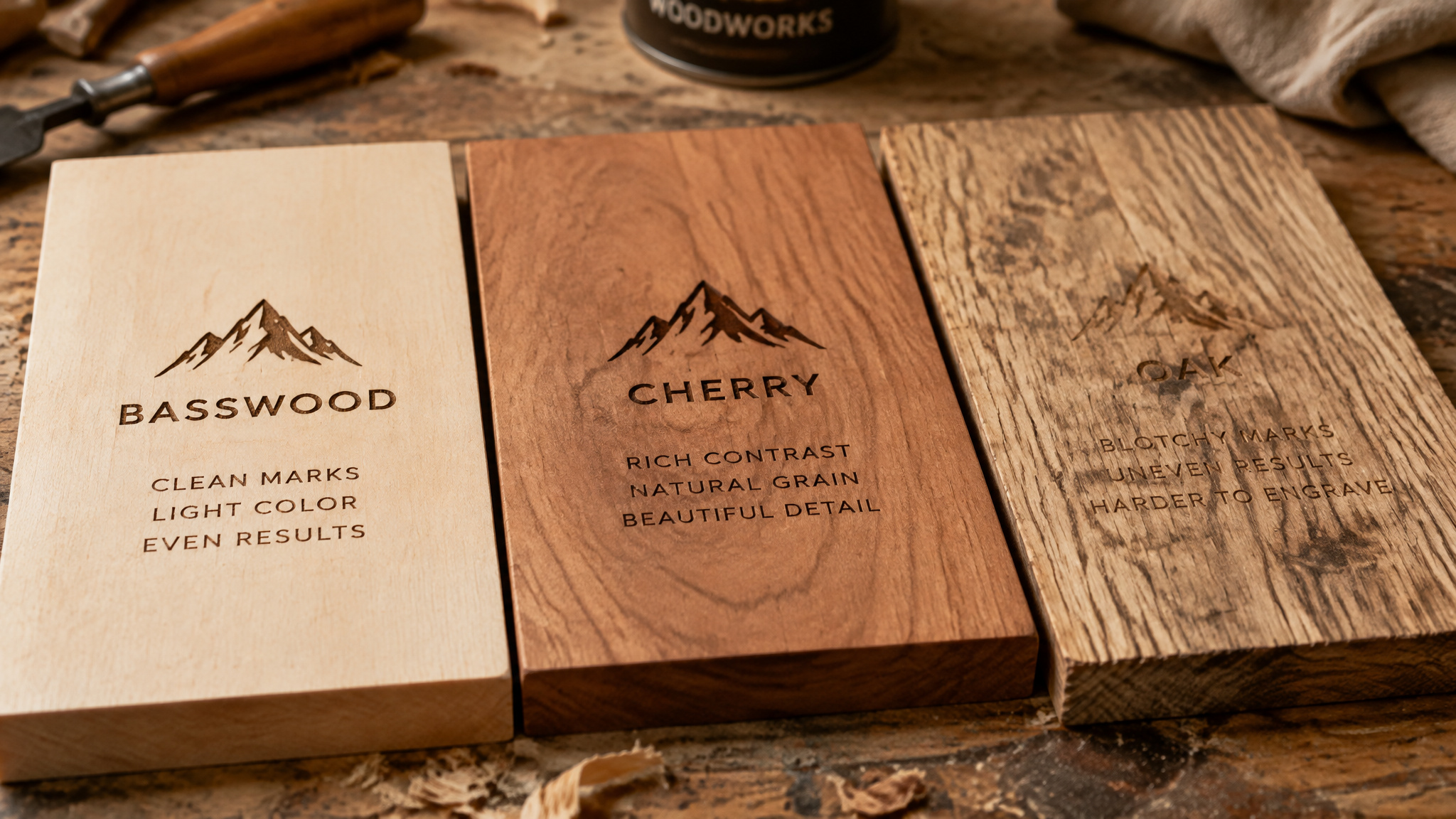
The best woods for laser engraving are the light-colored, fine-grained options: basswood, alder, hard maple, cherry, and Baltic birch plywood. That’s the cross-source consensus, and the logic behind it is consistent: light color and minimal grain interference give the dark burn mark something to contrast against, which is the entire mechanism of a readable engraving. The proof point on the dark end: basswood and cherry give some of the darkest, highest-contrast engraving among commonly available woods, which is why they anchor most recommendation lists.
Scored per Tyvok’s 2026 beginner guide, the quick-pick list looks like this:
- Basswood. Excellent contrast, Very Easy
- Alder. Very Good contrast, Easy
- Hard maple. Good to Very Good contrast, Easy-Medium
- Cherry. Excellent contrast, Medium
- Baltic birch plywood, the plywood default
Worth noting honestly: sources rank the same woods in slightly different orders. A ranked video covering seven wood types puts maple first, ahead of cherry and birch plywood. The order shifts because the raters weight different properties, not because anyone’s data is wrong.
The ranking isn’t the whole answer. Each species shifts the power/speed baseline you start from, and four familiar names, oak, pine, MDF, and ash, flip their verdict entirely depending on the job. A wood that’s terrible for photo engraving can be the right call for a farmhouse sign. The species sections below carry those verdicts; the point here is that “best” is conditional, and the conditions matter more than the ordering.
Basswood: the best starter wood for laser engraving
Basswood is the best starter wood for laser engraving, and it’s not a close call among the sources. Read it like a component spec sheet: soft, light, fine even texture, affordable, consistent density, low resin, smooth surface. Every property on that list is doing work for you. Low resin means the burn doesn’t fight the cut.
Consistent density means the same settings behave the same across the board. Fine texture means detail survives.
The ratings: contrast Excellent, difficulty Very Easy. State them and let them land.
Here’s the benchmark moment. On diode lasers (the xTool, Atomstack class of machines), basswood needs very little power and cuts intricate 3mm shapes in one pass at high speed with little charring. That’s the whole spec sheet paying off at once: one pass, intricate geometry, minimal char. Cleanup matches the benchmark, since char is minimal and with good air assist the edges stay near raw wood color.
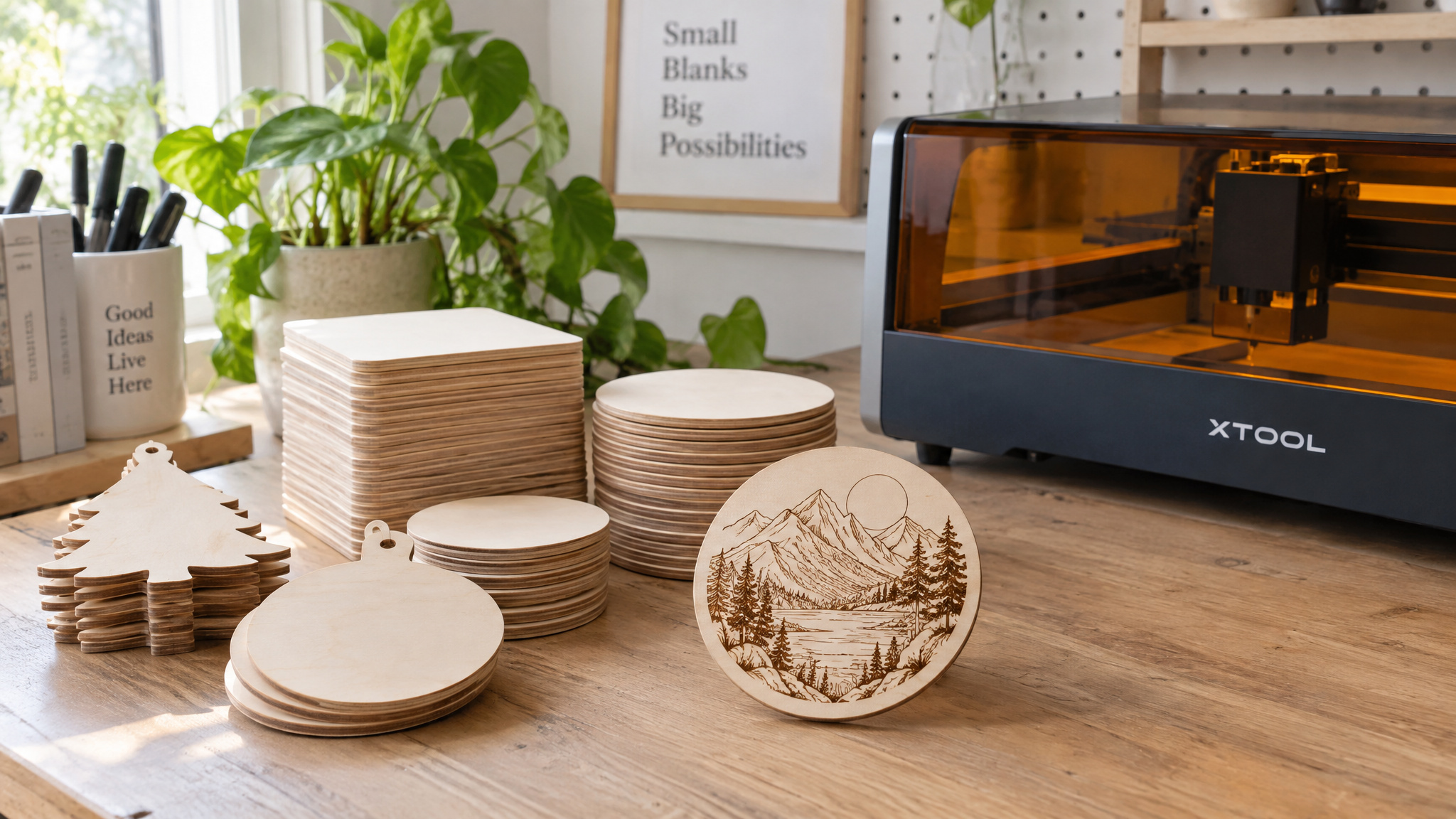
Two practical perks round it out. First, the dark contrast that makes designs pop. Second, availability: you can literally order pre-cut basswood blanks ready to burn, sized for coasters, ornaments, and signs, no milling required. That’s the lowest-friction entry point in the hobby.
Use cases run the standard beginner catalog: detailed artwork, signs, gifts, coasters, model building, ornaments. None of those are a stretch; basswood handles all of them at the settings a beginner can actually dial in.
The honest limit: this is the best starter wood, not the only wood you’ll ever need. Photo work, plaques with pristine lettering, and production runs each have a better-suited species below. But as the board you learn on, the one that forgives settings mistakes and still produces sellable output, basswood is the known-good default everyone starts with, and the specs back that up.
Alder: the engraver’s dream for plaques and lettering
Alder is one of the best woods for laser engraving plaques and lettering. It’s slightly harder than basswood, easy to work, and engraves slightly darker than maple with a warm rich appearance. Ratings: contrast Very Good, difficulty Easy. When the job is award plaques, recognition products, or anything where pristine lettering and even depth matter, this is the species people reach for.
The field report that makes it concrete: alder cuts vectors nicely, and one forum practitioner turned 1/4-inch alder into kitchen drawer dividers in about 45 minutes. That’s community practice, not universal law, but it’s a real job with a real time figure.
One documentation quirk worth flagging: the sources contradict each other on alder’s resin content. AP Lazer classifies it as high-resin; Tyvok calls it low-resin. Both agree it burns dark, so the shared conclusion survives the disagreement. Since resin varies by batch and region anyway, treat either label as a starting point and let the hidden-logo test on your actual stock make the call.
Hard maple: the contrast king (birch is its stand-in)
Hard maple holds fine detail with tight, uniform grain, and that grain is exactly why: tight grain produces sharp, high-contrast dark brown marks. This is the precision pick when detail has to survive the burn. Ratings keep their range: contrast Good to Very Good, difficulty Easy-Medium. The density tax is real but small: maple is denser, so it needs slightly higher power than the softwoods. “Slightly” is the honest qualifier.
The track record is the argument here. Maple is the industry standard for kitchen utensils, cutting boards, and awards, and there’s a reason defaults become defaults.
The substitution insight is the genuinely useful discovery: birch engraves nearly identically. One practitioner made State Fair plaques from birch one year and maple the next, and said the two were hard to tell apart side by side. That’s one person’s observation across two production years, not a lab equivalence claim, but when outputs are that close, cost and availability can make the call.
Birch’s own quick profile: a durable hardwood with a smooth surface, consistent grain, and good contrast, suited to decorative items, furniture accents, and corporate awards. The durability is the pick when the engraving has to survive handling.
Cherry: excellent contrast that ages with UV light
Cherry brings rich dark color, straight grain, smooth texture, and excellent contrast, which puts it among the darkest burns available. The straight grain is the detail-holding property: it keeps lines clean and consistent the way maple’s does. Ratings: contrast Excellent, difficulty Medium. That Medium is the honest cost of the Excellent; nothing here is free.
The angle other guides skip is how the piece looks months later. UV exposure darkens cherry engravings and adds character, but that developing patina can also blend into the design. Feature and caveat in the same breath: cherry suits pieces meant to age gracefully, not fine permanent detail. If the design depends on crisp contrast staying crisp forever, think it through first.
One-line gotcha: cherry can burn unevenly if laser power fluctuates. Stable power in, even burn out.
Walnut: low contrast that reads as luxury
Walnut’s dark chocolate surface produces lower-contrast engraving that reads as etched relief rather than burn, light-on-dark instead of dark-on-light. Ratings: contrast Good (light engraving on dark wood), difficulty Medium.
Here’s the contrarian beat: the “darkest burn wins” scoring misranks walnut, because the subtlety is a premium feature, not a defect. For wedding gifts, luxury pens, desk accessories, and corporate gifts, a subtle etched look often sells better than maximum contrast. Pick it deliberately when understated is the brief. Per AP Lazer, walnut’s irregular grain produces more textured engraving, a characteristic some jobs actively want.
Baltic birch plywood: the production gold standard
Baltic birch is the default plywood answer; ask nine of ten laser operators and that’s what you’ll hear. The buying criterion is void-free inner plys, which is why cuts come out uniform, and it requires quality sheets with a smooth face. The failure mode to know: cheap sheets can carry plastic-resin inner glue that melts instead of vaporizing, leaving a rock-hard crusty edge no sanding fixes, a common mid-job discovery that forces a full material swap. Dark edge lines come from the glue layer and can’t be sanded out, unlike MDF’s. For production runs of about 100 identical items, it’s the consistency pick, boxes, signs, earrings, mechanical parts, whatever the run calls for.
Buyer rule: Specify plywood by construction — void-free inner plys, smooth face, known glue — not by price tag.
More woods worth knowing, from mahogany to bamboo
The species above aren’t the whole catalog. Each one below has a quirk that shifts its verdict, from mahogany’s cut-resistant streaks to bamboo’s grass-botany. Poplar’s whole pitch is that it’s very affordable and engraves decently at easy difficulty, so mistakes feel low-cost, which is exactly why it’s the practice-wood pick. None of them are disqualifications; they’re just woods that reward knowing what you’re buying before the laser fires.
Mahogany
Consistent grain, very good contrast, medium difficulty, and a higher cost, stated plainly. Forum quirk: some mahoganies won’t cut at all but engrave acceptably, and may need paint fill for contrast.
Ash
Generic ash rates well: prominent grain, easy-medium difficulty, good for cutting boards and signs. But Black Ash is the documented counter-example, where banded density left part of a job virtually untouched even after three passes. Full story in the scrap-test section below.
Poplar
Very affordable, engraves decently, easy. “Decently” is the ceiling, and that’s exactly why it’s practice stock: mistakes feel low-cost.
Balsa
Extremely soft, easy to cut, only okay contrast. Model making, not most engraving.
Bamboo
Technically a grass, which is still delightful. Eco-friendly with a consistent surface and a medium brown burn, suited to kitchenware, and often sold pre-laminated into sheets.
Oak, pine, and MDF: same wood, different verdicts
“Is this wood good for laser engraving?” is unanswerable. “Is it good for your job” is the answerable question, for instance, the right answer depends on laser engraver material settings for your machine. Oak, pine, and MDF all appear on both recommend and avoid lists across sources; the use case resolves the contradiction. Neither side of any of those lists is wrong.
Oak
Oak engraves beautifully for bold lettering and is unsuitable for photos and fine detail, and strong open grain causes both outcomes. It’s also dense, so it needs more power and adds machine wear. The workaround: fill engraved designs with paint or resin to make rustic/farmhouse text pop.
Pine
The split verdict. One practitioner’s western-theme pine sign turned ribbing from uneven density and sap/knots into the aesthetic, with letter edges burned by a soldering iron for contrast, and the sign was well received. The other side: high-resin pine makes sticky tar that coats and ruins the lens, poses a flame hazard, and burns blotchy because soft spring wood burns faster than hard summer wood. The cursed edge case, reported with genuine delight: very old Heart Pine may give depth with no contrast at all. Mitigations are simple: low-resin varieties and good ventilation.
MDF
Yes, you can laser MDF, with mandatory ventilation. No grain means it engraves perfectly smooth, it’s dirt cheap, and it’s best for paint-grade signs, puzzles, models, and prototypes. Cut edges turn very dark but sand off easily, the fixable version of the plywood glue-line problem. The fumes contain formaldehyde, so ventilation is mandatory, especially in home shops. It also produces heavy dust; plan for cleanup.
Woods you should never put under a laser
Never put pressure-treated wood, oily tropical hardwoods like teak, rosewood, and cocobolo, or unknown-glue plywood under a laser. The hazard is toxic gas, fire, and ruined optics, not engraving quality.
- Pressure-treated lumber: copper, arsenic, and bug-killing chemicals vaporize into toxic gas that destroys laser optics and harms lungs. Absolute never.
- Oily tropical woods: natural oils act like lighter fluid, so ignition is easy, and the fumes are toxic and lung-irritating.
- Very soft porous woods like some cedar: density varies across the board, so engraving comes out inconsistent, which is harder for beginners. A caution, not a never.
- Unknown or low-quality plywood: unknown glue layers risk inconsistent engraving and harmful fumes; the melt-vs-vaporize mechanism is covered in the plywood section above.
These mechanisms form a causal model you can apply to any wood the list never mentions: check for treatment chemicals, natural oils, resin level, and unknown glue. Blade & Burnish is a further resource for exotic-species selection.
Wood settings and thickness by laser wattage
Wood choice and settings are one problem. Each species shifts the power/speed baseline, and wattage determines which species are even on the menu at your target thickness.
Thickness limits by wattage
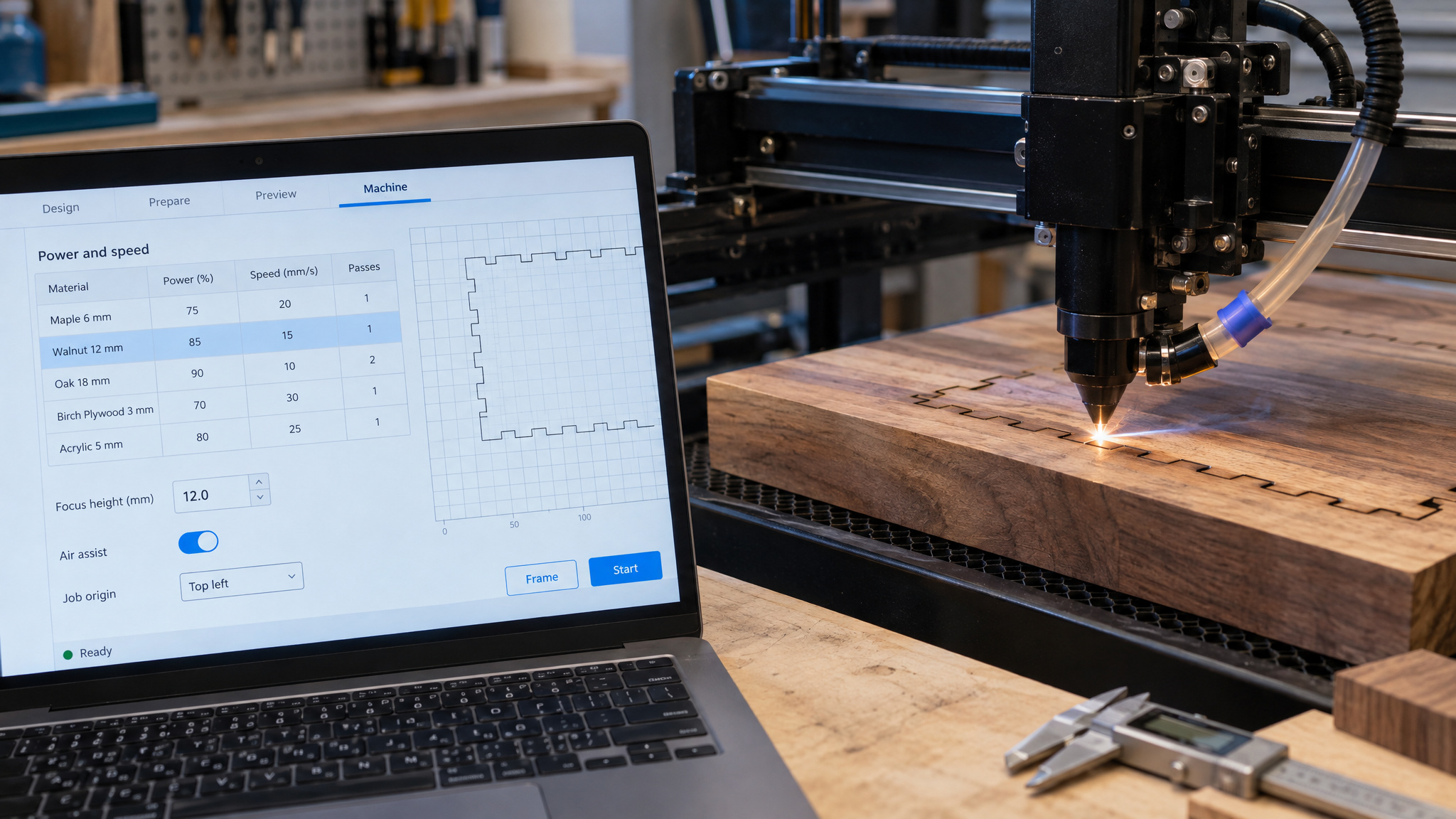
Diode lasers (5-10W) handle 3mm or less, pushable to 5mm with very slow speeds and multiple passes. CO2 lasers (40-60W) have a 3-6mm sweet spot, with 10mm possible in multiple passes at the cost of a sloped edge. High-power CO2 (100W+) handles 12-20mm of solid wood with the right lens. If cutting parameters are the bottleneck, our guide to laser settings for cutting wood covers passes, kerf, and char management in depth.
10W starting settings
Data first, prose second:
| Species | Power | Speed |
|---|---|---|
| Basswood (1/4″) | 40-50% | 50-60% |
| Alder | 35-45% | 55-65% |
| Hard maple | 45-55% | 45-55% |
| Cherry | 40-50% | 50-60% |
These are starting points only; adjust per machine. For the full dial-in workflow, the hub guide on best laser settings for wood covers speed/power interaction and a test-grid protocol.
Getting darker contrast
Lower speed and higher power produce darker, deeper engraving with more contrast. Correct focus significantly affects contrast and sharpness, so double-check it before starting; it’s the free fix people skip. Clean the lens every 10-20 hours, because a dirty lens reduces power and shows up as faint, inconsistent results, making it the first thing to check when output goes weird. Charring happens when the laser moves too slowly and burns instead of vaporizing, the same way a magnifying glass in the sun scorches only where it lingers. Air assist blows flaming gas away before it sticks to the wood, and transfer tape catches smoke so it never touches the surface at all. The low-tech fix in a high-tech hobby, and honestly kind of elegant.
Matching wood to the job: a project-goal matrix
For laser engraved signs to sell, match the wood to the finish and the job, not to the fanciest board on the list:
- Intricate jewelry and delicate ornaments ? 3mm Baltic birch or basswood (plywood’s strength prevents snapping; basswood cuts fastest)
- Rustic natural-finish signs ? walnut or cherry with clear-coat, no paint; the wood’s own look is the finish
- Signs destined for paint ? MDF, because why pay for grain you’re going to cover
- Production runs of about 100 identical items ? Baltic birch, for consistency at quantity
- Award plaques with pristine lettering ? alder
Photos and detailed clipart demand low-grain stock: basswood or Baltic birch, per forum practitioners. Basswood is solid with effectively zero grain; Baltic birch brings sheet consistency but watch the glue layers. The photo-specific settings are their own rabbit hole, covered in our guide to the best wood for laser engraving photos.
On the seller angle: Etsy and craft fairs are the cited channels where wood choice shows up in earnings, and a profitable business also needs machine selection, setup, pricing, product ideas, and marketing beyond material knowledge. One of the source videos pitched a free business-start guide framed for starting a business in 2025, covering exactly that list. Yes, it’s a funnel; the knowing read is that the material advice above is free either way.
Vendor note, clearly attributed: AP Lazer positions its patented open-architecture design and removable laser top for engraving oversized material like wood flooring, furniture, doors, and tabletops. That’s the vendor’s positioning claim, not independently verified.
Where to buy wood for laser engraving
For laser engraving, buy pre-cut basswood blanks, laser-grade Baltic birch sheets, and a variety sample pack to test before committing, and verify laser-grade status by the sheet’s construction, not the price tag.
- Pre-cut basswood blanks for small gift and ornament work, the low-friction entry point
- Laser-grade plywood specified by grade, not price: void-free inner plys, smooth face, known glue behavior
- Variety sample packs to compare several species cheaply before any bulk purchase
The honest limitation: the sources gesture at these product types without naming retail channels or brands, so treat channel choice as something to verify locally.
Test on scrap first: batch variation is real
Uneven or faint engraving often traces to the board, not the settings, because different batches of the same wood behave differently. Wood isn’t a standardized component, and the proof is the Black Ash job: a cremation box where the darker bands engraved acceptably, the lighter, denser bands stayed virtually untouched, and running the job three times improved it only slightly. A second practitioner on the same forum hit the identical problem. The rerun count is the detail that matters: reruns can’t rescue wrong stock, which is how you know the wood was the variable, not the settings.
The protocol is short. Test-engrave scrap from the same batch before the final job, checking three things: speed/power settings, smoke output, and sanding behavior. Variety sample packs are the cheap testing vehicle. The discipline is the point: every new batch gets a scrap test before the good stock goes under the laser.
Frequently Asked Questions
Can you laser etch on wood?
Yes — no wood is impossible to engrave, so the real question is which species gives the result you want. Light-colored, fine-grained woods like basswood, alder, hard maple, cherry, and Baltic birch plywood produce the darkest, cleanest marks. Dense or high-resin species still engrave, they just need more power and different settings.
What type of wood is best for wood burning?
For laser engraving, basswood is the consensus beginner default: it’s soft, low-resin, consistently dense, and rated Excellent contrast with Very Easy difficulty. Cherry also delivers some of the darkest, highest-contrast burns among commonly available woods. Both reward you with readable marks at settings a beginner can actually dial in.
Is pine or oak good for laser engraving or should I avoid them?
Both are use-case calls, not avoid-at-all-costs woods. Oak engraves beautifully for bold lettering but fails at photos and fine detail because its strong open grain interferes, and its density demands more power. Pine is a split verdict: high-resin pine makes sticky tar that ruins lenses and burns blotchy, but low-resin varieties with good ventilation can work, and uneven density can even read as rustic character.
Why does the same wood engrave differently from board to board?
Wood isn’t a standardized component — density, resin, grain, and color vary by species, batch, and even within a single board. The documented proof is a Black Ash job where darker bands engraved acceptably while lighter, denser bands stayed virtually untouched even after three passes. Reruns can’t rescue wrong stock, so test-engrave scrap from the same batch before committing good wood.
