
You clear your Reddit history on your phone, breathe a sigh of relief, then open your laptop and — there it is. Every link you just scrubbed is still sitting there, glowing in the History tab like nothing happened. That “wait, what?” moment is the exact reason this guide on how to delete reddit history without account exists.
I’ve spent time poking around Reddit’s history quirks, and the core problem is simple: most people don’t realize that visited history is device-specific and split into separate lists. The native Clear history button only wipes the Recent tab; it leaves upvotes, downvotes, comments, saved posts, and your own posts untouched. For a desktop browser deep-dive on how to delete reddit history on pc using old Reddit, new Reddit, and third-party tools — including bulk-deleting comment history, you’ll need a dedicated guide. And if you’re trying to wipe your tracks from a single subreddit? Reddit doesn’t even give you a button for that; you must use Redact with the subreddit filter or manually delete items.
So let me map out exactly what you can delete (visited history via native clear), what you can’t (upvotes, downvotes, comments, saved posts, your own posts), and how to delete things from reddit history for granular control, like removing individual entries or managing history via profile settings.
Key Takeaways
The native Clear history button only wipes the Recent tab under History, not Upvoted, Downvoted, or Hidden tabs. Upvotes, downvotes, comments, saved posts, and your own posts are all untouched by the native Clear history button.
If you’re using the app on an iPad specifically, you’ll need to know how to delete reddit history on ipad due to iPadOS quirks like split-screen impact, iCloud Keychain syncing, and multi-tab history behavior. Reddit visited history is device?specific—clearing it on the app does nothing to the website history, and vice versa—so you have to hit both separately.
For bulk deleting old posts and comments — or clearing history from just one subreddit, you need a desktop tool called Redact, available for Windows, macOS, and Linux from redact.dev. The old Nuke Reddit History Chrome extension is dead and no longer exists.
Table of Contents
What Reddit “visited history” actually is (and isn’t)
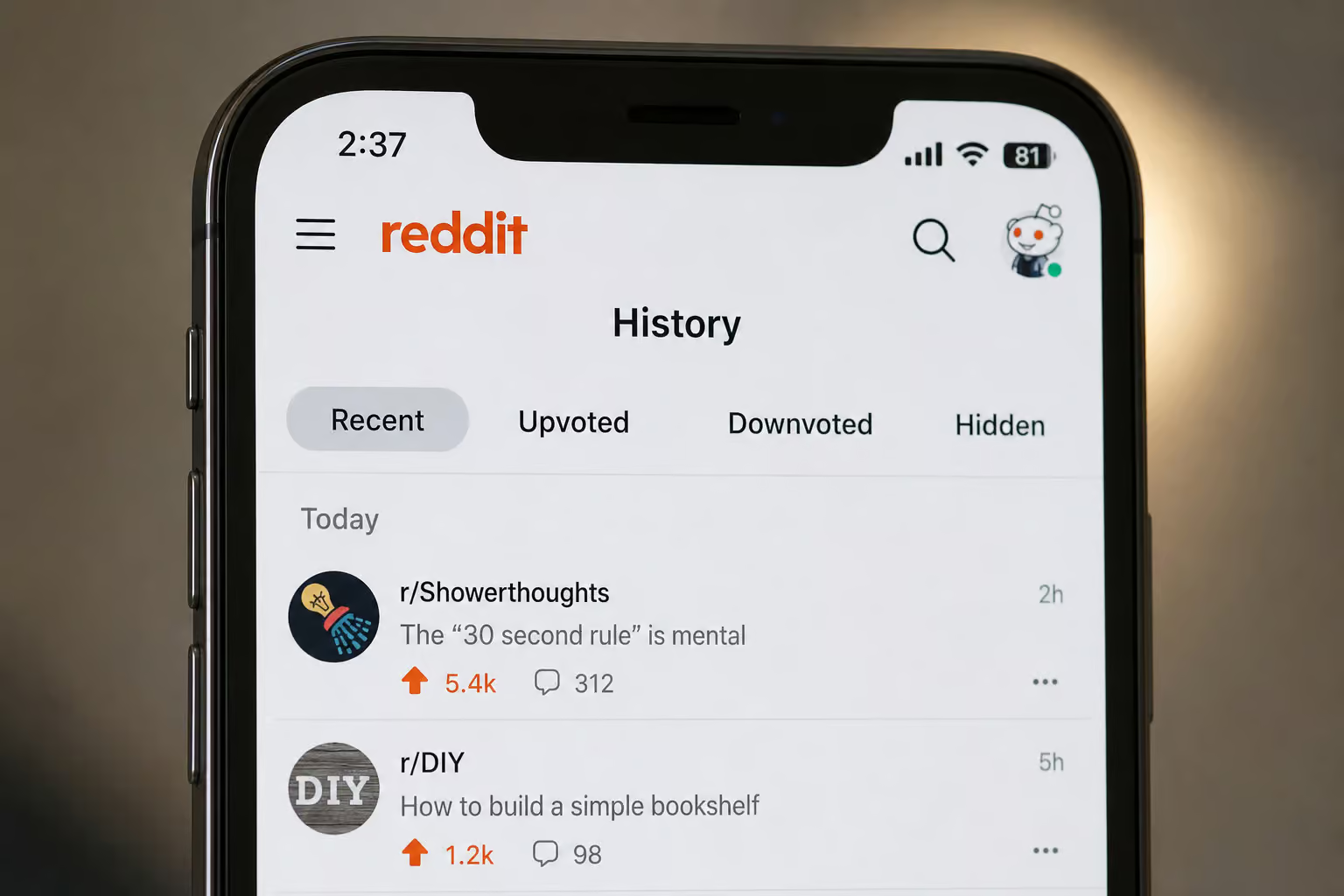
When you hear “Reddit history,” it’s easy to picture one big log of everything you’ve done. That’s not how it works: Reddit splits your activity into separate lists: Recent, Upvoted, Downvoted, and Hidden. Only the Recent tab is the visited history you’re trying to clean up — and if you need a complete walkthrough, here’s how to delete reddit history across every platform, including workarounds for permanent deletion and what Reddit actually keeps.
Visited history is simply the list of posts you’ve clicked on, found under your profile icon ? History ? Recent. On both the app and website, you find it under your profile icon ? History ? Recent — and if you want to erase that trail, here’s exactly how to delete Reddit history across every platform. That’s it — a chronological feed of links you’ve opened, with no upvotes, downvotes, comments, or saved items. Just a log of what you’ve looked at.
But the History page also has other tabs: Upvoted, Downvoted, and Hidden on the app; the website does not offer these sorting options. Those are completely different data sets, each with its own deletion rules. The app lets you switch between them via the History page, but the website doesn’t even offer that sorting. Each tab has its own deletion rules: the native Clear history button only touches the Recent tab; Upvoted, Downvoted, and Hidden must be cleared manually or via Redact—and for Mac users, browser differences can add extra friction, so check how to delete reddit history on mac for Safari, Chrome, Firefox, and iCloud sync specifics.
That list is tied to your device, not your public profile. They can see your posts and comments on your profile, but not the stuff you’ve simply browsed, so if you want to clear that data you’ll need to know how to delete reddit visited history. The only person who can see your visited history is someone with physical access to your phone or computer, since it’s stored locally per device.
And that’s where the device?specific headache comes in: your phone keeps its own list, your laptop keeps its own, and clearing one does nothing to the other. Your phone keeps its own list of visited history. Your laptop keeps its own. Clearing one does nothing to the other — no cloud sync, no account?wide nuke.You have to clear each device individually: app and website separately, making it crucial to know how to delete reddit history without account for client-side data even when you’re not logged in.
Field note: Clear visited history on every device you use — the app and website store separate lists with no cross-device sync, so your best bet is a complete, geek-deep guide on how to delete reddit history.
Clear visited history on the mobile app
The Reddit mobile app gives you two ways to scrub visited links: via the History page (three dots > Clear history) and via Settings > Clear local history. They are not the same thing. Which one you need depends on whether you want to wipe the Recently viewed feed (Method 1) or do a deeper local flush (Method 2), but for a desktop browser deep-dive, see how to delete reddit history on pc, which covers clearing visited history via old. Reddit, new Reddit, and third-party tools, including how to bulk-delete comment history.
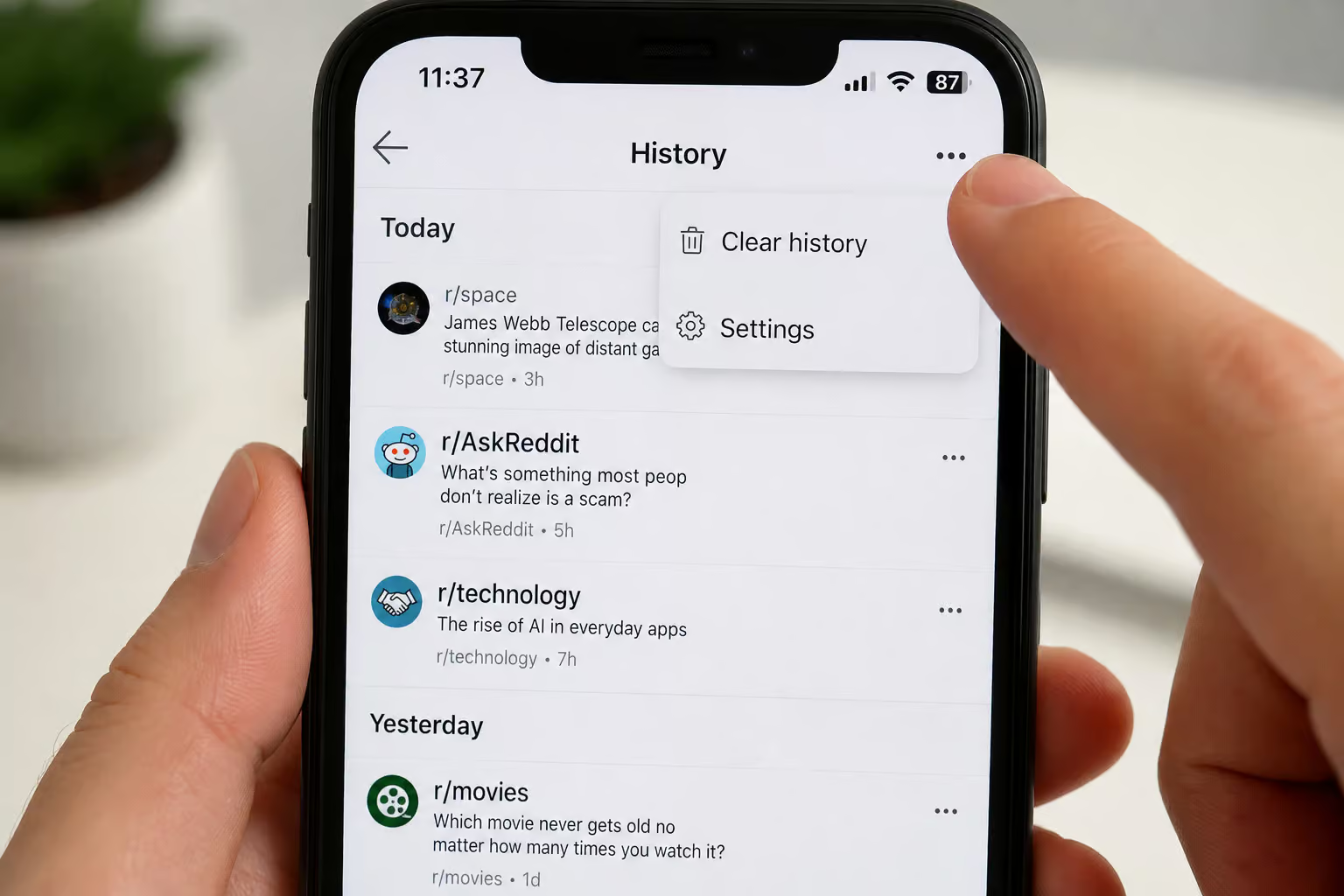
Method 1: Via the History page (the fast one)
Open the app, select your profile picture in the top?right corner, then scroll down to History on Android, iPhone, or iPad. That page shows your recently viewed posts — the Recent tab is selected by default, but you can switch to Upvoted, Downvoted, or Hidden. Look for the three dots in the top?right corner of the History page, tap them, and choose Clear history to clear only the Recent tab. For a complete, geek-deep guide on how to delete reddit history — including visited links, search queries, comment history, platform workarounds, and what Reddit actually keeps, see the full breakdown.
Your Recently viewed list is gone, but your upvoted, downvoted, hidden, saved, and posted items remain.
But here’s the gotcha: that only clears the Recent tab, not Upvoted, Downvoted, or Hidden. If you want to fully scrub your digital footprint, you’ll need to follow a complete guide on how to delete reddit history, because your upvoted, downvoted, and hidden lists are still intact, as are any posts or comments you’ve made and anything you’ve saved — the button is specifically for visited links and nothing else.
Method 2: Via Settings (a deeper clean)
There’s a second option buried in the app’s settings: Settings > Advanced > Clear local history. Select your profile icon, then Settings (usually near the bottom of the slide?out menu) on Android, iPhone, or iPad. For a detailed walkthrough on how to delete reddit history on android, scroll down to Advanced under the ‘Advanced’ header and you’ll see Clear local history.
Select it, confirm, and the app clears its local cache of visited data from your device — it only targets visited posts, not upvotes, comments, or saves. For a step-by-step guide on how to delete reddit history on iphone, this method covers clearing visited links, search history, and more. Think of it as a browser?history flush that only affects the Reddit app, not the website. It’s more thorough than the three?dot method (clears local cache), but it still only targets visited posts — not your upvotes, comments, or saves.
Both methods work the same on Android and iPhone, and neither one touches the website history; your desktop is still holding onto every link you clicked in the site’s visited history, which is exactly how to delete reddit history without account methods can address on the client side.
Clear visited history on the website
On the desktop website, the Clear history button is hiding under User Settings > Profile, not on the History page. It’s not on the History page. It’s tucked away under your user settings: click your profile avatar, select User Settings, then go to the Profile tab to find the option for how to delete reddit visited history.
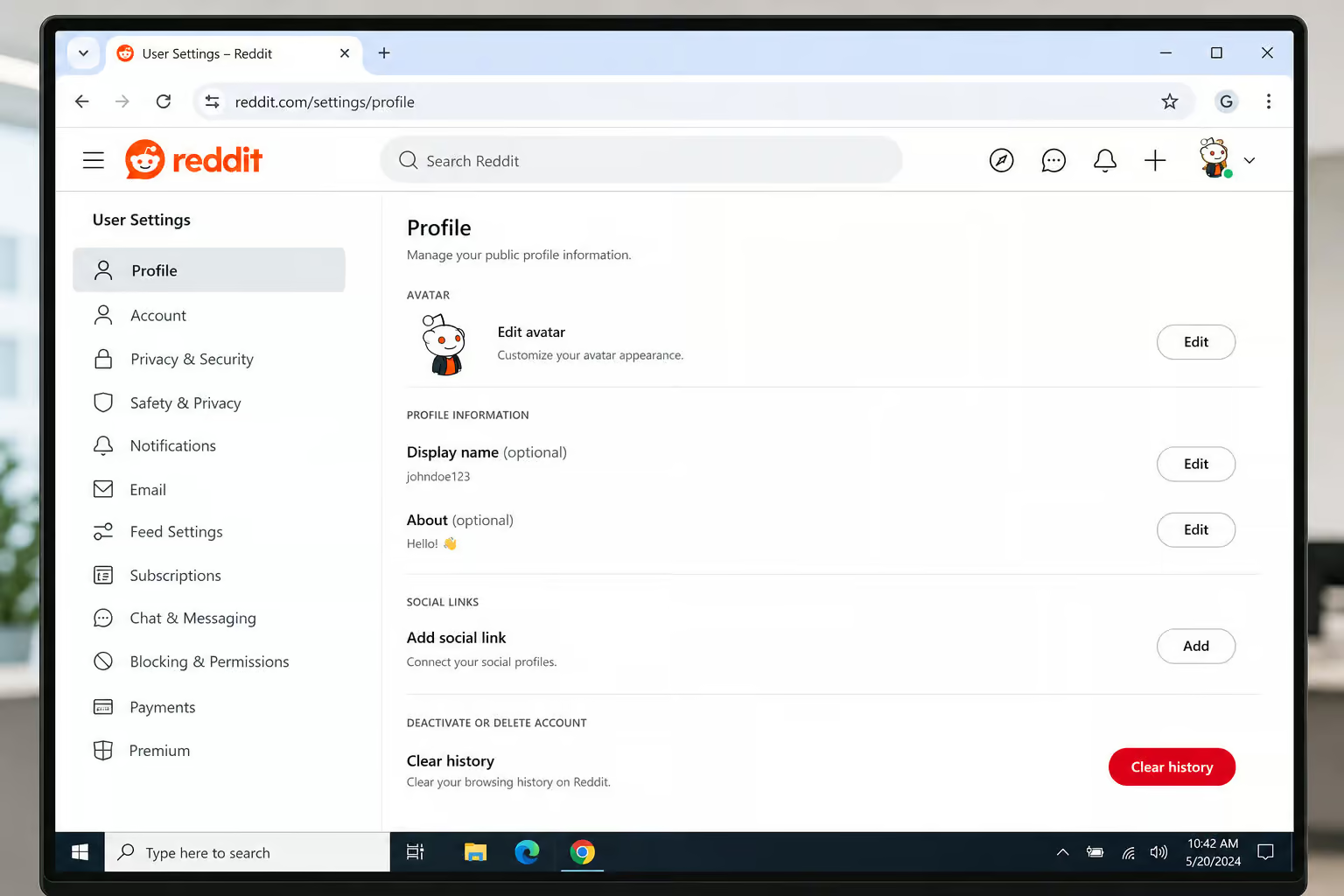
Click your profile avatar in the top?right corner, pick User Settings, then go to the Profile tab on the left sidebar on the website. Scroll down until you see Clear history and click it to clear post view history on the website—though if you are using the iOS app, how to clear history on reddit iphone involves a different button and may not fully wipe data from the server.
That’s it. Your post view history on the website is wiped, but comments, posts, saved items, upvotes, and downvotes remain; for granular control over deleting individual entries versus bulk operations, see how to delete things from reddit history.
Another caveat: this button only clears post view history, not comments, posts, saved items, upvotes, or downvotes. All untouched by the website’s Clear history button. The website’s native clear is strictly for post view history (visited links), so if you need the nuclear option, see how to delete all reddit history—but be warned that third?party scripts risk irreversible effects on karma and saved content.
What you can’t clear natively (and how to use Redact)
So you’ve cleared your visited history on both app and website using native methods. But what about all those old comments, posts, and upvotes from years ago? Reddit’s native tools won’t touch them; for a desktop browser deep-dive on how to delete reddit history on pc, including bulk-deleting comment history via old. Reddit, new Reddit, and third-party tools, you’re left with two options: manually delete each one individually, or use a third?party tool like Redact.

Redact is the current go?to for bulk deletion of Reddit posts and comments, available for Windows, macOS, and Linux from redact.dev. It’s a free desktop application that runs on Windows, macOS, and Linux — no mobile version, unfortunately, though users dealing with iPadOS quirks like split?screen impact, iCloud Keychain syncing, and multi?tab history behavior may want to know how to delete reddit history on ipad. You can grab it from redact.dev by clicking the Install button.
The workflow is straightforward:
- Download and install Redact from redact.dev.
- Launch it, click the Reddit tile, and log in with your Reddit account by entering credentials.
- Pick a date range — “All time” if you want to nuke everything, then choose whether you want to delete posts, comments, or both (they’re separate workflows).
- Preview what you’re about to delete by clicking Start previewing; Redact shows a list of items, count, and estimated time. For a complete, geek-deep guide on how to delete reddit history — covering everything from visited links and search queries to what Reddit actually keeps, see the full breakdown.
- When you’re ready, switch to Deletion Mode and hit Start Deleting to begin the deletion process.
The big tradeoff: Edit vs. Delete
Redact gives you two actions: Edit comments/posts and Delete Comments/Posts. Picking the right one matters, especially if you’re troubleshooting why your reddit history not deleting properly due to sync conflicts or server-side caches.
Edit replaces your post or comment text with a placeholder like “Removed with Redact” to prevent third-party views. The content stays on Reddit (so it still appears in your history), but the original text is overwritten, making it harder for third?party archive sites to show your original words. Delete removes the content from Reddit entirely, but archive sites might still have a copy. For those specifically wondering how to delete reddit history on android, the process involves navigating the Reddit app’s history settings, clearing cache without losing login, and dealing with cross-device sync. Deletion removes it from Reddit’s database, not from the internet, so archival remnants may persist.
There’s no perfect choice here; use Edit for better archive evasion, Delete for cleaner removal from Reddit. If you want to make recovery as difficult as possible for archivers, use Edit to overwrite original text. If you want the content gone from Reddit and you’re okay with a small chance of archival remnants, use Delete to remove from Reddit’s database — but if you’re on a Mac, be mindful of how browser choice and iCloud sync affect the process, so consult this guide on how to delete reddit history on mac for Safari, Chrome, and Firefox specifics, plus app-related data.
Bottom line: Choose Edit to overwrite text and hinder archives; choose Delete to remove content from Reddit completely, despite potential archival copies — though if you need to delete reddit history chrome, that guide covers clearing Reddit.com data via Chrome history, incognito mode limitations, and synced history across devices.
How to clear history for a single subreddit (targeted removal)
Here’s the scenario that most guides ignore: you browsed a subreddit you’d rather not have in your history, and you want to wipe just that community’s stuff without touching everything else. Reddit doesn’t have a native per?subreddit “clear history” button. None. But how to delete Reddit history on Mac covers the macOS?specific workarounds, including Safari vs Chrome vs Firefox quirks, iCloud sync interference, and wiping data from the Reddit app.

But you have two workarounds: use Redact with the subreddit filter, or manually delete Reddit history Chrome by clearing it through Chrome’s browser settings.
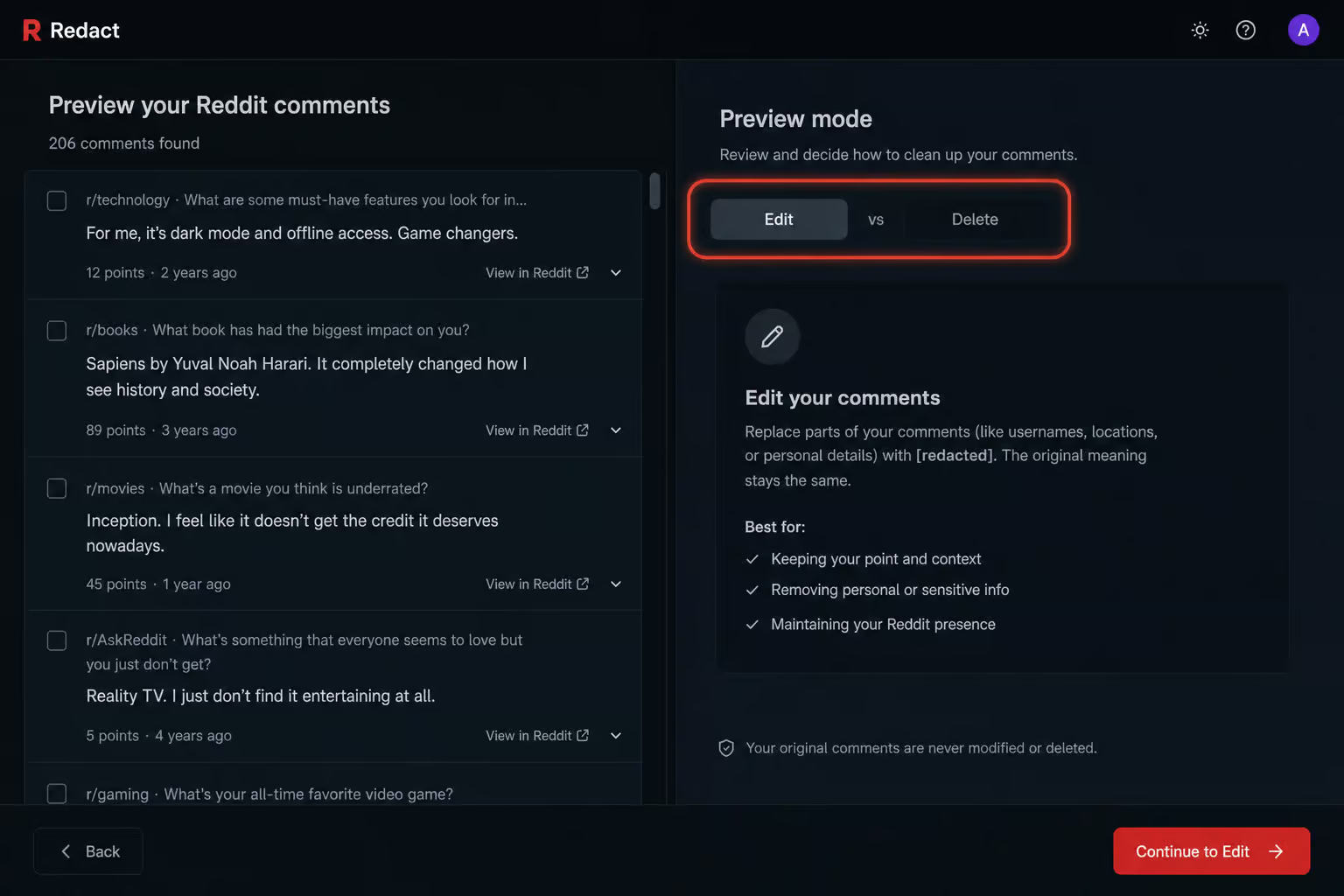
Workaround 1 (recommended): Use Redact with the subreddit filter. When you’re in the Redact preview screen, you can filter by subreddit to show only items from that community. Set your date range, choose posts or comments, and then specify the subreddit you want to target in the filter. Redact will show you only items from that community, which you can then preview and delete.
You can then preview and delete just those items from that subreddit. It’s the cleanest way to nuke one subreddit’s history without affecting other communities; for iPhone users with a specific workflow, there’s also a guide on how to delete reddit history on iphone that covers clearing visited links, search history, and comments in the official Reddit app, plus Safari gotchas.
Workaround 2 (manual): You can visit the subreddit, open your history page (on the app or website), and manually un?upvote, un?downvote, or delete posts one by one. It’s tedious, but it’s free and doesn’t require any extra tools like Redact—though you could also learn about how to delete all reddit history using third?party scripts if you’re willing to accept the risks to karma and saved content.
Neither method is native, but the Redact filter is the closest thing to a per?subreddit delete button you’ll find, as Reddit offers no such native feature—and if you’re wondering how to clear history on reddit iphone, the iOS app’s “Clear local history” button lives in a specific spot and interacts with Reddit’s servers in a way that might not nuke everything.
Preventive measures, myths, and obsolete tools
Before you dive into the cleanup details, it helps to know which strategies actually work and which ones will waste your time. Here are the facts on prevention, myths, and old tools.

Anonymous browsing
If you don’t want Reddit tracking what you look at going forward, switch to anonymous browsing from the app’s settings. It’s like incognito mode, but Reddit?native, and your visited history won’t accumulate while it’s active. For a detailed Android-specific walkthrough on navigating the app’s history settings, clearing cache without losing login, and dealing with cross-device sync, see how to delete reddit history on android. Prevention is easier than cleanup, as anonymous browsing avoids storing history altogether.
Account deletion myth
Deleting your Reddit account does not delete your posts or comments; they become orphaned under a deleted username — still visible under a deleted username, so you must delete content before deleting the account. For desktop users, a deep-dive on how to delete reddit history on pc covers clearing visited history via old. Reddit, new Reddit, and third-party tools, including how to bulk-delete comment history. This is a common misconception that leads to a nasty surprise when users find their content still visible.
Nuke Reddit History is dead
If you’ve read older guides, you might have seen mentions of the “Nuke Reddit History” Chrome extension, which no longer exists. That tool has been sunset. It was handy in its day, but don’t waste time looking for it; instead, check out how to delete Reddit history with Redact, the current alternative for bulk deletion of Reddit posts and comments.
Simple desktop fallback
If you’re on a computer and just want to clear Reddit’s site data, you can clear your entire browser history, which will wipe Reddit’s visited list along with everything else. But if you need a deeper approach, find out how to delete reddit history across every platform, including what Reddit actually keeps. That will wipe Reddit’s visited list along with all other browsing history, but it’s imprecise — you lose all your other browsing history too, not just Reddit’s.
Bonus: Clear search history
Search history is a separate beast, stored per device and cleared individually. On the app or website, select the search bar to see your recent searches, then hit the little X next to each query to remove it individually. Tedious, but it works; repeat on all devices to clear everywhere. And yes, it’s also device?specific — clearing on your phone won’t affect your desktop’s search history, just like visited history, so if you need to do the same for Reddit, follow this complete guide on how to delete reddit history.
Quick recap and your best next step
Here’s the decision tree based on your goal:
- Just want to clear visited links? Use the native methods: three?dot clear or Settings clear on the app, and the User Settings > Profile > Clear history button on the website. Remember to do both separately, as they are device-specific. For a Chrome-browser-specific guide on clearing Reddit.com data via Chrome history, incognito mode limitations, and synced history across devices, see delete reddit history chrome.
- Want to delete old comments and posts too? Use Redact from redact.dev. Decide between Edit (better for archive evasion) and Delete (cleaner removal from Reddit). Always preview first.
- Need to clear a single subreddit? Redact with the subreddit filter is your best bet. Or do it manually if you only have a handful of items, as Reddit offers no native per-subreddit clear.
- Don’t rely on account deletion. It leaves every comment and post intact; delete content before deleting the account.
The best piece of advice? Start with the native clear for visited links — it’s fast, built?in, and covers the most common use case of clearing recently viewed posts. Then, if you need to go deeper, grab Redact from redact.dev and preview before you pull the trigger. Your future self will thank you for taking these steps to clear your Reddit history thoroughly.
Frequently Asked Questions
How do I delete my Reddit recently visited history?
On the mobile app, tap your profile icon, go to History, tap the three dots in the top-right corner, and select Clear history. On the website, click your avatar, go to User Settings > Profile, scroll down, and click Clear history. These only wipe the Recent tab — upvotes, downvotes, comments, and saved posts are untouched.
