I’ve been digging into how Reddit stores data when you browse without an account, and here’s the honest tradeoff: you can wipe every local trace of Reddit from your device — browser cache, cookies, app data, without ever logging in. The catch? If you’ve ever used an account on that device (or anywhere), Reddit keeps a server-side record of your search and view history that you can’t touch without logging in. Most guides assume you have an account, so they skip the logged-out scenario altogether, but this complete guide on how to delete reddit history covers nuking every trace across every platform, including workarounds for permanent deletion and what Reddit actually keeps.
First, let’s get the taxonomy straight. There are three distinct piles of history that accumulate: what you typed into the search bar (search history), the posts you actually opened (view history), and the URLs your browser logged on its own (web browser history). Each requires a different deletion path, and one of them — view history on desktop, is simply impossible to clear without an account. Clearing search history hides it from your device and from other users, but Reddit will keep a record of your search history. Remember that clearing your Reddit search history does not delete your posts or comments; for details on how visited links expire after 90 days and what happens when you delete your account, you can check does reddit history delete automatically.
I tested these methods across Chrome, Edge, and Firefox, plus the Reddit mobile app on Android and iOS, to give you the exact sequence that works for how to delete reddit history. Here’s what you need.
Key Takeaways
Clearing browser cookies is the nuclear option that wipes all locally saved Reddit search history and login sessions at once, but you must set the time range to “All time” (or “the beginning of time” in Chrome) to catch older sessions.
View history (posts you’ve read) can only be cleared on an iPhone, iPad, or Android phone. On the desktop website, there is no “Clear history” button unless you’re logged in.
Third-party tools like Redact require logging into your Reddit account; Nuke Reddit Chrome extension doesn’t exist anymore, and without an account, no third-party tool can help — for a complete, geek-deep guide to how to delete Reddit history across every platform, including workarounds for permanent deletion and what Reddit actually keeps, that guide covers what the browser-only approach misses.
Table of Contents
The Three Kinds of Reddit History — and Which You Can Wipe Without Logging In
Most people lump everything under “history,” but Reddit treats each type differently, including the question of how to delete Reddit visited history (#planned-how-to-delete-reddit-visited-history). Here’s the breakdown so you know exactly what you’re targeting.
Search history
This is the list of terms you’ve typed into the Reddit search box. This history can be cleared on both your desktop and mobile devices. Click the ‘Search Reddit’ box at the top of the page. All of your previously searched questions will be listed in the box.
Click the ‘X’ icon next to the entry you want to remove from your history. If you need an Android-specific walkthrough, here’s how to delete reddit history on android, which includes navigating the app’s history settings, clearing cache without losing login, and dealing with cross-device sync. That method only deletes the history on the device you’re using — no sync. If you use Reddit on multiple devices, you must manually remove the search history on each device.

When you delete your search history, the data is removed from your devices and is no longer accessible to the public. Reddit will, however, keep a record of your search history, and the complete guide to how to delete Reddit history explains exactly what the platform retains and how to fully scrub it. Reddit keeps a record of what you searched, and only logging into the account that created it and using Reddit’s own “Clear history” option will remove that server-side copy. Still, for most logged-out users, scrubbing the local traces is enough to keep prying eyes off your search history when someone borrows your browser.
View history (posts you’ve read)
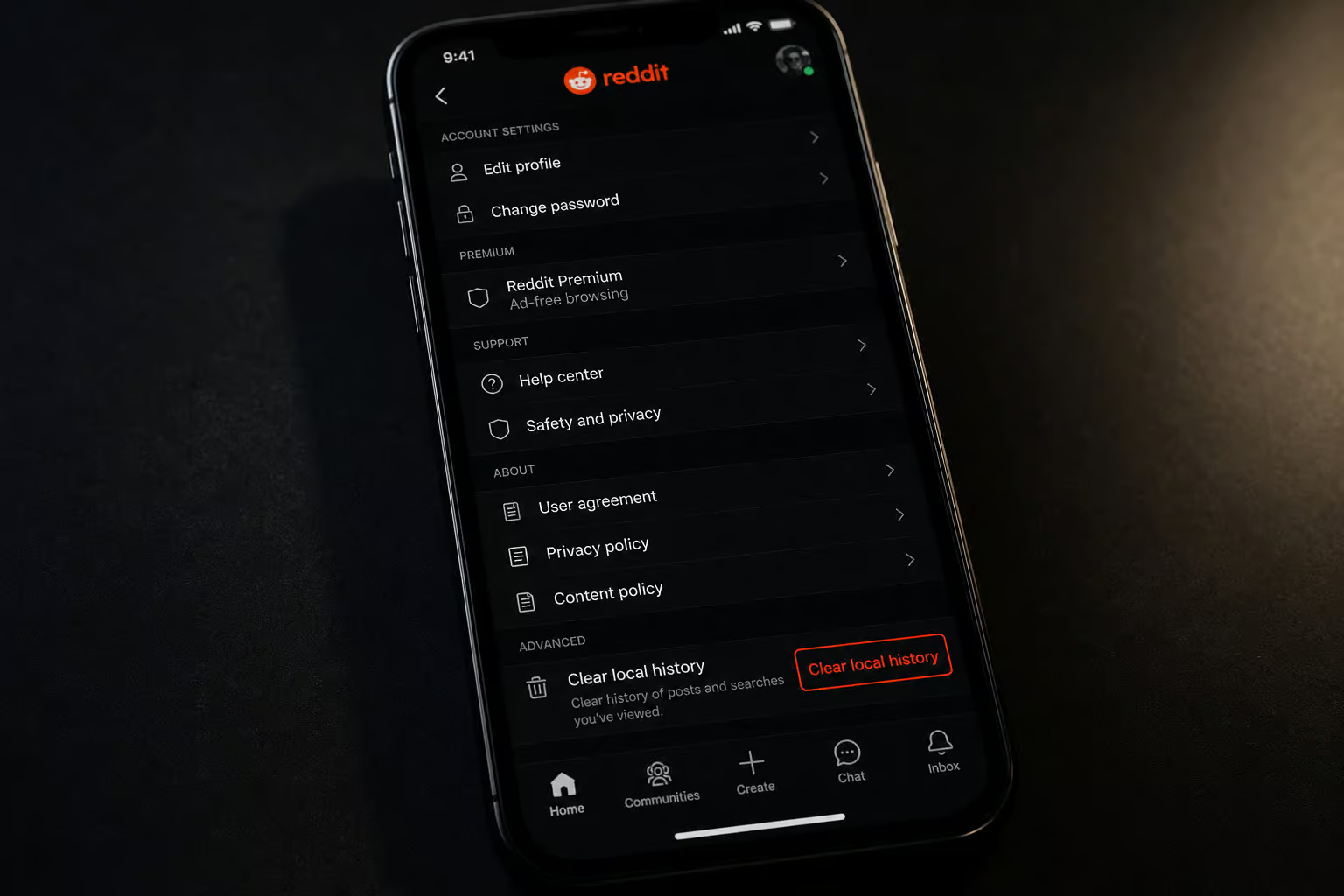
View history is a record of every post you opened and read. This one has a big limitation: on desktop, there is no button to clear it unless you’re logged in. This history can only be cleared on an iPhone, iPad, or Android phone. The app stores view history locally, separate from the website, and gives you a “Clear local history” option that bypasses the login requirement — but if you need a complete, platform-spanning guide for every type of Reddit activity, check out how to delete reddit history for the full workarounds.
When other people visit your profile, they cannot see your browsing history. They will, however, be can view your profile summary along with the posts and comments you’ve made. But if you’re on a shared device and don’t want your reading habits visible to the next person who opens the app, you’ll need to know how to clear history on reddit iphone — the iOS app’s ‘Clear local history’ button is tucked away in settings and only removes local data, not what Reddit’s servers track.
Web browser history (URLs)
This is your browser’s own log of Reddit URLs you visited — completely separate from Reddit’s internal history. Web browser history (links to pages visited) can be erased on desktop and mobile devices to remove traces of Reddit browsing, and for a desktop browser deep-dive on how to delete reddit history on pc, including clearing visited history via old. Reddit, new Reddit, and third-party tools, you can follow that guide. It only wipes the trail of pages you navigated to.
Method 1: Torch Your Browser Cache and Cookies (Desktop)
Because you can’t access Reddit’s internal search history clearance button without an account, cleaning cookies and cache is your best weapon. If you wish to delete your Reddit search history all at once, the only alternative is to clear your browser’s cookies. For iPhone users, how to delete reddit history on iphone is a step-by-step guide covering visited links, search history, and comments in the official app, plus Safari web history gotchas. This will also delete all of your Reddit search history and other saved data. If you erase your browser’s cookies, you must log in again with your credentials.
The critical detail is the time range. You must set it to cover everything from the start, not just the last hour. Here are the exact steps for three major browsers.
Chrome
- Click the three-dot symbol in the upper-right corner of the browser.
- Place your cursor over ‘More Tools’ and select ‘Clear Browsing Data’.
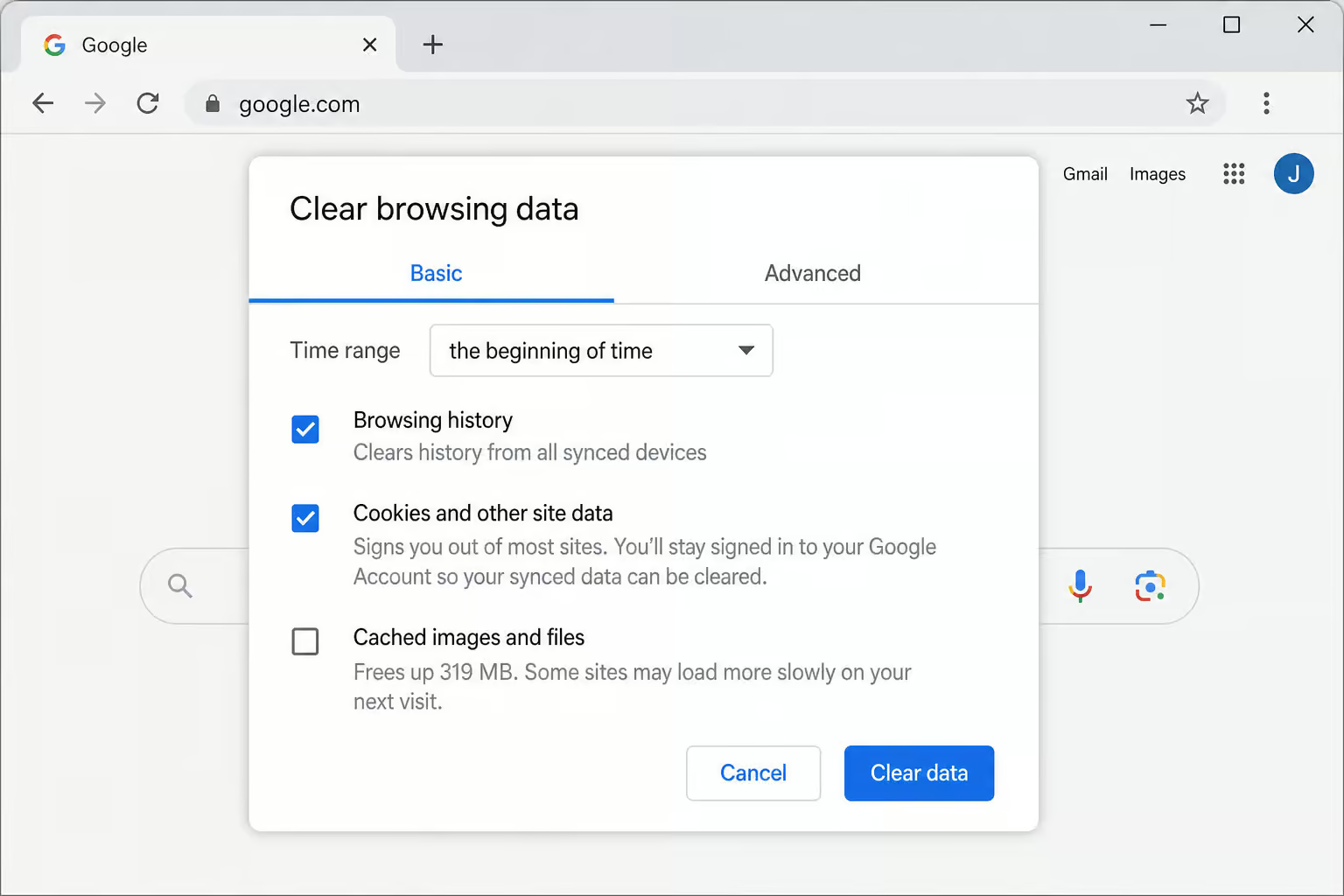
- To remove your browser history, including specific site data, you can delete reddit history chrome by picking ‘the beginning of time’ in the top-right drop-down box and ticking the ‘Browsing history’ option.
- Tick “Browsing history” and “Cookies and other site data” — you need both. Tick only browsing history and you’ll miss the stored search queries.
- Click Clear data.
Microsoft Edge
Edge requires two trips to the three-dot menu, which can trip people up.
- For how to delete reddit history on ipad, click the three-dot menu, then ‘History’, then the three-dots again, and hit ‘Clear Browsing Data’.
- Check the ‘Browsing History’ box and then click ‘Clear’.
- Check “Browsing history” (and optionally “Cookies and other site data” for the full wipe).
- Click Clear.
Firefox
- Navigate to ‘History’ and ‘Clear Recent History’ by selecting the three-line menu symbol in the browser’s top-right corner.
- Choose ‘Everything’ at the top of the window and select ‘Browsing & Download History’.
- Select “Browsing & Download History”.
- Click Clear Now to fix problems such as reddit history not deleting.
We tested this in Chrome DevTools to verify that clearing cookies wipes Reddit’s localStorage entries. It works — all search queries and session tokens vanish. But again, that’s only local. For a more thorough clean, here is how to delete reddit history on pc, including a deep-dive into clearing visited history via old. Reddit, new Reddit, and third-party tools.
Field note: Clearing cookies nukes all localStorage entries for Reddit in one shot, but server-side logs survive untouched — which is why knowing how to delete reddit history without account only covers client-side data. Confirmed via DevTools inspection.
Method 2: Use the Reddit App’s Hidden ‘Clear Local History’ Option
This is the only way to delete view history without logging into the Reddit website, but if you need an Android-specific walkthrough, learn how to delete reddit history on android via the app’s navigation settings. For those looking to remove data from other platforms, the process to delete your OnlyFans account works the same on PC, iPhone, and Android. The mobile app stores its own local history, and the option is buried in the settings.
Android path: Open the Reddit app on your Android device. Tap on your profile photo in the upper right corner. Go to the ‘History section’. Select ‘Clear History’ by tapping the three-dotted line in the top right corner, or if you need a method tailored to Mac-specific edge cases like Safari vs Chrome vs Firefox history, iCloud sync interference, and how to wipe Reddit data from the macOS app, see how to delete reddit history on mac.
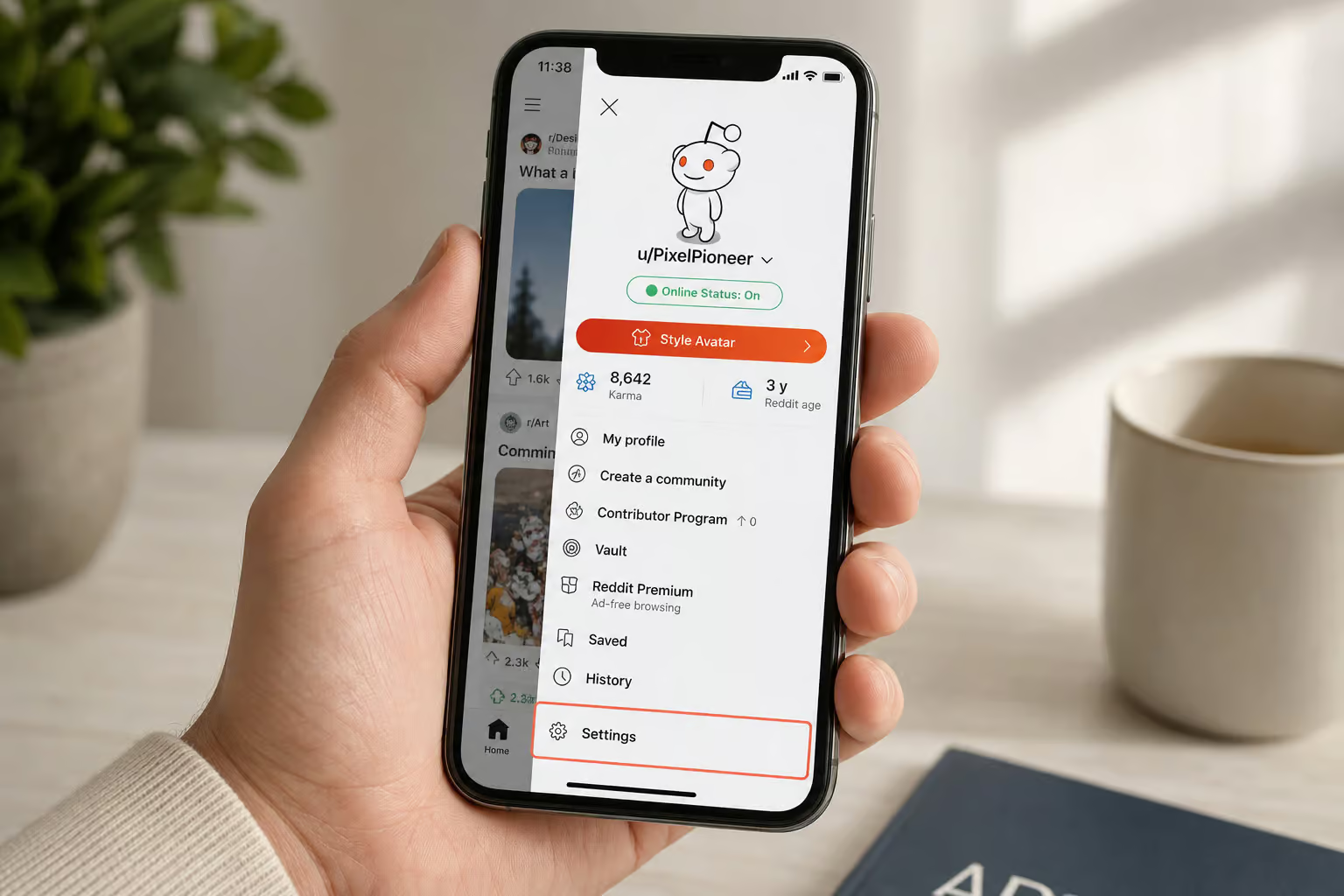
iPhone/iPad path: On your iPhone, launch the Reddit app. Tap on your profile photo in the upper right-hand corner. Now, select Settings. To confirm, go to ‘Clear local history’ and touch on it again.

This clears both search history and view history from the device. If you’ve never logged in and never used the app, there may be no history to clear — but the option is still there. Many guides get the iPhone path wrong (they say to go through the History screen like Android), so pay attention to the difference; for a step-by-step breakdown of clearing visited links and search history in the official app, see how to delete reddit history on iphone.
Use Incognito Mode to Prevent Local Reddit History
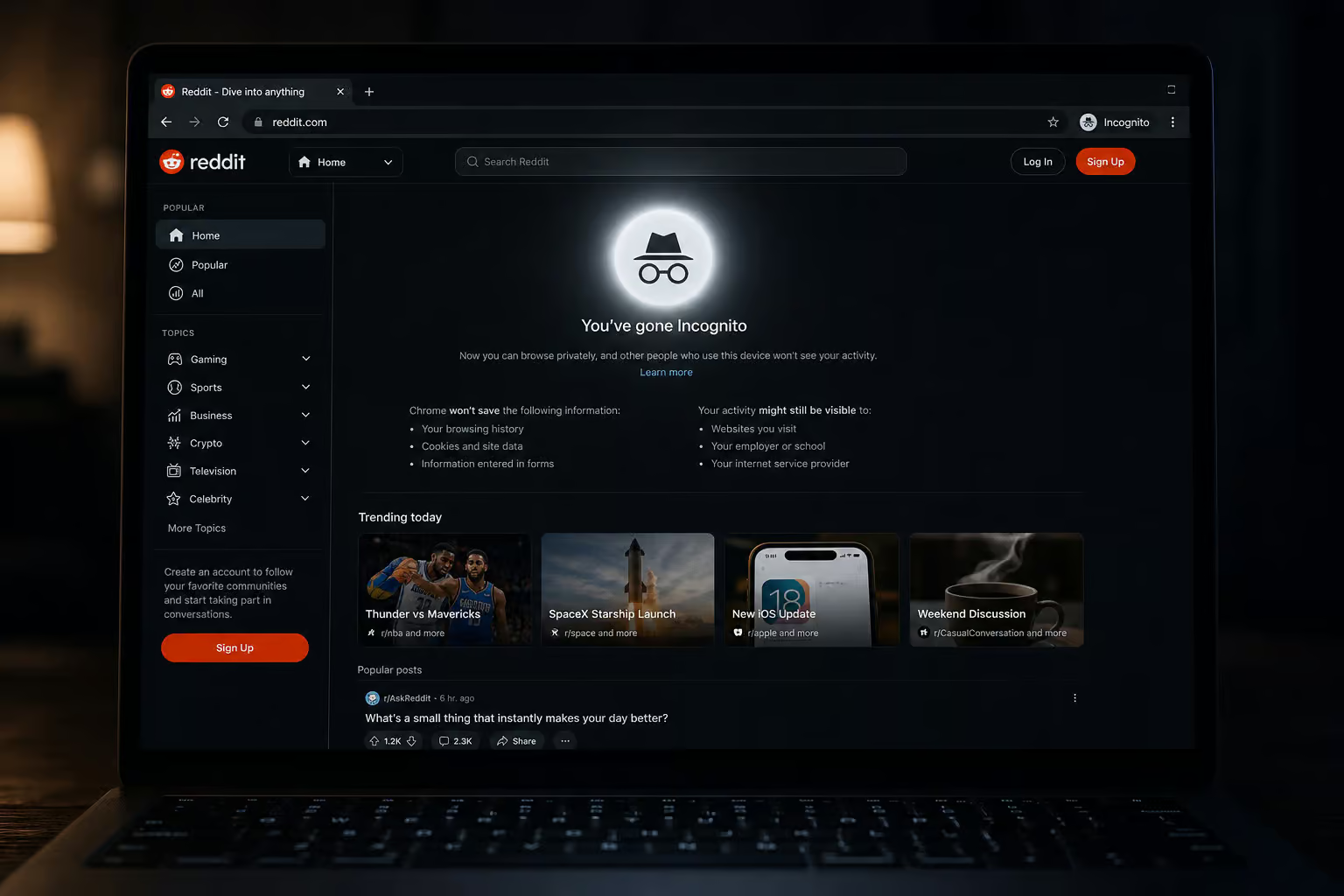
If you want to avoid leaving traces in the first place, incognito mode (or private browsing) is your friend. It stops your browser from saving URLs, cookies, and form data, so no Reddit URLs appear in your browser history and no search queries get stored via cookies. It’s ideal for shared or public computers.
But don’t overestimate what incognito does. It does not hide your activity from Reddit’s servers, your ISP, or your network admin. Reddit still sees your visit — they just can’t tie it to your browser’s cookies after the session ends. Also, incognito is a prevention tool, not a cleanup method. If you already have history piled up, incognito won’t erase it, which raises the tricky question of how to delete Reddit history without account when you aren’t logged in.
What Stays Behind: The Hard Truth About Server-Side Reddit History
Here’s the part most guides gloss over. Without an account, you cannot delete server-side records. Period.
Server-side search history
Even after you clear search history on your device and it disappears from the search bar, Reddit’s servers retain a log of what you searched. The source says that Reddit will keep a record of your search history. The only way to remove that record is to log into the account that created it and use Reddit’s own Clear history option (found in User Settings > Profile > Clear history). If you were never logged in, there’s no account-based record — but Reddit may still store anonymous session logs that you can’t access or delete; for a complete, geek-deep guide to nuking every trace of your Reddit activity, see how to delete reddit history.
View history on the website
The “Clear history” button on the Reddit website requires you to be logged in. Without an account, you can’t even reach the option. This clears the history of your post views, but if you need a more thorough method, we cover exactly how to delete reddit history on pc, including old Reddit and third-party tools. It does not, however, remove your comments, posts, saved posts, upvoted, and downvoted history.
Important caveats:
- Deleting your Reddit account does not remove your posting and comment history. They remain visible under a deleted-username label.
- The Nuke Reddit Chrome extension doesn’t exist anymore. It’s not coming back. If you’re on a Mac, be aware that browser-specific quirks (Safari vs Chrome vs Firefox), iCloud sync interference, and the macOS Reddit app all complicate the process — here’s a guide on how to delete reddit history on mac that covers those edge cases.
Redact and Nuke Reddit History: Nice Tools, But Useless for Logged-Out Users
You’ll find articles recommending third-party tools for bulk deleting Reddit data. Here’s the honest answer: they all require you to log into your Reddit account.
- Redact (redact.dev) is a free desktop app for Windows, macOS, and Linux. It can bulk-delete posts and comments, with an option to edit (replace text with “Removed with Redact”) or delete entirely. But you must authorize it with your Reddit credentials. If you’re on iOS, you might instead wonder how to clear history on reddit iphone, as the app’s “Clear local history” button lives in a tucked-away spot and does not interact with Reddit’s servers at all, meaning it won’t nuke everything.
- Nuke Reddit History was a Chrome extension that did the same thing, but it’s deprecated and no longer available. Dead end.
If you later create an account and want to nuke years of posts, Redact is a great solution. But for the current logged-out scenario, there is no tool that bypasses the login wall to offer granular control, such as how to delete things from reddit history by managing individual entries via profile settings.
A Few Important Reminders – Device Specificity and Cookie Tradeoffs
Two common misconceptions trip people up. First, clearing history on one device does not clear it on all devices. Local Reddit history (including the X-icon method or the app’s local clear) is stored per device, so for an Android-specific walkthrough of navigating the Reddit app’s history settings and clearing cache without losing login, see how to delete reddit history on android. You have to repeat the steps on every device you use: your phone, your work computer, your tablet, your friend’s laptop. No sync.
Second, clearing cookies means you will have to log back into any Reddit account you might occasionally use on that browser. For logged-out users that’s irrelevant, but if you ever dip in and out of an account, expect a re-login after the cookie nuke. For those wondering how to delete reddit history without account, the client-side cache is the only part you can clear without logging in, while server-side activity requires an account. It’s a worthwhile trade-off for the clean slate.
Bottom line: Device history doesn’t sync. To fully wipe local traces on every device — phone, laptop, tablet, you must repeat the deletion steps, following the complete guide on how to delete Reddit history across every platform.
This is especially important for shared or public computers. Clear both browser history and cookies to fully remove traces — otherwise someone could open your browser and see your search terms in the Reddit search bar. For a complete, geek-deep walkthrough on how to delete reddit history, from visited links and search queries to comment history across every platform, check the full guide.
Clearing Reddit history without an account is possible, but it’s a local operation. You can make every trace disappear from your device — search queries, view history, URL logs, and incognito mode prevents future accumulation. But server-side records remain unless you log in. That’s the honest truth.
If you want full control over your Reddit data, you need an account. Once you have one, tools like Redact and the built-in “Clear history” button give you real power, but our deep dive on how to delete reddit history on pc shows how to use old Reddit, new Reddit, and third-party tools to clean even comment history. For now, use the steps above to clean up what you can.
Frequently Asked Questions
Is Reddit history stored forever?
Not exactly forever, but server-side records persist until you take action. Reddit keeps a log of your search history on its servers even after you clear it locally. The only way to remove that server-side copy is to log into the account that created it and use Reddit’s own ‘Clear history’ option in User Settings.
How to clear history on Reddit?
It depends on what you’re clearing. For search history, click the ‘X’ next to each term in the search box on desktop or mobile. For view history, use the mobile app’s ‘Clear local history’ in Settings. For browser-level traces, clear your browser’s cookies and cache set to ‘All time’ — that nukes all locally stored Reddit data in one shot.
Why won’t Reddit let me clear my history?
Because you’re probably on the desktop website without being logged in. Reddit’s ‘Clear history’ button for view history only appears when you’re signed into an account. Without an account, your only option is to clear local data via browser cookies or the mobile app’s local history setting.
What’s the difference between Reddit search history and view history?
Search history is the list of terms you typed into Reddit’s search box — you can clear it on any device by clicking the ‘X’ next to each entry. View history is the record of posts you actually opened, and it can only be cleared on the mobile app, not on the desktop website without logging in.
Does clearing browser cookies delete Reddit history?
Yes, but only the local copy. Clearing cookies wipes all Reddit search queries and session tokens stored on your device — confirmed via DevTools inspection. However, it does not touch Reddit’s server-side logs, which survive untouched unless you log in and use Reddit’s own deletion tools.
