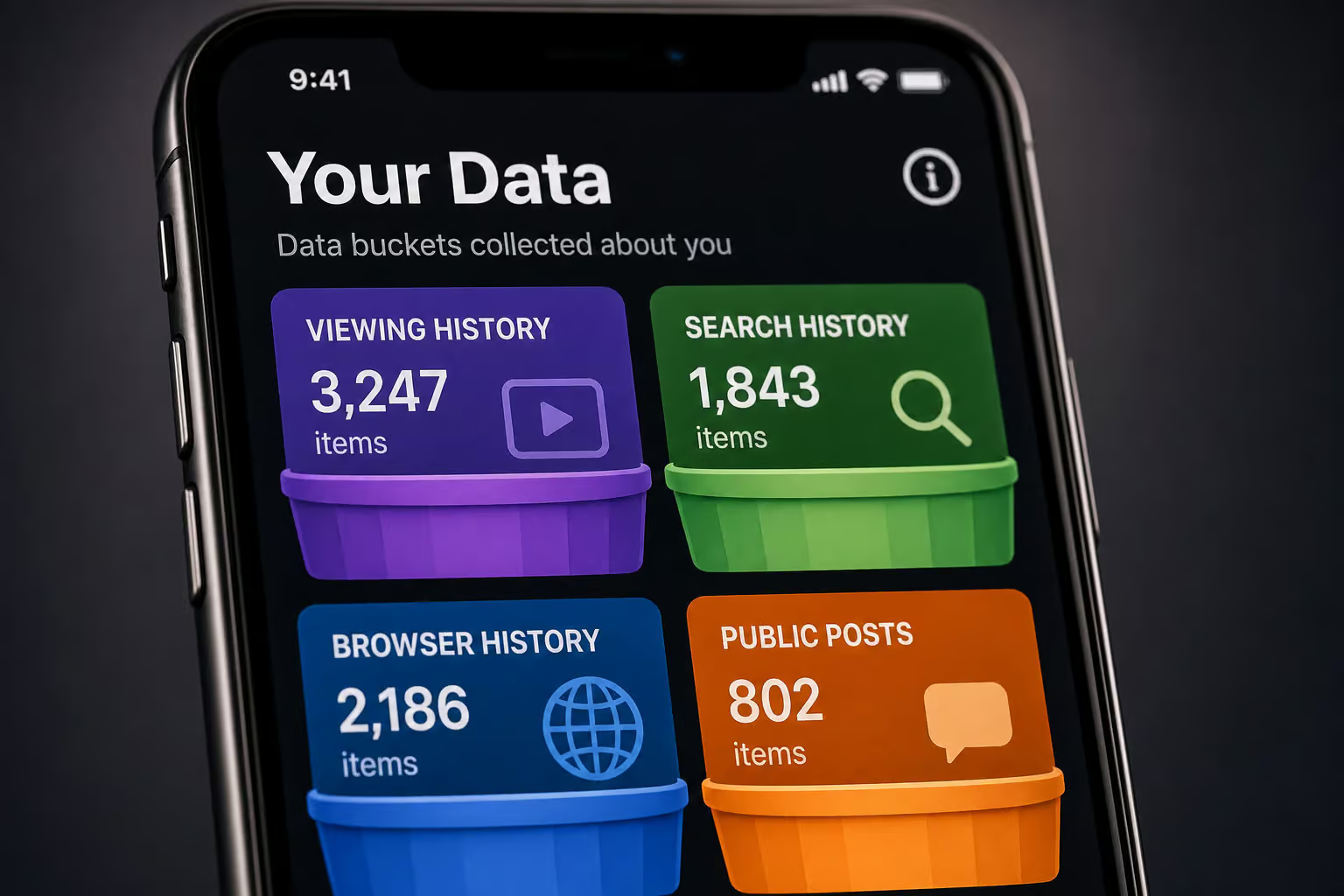
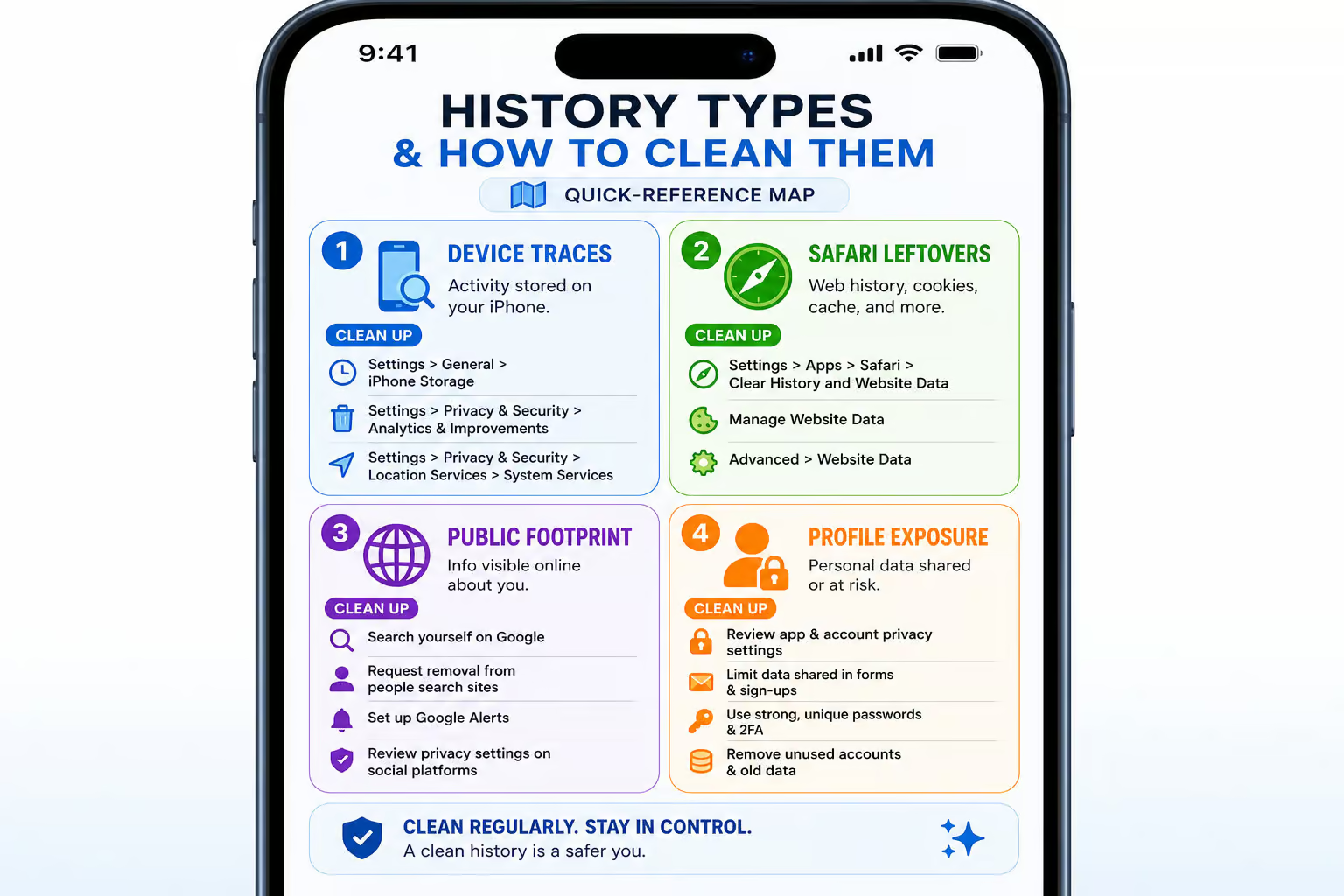
Reddit history isn’t one thing. It’s four different data types — each stored in its own place, each requiring a different cleanup method. And if you’re on an iPhone, there’s an extra trap that even careful users miss: here’s how to delete reddit history on iphone, covering visited links, search history, comments, and Safari web history gotchas.
Most people think clearing the Reddit app wipes everything. It doesn’t. Your viewing history, search terms, Safari-browsed pages, and public posts all live in separate buckets. The last one — public posts and comments, doesn’t even have a “clear all” button.
So, here’s the full iPhone-specific walkthrough for how to delete reddit history, including the one everyone forgets.
Key Takeaways
Reddit stores four separate history types on iPhone: local viewing data (app), search terms (one-by-one deletion only), Safari web history (completely separate from the app), and public posts/comments (must be deleted individually).
The Safari gotcha: clearing Reddit app history does nothing to Safari’s history — you must go into Settings, Safari, Clear History and Website Data to remove Reddit pages you visited in a browser.
The edit-then-delete strategy for sensitive posts/comments (replace text with a placeholder before deleting) reduces what survives in cached snippets and quote bots, but no method guarantees removal from third-party archives or screenshots. For a true nuclear option, though, you can use how to delete all reddit history via third-party scripts or Reddit’s own data deletion tools, though this carries risks and irreversible effects on karma and saved content.
Table of Contents
Why iPhone users need a separate Reddit history cleanup
Reddit collects data saved in your account, and nothing auto-expires. Your history — every post you’ve viewed, every search you’ve typed, every comment you’ve left, sits there until you deliberately erase it. And what most people don’t realize is that “history” isn’t a single bucket. It’s four:
- Local viewing history — the list of posts you’ve recently looked at, stored on your iPhone (or browser). Only you can see it, and it’s per-device: your iPad won’t know what you scrolled on your phone.
- Search history — the terms you’ve typed into Reddit’s search bar. Anyone who picks up your phone sees them when they tap the search bar. Semi-public, but not on your profile.
- Browser history — Reddit pages you visited in Safari or another browser. This is standard browser history, completely separate from the Reddit app, and it’s the one almost everyone overlooks.
- Public activity (posts and comments) — the stuff that lives on Reddit’s servers, visible to anyone, searchable, quotable, and archivable. This is your public footprint, and it’s the hardest to clean up, though a guide on how to delete reddit history covers workarounds for permanently erasing every trace across all platforms.
Each type needs its own cleanup approach. There’s no single “nuke everything” button. But if you follow these four steps in order, you’ll cover every trace.
Step 1: Clear local viewing history in the Reddit app
This is the easiest step and the lowest-risk cleanup. It only removes what’s stored on your specific iPhone — the recently viewed posts and “continue browsing” suggestions that appear in the app. Nobody else can see this stuff anyway, but it’s good to clear if you share your device or want a fresh start, much like knowing how to delete your OnlyFans account in 3 steps for a clean break.

The iPhone tap sequence:
- Tap your profile photo (top-right corner)
- Settings
- scroll down to “Clear local history”
- tap it and confirm.
That’s it. However, there is a crucial limit: this does not touch your search history, your posts, your comments, or your profile visibility. For the complete guide to how to delete reddit history across every platform, including workarounds for permanent deletion and sync behavior, it’s device-specific too — clearing it on your phone leaves your iPad or desktop untouched.
Step 2: Clear search history (recent searches)
Search history is more awkward. When you tap the search bar, your previous queries pop right up. Anyone who glances at your phone can see them. For granular control, you can learn how to delete things from reddit history to remove individual entries rather than wiping everything at once.
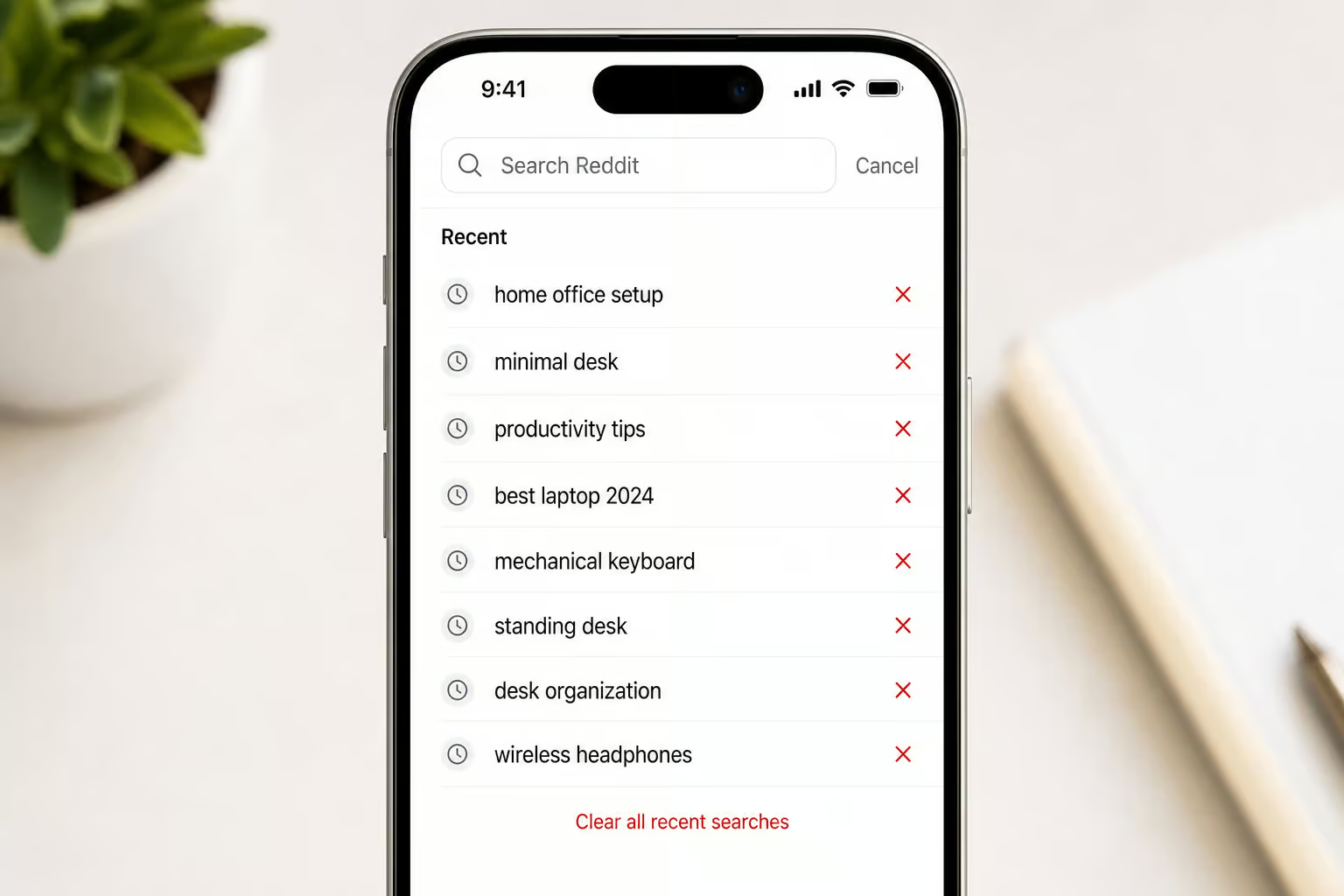
The removal process on iPhone:
Tap the search bar at the top of the app ? find a recent search ? tap the X next to it ? repeat for every term you want gone. Yes, one by one — there is no bulk delete button in the Reddit app for search history. (You could nuke all browser cookies to clear it in one go, but that logs you out of Reddit and every other site, a sledgehammer approach.)
For a desktop alternative, see how to delete reddit history on pc for a deep dive into clearing visited history via old. Reddit, new Reddit, and third-party tools.
Red flag: Even after you delete search history from your device, Reddit keeps an internal record of your searches — not public, but not truly gone-gone.
Important caveat: Even after you delete search history from your device and it’s no longer visible in the UI, Reddit keeps an internal record of your searches. It’s not public, and nobody browsing your profile can see it, but it’s not truly gone-gone. If you’re on an Android device, the practical question is how to delete reddit history on android — navigating the app’s history settings, clearing cache without losing login, and dealing with cross-device sync. This is simply how Reddit’s servers operate.
Step 3: The Safari gotcha — clear web browser history
This step is frequently overlooked. You clear the Reddit app, pat yourself on the back, and then a week later you tap the Safari search bar and there’s a Reddit thread sitting in autocomplete. The app’s “Clear local history” button doesn’t touch Safari’s history — they’re completely separate systems, and if you’re on a Mac you’ll need to dig into how to delete Reddit history on Mac to account for Safari vs Chrome vs Firefox and iCloud sync interference.
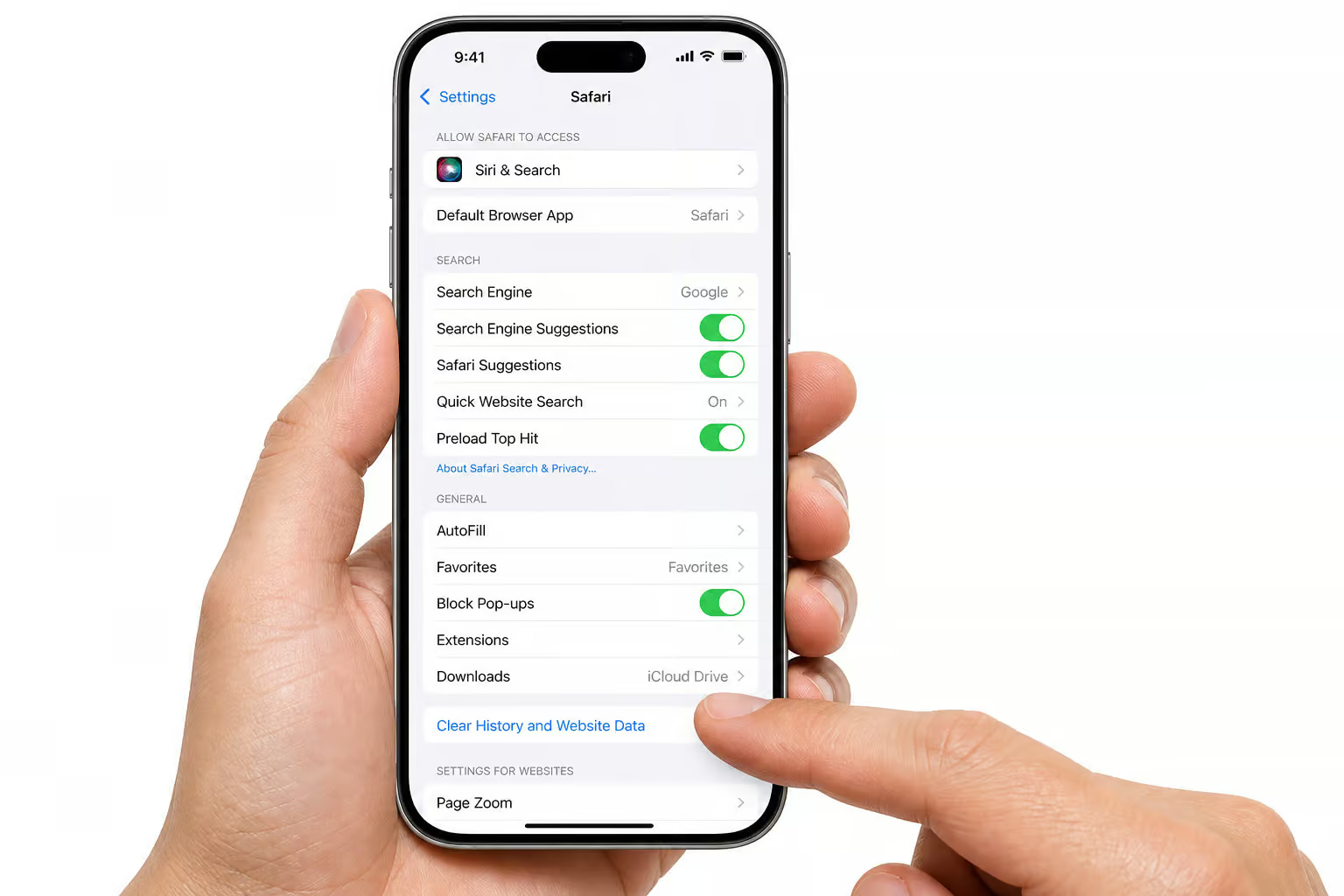
Reddit pages you visit in Safari (or any browser) are stored as standard browser history, just like any other website. The fix is straightforward:
On iPhone:
- Open the Settings app
- scroll to Safari
- tap “Clear History and Website Data”
- confirm.
This removes all Safari history, including every Reddit page you visited. The trade-off: it logs you out of Reddit and other sites, so you’ll need to sign back in. If you use Chrome or another browser on your iPhone, same concept — clear that browser’s history separately. This isn’t a Reddit bug; it’s just how browser history works. Easy to forget, but for iPhone users needing a step-by-step guide, how to delete reddit history on iphone covers clearing visited links, search history, and comments in the official Reddit app, plus Safari web history gotchas.
Step 4: Delete public posts and comments
This is where the most thorough cleanup is needed. Your posts and comments are stored on Reddit’s servers, visible to everyone, searchable, quotable, and archivable. Clearing local history does absolutely nothing to them — they must be deleted individually.
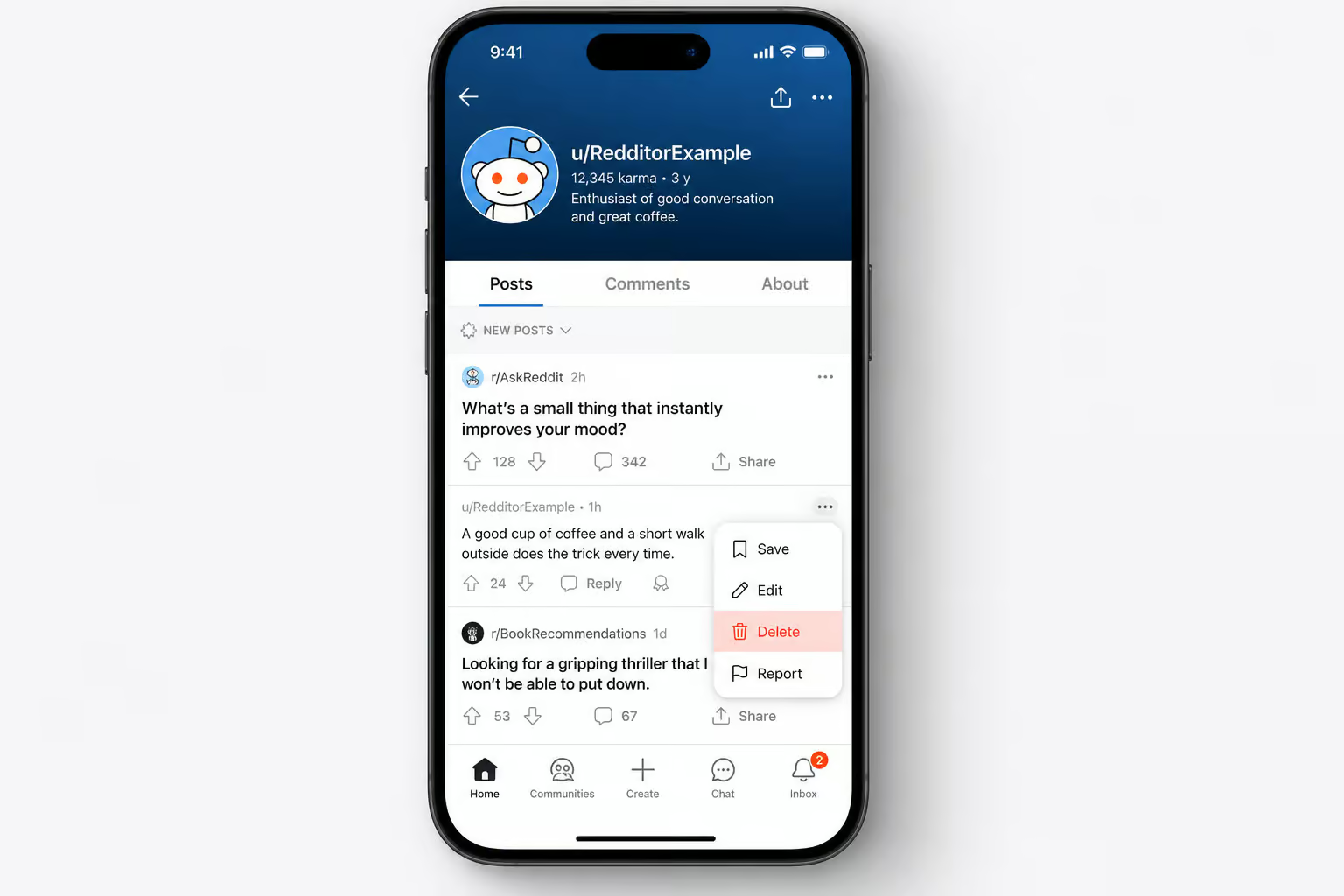
Manual deletion on iPhone:
Go to your profile ? Posts or Comments tab ? tap the three-dot menu (?) on the item ? Delete ? confirm. Repeat for each one. Yes, it’s manual. If you have a large history, the nuclear option uses third-party bulk deletion tools — but consider the risks and irreversible effects on karma and saved content before you follow a guide on how to delete OnlyFans account.
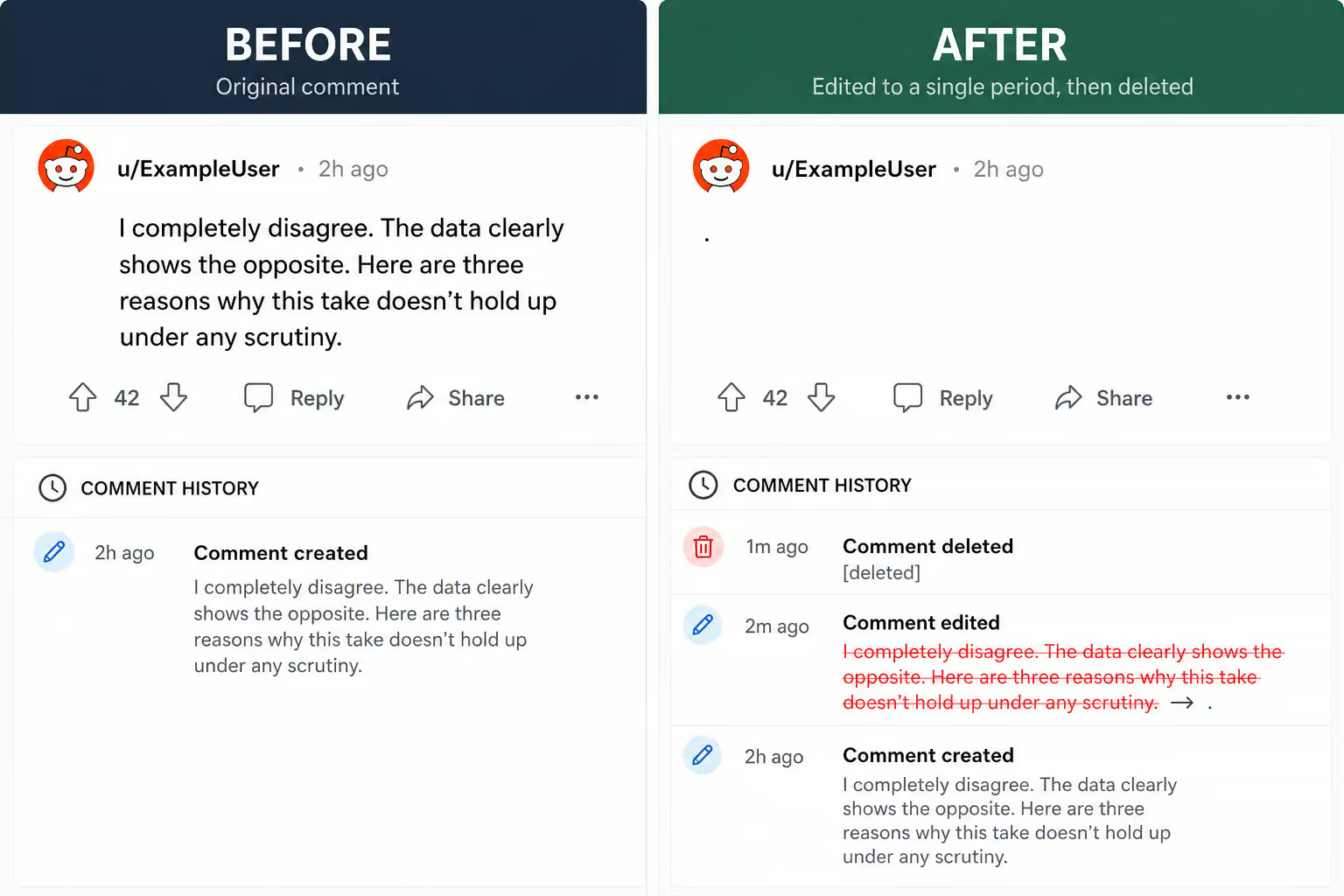
The edit-then-delete upgrade:
Before deleting something sensitive, edit the post or comment to replace the text with a placeholder (like a period or a removal note). Then delete it. This small extra step reduces what survives in quoted replies, cached snippets, and search results. For a desktop-browser deep-dive into clearing visited history and bulk-deleting comments, see how to delete reddit history on pc.
It won’t erase screenshots someone already took, and third-party archives like removeddit or pushshift may still have copies, but it limits the most common paths of exposure. It is a workaround, not a guarantee, but it is the most practical improvement.
Optional: Curate profile visibility (hide vs. delete)
A lot of people confuse hiding with deletion. They’re very different:
- Hiding removes content from your profile page only. It stays in the subreddit feed, stays in search engines, stays on Reddit’s servers. You can unhide it anytime. It’s a cosmetic cleanup — useful if you want a cleaner profile presentation, but not a privacy measure.
- Deleting removes the content from your profile and from subreddit feeds. It reduces search visibility over time as indexes refresh. It’s permanent. As for the client side, the tricky situation of how to delete reddit history without account hinges on clearing cookies and local storage, while server-side history still requires logging in.
To curate your profile: Profile ? ? menu ? “Curate your profile” ? choose what to show/hide ? save. If you only care about what strangers see when they land on your profile, hiding is fine. If you want the content gone, you need to delete it.

Important caveats: what deletion can and cannot guarantee
Deletion is not a time machine. Here’s a rundown.

What deletion achieves:
- Removes content from your profile and subreddit feeds
- Reduces casual discovery — new visitors won’t see it
- Over time, reduces search engine visibility as indexes refresh
- For browser-based removal, see how to delete reddit history on mac, which covers Safari, Chrome, Firefox, and iCloud sync interference
What deletion cannot guarantee:
- Screenshots someone already took — those are permanent
- Reposts or quotes in other threads — they survive independently
- Third-party archives (removeddit, pushshift, etc.) — they may have copies
- Search engine cache until it refreshes — old snippets can linger
- Reddit’s internal records of search history — they keep it, but if you’re on iPadOS you’ll also want to know how to delete reddit history on ipad because the same app behaves differently with split-screen, iCloud Keychain syncing, and multi-tab history.
- No single “delete all” button exists for public content — only for local viewing history
Deletion helps, but it is not absolute. Expectations should be set accordingly.
Frequently Asked Questions
How do I Delete my Reddit viewing history?
Open the Reddit app on your iPhone, tap your profile photo, go to Settings, scroll down to ‘Clear local history,’ and confirm. This removes recently viewed posts and ‘continue browsing’ suggestions stored on that specific device, but it doesn’t affect your search history or public comments.
How to clear Reddit search history activity?
Tap the search bar at the top of the Reddit app, find a recent search term, and tap the X next to it. You have to repeat this for every term you want gone — there’s no bulk delete button in the app. Reddit also keeps an internal server-side record of your searches that isn’t publicly visible.
How do I Delete my Reddit recently visited history?
In the Reddit app on iPhone, tap your profile photo, go to Settings, and select ‘Clear local history.’ This wipes the list of posts you’ve recently looked at. Keep in mind this is per-device — clearing it on your iPhone won’t touch your iPad or desktop history.
How to clear Reddit data from iPhone?
There’s no single button for it because Reddit stores four separate history types. Clear local viewing history in the app’s settings, delete search terms one-by-one from the search bar, clear Safari history separately in Settings > Safari > Clear History and Website Data, and delete public posts and comments individually from your profile.
Does clearing Reddit app history delete Safari history too?
No, the app’s ‘Clear local history’ button does nothing to Safari history — they’re completely separate systems. Reddit pages you visited in Safari are stored as standard browser history. You need to go to Settings > Safari > Clear History and Website Data to remove those traces.
What’s the difference between hiding and deleting a Reddit comment?
Hiding removes the comment from your profile page only — it stays visible in the subreddit feed and search engines, and you can unhide it anytime. Deleting removes it from both your profile and the subreddit feed permanently, reducing its search visibility over time.
Why does my Reddit history still show up after I delete it?
Deletion removes content from your profile and subreddit feeds, but it can’t erase screenshots someone already took, reposts in other threads, third-party archives like removeddit, or search engine caches that haven’t refreshed. Reddit also keeps internal server-side records of your search history that aren’t publicly visible.
