
Your Reddit account is a composite sketch of your life. Every post in r/local, every comment in r/industry, every thread in a hobby sub, every take in a religious or political community — together they build a detailed picture. Third parties can piece these fragments into a dossier: your city, your job, your beliefs, your habits. That’s the privacy risk, and it’s why you’re here to learn how to delete reddit history.
Maybe you’ve just changed your mind about things you posted years ago. Maybe you want a fresh start. Or maybe you finally realized that manual deletion is hopeless if you’ve been active for more than a few months. Reddit has no built-in mass delete, which is where third-party tools come in — but not all of them work the way you’d expect, especially if you’re looking for a desktop browser deep-dive on how to delete reddit history on pc.
Key Takeaways
Reddit’s API doesn’t expose your full history, especially older content, so tools can only see what’s on your profile page — you need a data export (.zip from reddit.com/settings/data-request) for a truly complete wipe
Editing your content before deleting is more effective against archive bots: Redact overwrites each post with a placeholder like “Removed with redact.dev” so scrapers capture the placeholder, not your original words
Free tiers vary significantly: Redact edits only (no deletion), the Glench extension deletes 50 items per day, and Shreddit Basic allows 5 deletion tasks per month — premium unlocks full history access
Table of Contents
Why delete all your Reddit history?
Let’s be specific: your Reddit history isn’t a collection of bad jokes and hot takes. It’s a composite profile. Post in r/local about a new restaurant, you just revealed your city. Comment in r/industry about your job, you just narrowed your employer.

Add a thread in a religious sub and a hobby community, and suddenly someone can build an accurate picture of who you are and where you live. If you’re on a Mac and need to clear this trail, you should look into how to delete reddit history on mac, which covers Safari vs Chrome vs Firefox quirks, iCloud sync interference, and wiping data from the macOS app.
Red flag: Your posts in unrelated subreddits can be cross-referenced to pinpoint your location, employer, and beliefs — even if each post seems innocent alone. If you want to cover your tracks, our complete guide on how to delete Reddit history shows you how to nuke every trace of your activity across every platform.
Beyond that, there’s the simpler reason: digital baggage. The views you held five years ago, the embarrassing posts, the threads you engaged with in ways you now regret — it all sits there. A fresh start is a valid reason to nuke your history, but for those who want more granular control, how to delete things from reddit history offers the option of removing individual entries rather than performing a bulk wipe.
Reddit lacks a built-in mass-delete button. Manual deletion means clicking, confirming, repeating for every single post and comment. If you’ve been active for years, that’s hours of tedium. That’s why tools exist to automate the process — but you need to know what you’re doing, because the default approach misses a lot.
Pick your tool: Redact, Shreddit, or the browser extension
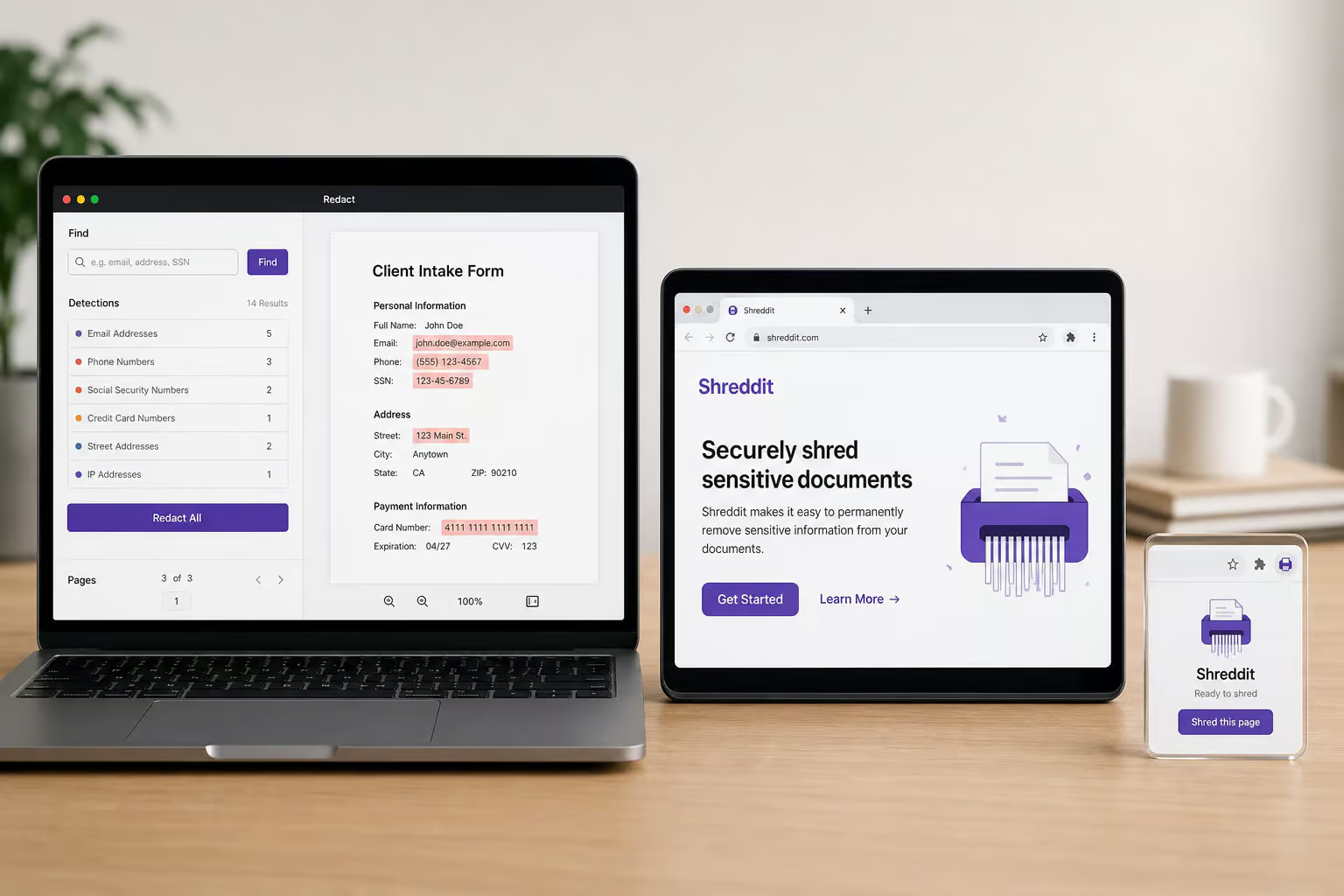
There are three main options for wiping your Reddit history, and they work very differently. If you’re on a desktop browser, a deep-dive on how to delete reddit history on pc covers clearing visited history via old. Reddit, new Reddit, and third-party tools, including how to bulk-delete comment history. Redact users have already deleted over 27.6 million comments as of June 2026 (that’s from anonymous desktop telemetry). But the tool you choose depends on what you want to pay, how much you want to delete, and whether you care about the data package step.
Redact: desktop app plus browser extension
Redact is the heavy lifter. It runs as a desktop app for Windows, macOS, and Linux, with a browser extension for Chrome, Firefox, and Edge — if you need a Chrome-specific guide on how to delete reddit history chrome, that covers incognito mode limitations and synced data across devices. There’s also a mobile app for iOS and Android, so it covers basically everyone.
The app is free to download, but here’s the catch: the free tier only does bulk editing. You can replace your content with a placeholder, but you cannot actually delete anything. Premium (subscription required) unlocks full deletion, the Engagement filter, chat deletion, and custom edit text. The real selling point is that everything runs locally — your credentials and content never touch Redact’s servers. That’s a privacy win, and if you’re looking for a thorough, step-by-step approach to scrubbing your account, check out how to delete reddit history.
Shreddit (by Block Party): web-based, no download
Shreddit is entirely web-based. You log in through your browser, no app installs, no extensions to manage. It uses Reddit’s official approved API with a controlled deletion rate, and there are no reports of anyone getting banned or disciplined for using it. That’s a green flag.
The privacy stance is solid too: they never save or log your deleted content, and they don’t share or sell your personal information.
Here’s where it gets interesting: Shreddit’s Basic tier is a one-time payment for lifetime access. It covers profile-visible content only (meaning what the Reddit API can see on your profile page), up to 5 deletion tasks per month, with filters by subreddit, keywords, score, and mod status. The Premium tier is also a one-time payment and adds full history via an archive file upload, up to 10 tasks per month, and you can schedule up to 2 recurring deletion tasks. The linked resource covers every platform and workaround — from visited links to what Reddit actually keeps.
The tradeoff: to get full history, you’ll need to request a data export from Reddit (a.zip file from reddit.com/settings/data-request) and upload it. It’s an extra step, but if you are an iPhone user wondering how to delete reddit history on iphone, that export is the only way to reach content the API hides.
Bulk Delete Reddit Posts & Comments History (by Glench): simple browser extension
This is the lightweight option. It’s a browser extension for Chrome, Firefox, and Edge — version 3.90, last updated April 2026, small footprint at about 48 KB. The free tier lets you delete up to 50 items per day. That’s enough for a test run, but if you’ve been active for years, 50 per day is painfully slow. The one-time payment for unlimited lifetime access is cheap, and the extension does not read, store, or transmit your data anywhere — but if you’re on a Mac and wondering how to delete reddit history on mac, note that Safari and Chrome handle history differently and iCloud sync can interfere with the macOS app.
Worth noting: only 646 users and a 3.2 rating from 43 reviewers. Take ratings with a grain of salt — some reviewers hit a bug, leave a bad review, the bug gets fixed, but the review stays. Still, the low user count means it’s a niche tool, especially when troubleshooting why your reddit history not deleting is a recurring issue tied to sync conflicts and server-side caches.
Before you start: the data package is the real key
Reddit’s API doesn’t expose every comment, especially older ones. When you use a tool that only scans your profile page, you might only see 40 to 70 percent of your actual history. The rest is invisible to the API.
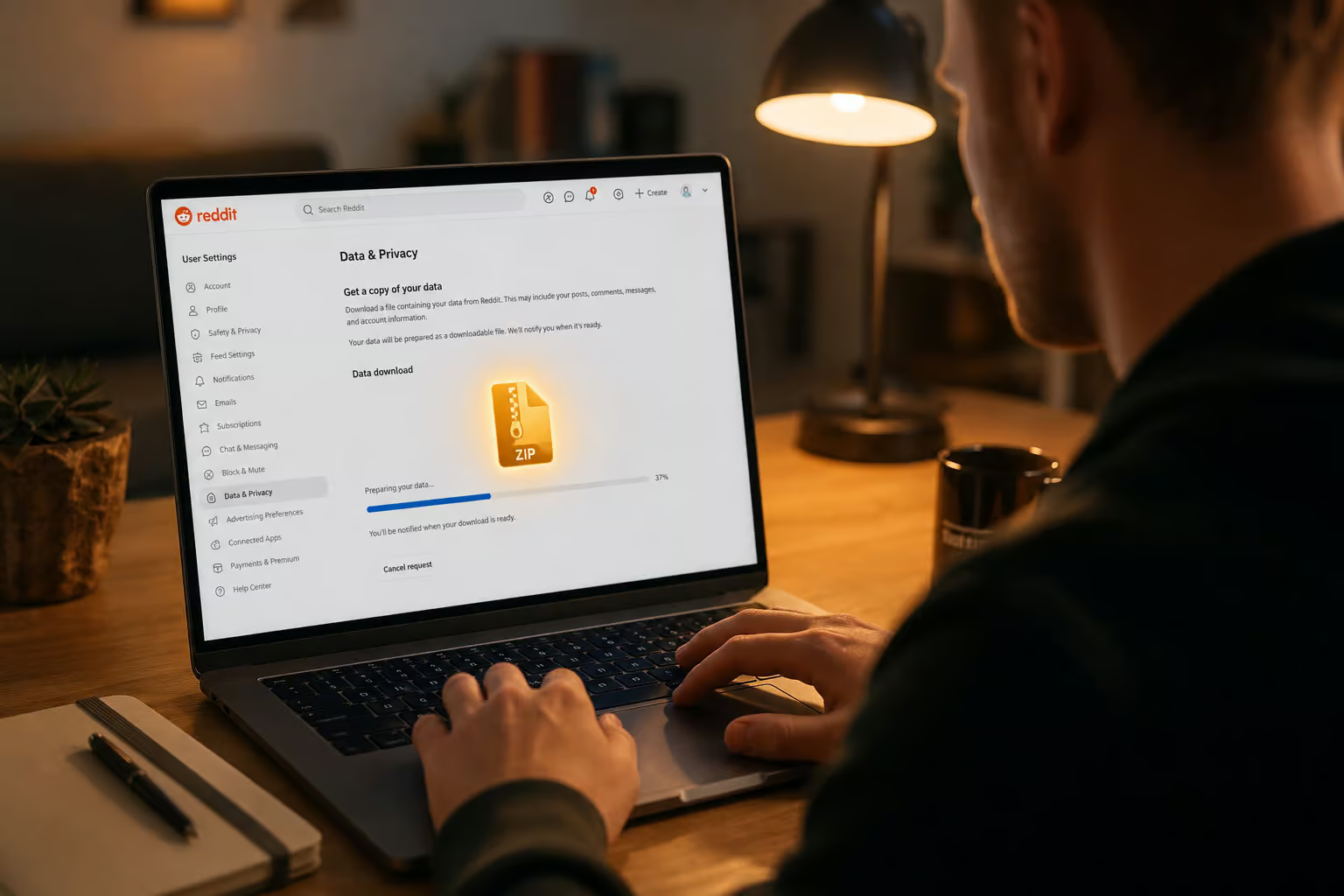
Cost check: Skipping the data export means you’re leaving 30–60% of your old content untouched — the stuff most likely to be embarrassing or revealing, so to avoid that, you can delete reddit history chrome and clear it completely.
To get a complete wipe, you’ll need to request your Reddit data. Go to reddit.com/settings/data-request and download the .zip file. Then upload it to your tool of choice. Shreddit requires this for its full history deletion.
Redact offers data import as a premium feature. Without this step, you’re only wiping the tip of the iceberg — the old stuff stays hidden. For a detailed walkthrough, see how to delete reddit history on iphone.
Configuring your filters for surgical cleanup
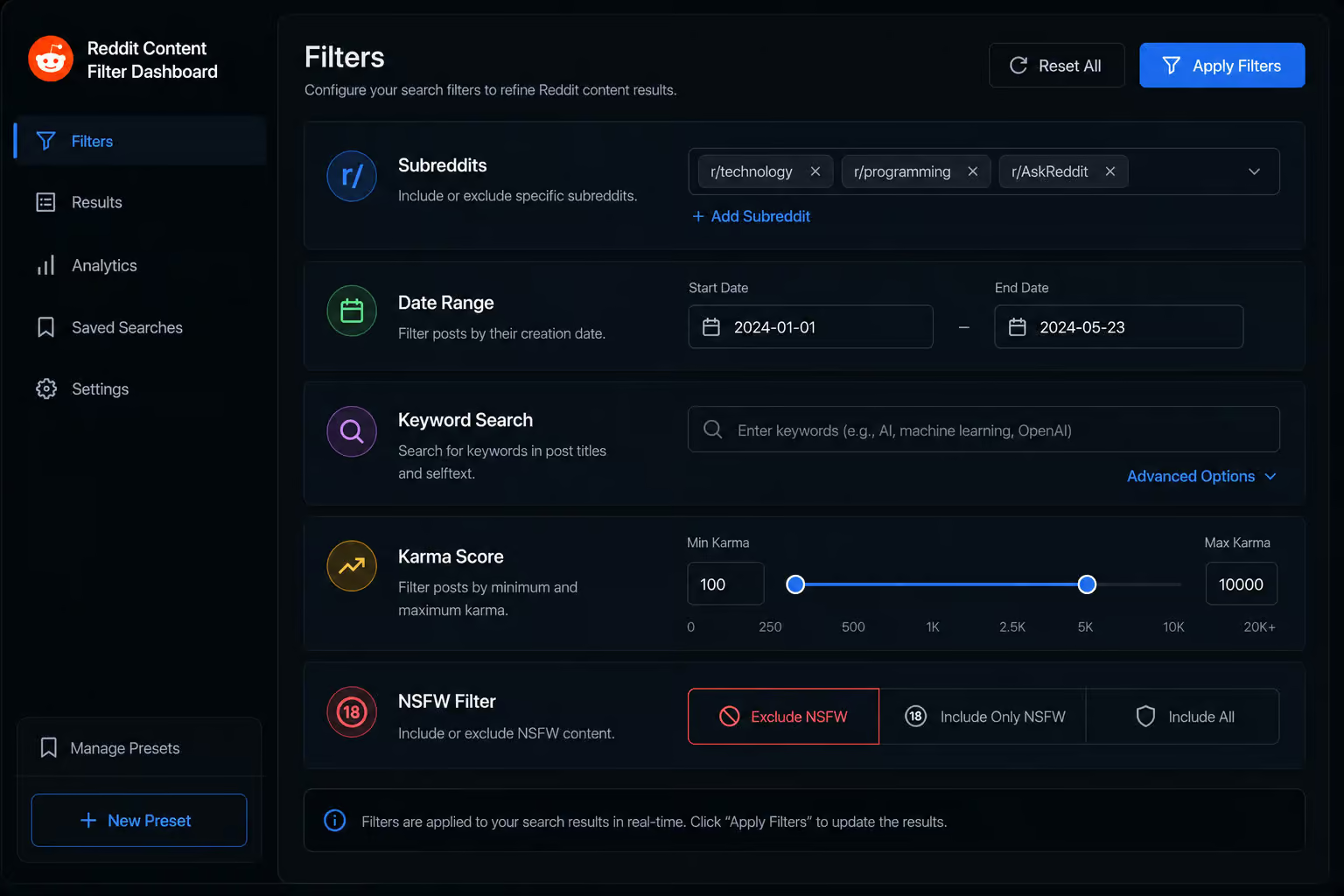
You can delete only link posts from r/atheism that have negative karma and contain the word “debate” by combining the subreddit, karma, and keyword filters. That’s where filters come in. Each tool offers a similar set of options, and you can combine them for maximum precision.
Filter by subreddit: delete from some, preserve others
Add subreddits to your deletion list or your preserve list. For example, preserve r/AskHistorians if you’ve made thoughtful contributions you want to keep. This works in both Redact and Shreddit. For Mac-specific edge cases — Safari vs Chrome vs Firefox history, iCloud sync interference, and wiping Reddit data from the macOS app, see how to delete reddit history on mac.
Filter by date range: wipe last year, keep the rest
Set different date ranges for posts versus comments — delete everything from 2021 but keep your recent activity. Redact supports per-content-type date filters, including a guide on how to delete reddit history.
Filter by keyword: text search with a preserve list
Search for specific words in titles, bodies, comments, and chats. Add words to a preserve list to keep matching content safe — for example, add your own username so you don’t delete mentions of yourself. For granular control over how to delete things from reddit history, you can remove individual entries like a single search or visited link versus performing bulk operations, and manage history via profile settings. Full-word matching only, like Discord search, so “test” won’t trigger on “testing.”
Filter by karma: delete only downvoted or low-engagement content
Set a maximum karma threshold — anything at or below that score gets deleted. Set it to 0 and you’ll only delete negative-karma comments — a “downvote purge.” Works independently on posts and comments, so you can set different thresholds for each. For a desktop browser deep-dive on how to delete reddit history on pc, this is a premium feature in Redact.
Filter by post type, flair, and NSFW tag
Choose to delete link posts only, text posts only, or both. Filter by flair keyword — “Vent” or “NSFW Story” are common examples. Toggle an NSFW-only switch to clear only over-18 content. For targeted removal of visited links only, learn how to delete reddit visited history, including the difference between ‘recently visited links’ and full browsing history, plus per-subreddit clearing tricks. These deletion options can be used alone or combined with other filters, such as our step-by-step guide on how to delete OnlyFans account, which shows a simple three-step process for any device.
Filter combinations: stack them for surgical precision
You can combine multiple filters at once — for example, delete only link posts from r/atheism that have negative karma and contain the word “debate.” That level of granularity is worth applying even when dealing with iPadOS quirks like split-screen impact, iCloud Keychain syncing, and multi-tab history behavior, just as you would when learning how to delete reddit history on ipad.
Edit vs. delete: why the “nuclear option” isn’t what you think
Deleting is the less effective option.
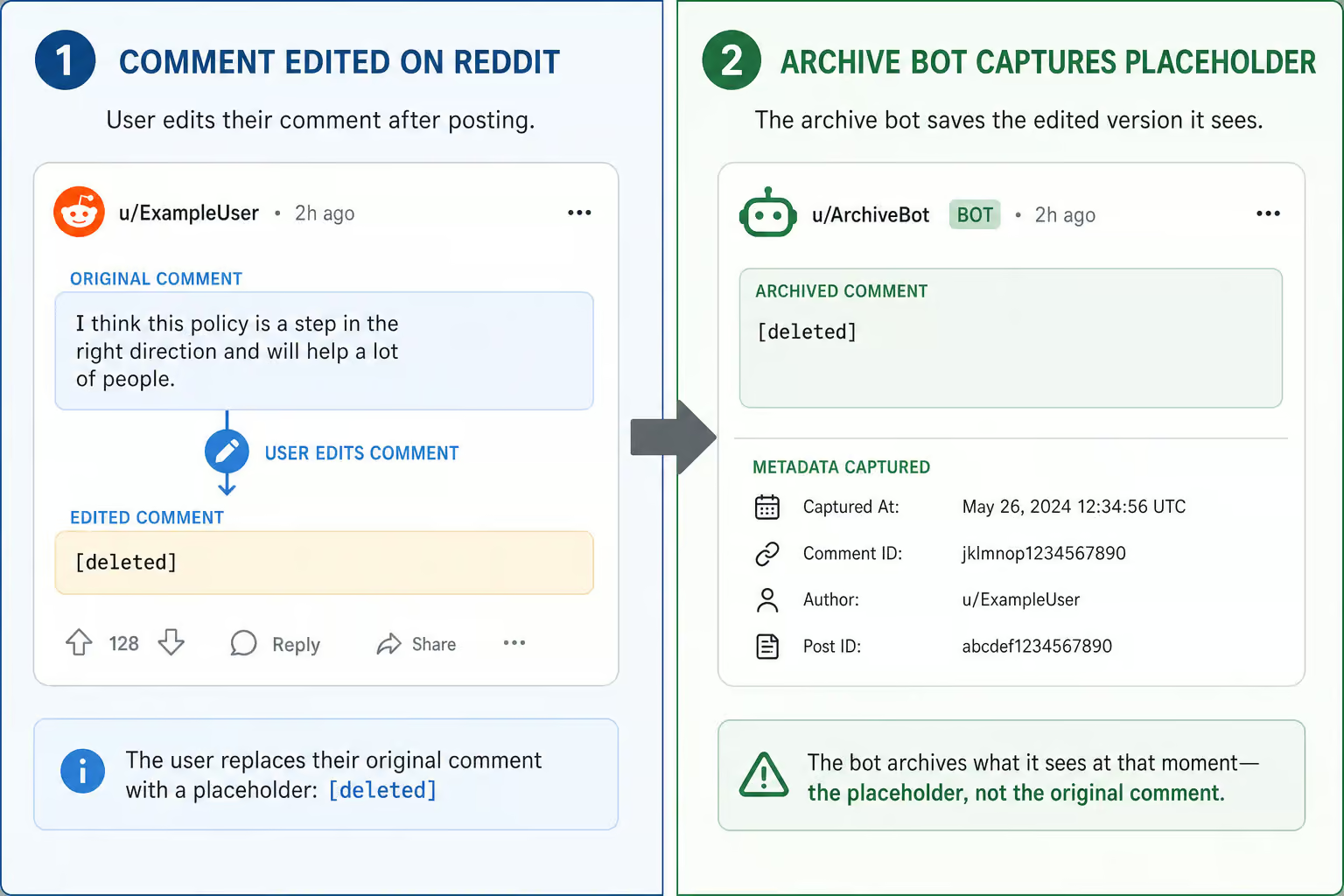
Archive bots scrape content the moment it’s posted. When you delete, you remove it from Reddit, but the bot already has a copy. When you edit first, you replace the content with a placeholder. Future scrapes capture the placeholder, not your original words.
Redact’s Edit action overwrites each post or comment body with “Removed with redact.dev” by default. On premium, you can set custom edit text. Block Party also overwrites with “[deleted]” before deletion. The edit-then-delete sequence is the nuclear wipe — for those considering the full sweep, the bot gets nothing useful, but how to delete all reddit history via third-party scripts comes with risks and irreversible effects on karma and saved content.
Free Redact users can only bulk edit, not delete. So if you’re on the free tier, you can at least replace your content with a placeholder, but if you’ve ever noticed your reddit history not deleting permanently, it might be due to sync conflicts or server-side caches. It’s not a full wipe, but it’s better than leaving everything visible.
The complete reset: deleting everything in one sweep
Sometimes you want to burn it all — skip all filters and run across everything, posts, comments, and chats in a single sweep. In Redact, select all content types, enable Enhanced Scan, and run the deletion. Expect double scan time. This is irreversible, so preview first. For Android users, a dedicated guide on how to delete Reddit history on Android covers navigating the app’s settings, clearing cache without losing login, and handling cross-device sync. Shreddit does too, with the data package uploaded for full history.
Enable Enhanced Scan to find content hidden by users who blocked you. This catches posts and comments that otherwise wouldn’t appear in your visible history. If you need to clear that history across devices, you can delete reddit history chrome to manage synced data. The tradeoff: double the scan time.
Mass deletion is irreversible. There’s no undo button. Pair it with Scheduled Deletion or Disappearing Mode for ongoing cleanup if you want to automate the process going forward.
Preview first: the safety net before the point of no return
Mass deletion is irreversible. You can’t undo it. That’s why every tool offers a preview mode.
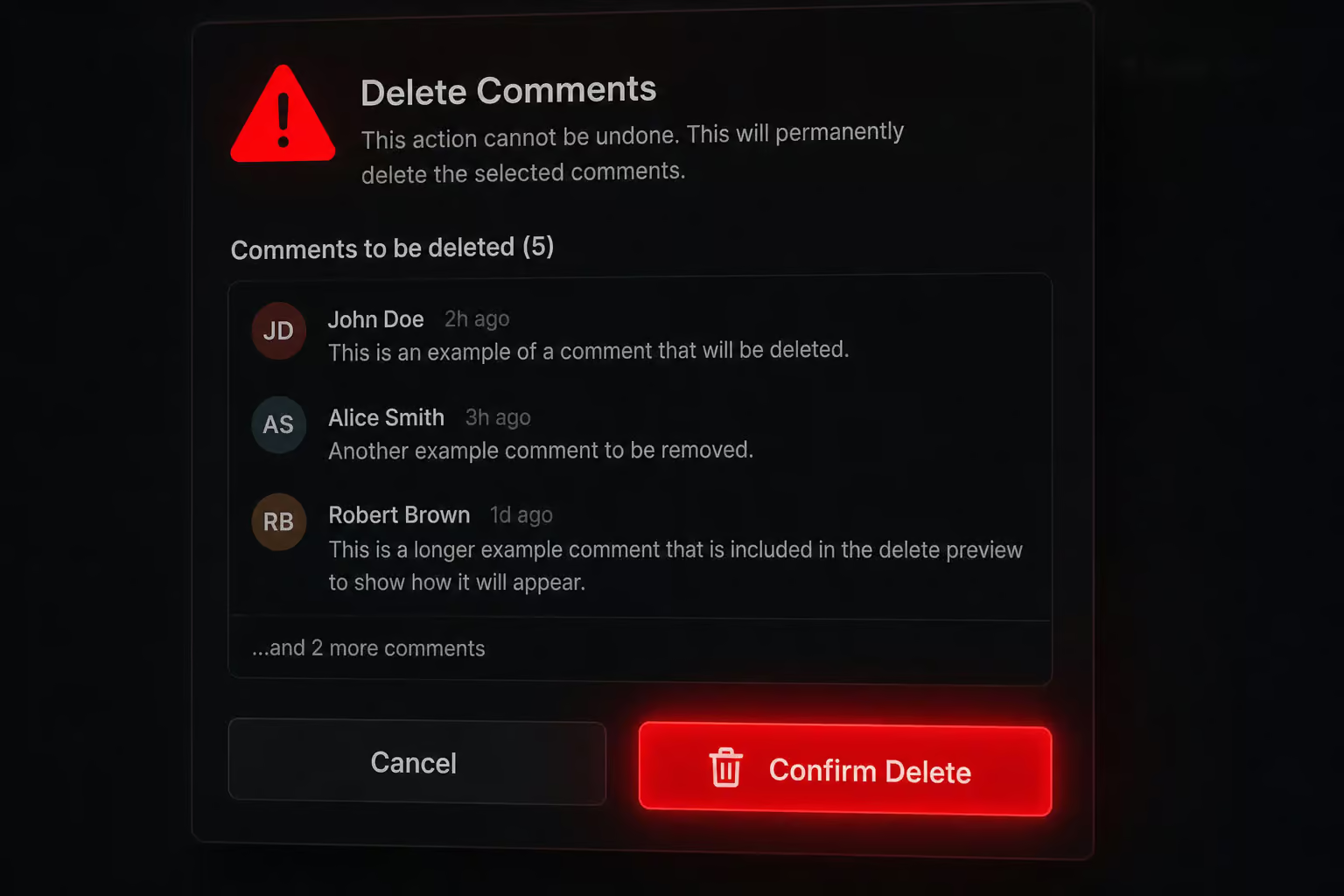
Redact’s Preview mode shows you exactly what’ll be deleted before you commit. You’ll see sample comments in the interface — things like Had a great time at the meetup yesterday! Here are some photos…, which makes the concept tangible. You get to confirm your filters are correct before pulling the trigger.
Shreddit and Block Party also recommend previewing — it’s best practice. Skipping the preview is the number one cause of accidental account destruction.
Advanced: Enhanced Scan and chat deletion
Two blind spots most guides miss.
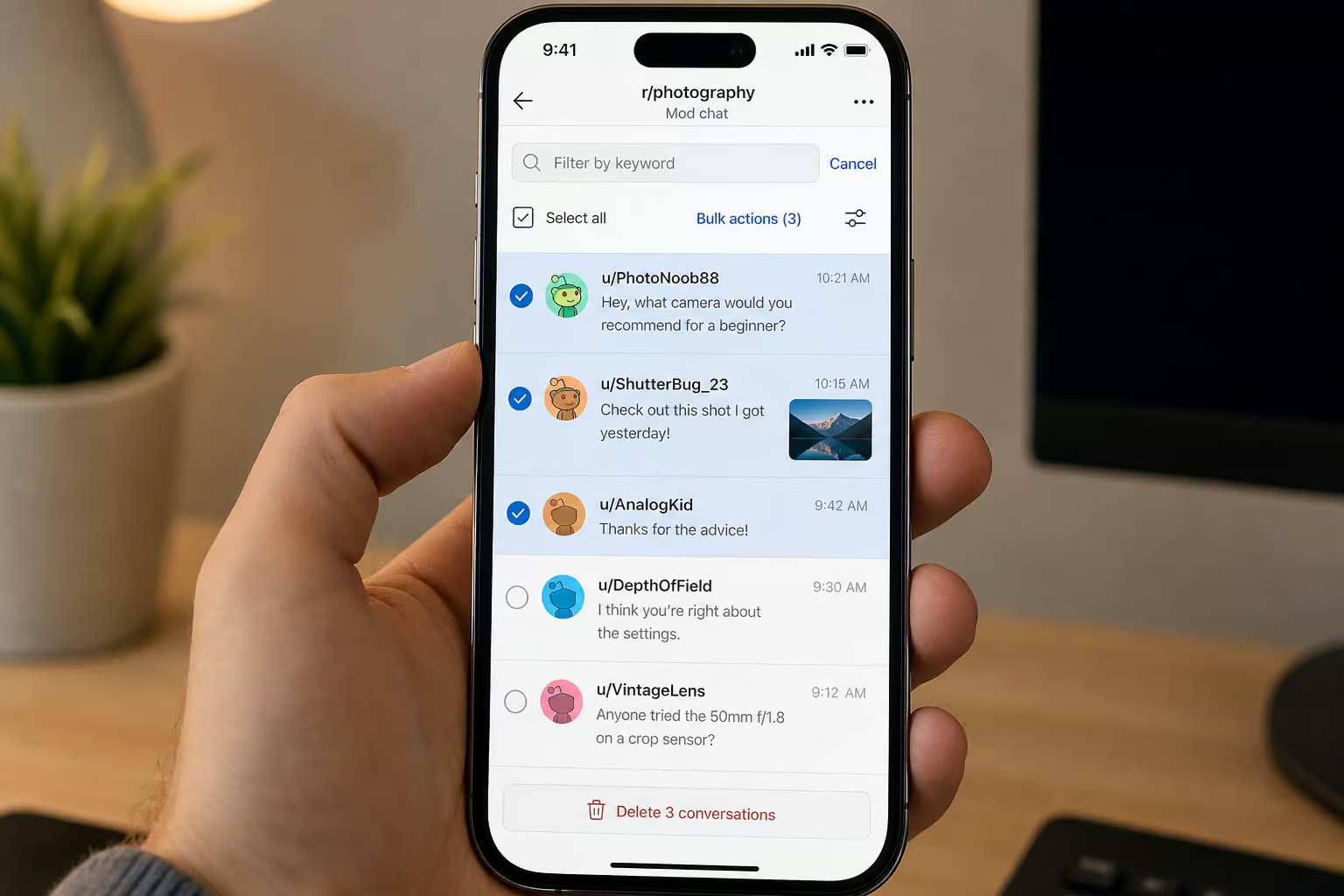
How Enhanced Scan finds hidden content
Even a “complete” wipe misses all content that other users have blocked you from seeing. Enhanced Scan finds those hidden posts and comments. It doubles the scan time, but if you want a thorough wipe, it’s necessary to follow a comprehensive guide on how to delete reddit history, which covers workarounds for permanent deletion and what Reddit actually keeps.
How to delete Reddit chat history and DMs in bulk
Chat deletion is a separate operation in every tool. In Redact, it’s a premium feature. You can filter by channel, date, message type (text vs. media), or keywords. Add keywords to a preserve list to protect specific messages. The offensive-content classifier flags risky language across posts, comments, and chats — a proactive tool for finding stuff you might want to delete before it becomes a problem.
Ongoing maintenance: scheduled deletion and disappearing mode
The nuclear option isn’t a one-time thing — for privacy maintenance, it’s recurring.
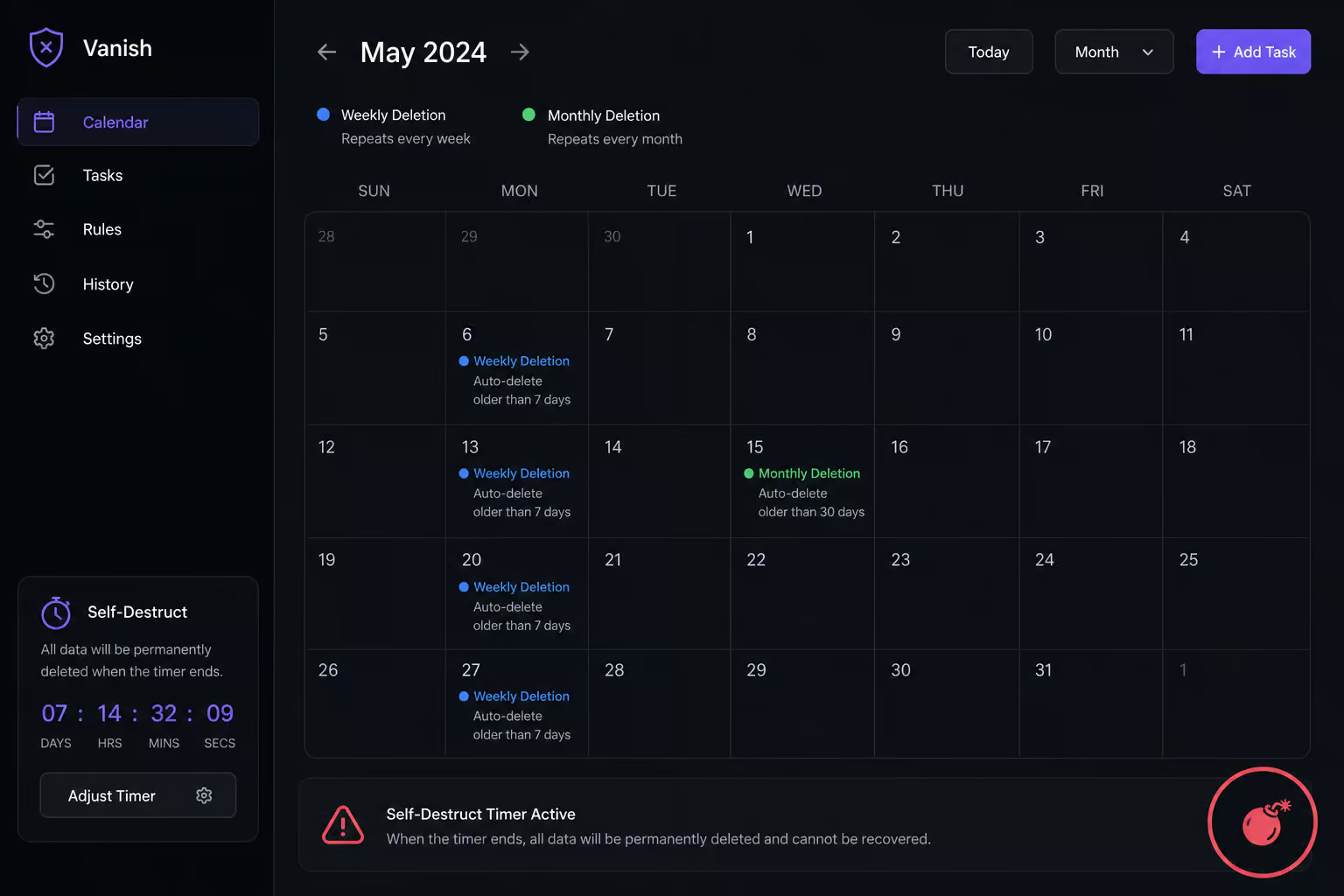
Redact offers Scheduler and Disappearing Mode — set it and forget it. Your history self-destructs on a timer. For targeted removal of visited links only, Shreddit Premium allows up to 2 recurring tasks, which you can set for weekly, monthly, or yearly cleanup — see how to delete reddit visited history for the difference between ‘recently visited links’ and full browsing history, plus per-subreddit clearing tricks.
These are premium features in both tools, but they’re worth it if you want ongoing automated cleanup rather than a one-time purge.
Risks and myths: what actually happens when you wipe your history
The two biggest fears: “Will I lose karma?” and “Will I get banned?”
Karma is not affected by deleting posts or comments. Your imaginary internet points stay the same. And there are no reports of anyone getting banned or disciplined for using Shreddit — it uses Reddit’s API at a controlled rate, so you don’t look like a bot.
The risk isn’t karma loss or a ban — it’s the false sense of completeness. Even after you delete everything, traces may remain in replies (if someone quoted you) or in third-party archives like web.archive.org or removeddit. Block Party goes a step further and scans for hidden exposures across your accounts, flagging potential risks beyond Reddit.
One important distinction: content removed by moderators (showing as [removed]) is different from content you delete yourself. Tools like Redact and Shreddit can only delete content you own — they cannot remove moderator-removed posts or comments from your history. If a moderator removed something, it stays on your profile as [removed] unless you delete it yourself through the tool.
Some users deliberately keep their history visible for credibility or reference. That’s a valid choice too. But if you’re here for the nuke, know that you can clean up Reddit properly — you can’t scrub the whole internet.
Which tool should you choose? Free vs. paid decision guide
Here’s how to decide.
If you only want to edit your content and walk away: Redact free works. But if you’re wondering how to delete reddit history permanently across every platform, you’ll replace each post with a placeholder. No deletion, but your original words are gone.
If you want to delete visible content slowly: The Glench extension free tier gives you 50 deletions per day. It’ll take a while, but it costs nothing—though for a complete, geek-deep guide to nuking every trace of your Reddit activity, check out how to delete reddit history.
If you want full history and don’t mind a data package upload: Shreddit Premium (one-time payment) is your best bet. You get 10 tasks per month, 2 recurring tasks, and full history via the data export. No subscription treadmill.
If you want local-first privacy with granular filters and chat deletion: Redact premium (subscription) gives you the most control. Desktop app, mobile app, Enhanced Scan, offensive-content classifier, custom edit text, and iPad-specific instructions for how to delete reddit history on ipad — covering split-screen impact, iCloud Keychain syncing, and multi-tab history behavior.
If you just want to try before you commit: Start with Redact free to see how the filtering works. Then decide if you need deletion and which pricing model fits.
No tool can delete 100% of your content — third-party archives and cached replies will always exist. But you can get close. Pick the tool that matches your needs, request that data package, and nuke away.
Frequently Asked Questions
How to clear history on Reddit?
Clearing history depends on what you mean. For posts and comments, Reddit has no built-in mass delete — you’ll need a third-party tool like Redact, Shreddit, or the Glench extension. For your visited links, use old Reddit’s preferences to uncheck saved clicks. A data export from your Reddit settings is critical for reaching older content the API hides.
Is Reddit history stored forever?
Reddit keeps your history indefinitely unless you delete it, but the API only exposes a portion of it — roughly 40–70% of your total activity. The oldest content is often hidden from third-party tools unless you upload a full data package from your Reddit account settings. Third-party archives like web.archive.org may also retain copies even after deletion.
How do I delete my entire history?
You can’t do it with Reddit alone — there’s no built-in mass delete. Use a tool like Shreddit (web-based, one-time payment for lifetime access) or Redact (desktop app, subscription required for actual deletion). Both require you to first request your full data from Reddit (Settings > Data Request) and upload the .zip file to reach content the API can’t see.
Does editing your Reddit history work better than deleting it?
Yes — editing before deleting is more effective against archive bots. When you edit first, you overwrite your content with a placeholder like ‘Removed with redact.dev’ so future scrapes capture the placeholder, not your original words. Deleting alone removes the post from Reddit but bots already have a copy. The most thorough method is edit-then-delete.
What’s the difference between Redact and Shreddit for wiping Reddit history?
Redact is a desktop app with browser extensions, running everything locally for privacy. The free tier only edits content (no deletion); premium unlocks full delete, chat deletion, and granular filters. Shreddit is web-based with a one-time payment — Basic covers visible content only, while Premium adds full history via a data package upload. Shreddit requires fewer tech skills; Redact offers more control.
