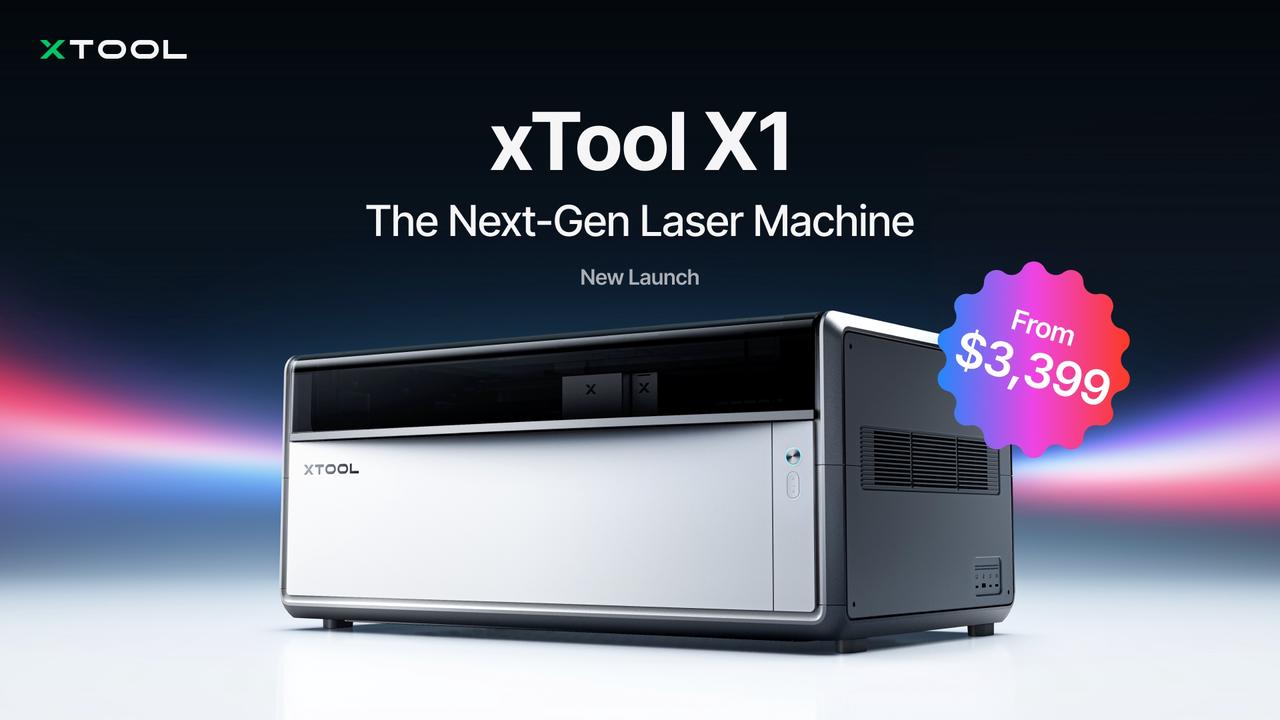
Four different laser engravers can sit on a workshop bench and still refuse to talk to the same material. A CO2 tube slices cast acrylic like butter and bounces off bare brass. A fiber source etches serial numbers into titanium and passes straight through clear glass as if it were empty air. The usual maker-bench tax is buying separate diode, CO2, fiber, and UV rigs, losing half the garage, and maintaining four motion systems. In xTool’s product experience guide, the xTool X1 (model name X1) tackles that problem as an upgradable work platform with virtually unlimited room for upgrades, mounting multiple swappable laser sources so your shop grows with the work and income you’ve already built rather than forcing a full machine replacement.
Swapping a laser source backpack on the X1 changes the field lens, calibration data, and software workflow, turning one chassis into five distinct optical architectures. The decision isn’t whether one box can do everything, but which subset of its five modules matches the materials on your bench.
Key Takeaways
The xTool X1 combines a 55W CO2 gantry cutter (10,600 nm) with swappable galvo laser source backpacks covering 20W blue diode (450/455 nm), 5W UV (355 nm), 30W fiber (1,064 nm), and 60W MOPA (1,064 nm), requiring a matched field lens and backpack-specific calibration paper for each optical setup.
Its Automatic Conveyor Feeder handles wood up to 25.4 mm and acrylic up to 20 mm across lengths from 1,500 mm standard to 3,000 mm with extra flow rails at 160 mm/s, adding automatic clamping, photo-stitching preview without a border pass, and permanent install-once leveling over the xTool P2S.
Pre-launch documentation pairs Studio v1.10.2 beta with firmware 40.140.003.01.ht14, marks four processing modes (jig, curved-surface, rotary attachment, and screen-print plates) plus glass cutting as not recommended yet, and notes that the advertised ±0.5 mm accuracy applies strictly to the point laser while real-world positional variance can exceed 1 mm.
Table of Contents

What is the xTool X1? The five-source platform explained
The xTool X1 (Model X1) is an upgradable, multi-source laser work platform that consolidates gantry cutting and high-speed galvo engraving into a single chassis instead of locking you into a fixed-head machine. The xTool X1 is a 5-in-1 hybrid laser system combining a 55W CO2 gantry cutter with a galvo engraving platform that configures via swappable backpack modules, with a 20W diode laser in the base setup.
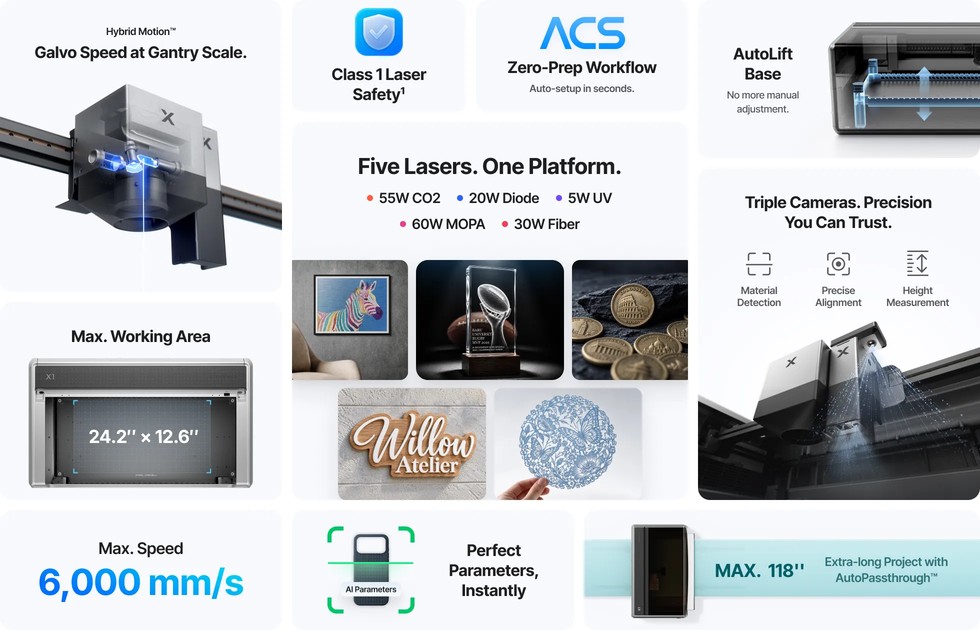
Rather than swapping entire desktop machines when a job shifts from wood signage to stainless steel or K9 crystal, the platform mounts five laser sources across distinct wavelengths: a 55W CO2 laser (10,600 nm), a 20W blue diode laser (450 nm / 455 nm), a 5W UV laser (355 nm), a 30W fiber laser (1,064 nm), and a 60W MOPA laser (1,064 nm). Across those sources, the system runs five process types and two specialized engraving modes, with software-enforced field-lens detection ensuring the installed optics match the active backpack.
Related: Diode vs Fiber vs CO2 Laser Engravers
Five laser sources and their wavelengths
When we dig into the official documentation here at GeekExtreme, one quirk stands out right away: while the headline product introduction spec list pairs the five modules as 55W CO2, 20W Blue Diode, 5W UV, 30W Fiber, and 60W MOPA, the FAQ and material tables also print shifted wattage labels (CO2 5W, UV 20W, Diode 60W, and MOPA 30W Fiber). The headline specification pairings below reflect the primary optical lineup and how each source couples into matter.
| Laser Source Module | Headline Power | Wavelength | Primary Processing Role |
|---|---|---|---|
| CO2 Laser | 55W | 10,600 nm (10.6 µm) | Heavy cutting and engraving on organics and nonmetallic materials |
| Blue Diode Laser | 20W | 450 nm / 455 nm | Fine surface engraving, DIY making, and reflective metals |
| UV Laser | 5W | 355 nm | Cold processing (~10 µm spot) and 3D glass internal engraving |
| Fiber Laser | 30W | 1,064 nm | High-precision bare and coated metal marking and texturing |
| MOPA Laser | 60W | 1,064 nm | Tunable pulse-width metal color marking and black aluminum marking |
Related: How Does Laser Engraving Work?
Process types and engraving modes
The X1 divides its workload across five process types (cutting, surface engraving, relief engraving, color engraving, and internal engraving) and two engraving modes (rotary engraving and curved-surface engraving). Those capabilities run through two distinct workflow families: Hybrid Motion, which pairs the gantry and galvo systems for jobs like CO2 cutting combined with blue-diode galvo engraving, and Laser Swap, where you mount different laser source backpacks on the rear of the machine to switch wavelengths.
Because a 355 nm UV beam and a 1,064 nm fiber beam refract differently, each light-source module requires its own dedicated field lens. Whenever you swap backpacks, the X1 runs field-lens detection and prompts you in software to manually confirm that the matching lens is seated, protecting both processing quality and your stored calibration data.
The 55W CO2 laser: organics, cutting power, and the thermal tradeoff
The xTool X1’s 55W CO2 laser cuts and engraves organic and non-metallic materials, specifically wood, leather, paper, fabric, acrylic, rubber, and glass, using a 10,600 nm (10.6 µm) long-wavelength infrared beam that these substrates readily absorb across a wide power range. Because that 10.6 µm beam focuses to a larger spot size than the UV module, it trades away ultra-fine micro-detail in exchange for heavy cutting power and high throughput. The underlying physics is purely thermal, and how a material reacts to rapid heating determines the finish. Wood, paper, and leather carbonize along the kerf, leaving scorched edges, yellowing, or burn marks if you don’t dial in parameters.
Cast and extruded acrylic, by contrast, vaporizes and melts locally under the same infrared energy to leave smooth, flame-polished, transparent edges right off the bed. That combination makes the 55W CO2 source the primary engine for advertising production, packaging, apparel, handicrafts, and industrial cutting, particularly acrylic signage, display racks, and decorative cutouts.
The 20W blue diode laser: fine detail on a power budget
The 20W blue diode module isn’t built for cutting thick stock or deep metal engraving, fitting desktop makers, DIY hobbyists, and small-gift customizers who prioritize fine surface detail and lightweight material processing over heavy industrial cutting. Generating visible blue light at roughly 450/455 nm from compact semiconductor laser diodes, the module focuses to a small spot size that excels at intricate pattern marking and crisp graphic engraving. Its shorter 455 nm wavelength gives it an optical trick that longer infrared beams lack: highly reflective metals like copper, gold, and aluminum absorb blue light significantly better, allowing surface marking alongside wood, paper, leather, dark plastics, rubber, and select coated stock. Still, 20W of diode output carries far less punch than industrial CO2 or fiber sources, capping its cutting thickness. Because diode engraving on organics is also a thermal process, pushing power on wood and leather can leave scorch or carbonization marks along the edges.
The 30W fiber laser: the metal-marking workhorse
Yes, the 30W fiber laser is purpose-built for marking metals like stainless steel and aluminum, provided your workload sticks to bare metals, coated metals, and select engineering plastics rather than untreated organics or clear materials. Operating at a 1,064 nm near-infrared wavelength generated inside an optical fiber gain medium, this module combines high beam quality, rock-solid output stability, low maintenance costs, and an ultra-tight spot size.
Most metals soak up 1,064 nm energy immediately, covering stainless steel, aluminum, copper, brass, titanium, silver, gold, and iron. That tiny focal spot makes it the shop workhorse for high-precision industrial markings, from surface-textured metal and fine lines to logos, serial numbers, and crisp QR codes, serving part traceability workflows alongside medical devices, auto parts, jewelry, hardware tools, and consumer electronics. The optical boundary is just as strict: non-metallic materials like wood, transparent glass, and transparent acrylic barely interact with a raw 1,064 nm beam, making the 30W fiber unsuitable for processing them directly.
The 60W MOPA laser: what the fiber upgrade buys
The 60W MOPA laser separates itself from the standard 30W fiber laser through an adjustable pulse-width and frequency range that controls exactly how long each packet of 1,064 nm laser energy sits on a material’s surface. While both modules are 1,064 nm fiber lasers that mark bare metals, the 60W unit uses a Master Oscillator Power Amplifier (MOPA) architecture rather than a fixed-behavior oscillator.
By independently tuning pulse width, frequency, power, and scanning speed, you control thermal diffusion at the microsecond level, curbing the burning, yellowing, heat deformation, and excessive melting that happen when heat lingers too long. In practice, that pulse control unlocks jobs a standard fiber source struggles to pull off cleanly: repeatable oxide color marking on stainless steel, high-contrast finishes on anodized aluminum, deep black marks on raw aluminum, and crisp results on heat-sensitive plastics. Those capabilities put the 60W MOPA in the driver’s seat for consumer electronics housings, precision hardware, medical instruments, knives, ornaments, and high-end custom pieces.
The 5W UV laser: cold processing and glass internal engraving in practice
A 5W UV laser is worth choosing over CO2 or diode modules whenever you need cold processing at a 10-micron-level spot size or 3D subsurface glass engraving without the thermal micro-cracking and scorching that infrared and visible beams inflict on fragile stock.
Why UV behaves differently: cold processing at 355 nm
Operating at a short 355 nm ultraviolet wavelength, the 5W UV beam is absorbed by almost everything: glass, crystal, ceramics, textiles, plastics, and organics. Whereas the 55W CO2 and 20W diode modules rely on heat, 355 nm photons break molecular bonds directly through cold processing, eliminating scorch marks on delicate surfaces while focusing down to a 10-micron-class spot that leaves CO2 detail in the dust.
Glass internal engraving: limits, calibration, and base-plate protection
Internal 3D engraving inside K9 inner-carved glass and K5 crystal keychains is exclusive to the 5W UV module in single-piece and batch modes. In the pre-launch software state, Z-axis height limits cap single-piece internal engraving at 300 × 300 mm and batch internal engraving at 280 × 280 mm (with a recommended batch block size of 70 × 70 × 50 mm to prevent mechanical collisions), while the launch software version targets 600 × 300 mm in the top 50 mm and 60 × 300 mm at 50-100 mm depth; any structurally unreachable zones appear as red unprocessable areas on the canvas.
Because refractive index varies, you must recalibrate focus whenever you switch glass types, complete glass focus calibration before running glass in flat mode (which supports all modules and ACS), and run glass jig coordinate calibration in Device Settings before processing after mounting the internal engraving jig to fix any coordinate offset. Always place masking tape or a flat object under the glass block so the unabsorbed UV beam doesn’t pass straight through and engrave your base plate; inner-engraving mode pops up a software reminder, but flat mode can’t detect clear glass at all.

Conveyor feeder: the quantified X1 vs P3 vs P2S comparison
The xTool X1 Automatic Conveyor Feeder is a permanent, auto-clamping pass-through upgrade that outperforms the xTool P2S on material thickness, processing length, and setup automation while matching the xTool P3’s smart clamping workflow and sharing a CO2-only light-source restriction across all three machines. Compared to the manual clamping and per-use rail shimming required on the P2S, the X1 feeder handles wood boards up to 25.4 mm thick and acrylic up to 20 mm across runs from 1,500 mm standard up to 3,000 mm with two extra flow-rail sections, matching the P2S’s 160 mm/s maximum feed speed while keeping expansion deviation under 1 mm per meter. For buyers mapping out a full shop budget across the base X1 unit, swappable laser source backpacks, the Automatic Conveyor Feeder, extra flow rails, the Mobile Work Stand, and fire or fume accessories, retail prices for the machine, modules, and add-ons aren’t public in the pre-launch documentation.
What the automation actually replaces
Documented in Feeder Accessory Quick Start Guide.pdf, the X1 feeder and the P3 feeder automate three steps that are manual on the P2S: automatic board clamping (adjusting clamping stroke from the selected material and measured thickness), automatic photo-stitching preview without running a physical border pass, and automatic release and reset to the initial feeding position. Unlike P2S-class feeders that must be mounted, shimmed with wood boards, and disassembled after every job, the X1 feeder installs once and stays on the machine, using built-in height-adjustable support feet that level with a twist and an end sensor that detects material placement automatically with software prompts. Paired with the movable, DIY-modifiable Mobile Work Stand and its integrated feeder hanging bracket, the X1 runs 1,500 mm conveyor jobs without needing an extra support table.
Capability numbers: thickness, length, speed, accuracy
All three feeders operate exclusively with the CO2 laser source. On the X1, standard Conveyor Rail / Flow Rails support 1,220 mm near and 1,500 mm away, expanding to 2,440 mm with one extra rail section and 3,000 mm with two. Maximum feeding speed on the X1 is 160 mm/s, on par with the P2S.
| Specification / Feature | xTool X1 | xTool P3 | xTool P2S |
|---|---|---|---|
| Supported Light Source | CO2 only | CO2 only | CO2 only |
| Max Wood / Acrylic Thickness | 25.4 mm / 20 mm | 20 mm (26 mm marketing) / 20 mm | 14 mm / 14 mm |
| Processing Length (Standard / Max) | 1,500 mm / 3,000 mm | 1,500 mm / 2,200 or 2,900 mm | 1,000 mm standard |
| Supported Feeding Width | 152.4-610 mm | 101.6-610 mm | 65-624 mm |
| Front and Rear Waste | 210 mm | 200 mm | 250 mm |
| Supported Feeding Weight | ?18 kg | ?18 kg | ?18 kg |
| Dimensional Accuracy | <1 mm/1 m deviation; 1 mm/1 m offset | <1 mm/1 m deviation; 1 mm/1 m offset | <1 mm/1 m deviation; 1 mm/1 m offset |
| Clamping, Stitch Preview & Reset | Yes (fully automatic) | Yes (fully automatic) | No (manual clamp, border pass, manual reset) |
| Permanent Install & Built-in Leveling | Yes (install once, turn-to-level feet, end sensor) | No (per-use setup) | No (remove after use, requires shimming) |
Soft materials and the honest accuracy caveat
Feeding flexible stock like EVA foam introduces mechanical slip unless you glue or mount the sheet onto a rigid 6 mm basswood backing board first. Even with basswood backing, soft materials exhibit a larger expansion deviation of roughly 2 mm, require tuning the feeding lead (down-pressure) to match each material’s softness, and demand regular cleaning of debris from the steel spiked roller to prevent tracking skew.

Safety, filtration, and rotary accessories: what each one is for
The xTool X1 supports tumbler and cylindrical engraving exclusively through the RA3 rotary attachment in chuck (jaw) and roller modes, though the CO2 laser can’t use roller mode and both rotary and curved-surface processing aren’t recommended in the pre-launch state because they run in slow perpendicular-beam mode until a post-launch update adds galvo rotary support.
Fire Safety Set Pro and air purification
The Fire Safety Set Pro (alongside Fire Safety Set 2, detailed in Fire Safety Set 2 Start Guide.pdf and compatible with the X1, M2, F2 Ultra series, and F1 Ultra) links the main unit’s flame sensor and camera to trigger its 0.6 L CO2 cylinder in under 1 second, delivering more than 4 extinguishing cycles. For fume extraction alongside the Honeycomb Panel and Duct fan2, the AP2 air purifier clamps directly onto the X1’s built-in exhaust duct and handles light engraving or occasional small cuts, while heavy, frequent cutting requires the AP2 Max air purifier. The X1 power supply is grounded by design against leakage on a grounded outlet, though operators should discharge static electricity before touching the chassis in autumn and winter.
RA3 rotary attachment and tumbler work
When you do use the RA3 (X1-RA3 User Guide (EN).pdf), chuck mode is recommended first because roller mode can introduce quality issues. In the rotary material matrix, 40 oz (1,183 ml) tumblers with removable handles (Peony Pink to Silver, Pastel Blue to Gold, and Green to Gold) work across all 5 laser modules (CO2, 5W UV, 20W Diode, 60W MOPA, and 30W Fiber), whereas soda-lime glassware like the Narrow-mouthed Champagne Flute and Round Soda-Lime Glass Cup (9.8 oz / 290 ml) works with 1 module only (CO2, which supports chuck mode rather than roller mode).
First setup and calibration: where new owners get stuck
The xTool X1 is manageable for beginners who strictly follow its guided video tutorials and hardware-first installation sequence, because calibrating the laser source backpack and flying galvo succeeds only when you mount all modules and the matching field lens before running software calibration, use the backpack-specific calibration paper positioned slightly lower to clear the masking tape, and update Studio v1.10.2 beta alongside firmware 40.140.003.01.ht14 in exact order.
Install everything before you calibrate
Before triggering ‘Initialization Calibration’ (Machine Quick Start Guide.pdf, 20W Laser Module User Manual.pdf, Laser Source Backpack User Manual.pdf), mount the galvo laser module, every light-source backpack you own, and the matching field lens; adding a backpack later forces a partial recalibration, and swapping the galvo head requires redoing backpack beam adjustment, flying-galvo calibration, and focus calibration. Keep the field lens protective cap on until seated, never touch the glass with bare hands, run flying-galvo calibration on any brand-new lens, and ignore faint refraction ghosts during beam alignment by watching only the brightest central spot. Onboarding includes a re-enterable beginner tutorial and videos covering Main Unit Unboxing & Assembly Video.mp4 (300.32 MB), Feeder Accessory Assembly Video.mp4 (219.11 MB), Diode laser focus calibration.mp4, CO2 optical path alignment.mp4, and first/second-stage backpack alignment.
Backpack calibration paper and the masking-tape failure
Always use the calibration paper packed inside the specific laser source backpack box, never the sheet inside the main machine (third-party paper specs or bypassing non-essential calibrations serve as emergency fallbacks). Because a revised dot pattern changed the left-side dot count, stick the sheet slightly lower than before during flying-galvo calibration so the bottom-left dots don’t land on masking tape and fail detection.
The beta software and mandatory firmware pairing
Studio v1.10.2 is a beta built to run the X1 alongside other xTool machines (while temporarily incompatible with other xTool devices) and must pair with firmware 40.140.003.01.ht14: install Studio first, update firmware automatically or via Device Settings without mixing versions (no recalibration needed), and manually disable the two unstable features flagged in the pre-launch guide. Also disable far/near-field monitoring if CO2 air-nozzle detection fails, and turn off all xTool or third-party extraction fans during inkjet printing so the printhead doesn’t drip ink.
Processing modes at launch: what works, what doesn’t, and the fixes
At launch, Hybrid Motion and Laser Swap flat, batch, and relief workflows are ready for production, while jig processing, curved-surface processing, rotary attachment processing, screen-print plate making, and glass cutting are explicitly not recommended.
Hybrid Motion and Laser Swap workflows
Working modes cover blue-diode galvo flat/batch engraving, combined CO2 cutting plus blue-diode engraving, MOPA/Fiber flat, batch, and relief metal work, and UV glass engraving, aided by lid-close camera stitching (with tunable fill-light/fusion), pre-processing camera checks, CO2 air-nozzle checks, and custom jig cutting.
Four modes not recommended yet
You’ll want to skip jig, curved-surface, rotary, and screen-print plate making (segmented coating inconsistency) plus glass cutting (slow relief-style method; metal cutting works fine).
Known bugs and their workarounds
You’ll need to split combined galvo cut-and-engrave jobs (5W/20W/30W/60W) into two runs to prevent offsets; reset imported internal-engraving file sizes; raise line density for uneven fills; switch 30W/60W bidirectional scanning to random to hide seams; and disable screen sleep during slow G-code relief jobs (structural load caps relief/internal area; Jarvis noise and fill-path fixes are pending).
Per-module parameter fixes
For the best results, cap blue-diode line density at 100-140 on plywood, MDF, and acrylic (with feathering passes); raise UV focus 1-2 mm for seams and convert >30 × 30 mm mixed fills to bitmaps; use Tiling Mode for vectors; and run stainless color engraving in ?50 × 50 mm blocks near the flat center or split runs to prevent warping.
Material compatibility: what the module checkmarks tell you
A material’s checkmark count across the five module columns in X1_Recommended_Parameters.pdf and .xlsx tells you whether you need a specialized laser backpack or can use the base setup, with one-checkmark materials locking you into a specific source. In flat mode (26 consumables), black anodized aluminum and photo paper work with all 5 modules, 1/8″ (3 mm) basswood plywood, 3 mm walnut plywood, 3 mm Mint Green MDF Board V2.0, walnut wood, and round cork coasters work with 3, and K9 inner-carved glass works with 1 (UV). In relief mode (4 non-CO2 modules), Grade 0 zinc coins, Grade 0 zinc, rock coasters, and cherry wood work with 2 modules; in screen-print plates, 200 Mesh Coated Screen works with 3 and 100/200 Mesh Polyester Boards work with 4. Because the pre-launch matrix covers only listed materials before full post-launch effect maps arrive, and individual machines vary, run the built-in parameter matrix test to dial in unlisted stock.
Accuracy expectations: what ±0.5 mm means
In real-world use, the xTool X1’s automatic distance measurement stays within roughly 0.5 mm on flat, matte stock, but the advertised ±0.5 mm specification applies strictly to the point laser itself while actual positional error on the bed can exceed 1 mm. As we often point out on GeekExtreme when dissecting spec sheets, optical sensor precision and mechanical bed tolerance are two different numbers: real readings drift with material warp, variations in how the blade strips sit, and the flatness of the base plate (plus auto measurement returns a negative number if a workpiece is too tall, with manual height input available as a fallback).
On top of that, point-laser power fluctuations cause measurement failures or bad height readings on black surfaces, glass, highly reflective metals, and stainless steel during color marking; sticking a strip of masking tape onto the target spot before measuring fixes it immediately. Two hardware quirks also need watching: CO2 engraving depth on anodized aluminum goes uneven around 37% power due to power-supply instability shared with the P2S (official parameters avoid ~37%), and any gap on the galvo protective cover requires removing the cover, verifying the lens cap is off, and reinstalling the gantry side first.
Owning the X1: the maintenance schedule and the fixes that matter
Keeping the xTool X1 cutting at full depth requires a strict weekly optics-and-debris cleaning routine and a monthly Molykote EM-30L rail-and-lead-screw lubrication schedule, while shallow CO2 engraving is fixed by cleaning the second and third mirrors, clearing the air nozzle, and aligning the first mirror with the power off.
Weekly cleaning: optics and fire risk
Every week, clear cut waste from the base bed so leftover scraps don’t catch fire on later runs. When cleaning beneath the base plate, raise the bed all the way up and pull off the front cover before powering down to clear out trapped debris, ensuring a clean bed reset on restart. Wipe the distance-measurement stair block, check the air nozzle for clogs, wipe the galvo covers, and use a cleanroom swab or microfiber cloth with anhydrous ethanol to clean the CO2 focusing lens, 2nd and 3rd mirrors, 3 galvo window-lens positions, galvo field-lens protector, 1 backpack window protector, and 2 backpack mirrors.
Monthly lubrication: rails, lead screws, and corner checks
Monthly, clean the CO2 primary mirror, cameras, and exhaust/galvo fans (via Device Settings). Wipe and re-grease the linear guide rails with Molykote EM-30L, power off before cleaning the four lift-motor lead screws, apply grease plus two drops of lubricating oil per screw, cycle the bed up and down 2-3 times, and verify all four corner heights with a caliper.
Troubleshooting sequences and error recovery
For shallow CO2 cuts (power off), clean the 2nd and 3rd mirrors first, clear the air nozzle second, and remove the rear cover third to clean the 1st mirror and center the optical path; fix uneven feeder gaps after heavy use by re-tensioning the belt per JS001.1 Feeder Assembly Tension Adjustment Method. Vacuum glass relief dust every 40 hours; power-cycle for at least 2 seconds to clear general errors or camera driver bug JS001-1487; drain and dilute excess antifreeze via the lower port for water-pump errors (or push a kinked drain hose slightly back in for low flow); replace clogged air-pump nozzles/tubes; free a stuck feeder via the clamping motor with a flathead screwdriver; lift feed-roller residue with masking tape (shaft residue requires feeder disassembly); and when replacing the CO2 tube, face the cable-tie notch outward so the glass doesn’t crack, route the high-voltage wire through the red shield hole, point the water inlet up, and leave a 1 cm gap to the first mirror.
What Is The Price of The xTool X1 and Accessories
With great capabilities comes a great price, while the base price on the X1 is a reasonable $3,399, it can quickly climb as you add the various modules/backpacks. These prices are introductory (launch prices) and will go up after the initial launch period. All prices are in USD.
The xTool X1 is available for purchase starting today (October 28, 2026) on the official xTool online store, featuring limited-time launch pricing across multiple configurations:
- X1 Single CO2 (55W CO2):$3,399
- X1 CO2 + Diode Galvo (55W CO2 + 20W Diode Galvo Module): $3,999
- X1 CO2 + Diode Galvo + Fiber (Includes 30W Fiber Laser Source): $5,799
- X1 CO2 + Diode Galvo + UV (Includes 5W UV Laser Source): $6,499
- X1 CO2 + Diode Galvo + MOPA (Includes 60W MOPA Laser Source): $6,679
If you were to order each type of the above laser engraver separately, you’ll probably be paying over $10,000 and you’ll need a heck of a lot of space to store all the laser engravers. The X1 is an all-in-one unit, so you save a lot on space. Which is especially useful for a person like me, who is limited on space but unlimited on creativity.
Frequently Asked Questions
What materials can the xTool X1 CO2 laser cut and engrave?
The 55W CO2 tube outputs a 10,600 nm infrared beam built to cut and engrave non-metals and organic stock—specifically wood, acrylic, leather, fabric, paper, rubber, and glass. Cast and extruded acrylic melt locally under that energy to come off the bed with smooth, flame-polished edges. Wood, paper, and leather react thermally by carbonizing along the cut line, so you have to tune your settings carefully to avoid scorched or yellowed edges.
Is the xTool X1 fiber laser good for marking metal like stainless steel and aluminum?
Yes, the 30W fiber module’s 1,064 nm near-infrared beam is absorbed immediately by bare and coated metals, making it ideal for stainless steel, aluminum, brass, copper, titanium, silver, gold, and iron. Its tight focal spot handles industrial part traceability—like serial numbers, QR codes, fine logos, and surface texturing—as well as select engineering plastics. Just don’t expect it to touch untreated wood, clear glass, or transparent acrylic, since raw 1,064 nm light passes right through or ignores non-metals.
What can the xTool X1 MOPA laser do that a regular fiber laser cannot?
While both modules run at 1,064 nm, the 60W MOPA architecture lets you independently tune pulse width and frequency to control heat buildup at the microsecond level. That precise thermal control unlocks repeatable oxide color marking on stainless steel, deep black marks on raw aluminum, high-contrast finishes on anodized aluminum, and clean results on heat-sensitive plastics. A standard fixed-pulse 30W fiber laser lacks that pulse-width flexibility, making it much harder to avoid melting, yellowing, or warping on delicate jobs.
When is a UV laser worth using instead of CO2 or diode for glass and ceramics?
Step up to the 5W UV module whenever you need ultra-fine detail around a 10-micron spot size or want to engrave fragile materials without heat damage. Instead of melting or burning stock like CO2 and diode beams do, the 355 nm ultraviolet wavelength breaks molecular bonds directly through cold processing, preventing scorch marks and thermal micro-cracking on glass, crystal, ceramics, plastics, textiles, and organics. It is also the only module on the X1 capable of 3D subsurface engraving inside K9 glass and K5 crystal.
