A continuous integration pipeline can flash green across every automated scanner while a penetration tester quietly walks out with another user’s database records. In the broader discipline of application security in cyber security, that gap between a clean code scan and a broken permission check is where real-world compromises live.
Application security (AppSec) is the ongoing process of identifying and repairing vulnerabilities in application software from design through deployment. It’s a continuous software development lifecycle (SDLC) loop, the application-layer domain inside cyber security, rather than a single tool or a pre-launch audit. Engineering teams spend heavily on static code scanners, shift-left pipelines, and compliance checkboxes to keep that loop tight. Yet in Kroll’s State of Application Security report, published on October 5, 2026 and analyzing five years of pooled web and mobile penetration testing data, Broken Access Control alone accounted for more than 40% of all critical- and high-severity findings. Scanners check syntax, while attackers exploit how the system was designed to trust users.
Key Takeaways
Five years of web and mobile penetration testing data from Kroll show that Broken Access Control accounts for over 40% of all critical- and high-severity findings, rising to nearly 60% when combined with Identification and Authentication Failures.
Nearly 40% of application programming interfaces (APIs) face multiple authentication risks according to Imperva’s API Security Token & Authentication Risk Report, making Broken Object Level Authorization (BOLA) and missing rate limits primary targets.
Mature shift-left programs hit a Static Application Security Testing (SAST) and Software Composition Analysis (SCA) plateau because automated static scanners can’t see design-stage authentication and authorization flaws, while passing regulatory compliance audits fails to predict actual attack surface health.
Table of contents
Table of Contents
What is application security in cyber security?
Application security is the continuous process of identifying and repairing vulnerabilities in software from design through deployment so attackers can’t gain unauthorized access, modify data, or misuse the system. Standard industry frameworks from Imperva and IBM define software application security as an all-lifecycle engineering loop rather than a single gate before release, because modern attackers increasingly target cloud-hosted applications directly and the worst vulnerabilities are structural design-stage authorization flaws rather than simple code typos. Skip security at the architectural level and the consequences stack up fast: temporary or permanent shutdown, identity theft, financial loss, privacy violations, and customers who stop trusting you. Because AppSec and broader cyber security share core controls, IBM’s five-feature taxonomy marks the exact boundary of the application layer.
- Authentication: Verifying that a user or system is who they claim to be, often upgraded through multifactor authentication (MFA) combining passwords, biometrics, or physical hardware tokens.
- Authorization: Checking a validated identity against a predefined list of authorized users via identity access management (IAM) systems to control what that identity can touch.
- Encryption: Protecting sensitive data in transit and at rest, which is vital when traffic traverses cloud environments.
- Logging: Generating timestamped records of application events to support post-incident forensics.
- Testing: Validating that security controls work through static code analysis and dynamic scanning.
Broader cyber security secures the surrounding networks, people, and physical or virtual infrastructure. At GeekExtreme, we treat those five features like a hardware spec sheet: if a control lives inside one of those five buckets to protect the software’s own logic and data, it’s app security.
What types of applications need securing
The main types of application security in cyber security are the specialized defensive disciplines covering web applications, APIs, cloud native apps on platforms like Amazon Web Services (AWS), Kubernetes and containers, operating systems, mobile apps, and Large Language Model (LLM) embedded software, each defined by where the software runs and how its trust boundaries fail. Consensus enterprise frameworks group these targets alongside core authentication, authorization, encryption, logging, and testing controls because securing “the website” is only a fraction of the modern attack surface. A single misconfigured role-based access control (RBAC) policy in a container cluster or an unencrypted network hop can expose the entire stack.
- Web applications: Exposed over untrusted networks to browser traffic and man-in-the-middle (MitM) interception, where an attacker sits between two parties to read or alter traffic, alongside server-side logic flaws.
- APIs: Built for microservices with endpoint counts that fail through weak authentication and missing rate limits.
- Cloud native applications: Composed of ephemeral virtual machines (VMs), containers, and serverless functions whose short lifespans obscure visibility.
- Kubernetes and containers: Vulnerable to exposed cluster APIs, overly permissive RBAC, sketchy base images, and flat pod networks.
- Operating systems: The foundational host layer where unpatched services turn minor app bugs into full system compromises.
- Mobile applications: Personal devices holding banking and identity data targeted by scams, fraud, and data leakage.
- LLM-embedded applications: AI workloads exposed to natural-language prompt injection and insecure plugin calls.
Web application security
Web applications run on web servers, carry sensitive customer data that businesses depend on, and get hammered over insecure networks through browsers. The evolution of HTTPS created an encrypted channel that effectively killed standard MitM eavesdropping, yet application-layer web vulnerabilities like Broken Access Control, SQL injection, and cross-site scripting (XSS) remain wide open inside the encrypted tunnel.
Cloud native and Kubernetes security
Cloud security in cyber security gets tricky when applications run as microservices across VMs, containers, and serverless functions on platforms like Amazon Web Services (AWS) and Microsoft Azure. Because these components spin up and vanish in seconds, traditional testing tools lose visibility. Everything is defined at the development stage via infrastructure as code (IaC) config files, so teams need dedicated tooling to secure containers, clusters, and serverless functions with fast developer feedback loops, pairing IaC review with automated container image scanning at every stage of development.
Kubernetes clusters fail in painfully predictable ways: exposed Kubernetes APIs, RBAC set to “everyone,” insecure container images, and zero network segmentation between pods. Locking them down requires pre-deployment container image scanning, image provenance policies, hardened configurations, Kubernetes RBAC tuned strictly to least privilege, pod network policies, audit logging, and runtime anomaly detection to catch privilege escalation or unauthorized process execution.
Operating system security
Operating system security underpins every container and runtime above it, and an unhardened OS turns a routine application bug into a host-level compromise. Defending the host requires strict access controls, regular patching, system hardening by disabling unused services and ports, anti-malware tooling, and centralized logging and monitoring for real-time threat identification.
Mobile application security
Smartphones hold personal info, financial accounts, credentials, and private messages, making them prime targets for deceptive calls, texts, fake websites, and impersonation. Google has rolled out enhanced Android security features specifically targeting scams, online fraud, and emerging threats. On the user side, mobile safety comes down to updating the OS and apps, sticking to trusted download stores, reviewing app permissions, and watching for unsolicited messages, one-time passwords (OTPs), or unexpected transactions, while enterprises have to educate employees who use personal devices for work.
API security and the OWASP API Top 10
API security is the specialized practice of protecting the data-exchange endpoints that connect microservices and external clients by enforcing strict object-level authorization, robust token validation, payload filtering, and rate limiting. While general application security testing (AST) evaluates entire web, mobile, and desktop applications for code flaws, misconfigurations, and runtime behaviors, API protection zeroes in on improper authentication, missing encryption, excessive data exposure, and traffic abuse across distributed endpoints. That dedicated focus is mandatory because nearly 40% of APIs face multiple authentication risks, according to Imperva’s API Security Token & Authentication Risk Report.
Why APIs widen the attack surface
APIs are the backbone of modern microservices and the wider API economy, and by design they expose far more individual endpoints than a traditional monolithic web application. Because nearly 40% of APIs face multiple authentication risks, vulnerable endpoints have triggered data breaches that spill customer records and halt operations, usually failing on the exact same trio of problems: weak authentication, unwanted data exposure, and missing rate limits.
Even endpoints that developers assume are unreachable from the internet can bite back. Oligo’s 0.0.0.0 Day research demonstrated that attackers can exploit localhost APIs running on a developer’s or user’s own machine straight from a web browser. Binding a service locally doesn’t make an unauthenticated API safe.
Protecting APIs against the API Top 10
Where standard web risk catalogs cover a broad mix of browser and server flaws, the Open Worldwide Application Security Project (OWASP) API Top 10 catalog is relentlessly authorization-centric. Securing an API program means mapping defenses directly against the ten failure modes in the OWASP API Top 10:
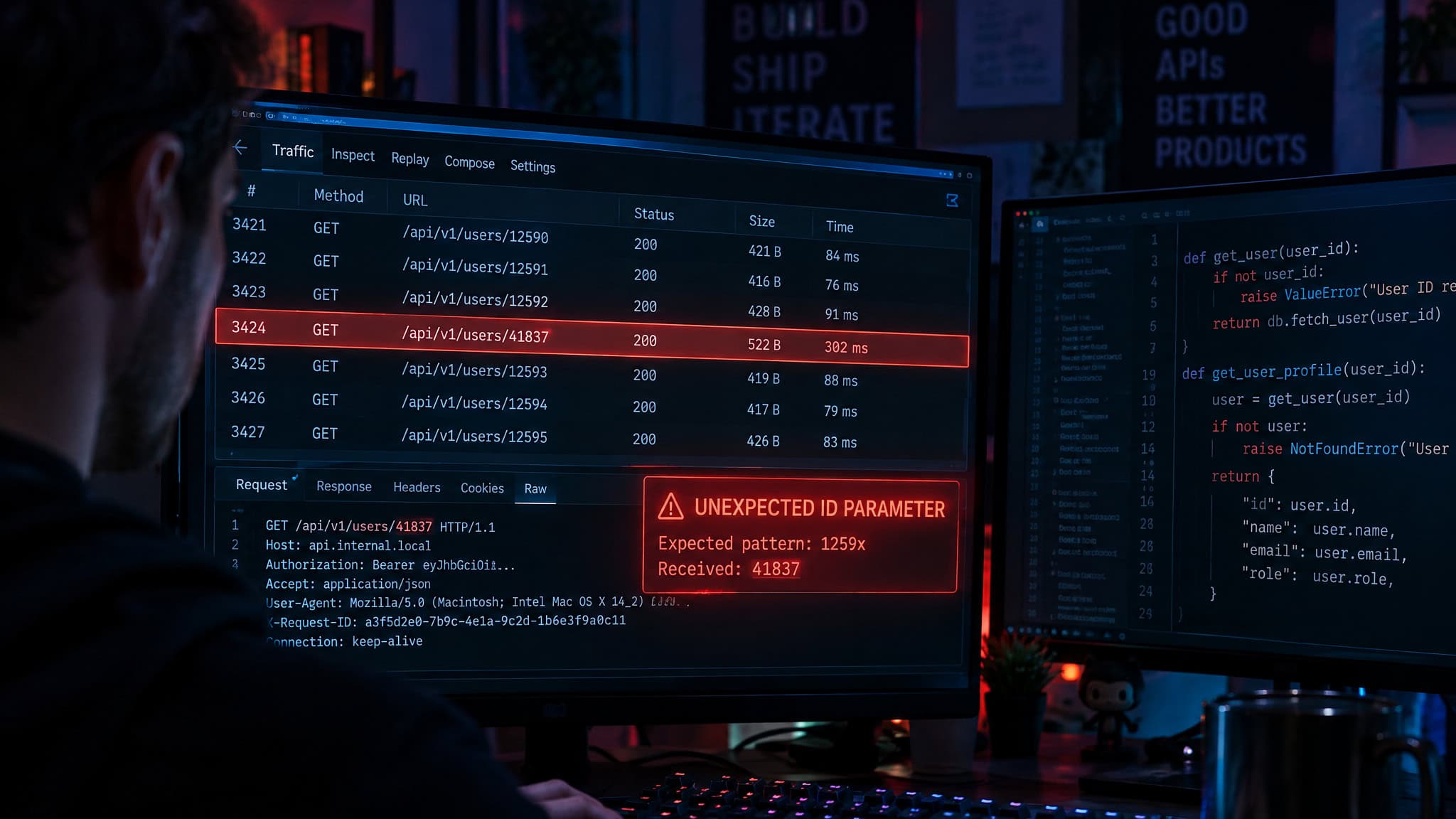
- Broken Object Level Authorization (BOLA): The signature API vulnerability, where an endpoint lets an authenticated user swap an ID in a request to read or modify another user’s objects without verifying ownership.
- Broken User Authentication: Flawed token validation, weak session handling, or credential-stuffing gaps that let attackers impersonate legitimate accounts.
- Excessive Data Exposure: Returning full database objects in JSON responses and trusting the client frontend to filter out sensitive fields before rendering.
- Lack of Resources and Rate Limiting: Leaving endpoints uncapped, which invites API abuse, automated brute-force credential attacks, and denial of service (DoS) outages.
- Broken Function Level Authorization (BFLA): Failing to separate regular user routes from administrative functions, allowing privilege escalation by guessing an admin URL or HTTP method.
- Mass Assignment: Blindly binding client-provided data, such as a JSON payload, directly to internal data models or database records so users can overwrite restricted fields like account roles.
- Security Misconfiguration: Shipping permissive Cross-Origin Resource Sharing (CORS) policies, verbose stack traces in error messages, or insecure default settings.
- Injection: Accepting untrusted input that gets executed as a command or query by a backend interpreter.
- Improper Assets Management: Leaving deprecated API versions or forgotten debug endpoints live and connected to production databases.
- Insufficient Logging and Monitoring: Failing to record failed auth attempts and anomalous traffic spikes, leaving defenders blind until data is already gone.
OWASP Top 10 web risks, weighted by pentest data
The OWASP Top 10 is a periodically updated catalog of the ten most severe and common web application vulnerabilities, maintained by the international nonprofit OWASP to guide developer remediation and security testing. The catalog is led by Broken Access Control, Cryptographic Failures, Injection, Insecure Design, and Security Misconfiguration, alongside Vulnerable and Outdated Components, Identification and Authentication Failures, Software and Data Integrity Failures, Security Logging and Monitoring Failures, and Server-Side Request Forgery (SSRF). Reading that list as ten equal priorities misleads engineering teams, because Kroll’s five-year penetration testing dataset shows Broken Access Control alone accounts for more than 40% of all critical- and high-severity findings.
When you combine Broken Access Control with Identification and Authentication Failures, those two categories represent nearly 60% of the serious vulnerabilities observed in Kroll’s pentest data. They dominate real-world findings not because developers forget to run scanners, but because authentication and authorization logic is baked in during the design phase, making those structural flaws the hardest for static analysis to spot.
The rest of the catalog still packs plenty of teeth. Cryptographic Failures carry stiff General Data Protection Regulation (GDPR) and Payment Card Industry Data Security Standard (PCI DSS) non-compliance risks. Injection covers classic Structured Query Language (SQL) injection alongside cross-site scripting (XSS), cross-site request forgery (CSRF), and extensible markup language external entity (XXE) flaws. Insecure Design marks architectural flaws that no configuration tweak can fix, while Software and Data Integrity Failures include insecure continuous integration and continuous delivery (CI/CD) pipelines that open the door to supply chain attacks. Disclosed Common Vulnerabilities and Exposures (CVEs) tracked by Bright Security and Imperva show how these flaws play out in production: CVE-2023-22524 opened a remote code execution hole in Atlassian Companion for macOS, CVE-2024-45195 hit Apache OFBiz with a critical flaw, and the OpenSSH remote code execution pair CVE-2024-6387 and CVE-2024-6409 prompted full Imperva detection and mitigation walkthroughs.
Black box, white box, and gray box testing
Choosing gray box authenticated testing gives engineering teams the most efficient balance of realism and depth for a web application, because it uses signed-in credentials to uncover session manipulation and SQL injection flaws that outsider scans miss without bogging down in unexploitable code alerts. AST exists to find and fix vulnerabilities before attackers do, and as Oligo’s 2024 State of Web Application Security Testing report highlights, automation is now mandatory because modular software stacks pull in large volumes of open-source components and known CVEs. Alongside automated scans, penetration testing simulates live attacks like SQL injection, XSS, and privilege escalation using manual techniques or open-source dynamic tools like OWASP Zed Attack Proxy (OWASP ZAP) to produce actionable remediation reports.

The three-tier testing taxonomy
Every application security test falls into one of three modes based on how much internal access the tester gets:
- Black box testing: The tester gets zero access to system internals and has to run reconnaissance, often using open-source intelligence (OSINT), to attack the app from the outside; it mirrors a real stranger on the internet, but it can’t probe underlying security weaknesses it can’t see.
- White box testing: The tester gets full access to source code and architecture (static code analysis is the textbook example) to surface business logic bugs, code quality issues, and misconfigurations, though many findings turn out not to be exploitable in production.
- Gray box testing: Armed with limited internal context like login credentials, the tester works from a signed-in user perspective. It’s a highly efficient way to simulate insider threats and catch authenticated bugs.
Testing parameters that change what you find
Before firing up a scanner, teams need to build a complete application inventory, rank apps by business use, impact, and data sensitivity, and start with public-facing web and mobile applications. Where and when you test changes the result: testing in production catches active threats in real time but degrades performance, whereas testing in staging is easier and speeds up fixes. Smart teams schedule active scans during off-peak hours and either disable firewalls, web application firewalls (WAFs), and intrusion prevention systems (IPS) or whitelist the scanner’s IP addresses so edge defenses don’t mask application bugs. The one exception is a full penetration test, where every defense stays on because the whole point is seeing if an attacker can scan and exploit the app while evading detection.
Once the scan finishes, workflow friction kicks in. Automated scanner exports are notoriously unreadable to non-security engineers, so security teams have to distill raw dumps into clear developer tickets, and they must rerun the exact test afterward to verify the fix rather than taking a developer’s word that a ticket is closed.
SAST, DAST, IAST, SCA, and MAST explained
The four core types of automated application security testing are Static Application Security Testing (SAST), Dynamic Application Security Testing (DAST), Interactive Application Security Testing (IAST), and Mobile Application Security Testing (MAST), supplemented by Software Composition Analysis (SCA) for third-party dependencies, and effective programs combine them because each tool inspects a different layer of the software stack. Black, white, and gray box modes sort tests by how much internal access the tester gets. The AST tool taxonomy sorts automated scanners by how they inspect the app: reading source files, attacking running servers, or auditing external libraries.
- SAST: Inspects static source code without executing it to catch syntax errors, input validation gaps, insecure references, and math errors, while binary and byte-code analyzers extend that inspection to compiled code.
- DAST: Executes the application and attacks it from the outside at runtime for large-scale scans, uncovering flaws in query strings, requests and responses, memory leakage, authentication, cookie and session handling, and Document Object Model (DOM) or data injection.
- IAST: Fuses SAST and DAST by running inside the application server at runtime to trace data flow, configuration, and third-party libraries; it handles API testing and hands developers root causes with exact line numbers to speed up remediation.
- MAST: Combines static and dynamic analysis with mobile forensic data to hunt mobile-specific flaws like jailbreaking exposure and local data leakage.
- SCA: Inventories third-party open-source and commercial components to identify exact library versions and flag severe known vulnerabilities.
Because each acronym only sees its own slice of the stack, engineering orgs end up buying all five. That tool sprawl sets up a frustrating surprise once a program matures.
Where static analysis stops: the SAST/SCA plateau
Static analysis stops delivering proportional risk reduction once an organization reaches shift-left maturity, hitting a documented SAST/SCA plateau across five years of penetration testing data where Broken Access Control (>40%) and Identification and Authentication Failures (nearly 60% combined) keep slipping through into production. In Kroll’s State of Application Security report (which pairs its five-year retrospective with a 12-to-24-month forward outlook), the data draws a sharp line: organizations that haven’t adopted SAST and SCA yet still have major risk-reduction gains on the table, but mature shift-left programs see diminishing returns from buying more of the same static scanners.

The reason comes down to how static analysis works. SAST and SCA excel at pattern-matching code syntax and checking dependency manifests against known CVEs, but authentication and authorization logic is a structural property introduced during the design phase. A static scanner looking at a controller function can’t tell whether a business workflow was supposed to let a standard user query another tenant’s invoice. In mature shift-left shops, automated pipeline scans routinely come back clean right before penetration testers uncover critical Broken Access Control bugs.
Closing that gap requires shifting human brainpower left through design-stage authorization threat modeling and verifying the live app with authenticated gray box penetration testing. Kroll’s 2026 offensive security case studies show where human-led and specialized testing catches deep flaws: guiding a security transformation for a crypto bank (published February 17, 2026), delivering offensive security and operational technology (OT) testing for a major oil pipeline (March 3, 2026), securing containerized environments for a financial institution (July 28, 2026), and running agentic AI-assisted penetration testing at a large financial institution that uncovered a Frontier AI vulnerability (September 24, 2026).
Application security across the SDLC
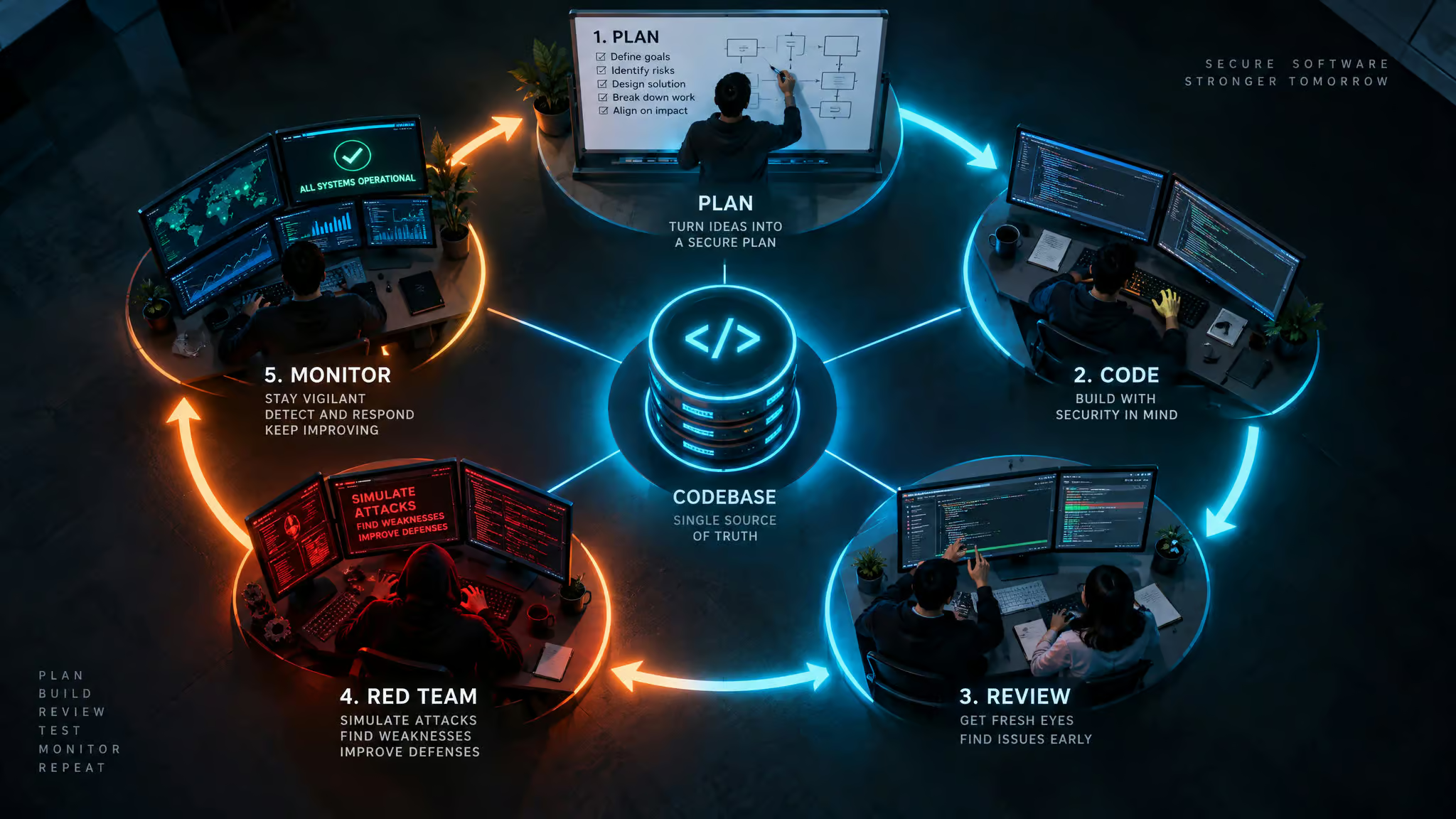
Shifting security left in the software development lifecycle works best when teams pair early automated scanning during coding with design-stage threat modeling, fixing vulnerabilities at the exact point in the build where remediation is cheapest and before structural flaws harden into production APIs. Fixes cost pennies during design, and that’s where the 60% majority of serious auth and access-control bugs originate. A real shift-left program takes more than bolting a SAST linter onto a git commit hook. Across IBM and Imperva lifecycle frameworks, a complete SDLC security loop runs through five sequential phases:
- Risk assessment and planning: Threat modeling what the application does, how it handles data, and how an attacker would target it by listing sensitive assets and auditing existing controls.
- Secure design and development: Building in input validation, strong authentication for mission-critical apps, clean error handling, secure build pipelines, and early vulnerability scanning during design.
- Code review and testing: Training developers to write secure code and running SAST during active coding and peer review.
- Security testing and evaluation: Attacking the build through red teaming, penetration testing, vulnerability scanning, and formal risk assessments.
- Deployment and monitoring: Running continuous security testing in production alongside real-time logging, regular patching, and network or edge defenses like firewalls, WAFs, and IPS.
In daily engineering work, DevSecOps automates those DAST, SCA, and container checks directly across CI/CD pipelines so security and development teams share the same workflow. To keep the program grounded, teams enforce least privilege everywhere, prioritize fixes by combining Common Vulnerability Scoring System (CVSS) severity with operational importance, and report a tight set of executive-level metrics rather than drowning leadership in raw scanner counts.
Application security tools: WAF, RASP, and beyond
Application security tools are specialized software defenses and visibility platforms that protect code, runtime execution, third-party dependencies, and cloud infrastructure, requiring teams to layer complementary application security solutions across the stack because no single tool blocks every threat class. A complete enterprise kit combines testing scanners (SAST, DAST, IAST, and MAST) with runtime shields like WAF and Runtime Application Self-Protection (RASP), supply-chain trackers like Software Bill of Materials (SBOM) and SCA, and Cloud Native Application Protection Platforms (CNAPP). Even the most ubiquitous edge tool proves why layering is mandatory: a WAF operates as an Open Systems Interconnection (OSI) model layer 7 reverse proxy that filters HTTP traffic against SQL injection and XSS, yet it can’t see inside internal microservice logic or replace holistic application defense.
WAF and RASP: the perimeter of the app
A WAF sits in front of a web server as a layer 7 reverse proxy, inspecting HTTP traffic between the application and the internet to block XSS, cross-site forgery, SQL injection, and file inclusion attacks. Because a WAF only sees outside traffic hitting the perimeter, teams pair it with RASP inside the application runtime. RASP hooks into the runtime environment with direct visibility into application source code, watching user behavior and live traffic to spot weaknesses under active exploitation, terminate compromised sessions, fire alerts, and in some modes block malicious actions on the spot.
Supply chain visibility: SBOM and SCA
Modern apps are mostly assembled from external parts, which makes an SBOM essential. Acting as a complete manifest of every open-source and proprietary component, library, and module inside an application, an SBOM lets teams see within minutes whether a newly disclosed CVE affects their production builds. Pair that manifest with software composition analysis tools, such as the open-source OWASP Dependency Check, to continuously inventory third-party dependencies and flag vulnerable library versions before they ship.
Cloud, lifecycle, and intelligence tooling
When workloads move to the cloud, CNAPP consolidates Cloud Workload Protection Platforms (CWPP, which protect VMs, containers, and serverless workloads) and Cloud Security Posture Management (CSPM, which checks cloud configs) with identity entitlement management, API discovery and protection, and container orchestration security. Alongside cloud posture, Faddom-authored lifecycle guidance in Imperva’s documentation breaks application management into five operational tools: application assessment (checking posture against OWASP, National Institute of Standards and Technology [NIST], and International Organization for Standardization [ISO] 27001 via static/dynamic scans and pentests), application discovery (cataloging known and unknown apps to catch shadow IT and map dependencies), application migration (verifying encryption and access controls during cloud moves), application monitoring (using AI and machine learning to track uptime and security events in real time), and application portfolio management, or APM (scoring app risk by business impact and retiring outdated software).
To know which alerts matter today, threat intelligence platforms (detailed in BlueVoyant-authored material and reports like the IBM X-Force Threat Intelligence Index 2026) feed defenders active indicators of compromise (IOCs), malicious IP lists, and real-world exploit data to tune WAF rules and patch queues across three tiers: strategic (long-term risk trends), operational (active campaigns targeting specific assets), and tactical (immediate technical IOCs). Major vendors bundle these layers into unified suites: IBM offers IBM Concert, while Imperva’s vendor-authored portfolio spans Imperva WAF, Imperva RASP, Imperva API Security, Imperva Account Takeover Protection, Imperva Advanced Bot Protection, edge-based Imperva DDoS Protection across AWS, Microsoft Azure, and Google Cloud, machine-learning Imperva Attack Analytics, Imperva Client-Side Protection against third-party JavaScript supply-chain tampering, and cloud-native Web Application and API Protection (WAAP), which Imperva also delivers to Google Australia customers through a regional partnership.
| Tool Category | Primary Inspection Layer | Catches Design-Stage Auth Flaws? | Real-Time Attack Blocking |
|---|---|---|---|
| SAST | Static source and compiled code | No (syntax and code patterns only) | No (build-time analysis) |
| DAST | Running app via external HTTP requests | Partial (catches surface auth bugs) | No (test-time scanner) |
| IAST | Inside the application server at runtime | Partial (traces runtime data flow) | No (diagnostic instrumentation) |
| SCA & SBOM | Third-party libraries and component manifests | No (tracks known dependency CVEs) | No (inventory and alerting) |
| WAF | OSI Layer 7 HTTP edge traffic (reverse proxy) | No (filters SQLi, XSS, CSRF, file inclusion) | Yes (blocks malicious requests) |
| RASP | Inside the application runtime environment | Partial (detects active session abuse) | Yes (terminates sessions and blocks) |
| CNAPP | Cloud workloads (CWPP), configs (CSPM), APIs, K8s | Partial (audits cloud identity entitlements) | Yes (runtime workload protection) |
Prioritizing vulnerabilities beyond CVSS severity
Prioritizing vulnerabilities by CVSS score alone wastes engineering cycles because a critical vulnerability in an open-source library carries zero real-world risk if the application never invokes the vulnerable function. Standard vulnerability management scans builds against the CVE database and applies patches, leading teams to panic-patch every high-CVSS alert before checking code reachability. Pairing SBOM manifests with SCA reachability analysis lets teams filter out uncalled code across transitive dependencies (your dependencies’ dependencies), an area where Kroll expects economic pressure and supply-chain risk to grow alongside a potential future split between web and mobile dataset tracking.
AppSec compliance, MSSPs, and the business case
Organizations decide between running application security in-house or outsourcing to a Managed Security Service Provider (MSSP) by weighing internal expertise, budget, and environment complexity against the turnkey value of an MSSP’s staffed Security Operations Center (SOC) and Security Information and Event Management (SIEM) stack, whereas individual entry-level career requirements and AppSec engineer salary figures sit outside these technical operational frameworks. On the business side, a solid AppSec program reduces operational disruption, catches bugs early when fixes are cheap, protects intellectual property and financial records, builds customer trust and brand loyalty, and avoids steep breach cleanup costs like forensic investigations, legal fees, and regulatory fines.
Formal assessments verify compliance against OWASP, NIST, and ISO 27001 standards, satisfy GDPR, Health Insurance Portability and Accountability Act (HIPAA), and PCI DSS mandates, and align with the Digital Operational Resilience Act (DORA) for threat-led penetration testing. Don’t confuse passing an audit with being secure. Kroll’s five-year dataset proves that regulation isn’t a reliable predictor of security outcomes: two heavily regulated industries operating under comparable compliance obligations followed starkly different trajectories in vulnerability density, severity, and attack surface health, with some regulated sectors improving while others stagnated or slid backward.
Secure coding techniques for developers
Developers prevent common exploits at the keyboard by combining strict input validation and automated fuzzing with HTTPS-only cookies, static code analysis, cryptographic code signing, OS sandboxing, and built-in log monitoring. As Imperva’s guidelines and Professor Messer’s CompTIA Security+ SY0-701 material illustrate, constraining a zip code field by country-specific length and numeric format blocks unexpected data interpretation, while fuzzing bombards the app with random inputs to expose validation gaps. Marking cookies as HTTPS-only and keeping secrets out of readable cookie files protects sessions. Code signing uses asymmetric encryption and a certificate authority to verify install integrity. Sandboxing isolates runtime, VM, dev-network, and mobile boundaries (keeping a compromised mobile browser in its bookmarks and out of the camera roll). Built-in log monitoring spots SQL injection or strange file transfers. Meanwhile, static analyzers flag classic bugs like filetest.c line 32 (gets() buffer overflow, use fgets()), though they miss crypto implementation flaws and require manual false-positive triage before outside researchers find what quality assurance (QA) missed and force a security patch.
Application security in the AI era
Securing LLM and AI-powered applications against prompt injection, proprietary data leakage, and insecure plugin integrations requires enforcing continuous input and output validation, strict guardrails, least-privilege access controls on sensitive data, and authenticated rate limits across every external API or tool call. Because natural-language prompts and external retrieval plugins behave dynamically, those guardrails and response monitors have to run continuously as inputs and underlying models shift.
Interestingly, while AI-assisted coding tools have seen wide adoption since ChatGPT debuted in late 2022, Kroll’s five-year penetration testing dataset shows no distinct vulnerability signal from AI-generated application code yet. The live fire is hitting AI infrastructure instead: Oligo documented ShadowRay as the first known attack campaign actively exploiting AI workloads in the wild, Meta’s meta-llama/llama-stack suffered the critical vulnerability CVE-2024-50050, Imperva flagged Model Context Protocol (MCP) servers as a glaring security blind spot in enterprise AI stacks, and Kroll’s September 24, 2026 case study detailed an agentic AI-assisted penetration test at a large financial institution that uncovered a Frontier AI vulnerability. Looking ahead over the next 12 to 24 months, AI is poised to be the single biggest force reshaping how software is written and audited, leaving one open question for the SAST/SCA plateau: whether AI- and LLM-enriched static scanners will finally learn to spot the design-stage authentication and authorization flaws that current tools miss.
Frequently Asked Questions
What is the difference between application security and cyber security?
Broader cyber security defends the surrounding networks, human users, and physical or virtual infrastructure, while application security focuses strictly on the software layer itself. Based on IBM’s five-feature taxonomy, we draw the boundary around controls that protect an application’s internal logic and data: authentication, authorization, encryption, logging, and testing. If a safeguard lives inside one of those five buckets to keep software from being exploited, it belongs to AppSec.
What are the four types of application security testing?
The four primary automated testing methods are Static Application Security Testing (SAST), Dynamic Application Security Testing (DAST), Interactive Application Security Testing (IAST), and Mobile Application Security Testing (MAST). SAST reviews unexecuted source or compiled code, DAST probes the running application from the outside, IAST monitors runtime data flow from inside the application server, and MAST targets mobile-specific risks like jailbreaking exposure. Most engineering teams also pair these four with Software Composition Analysis (SCA) to track vulnerable third-party libraries.
Black box vs white box vs gray box testing: which should we use for our web application?
Gray box authenticated testing hits the sweet spot for web applications by giving testers login credentials to work from a signed-in perspective. Black box testing attacks the app blind from the outside like a stranger on the internet, which misses internal weaknesses, while white box testing hands over full source code and architecture but often buries teams in unexploitable alerts. Gray box testing efficiently exposes insider threats, session manipulation, and authenticated SQL injection without the white-box noise.
Should we manage application security in-house or outsource to an MSSP?
Choosing between an in-house team and a Managed Security Service Provider (MSSP) comes down to weighing your internal talent, budget, and architectural complexity against the turnkey speed of an outsourced operation. An MSSP brings an already-staffed Security Operations Center (SOC) and a built-out Security Information and Event Management (SIEM) stack, which saves organizations from building continuous monitoring and triage infrastructure from scratch.