
I went digging into “laptop snaps” expecting nothing much, and came out with a genuinely weird haul. Because it turns out the phrase means three completely different things, and search results happily mix all of them. There’s Snapchat on a laptop (which runs through the web client, and gets its own separate coverage here), there’s screenshotting your screen (also separate coverage), and then there’s the meaning I can’t stop thinking about: snap-on hardware. Magnetically attached screens, pop-off keyboards, port blocks that unclip. Windows Snap and Snapdragon laptops float around in there too, but those are different rabbit holes.
The snap hardware one is the good one, and it has a spectrum. At one end: Lenovo’s ThinkBook Modular AI PC concept, a laptop I watched come apart in person at Lenovo’s early-February press event and once more at Mobile World Congress in Barcelona, whose keyboard, second screen, and even chunks of ports all pop off. Our whole thing here at GeekExtreme is checking whether the connector mechanism actually shipped before we get excited, and that discipline matters this year, because the loudest snap laptop of 2026 is one you cannot buy. The best snap accessory you can buy costs $27.
Key Takeaways
The Lenovo ThinkBook Modular AI PC concept has no announced price or market commitment, but its Magic Bay 11-pogo-pin connectors already shipped on the ThinkBook 16p Gen 4, which makes it the more credible of Lenovo’s two MWC concepts.
The ThinkPad T14 and T16 scored 10/10 from iFixit, with removable back plate, battery, SSD, keyboard, and USB-C ports, starting at $1,799; the ThinkPad X13 Detachable arrives in Q3 from $1,999.
The most affordable shipping snap hardware is the SightPro magnetic privacy screen for 14-inch MacBook Pros at $27 (down 33% from $40), while the priciest is the ~$1,000 Xebec Snap magnetic triple-monitor rig with a ~17.5-inch laptop size cap.
Table of Contents
What snap-on laptop hardware actually is: pogo pins, magnets, and pop-off parts
Snap-on laptop hardware is a design system where components attach magnetically or via spring-loaded pogo-pin connectors instead of internal hinges and soldered everything, and the current showcase is Lenovo’s ThinkBook Modular AI PC concept, which lets the screen, keyboard, and port blocks all come off a single laptop. That’s the flat answer. The fun answer is that I’ve been tracking this one since Lenovo showed it at a press event in early February, and watching the keyboard pop off live at MWC Barcelona did something to my gadget-bench brain that a spec sheet never could.

One important limit up front: not everything snaps. The main panel is a fixed 14-inch 4K 120 Hz OLED touch display. It stays put. Which, honestly, is fine, because that’s a flex of a screen on its own.
Here’s the actual mechanics:
- The second display has three modes. It magnets onto the back of the lid. It works as a standalone wired monitor. Or it snaps onto the deck, where the keyboard used to be, for a Yoga Book 9i-style dual-screen setup. Snap, done.
- Magic Bay connectors do the heavy lifting. Two magnetic connectors with 11 pogo pins each: one on the back of the lid, one under the keyboard. Tiny wizardry. And here’s the credibility part: Magic Bay already shipped on the ThinkBook 16p Gen 4, driving a light, a webcam, or a 4G modem.
This is not Lenovo’s first pogo-pin rodeo. The clever bit is repurposing an accessory connector into core-hardware duty.
- The keyboard pops off, and that’s the point. It slides off so its spot can hold the second panel. Simple, kind of elegant. Crucially, it keeps working over Bluetooth while detached, so you can run dual screens and a physical keyboard simultaneously. That fallback is what makes the whole design coherent instead of a gimmick.
- Even the ports are modular. Yes, really. HDMI pops off the right side, USB-C pops off the left, and both blocks perch beneath the keyboard. Honest caveat: Lenovo only demoed those two blocks, so if this thing ships, swappable alternates are an assumption, not a fact.
- There’s a magnetic stand too. It snaps onto the back of the second screen for external-monitor duty, swaps between portrait and landscape, and when stowed doubles as a foot for the laptop itself. Three tricks from one accessory. That last one is exactly the kind of detail I geek out over.
What the ThinkBook Modular specs and price reveal, and hide
The ThinkBook Modular AI PC concept has no announced price, and its spec sheet reads like solid mid-range silicon wrapped around a physically expensive idea: an Intel Core Ultra 7 255H (Arrow Lake) paired with 32 GB of RAM and a 1 TB PCIe SSD; the camera is an 8 MP unit, and power comes from a 33 Wh battery.
Spec hounds will clock that Arrow Lake is already one generation behind; Panther Lake, aka Core Ultra Series 3, is newer, so a shipping version would presumably use current silicon. No complaints, just context.
The rest of the sheet:
- 12.3 × 9.2 inches, 0.94 inches thick
- 2.5 lbs with one display, 3.1 lbs with both
- Luna Gray
Now the part every trend piece skips: the modularity tax. A laptop that comes apart has to pay for it somewhere, and here it’s paid in thickness (0.94 inches) and that 33 Wh battery, which is a number worth raising an eyebrow at. You’re packing a charger. The second screen costs you six-tenths of a pound, which is the tradeoff you control.
On price: no number exists, and it won’t be cheap, especially if the memory crunch keeps up. For calibration, last year’s rolling-screen ThinkBook cost $3,500 when it shipped. That’s not a price prediction, it’s a reality check on what Lenovo’s wild concepts cost when they become real. And even if this exact configuration never ships, the modularity idea may well show up in a future ThinkBook. Read it as a signal, not vaporware.
Concept vs. shipping: which snap laptops can you actually buy
No, the ThinkBook Modular is not confirmed for market. There’s no market commitment, no date, no price, and the honest read is that it’s more likely to ship than its sibling from the same event, which is a low bar being cleared.
Concepts, by definition, carry no promise. The modularity idea may live on in a future ThinkBook even if this exact machine never does.
About that sibling: the Lenovo AI Workmate Concept is a tabletop robot with a rotating, bending screen that looks like the jumping Pixar lamp came to life, and it handles presentations, note-taking, and meeting summarization with local AI processing, plus a built-in projector. I want to love it unreservedly. I can’t, because the demo unit at the show didn’t actually work, the whole thing felt like one of those staged “working hard” shots that looks great in photos and falls apart in person. Delight and skepticism can share a paragraph.
Here’s the mistake pattern I see every trade-show cycle: readers fall for a concept, pre-plan their purchase, run spec comparisons against laptops that actually exist, then eventually defer, and settle for the nearest shipping analog months later. Demos are evidence of engineering direction, not purchase orders. Watch them, enjoy them, don’t budget around them.
The snap-on accessories you can buy today, by price tier
If the concepts are promissory notes, this is the cash-on-the-barrel section. Prices run from $27 to roughly $1,000, and the evidence quality varies just as much by tier.

SightPro magnetic privacy filter: the $27 entry point
The SightPro magnetic privacy screen for MacBook Pro is $27 at Amazon right now, down 33% from $40, on a limited-time deal. It fits 14.2-inch MacBook Pros from 2021 through 2025, M1 through M5, Pro and Max chips, with model numbers A2442, A2779, A2918, A2992, A3112, A3185, A3401, or A3434. Check yours before buying; this list is the whole point.
The magnets run along the top of the Liquid Retina XDR display, so it snaps on and pulls off instantly. Multi-layer film darkens the screen from the sides, so shoulder-surfers in a cafe see black while you see your work. There’s also a UV and blue-light protection claim, which is promotional language, and I’ll leave it at that line. In the box: a storage folder alongside a reusable double-sided adhesive, plus a cleaning cloth. That reusable adhesive is the long-term-ownership detail; it means the filter can come off and go back on without turning into a one-shot sticker.
Xebec Snap: the ~$1,000 magnetic triple monitor
The Xebec Snap is two portable monitors plus a magnetic accessory system that can triple a laptop’s screen space, and it runs about $1,000. Full disclosure, plainly: the main video coverage was sponsored, from SomeGadgetGuy (Juan Carlos Bagnell, whose channel has 184K subscribers), and when I was researching this, no independent review was loadable. Xebec’s own page is at thexebec.com/pages/snap-story.
So the YouTube comments become the genuinely useful signal, with the obvious caveat that comments are not a scientific sample. Praise centers on portrait-mode ergonomics and the magnetic connector, the kind of setup details that fuel the whole laptop-snap aesthetic on social media. Pushback hits the price and the panels: @Jorge101 wants OLED and better color accuracy at that price point, which is a fair critique and deserves airtime. Counterweight: verified purchaser @DominequeTaylor reported being highly satisfied, preferring portrait mode through a full week of work travel. One verified user’s week beats ten spec bullets, but it’s one user, not a verdict for everyone.
Tri-Screen 2 and Domyfan S6 alternatives
The Xebec Tri-Screen 2 is the earlier product in this line, and related coverage rated it good but not great. The Domyfan S6 sits in the set as the budget-adjacent portable monitor option. The portable-monitor rabbit hole goes deeper: Xebec got CES 2025 coverage for earlier snap-on monitor work. One honest caveat on the Xebec Snap itself: the evidence we have is sponsored coverage plus YouTube viewer feedback, not independent review data, so treat it as promising rather than proven. I’m not declaring a winner here; the field is a territory map, and your fit and budget decide it.
Compatibility traps: size caps, port coverage, and fit
The practical landmines are where the comments earn their keep. @jessecollins1943 flagged that the Snap caps out around 17.5-inch laptops, so an Alienware m18 R2 simply won’t fit. Concrete beats “big laptops might not work.” Meanwhile @dacook1987 asked whether Surface Pro-style devices work and whether the mount covers the IO ports. That question went unanswered, and I’m surfacing it as-is rather than inventing an answer.
The quieter failure mode is the fit mismatch: buyers of generic magnetic filters commonly report edge-fit issues because they measured the screen diagonal but not the closed-lid geometry, then discover at setup that a mount blocks a vent or port, or sits a millimeter off the bezel catching glare. The return happens before the first work session. Model-number-specific fit lists, like SightPro’s, beat generic “fits 14-inch” sizing every time. And portrait versus landscape isn’t a spec-sheet footnote; it’s a real ergonomic decision, and it’s the thing actual owners talk about most.
Quick test: Before ordering any magnetic accessory, match your laptop’s full model number against the fit list and check what the mount covers — vents and ports included.
Magnetically attached keyboards: the detachable form factor you can order now
The ThinkPad X13 Detachable is a 13-inch, Surface Pro-style machine, and its real differentiator isn’t the magnet, it’s the keyboard quality and the internals behind it.
The keyboard is the headline: a magnetically attached ThinkPad keyboard with 1.5 mm of key travel, matching the X1 Carbon, which is the ThinkPad keyboard gold standard. Lenovo claims it beats Surface tablet keyboards, and that’s a claim worth testing, not settled fact. Small quality-of-life win: the Lenovo Slim Pen charges in the keyboard, so it’s never dead when you grab it. Genuinely appreciate that.
The internals are where detachables usually cheap out, and this one doesn’t:
- Intel Core Ultra Series 3 (Panther Lake)
- Up to 64 GB LPDDR5x (note: soldered-class memory, which is why the T-series LPCAMM2 story in a moment stands out)
- Up to 2 TB SSD
- 2880 × 1920 display, up to 100% sRGB (a baseline-good sign, nothing more)
It’s available in Q3 starting at $1,999.
Snap-together engineering and the repairability movement
The reason laptop makers are suddenly designing machines that come apart is that repairability is finally a selling point, and the numbers behind it are getting quantified, along with the physical cost of getting there.
Dell Concept Luna: a laptop that snaps together in under a minute
Check out what Dell’s been cooking. Concept Luna is near screw-less, adhesive-free, and cable-free, and anyone who’s ever pried open a glued-shut laptop just felt something shift in their chest. Dell’s demo shows it disassembling in seconds and snapping back together in under a minute with nothing but a push-pin tool. Even wilder: Dell built a micro-factory where robots disassemble and reassemble the thing. That’s a manufacturing angle I did not see coming, and it’s all still concept-stage.
Dell CTO Glen Robson frames Luna as a vision for the company’s future, and I’ll keep that honesty even while geeking out. Dell’s own analogy: you replace the tires and brakes on a car, not the whole car. Laptops should work the same way.
ThinkPad T-series: 10/10 repairability in a mainstream business line
Okay, but the spring 2026 refresh is stuff you can actually buy. Lenovo brought us the ThinkPad T14 Gen 7 together with the T14s Gen 7 and the T16 Gen 5, and it landed in Q2, so it’s on shelves now. Cosmic Blue debuts as a new colorway alongside classic black, and I saw it in person: it’s nearly black until direct light hits it, then it’s very much blue. Nice trick.
The repairability story is the real news. The T14 and T16 scored 10/10 from iFixit: the back plate, battery, SSD, keyboard, and even the USB-C ports come off easily. Predecessors made you gut large components to reach anything; here the back plate comes off and everything’s right there. Buyer translation: cheap fixes, upgradeable parts, longer ownership.
- T14s from $1,899; T14 and T16 from $1,799, Q2 availability
- CPU menu: Intel Core Ultra Series 3, AMD Ryzen AI PRO 400, or Snapdragon X2 (Windows on Arm on the T14s, worth a clear note since software compatibility matters; I’m not making app-by-app claims beyond that)
- T14s: 2.45-2.66 lbs, 0.7 inches thick. T16: 3.62 lbs, nearly an inch
LPCAMM2: the screw-on middle ground
In the Intel T14/T16 models, the RAM is LPCAMM2, which means it’s screwed onto the motherboard and swaps out easily: 16 GB upgradable to 32 or 64 GB. The anti-soldered-RAM win. The honest caveat: memory prices may make that upgrade painfully expensive right now. The path exists; affording it is another matter.
Zoom out and the landscape makes sense: Framework is the modular-repair standard, the MacBook Pro is notoriously miserable to open, and for you that’s the difference between a 10-minute swap and a repair-shop bill. Dell’s Concept Luna pushes the same idea harder, a near screw-less, adhesive-free design that disassembles in seconds and snaps back together in under a minute with just a push-pin tool. Dell argues most end-of-life laptops still hold usable parts, because remote workers run external keyboards and monitors anyway. It’s Dell’s take, but it tracks.
Snap hardware as reversible laptop customization
Snap-on accessories are the reversible way to customize a laptop’s look, and that reversibility is the whole pitch. Magnetic privacy filters, Magic Bay lights and webcams, snap-on stands, portrait second-screen setups: every one is a modification you can undo tomorrow, which is the exact opposite economics of adhesive skins and stickers. A sticker is a commitment; a snap is a mood.
I’ll frame the aesthetic demand honestly: there’s real, observed search demand around “how to make your laptop aesthetic” and “laptop snap ideas,” plus the whole laptop-snaps visual culture on social, a culture with its own curated bank of snap compositions spanning flat lays, workspace shots, and night-mode desk setups. I’m not going to invent trend statistics or recommend aesthetic products the sources don’t support. But the hardware answer to that demand is real, the Magic Bay magnetic 11 pogo pin connectors, which previously shipped on the ThinkBook 16p Gen 4 for accessories like a light or webcam, are exactly this kind of snap-on, snap-off customization. And that rhymes with the DIY ethos: changes you can reverse are changes you can experiment with.
Who snap hardware is actually for, and what to buy at each commitment level
The demand in the wild maps to real people, and the comment sections name them: @twinfolktech’s digital-nomad setup, @OutlawedOutlier’s Formula 1 multi-viewer entertainment rig, hybrid workers missing their multi-screen desk, and everyone who just wants privacy in cafes, trains, and coworking spaces (not just secret missions, despite what the marketing implies). And note the Snap’s real competition isn’t another monitor kit. It’s @GtheJuggler’s DIY alternative: a mini PC plus two 20-inch portable displays. Whether that beats an integrated magnetic rig depends entirely on your use case, and I’m not going to fake the math for you.
The spectrum, bottom to top:
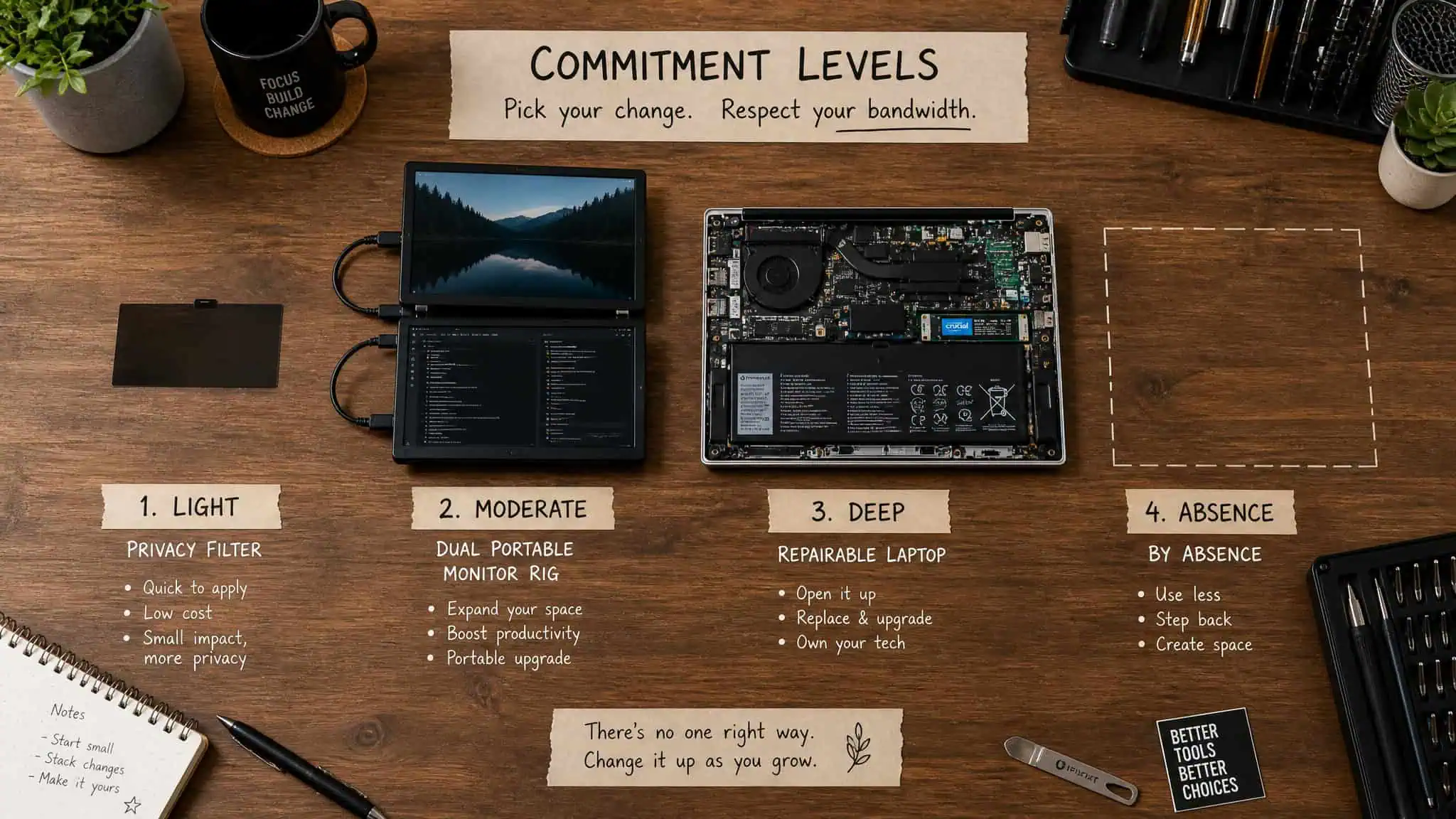
- $27. SightPro magnetic privacy filter. Reversible privacy today, if your MacBook model number matches.
- ~$1,000. Xebec Snap monitor rig. Screens on screens, with the fit-check and sponsorship caveats attached.
- $1,799, $1,999. ThinkPad T-series or X13 Detachable. Longevity, repairability, and a genuinely good keyboard.
- Patience, the concepts. The ThinkBook Modular and Concept Luna are worth watching and not worth pre-ordering your imagination over.
That’s the honest shape of “laptop snaps” in 2026. The most exciting machine in the story is one you can’t have yet. The most useful one costs less than a pizza night.
People Also Ask
What are snap-on and magnetic modular laptop components and how do they work?
Snap-on laptop components attach via magnets or spring-loaded pogo-pin connectors instead of hinges, screws, and soldered parts. Lenovo’s ThinkBook Modular concept, for example, uses two magnetic Magic Bay connectors with 11 pogo pins each — one on the back of the lid, one under the keyboard — to hold a second display, while the keyboard, port blocks, and stand all pop off and reattach.
How much does the ThinkBook Modular laptop cost and what are its specs?
No price has been announced, and it won’t be cheap — Lenovo’s last wild concept, the rolling-screen ThinkBook, cost $3,500 when it shipped. The demoed configuration includes an Intel Core Ultra 7 255H (Arrow Lake), 32 GB of RAM, a 1 TB PCIe SSD, a fixed 14-inch 4K 120 Hz OLED touch display, an 8 MP camera, and a small 33 Wh battery, weighing 2.5 lbs with one display or 3.1 lbs with both.
Are magnetic snap-on laptop screens like the Xebec Snap worth the price?
It depends on your tolerance for caveats. At around $1,000, owner feedback praises the portrait-mode ergonomics and magnetic connector, but the main video coverage was sponsored and no independent review was available, and buyers criticize the price given the panels aren’t OLED and color accuracy lags. The bigger practical risk is fit — it caps out around 17.5-inch laptops, so larger machines simply won’t work.
What is the cheapest magnetic laptop privacy screen for a MacBook Pro?
The SightPro magnetic privacy screen for 14-inch MacBook Pros is the cheapest shipping snap hardware at $27, down 33% from $40 on a limited-time deal. It fits 14.2-inch MacBook Pros from 2021 through 2025 (M1 through M5, model numbers A2442, A2779, A2918, A2992, A3112, A3185, A3401, or A3434), and it snaps onto the magnets along the top of the display so shoulder-surfers see black while you see your work.
