I’ve been digging into this question since 2021, partly because I keep seeing the same pattern pop up in IT support forums. Someone’s PC slows down, their browser homepage suddenly points somewhere else, and when they check installed programs, “Wave Browser” is sitting there like it owns the place. The question is always the same: is this malware?
The short answer is no — not in the traditional sense. But the answer involves a rabbit hole that runs through Genimous Technology Co Ltd, a two-decade-old adware playbook, and a concept called “consent laundering” that explains why this stuff keeps ending up on machines. Let’s trace the whole thing.
Key Takeaways
Malwarebytes flags Wave Browser as PUP.Optional. Wave — a Potentially Unwanted Program, not a virus or trojan, but the distinction is thinner than people think.
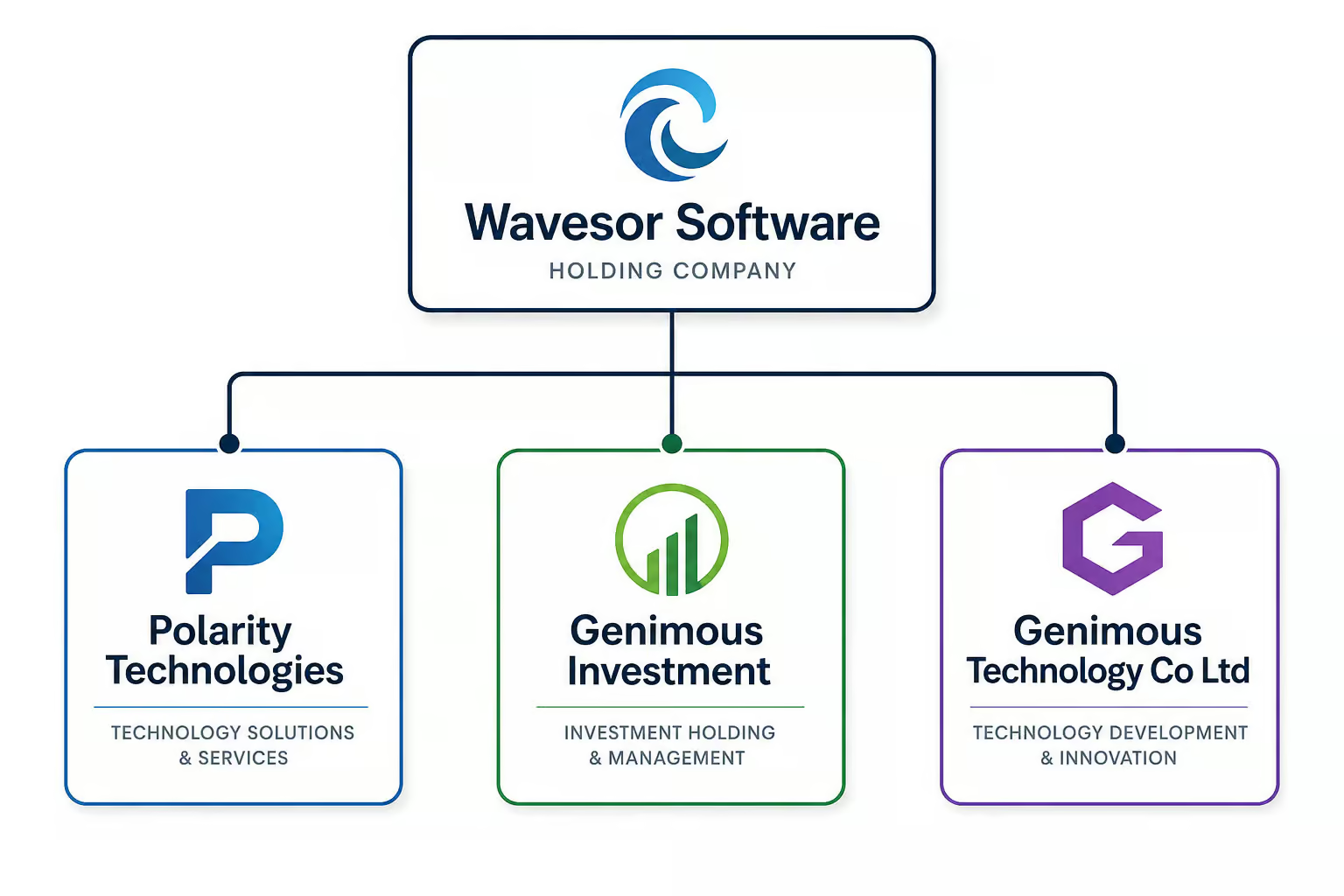
The corporate chain behind the browser runs through Wavesor Software ? Polarity Technologies Ltd. ? Genimous Investment ? Genimous Technology Co Ltd, and your browsing data—search queries included—ends up on Chinese servers under Chinese data privacy laws.
It spreads through software bundling: hidden inside installers for free programs (media players, PDF tools, driver updaters), where the offer is pre-checked and hidden behind “Express” installation mode.
Table of Contents
Is Wave Browser Malware? A Definitive Answer
Wave Browser is not malware in the strict sense. It’s a Potentially Unwanted Program (PUP) — a category that covers software you probably didn’t mean to install but that technically got some form of your consent along the way. Malwarebytes detects it as PUP.Optional.Wave, and that “PUP” prefix matters. It’s a lower-confidence classification than “trojan” or “ransomware.”
The detection means PUP.Optional. Wave rather than definitely malicious.
But here’s where the nuance kicks in. The PUP label describes a revenue model, not a capability ceiling. Adware like this exists to monetize your attention and your data — it shows you ads, reroutes your searches, and tracks what you do. Some adware stops there. Other adware, like the infamous Fireball case from 2017, turned out to be full-blown malware that could run arbitrary code on 250 million machines while being called “just adware.”
The dividing line is user consent — not technical behavior. Wave Browser’s consent is often obtained through software bundling, which is why this distinction matters more than a label.
What Is Wave Browser? Background, Features, and Ownership
Wave Browser is a Chromium-based browser developed by Wavesor Software, but its ownership chain leads to Genimous Technology Co Ltd, which has a history of adware operations. Understanding what it offers and who controls it is essential before evaluating its risks.
Why it looks useful
Wave Browser is a real, functional Chromium-based browser. If you launch it, it works like Chrome. It comes with a built-in VPN, an ad blocker (the irony writes itself), a task planner, and password management features. The developer, Wavesor Software (founded 2021), pitches it as a secure browser that lets you surf the Internet faster.
And it can browse the web. That’s part of why people click through installers — the feature list looks genuinely useful.
The corporate chain you need to know about
Follow the ownership and things get interesting. Wave Browser sits under a shell game of entities:
- **Wavebrowser
- Wavesor Software
- Polarity Technologies Ltd.
- Genimous Investment
- Genimous Technology Co Ltd**
That last name — Genimous Technology Co Ltd, is the key entity to remember. A Medium article titled ‘How a Chinese company built a $250 million search hijacking empire’ documents Genimous’s history in exactly this kind of operation. They collect search queries, browsing history, and device identifiers and store them on Chinese servers, where the data falls under Chinese data privacy laws — not GDPR, not CCPA. And the privacy policy? Modifiable at any time.
Whatever protections are claimed today might not hold tomorrow. Past research has found how easy it is to de-anonymize data, so don’t assume your browsing is anonymous.
What it’s not
Despite looking like Chrome and letting you set Google as your default search engine, Wave Browser has zero connection to Google. The familiar interface is a costume.
How Wave Browser Gets Installed — Bundling and Consent Laundering
Wave Browser rarely arrives through intentional download; instead, it piggybacks on other software installers through a process known as bundling. The following explains exactly how that mechanism works and why it constitutes consent laundering.
The bundling mechanism
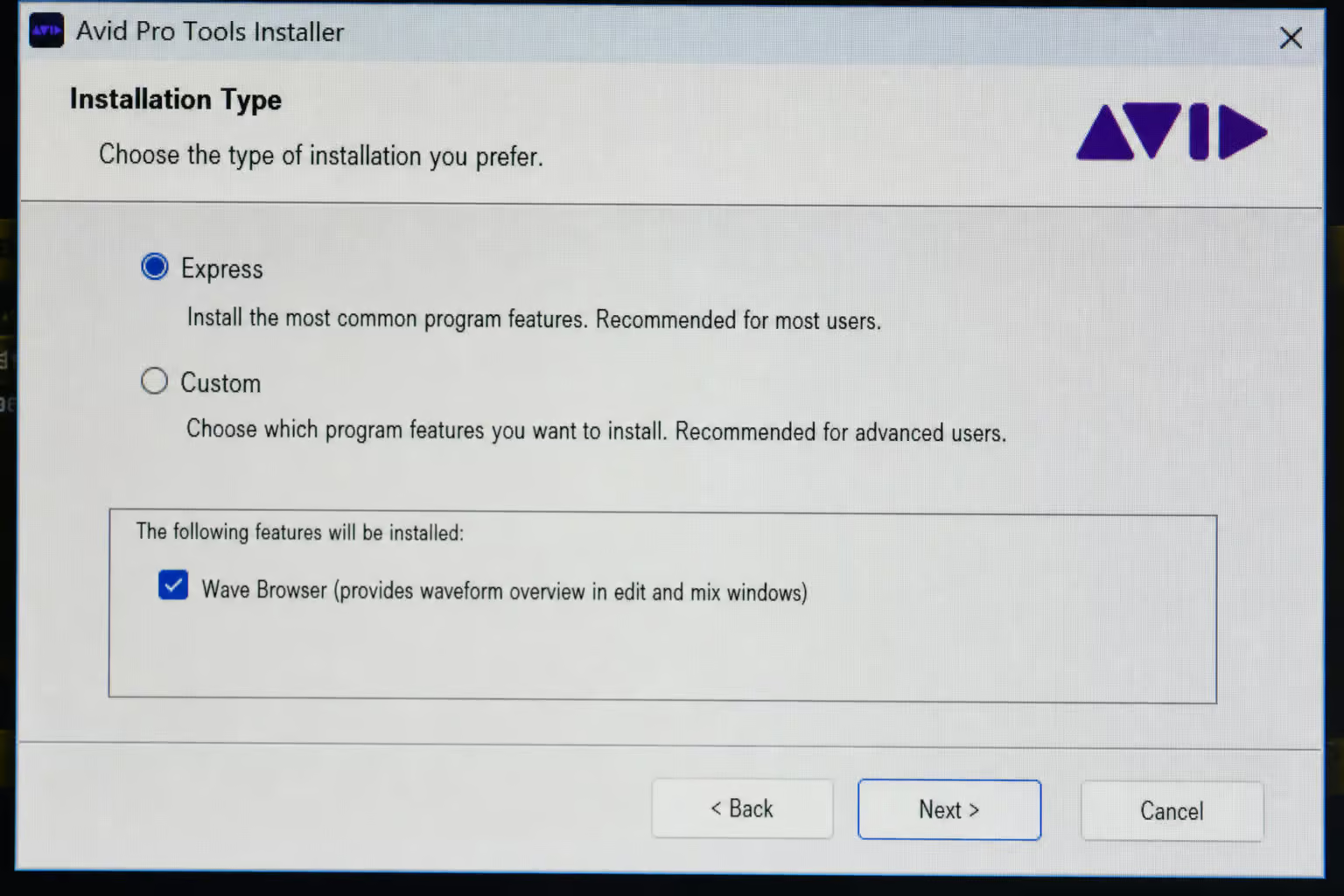
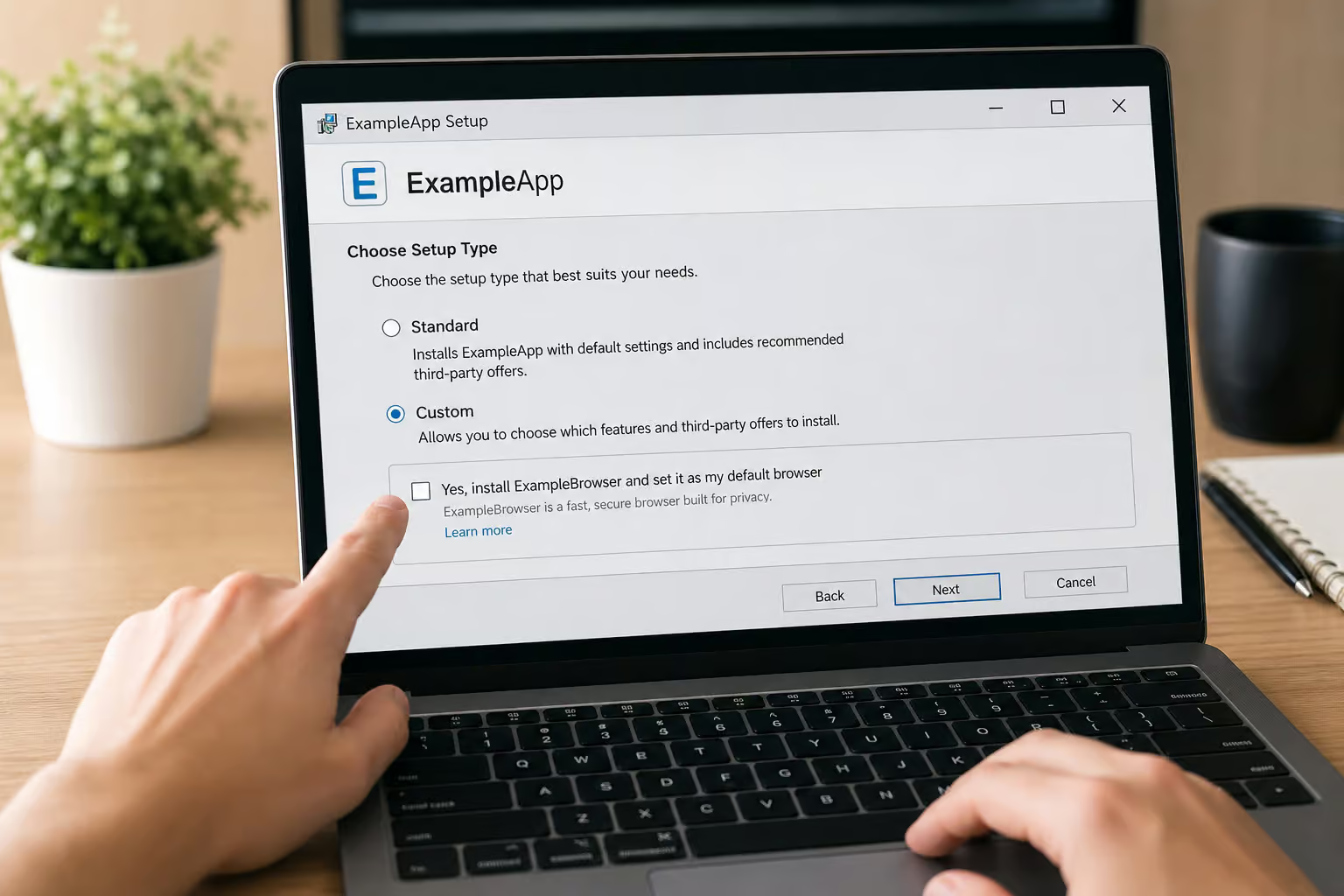
Wave Browser almost never gets installed because someone sought it out and deliberately chose it; it is spread through distribution channels that install it without user consent. It gets installed because someone wanted a PDF converter, a media player, or a driver updater, and the installer for that program came with a pre-checked box offering “Wave Browser” as a bonus. The installer defaults to “Express” or “Recommended” mode, which hides the bundled offer; the user has to actively choose “Custom” or “Advanced” to opt out. The user has to actively choose “Custom” or “Advanced” to opt out.
This is consent laundering: you agreed to install something, and the adware hides inside that authorization. The installer’s phrasing makes it seem like you’re accepting a useful utility, not a browser that’s about to hijack your homepage.
Two installer types with real file details
Thanks to detailed posts on the BleepingComputer forum, we know what these installers look like:
- Full download:
Wavebrowser_ajpko2tb_.exe(62,792 KB, SHA-256:33111d45c6e463b267685b51faefb49565d3e517a30940338e285c52e019e1a6) — comes fromhxxps://wavebrowser.co, self-contained. - Network installer:
Wavebrowser_frpc0m9a_.exe(934 KB, SHA-256:095e81425ebd375ebc1030b5c3cf03ff4321f58f25b3b86549512097366721f4) — delivered from drive-by sites (Doodle, fake VLC-download pages, etc.) and pulls the rest on installation.
Both unpack the same executables and DLLs. The end result is identical regardless of how it landed on your machine.
A “Download Now” banner promoting Wave Browser appeared on Cloud Helpdesk (the Spiceworks community forum). Even IT professionals aren’t immune to third-party ad networks serving this stuff; it can be launched by accident through bundled software or downloads that haven’t been checked out.
Field note: Two installer hashes — self-contained and network — both unpack the same payload, so file size alone won’t tell you which variant hit your system.
Symptoms and Behaviors — What Wave Browser Does on Your System
Once installed, Wave Browser exhibits a range of intrusive behaviors that affect browsing, performance, and privacy. The most immediate symptom users report is browser hijacking and search redirection.
Browser hijacking and search redirection
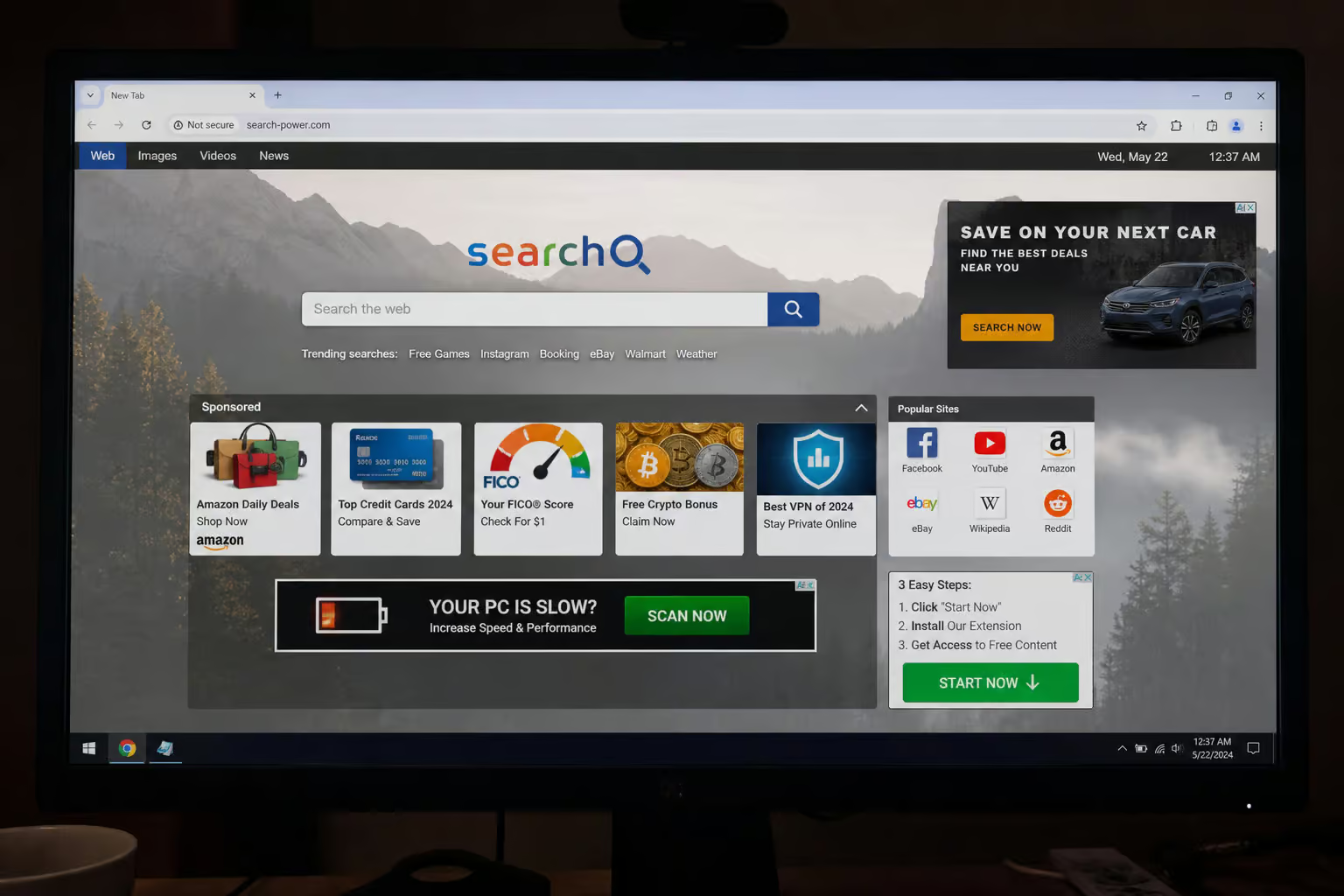
The first thing people notice: their homepage changed by itself; Wave Browser is a browser hijacker that changes homepage and search engine settings. The default search engine now points to an attacker-controlled domain. Every search query routes through an intermediary that injects sponsored results and skims click revenue. New-tab pages get stuffed with ads.
A user on BleepingComputer described this: homepage changes, searches go through a domain nobody recognizes, and a toolbar appeared that nobody installed.
Ad injection and unwanted toolbars
Ads start appearing on pages that never had them before; it causes ads to appear. Pop-ups and pop-unders. Toolbars and browser extensions that suddenly exist without any installation step.
Tracking, profiling, and data collection
Beyond the visible annoyances, Genimous is collecting and storing sensitive user data, including search queries, on Chinese servers. It fingerprints your device for cross-session tracking. That data gets monetized through targeted advertising; data is subject to Chinese laws on data privacy. When tracking involves exfiltration to Chinese servers, it starts looking less like adware and more like spyware; Genimous has a history of browser hijackers.
Performance impact and persistence
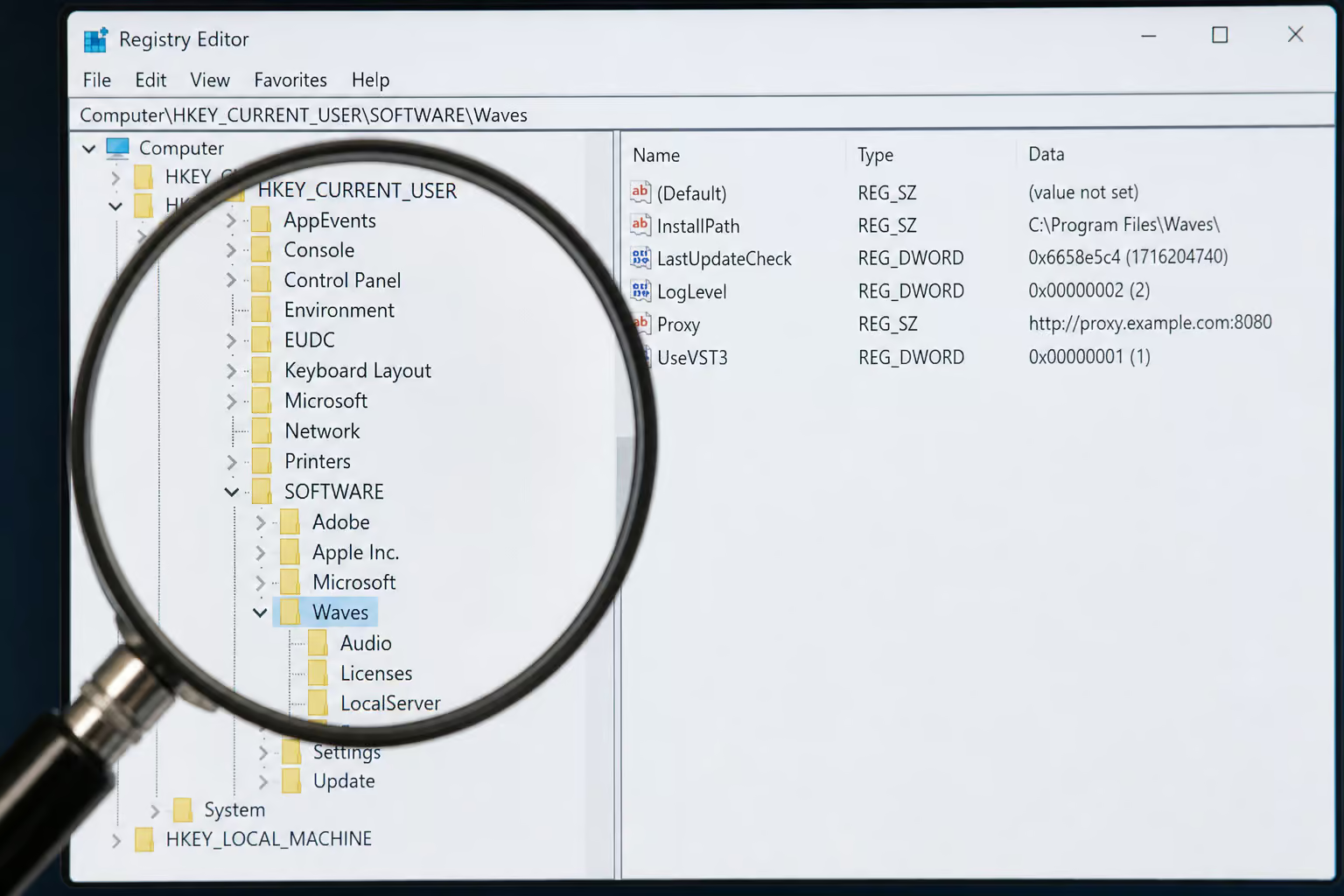
Constant ad rendering and background tracking slow your system; system slows down, apps freeze, mouse cursor stops moving. Network activity spikes from beaconing to ad and tracking infrastructure. Wave Browser makes itself persistent through scheduled tasks, registry keys at HKEY_CURRENT_USERSOFTWAREWavesor and HKEY_CURRENT_USERSOFTWAREWaveBrowser, and files in %APPDATA%Wavesor Software; it survives browser restarts and reboot. It survives browser restarts and often reboot.
PUP vs. Malware — The Gray Zone
Wave Browser is classified as a Potentially Unwanted Program, but the boundary between PUP and malware is not always clear. The following section examines where that line blurs and why the distinction matters.

Where the lines blur
Adware’s primary goal is ad revenue — it’s visible (pop-ups, hijacked browser); Wave Browser causes ads to appear. But how did Wave Browser get on my computer? It piggybacks on free software installers like Java updaters, PDF converters, and download managers. Spyware’s primary goal is covert surveillance — it’s silent by design.
A PUP is the bucket both fall into when hostile intent isn’t clear-cut. But adware that tracks and exfiltrates behavioral profiles has crossed into spyware territory; it can be a security risk, leading to malware and phishing scams.
Fireball: the adware that was also malware
Check Point reported in 2017 that Fireball had infected 250 million computers worldwide — one in five corporate networks sampled; it was labeled adware because it monetized search, but it was built to run arbitrary code and download further payloads. Operated by Rafotech, a Beijing-based digital marketing agency, it spread by bundling with Deal Wifi and Mustang Browser. It was labeled adware because it monetized search, but it was built to run arbitrary code and download further payloads. That’s malware behavior by any definition.
What this means for Wave Browser
The PUP label describes a business model, not a capability ceiling. Treat a PUP detection as a thread to pull, not a verdict to file; Malwarebytes detects it as PUP.Optional. Wave. Ask: how did it get installed? What came with it?
Can it do more than show ads? If the sample can run code or arrived with other detections, escalate to incident response — isolate the host, scope the infection, consider reimaging.
PUA detections land in a low-priority queue and get bulk-closed. Don’t do that. A PUA hit on a host with an unexplained scheduled task is not an ad nuisance.
Privacy and Security Risks — The Genimous Connection
The risks posed by Wave Browser go beyond annoyance; they involve data collection and exfiltration to servers controlled by Genimous Technology Co Ltd. Understanding what data is collected is the first step in evaluating the threat.

What data is collected
Search queries, browsing history, and device identifiers — stored on Chinese servers under Chinese data privacy laws; Genimous is collecting and storing sensitive user data, including search queries, on Chinese servers. The privacy policy can be modified at any time. Today’s protections may not apply tomorrow. Past research has found how easy it is to de-anonymize data, even when “anonymized.”
Genimous’s track record
The Medium article about a Chinese company that built a large search hijacking operation documents Genimous’s history; Genimous has a history of browser hijackers. This isn’t a new or isolated operation; Genimous has a history of browser hijackers. The same playbook that produced earlier browser hijackers now operates through Wave Browser.
For business or enterprise use, the risks multiply; data is subject to Chinese laws on data privacy. Data stored under a jurisdiction with different privacy standards, combined with modifiable policies, creates exposure that compliance frameworks don’t cover.
How to Remove Wave Browser — A Forensic Removal Guide
Removing Wave Browser requires more than a simple uninstall; you need to confirm its presence first. The steps below will help you verify whether it is on your system before proceeding with removal.
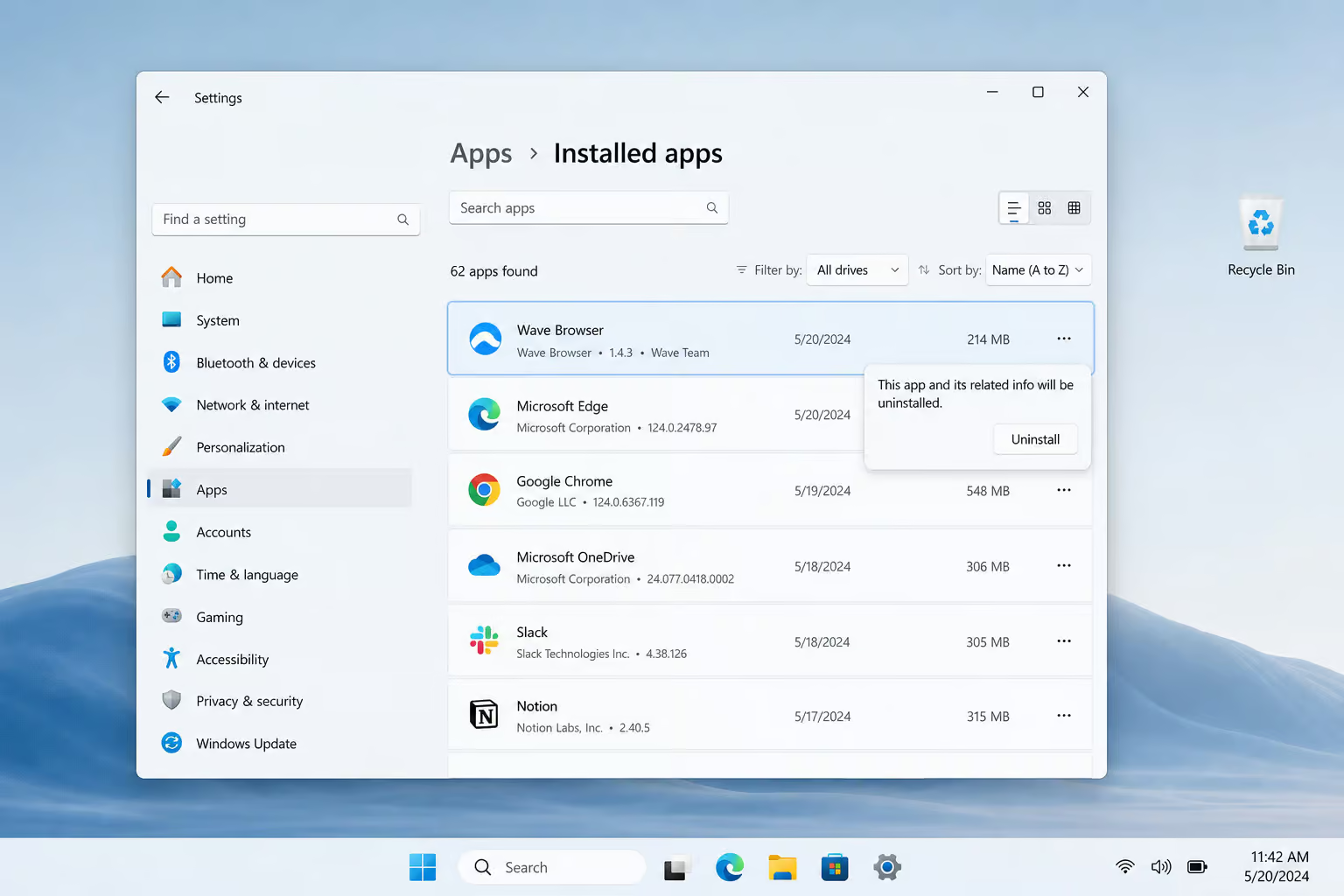
How to confirm it’s present
- Check installed programs for “Wave Browser” or “Wavesor Software.”
- Check browser extensions for unknown add-ons; Wave Browser extension in Google Chrome can be removed via the three-dot menu.
- Scan with Malwarebytes and look for PUP.Optional. Wave; Malwarebytes can detect and remove PUP.Optional. Wave without further user interaction.
- Check network telemetry for beaconing to ad domains; network usage goes up.
- Look for the
%APPDATA%Wavesor Softwarefolder.
Removal on Windows
- Go to Control Panel or Settings > Apps & Features, find Wave Browser, and uninstall it.
- Delete leftover folders:
%APPDATA%Wavesor Software,%PROGRAMFILES%Wavesor Software,%QUICKLAUNCH%WaveBrowser.lnk,%PROGRAMS%WaveBrowser.lnk. - Remove registry keys:
HKEY_CURRENT_USERSOFTWAREWavesor,HKEY_CURRENT_USERSOFTWAREWaveBrowser,HKEY_CURRENT_USERSOFTWAREMicrosoftWindowsCurrentVersionUninstallWaveBrowser.
If you need a deeper walkthrough, check our guide on how to uninstall Wave Browser — it covers safe mode, Autoruns, and scheduled tasks.
Removal on Mac, Android, iPhone/iPad
- Mac: Drag Wave Browser from Applications to Trash, then empty Trash.
- Android: Settings > Apps > select Wave Browser > Uninstall.
- iPhone/iPad: Long-press the app icon, tap X, confirm.
Removing the Chrome extension
- Open Chrome.
- Three-dot menu > More tools > Extensions.
- Find the Wave Browser add-on.
- Click Remove (or the trash icon) and confirm.
When to escalate
If the sample can run code, download payloads, or arrived alongside other detections, treat it as an incident response issue; it can be a security risk, leading to malware and phishing scams. Isolate the host, scope the infection, and consider reimaging. Adware uses the same delivery channels as serious malware — don’t assume it’s a nuisance; it can get into your device and steal personal information or infect it with worse software.
Prevention — How to Avoid PUPs Like Wave Browser
Avoiding PUPs like Wave Browser requires a combination of technical safeguards and user awareness. The technical controls below can block installation before it happens.
Technical controls
- Restrict software installs to vetted sources or an internal application catalog; Wave Browser is spread through software bundling.
- Use application allowlisting and least privilege — users without local admin can’t complete bundled installs; Wave Browser is spread through distribution channels that install the browser without user consent.
- Manage browser extensions with allowlist policies.
- Block known adware and malvertising infrastructure at the proxy and DNS layer; Wave Browser installer file details include SHA-256 hashes.
- Keep PUA detection enabled in your EDR; Malwarebytes detection name: PUP.Optional. Wave. Review the queue instead of bulk-closing.
User awareness — the human factor
Always use custom (not Express) installation mode; the installer defaults to “Express” or “Recommended” mode, which hides the bundled offer. Read every pre-checked box; Wave Browser is spread through software bundling. Download software only from official sources; Wave Browser is spread through distribution channels that install the browser without user consent. Be skeptical of ads offering free downloads; it gets into your system through false ads or software that comes with other software. Understanding consent laundering helps you recognize deceptive installs; if users have chosen to install it there is no problem, but it is also spread through distribution channels that install it without user consent.
For more on how this happens, see our breakdown of how did Wave Browser get on my computer — it traces the bundling vectors.
Buyer rule: If an installer defaults to “Express” mode, you’re opting into every pre-checked bundle — always pick “Custom” and read every checkbox before clicking Next.
Historical Context — Gator and Fireball as Precedents
Wave Browser is the latest iteration of a pattern that’s been running for over two decades; Gator (released 1999 by Gator Corporation) was the template.
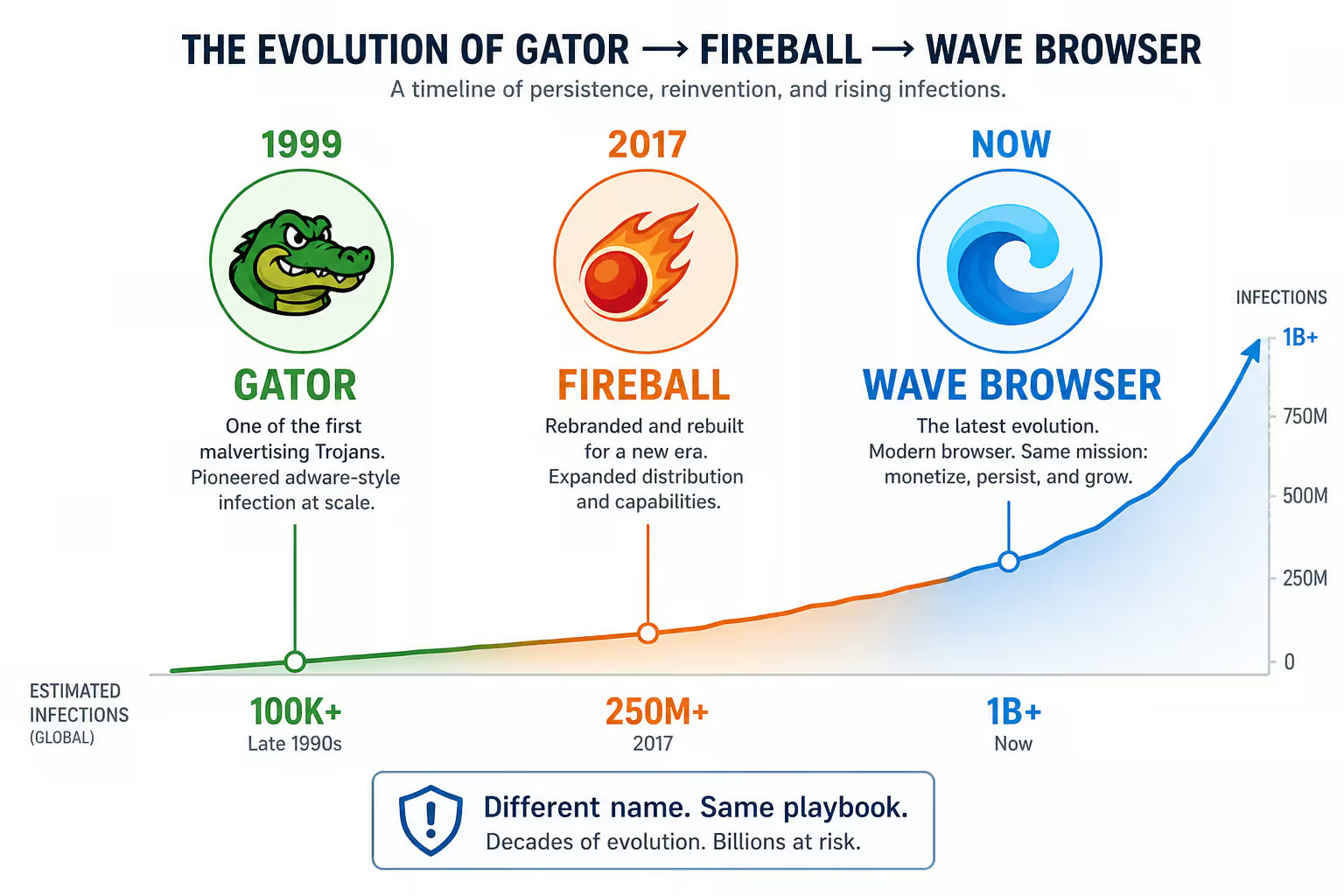
Gator (released 1999 by Gator Corporation, later renamed Claria Corporation in 2003) was the template for the bundled-adware industry; at its peak, it was installed on tens of millions of machines. At its peak, it was installed on tens of millions of machines. It displayed pop-ups over competing websites and tracked browsing habits. Publishers sued. The company rebranded to evade scrutiny.
Fireball (2017, Rafotech) infected 250 million machines and could run arbitrary code; it was labeled adware because it monetized search, but it had full malware capability. It was labeled adware because it monetized search, but it had full malware capability.
Both show that adware describes a revenue model, not a capability ceiling; Wave Browser follows the same playbook: legitimate-looking product, deceptive bundling, data monetization.
Should You Remove Wave Browser? The Bottom Line
If you consciously installed it and use the features — the VPN, ad blocker, task planner, the privacy risk remains; Genimous is collecting and storing sensitive user data, including search queries, on Chinese servers. Your data sits on Chinese servers under Chinese law with modifiable policies. That’s a jurisdiction risk people don’t factor in.
If you found it installed without your knowledge, remove it using the forensic steps above; Malwarebytes removal steps for PUP.Optional. Wave include downloading Malwarebytes and running a scan. The consent wasn’t real.
For enterprises, treat it as a PUP incident requiring investigation of co-installed payloads; Malwarebytes protects users from PUP.Optional. Wave by using real-time protection. Don’t bulk-close the detection; Malwarebytes detection name: PUP.Optional. Wave. Pull the thread.
The decision isn’t about the PUP label; the line between PUP and malware is grey. It’s about consent and data jurisdiction. The PUP label is a business model description, not a safety guarantee.
Frequently Asked Questions
What is the most unsafe browser?
There’s no single winner for that title, but Wave Browser is a strong contender because it blurs the line between adware and spyware. It hijacks your homepage, injects ads, tracks your browsing, and sends your data to Chinese servers under a privacy policy that can change at any time. That combination of deceptive installation and data exfiltration puts it in a dangerous gray zone.
How does Wave Browser end up on my computer without me installing it?
It piggybacks inside installers for free programs like PDF converters, media players, or driver updaters. The installer defaults to ‘Express’ mode, which hides a pre-checked box offering Wave Browser as a bonus. You have to manually choose ‘Custom’ or ‘Advanced’ installation to see and uncheck it — a tactic called consent laundering.
What’s the difference between a PUP and actual malware?
A PUP (Potentially Unwanted Program) is software you probably didn’t mean to install but technically agreed to somewhere in the process. Malware is software with clear hostile intent like stealing data or running arbitrary code. The problem is that adware like Wave Browser can cross that line — the Fireball case infected 250 million machines while being labeled ‘just adware’ before it was found to execute code.
