You’ve seen the landing pages. Every single email verification vendor says they’re “99%+ accurate.” Every single one. It’s so universal you’d think they’re all reading from the same script.
Ok so check this out: At GeekExtreme, we ran those claims through a real test. No marketing fluff, no cherry-picked data. We sent 15 email verification tools to check a set of 3,000 real emails — 2,700 addresses pulled from actual outreach campaigns plus 300 that we knew were invalid. The accuracy we saw? Somewhere between 31.2% and 70%.
Not a single tool hit 99%. The best one, Hunter, still failed on three out of every ten legitimate business emails.
That’s not a bug — that’s the internet being stubborn.
Email verification protects your sender reputation and keeps your deliverability from tanking. But the gap between what vendors claim and what actually happens is wider than most buyers realize. So we dug in — across accuracy, speed, price, integrations, and privacy, to figure out which tools deserve your money and which ones are just good at marketing.
Key Takeaways
No tool hits 99% in real-world conditions. Our independent benchmark of 15 tools on 3,000 real emails found overall accuracy ranging from 31.2% (Snov.io) to 70% (Hunter), with most tools falling between 60% and 68%.
Enterprise domains kill accuracy. Every tool tested scored lower on large-business (201+ employees) domains than on small-business domains. Snov.io dropped from 37.5% on small businesses to 22.4% on large ones — misclassifying three out of four valid enterprise addresses.
Pricing varies wildly, and hidden costs are real. For 10,000 verifications, prices range from $24 (EmailListVerify) to $189 (Snov.io). Watch out for tools that charge for “unknown” results — that can double your actual cost.
Table of Contents
How email verification works (and why 100% accuracy is a myth)
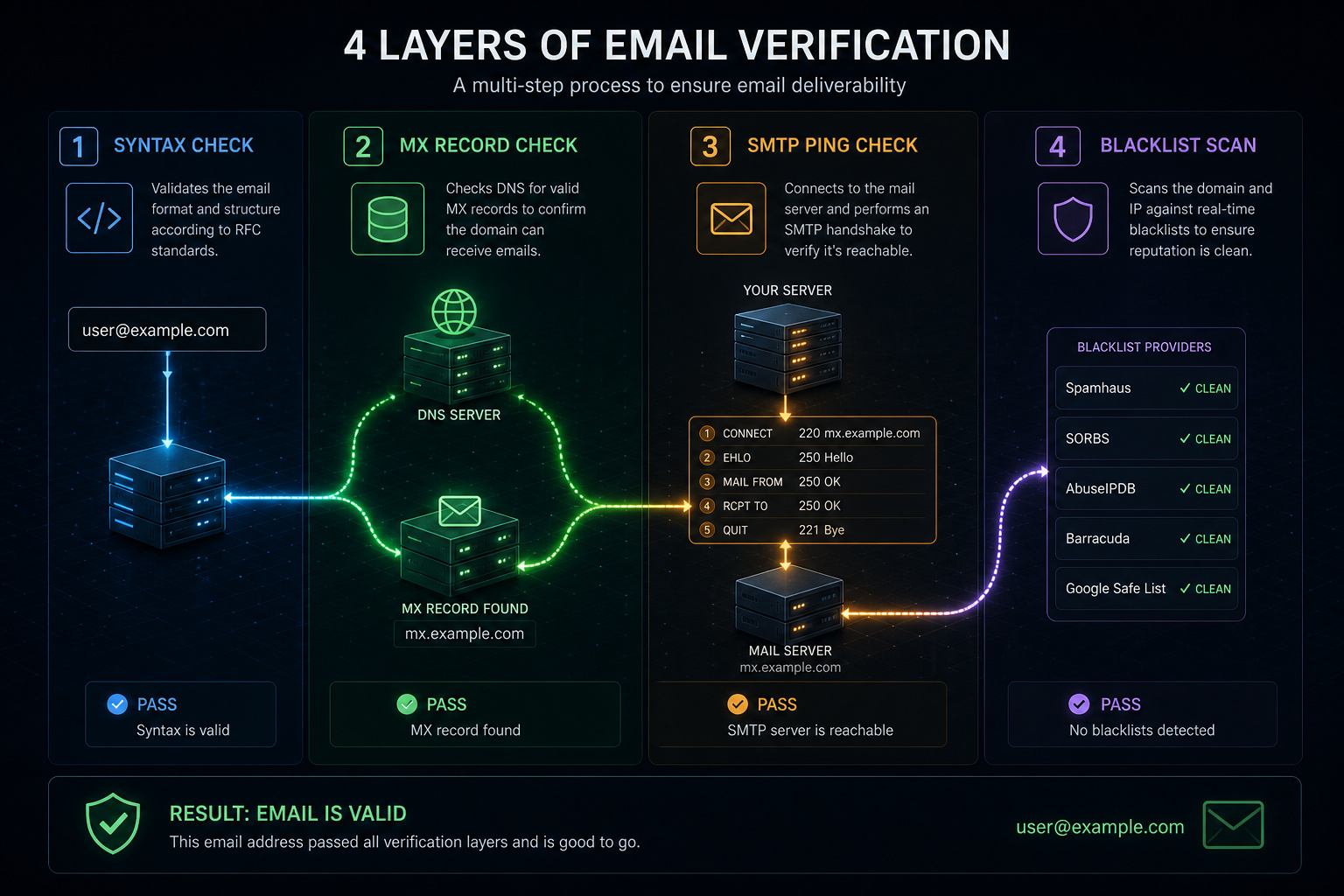
You hit “verify,” and behind the scenes a chain reaction fires off. Most tools run through four layers:
- Syntax check — Is the format valid? Pretty trivial.
- MX record lookup — Does the domain have mail servers configured? Tells you the domain can receive mail, but not that your specific address works.
- SMTP ping — The tool essentially knocks on the mail server and asks, “Hey, does this mailbox exist?” The server either says yes, no, or, this is the key, stays silent.
- Blacklist / spam trap scan — Checks if the domain has a reputation problem.
That third step is where everything falls apart. Many enterprise mail servers (think Exchange or custom security gateways) treat SMTP pings like a nightclub bouncer who won’t confirm if anyone specific is inside. They respond with a generic “maybe” or refuse to answer at all. That’s an “unknown” result, and it’s not a tool failure — it’s a fundamental limitation of the protocol.
Then there are catch-all (accept-all) domains. Some domains are configured to accept email for any address at that domain, so the SMTP ping always says “yes.” Verification tools can’t tell if a specific address is active without actually sending a message. A few tools, like Allegrow, try to infer deliverability using 30+ other signals, but even that has limits.
The upshot? Every tool produces a mix of valid, invalid, and unknown results. Anyone promising 100% accuracy either hasn’t tested on real enterprise lists or is selectively reporting lab results. As we found, the gap between self-reported and benchmark accuracy is enormous.
Field note: Accept-all domains make SMTP pings useless — the server always says “yes.” No verifier can confirm an individual address without sending a real email.
Comparison table: Top email checkers at a glance
Here’s how the top 10 stack up on the metrics that actually matter. Accuracy numbers come from our independent benchmark (where available); self-reported claims are from vendor websites. Prices are current as of time of writing. Note that benchmark data is from a single study with defined methodology — it’s more objective than self-reporting, but it’s not the final word for every use case.
| Tool | Self-reported accuracy | Benchmark accuracy | Free credits | Price for 10K verifications | Speed (emails/hr) | Integrations | Compliance |
|---|---|---|---|---|---|---|---|
| Hunter | 99%+ | 70% | 50 | $149 | 30K | 9-24 | GDPR, CCPA |
| Clearout | 99% | 68.37% | 100 | $58 | 160K | 38 | SOC2, GDPR |
| Kickbox | 99% | 67.53% | 100 | $80 | 60K | 27 | GDPR |
| Bouncer | 99% | 65.43% | 100 | $45 (with discount) | 180K | 16 | SOC2, GDPR, ISO 27001 |
| ZeroBounce | 99% | 60.7% | 100 | $64 | 120K | 45+ | GDPR, SOC2, PCI |
| Emailable | 99% | N/A | 250 | $50 | 300K | 22-92 | GDPR, SOC2 |
| NeverBounce | 99% | N/A | 10 | $50 | 80K | 22-88 | GDPR, SOC2 |
| Alfred | 99.9% | N/A | 250 | $80 | 50K | 5 | GDPR, SOC2 |
| EmailListVerify | 99% | N/A | 100 | $24 | 100K | 11 | GDPR |
| Snov.io | 98% | 31.2% | 50 | $189 | 20K | 45-46 | GDPR |
Benchmark accuracy only available for the six tools included in the independent test. Bouncer price reflects a verified 25% discount link available at time of writing.
Accuracy benchmarks: The real numbers
Let’s talk about that 31.2% for Snov.io. They claim 98% on their site. Our test showed them correctly classifying fewer than one in three real emails. That’s not a rounding error — that’s a fundamentally different approach to verification.
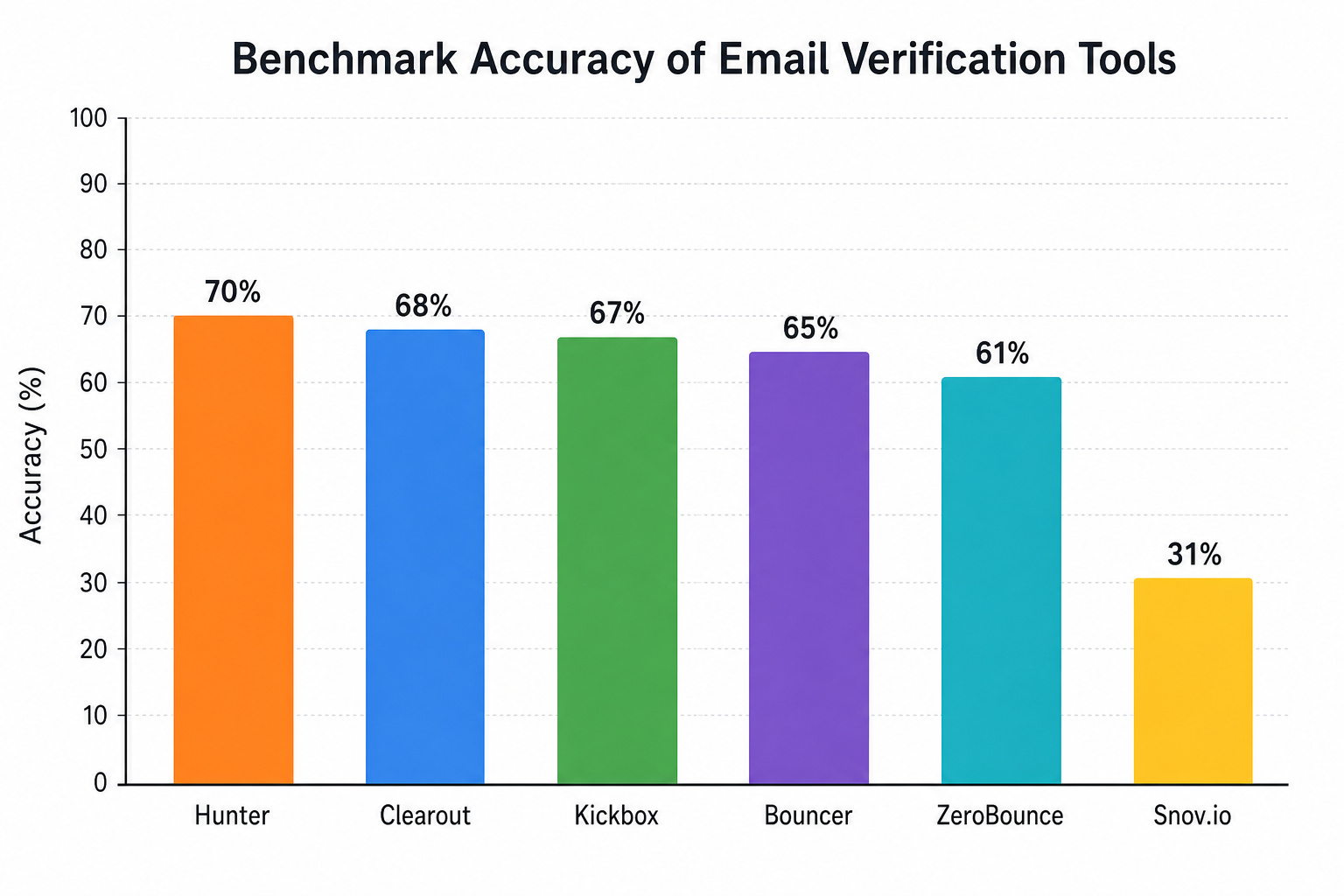
Here’s the full ranking from our benchmark on all 3,000 emails:
- Hunter: 70%
- Clearout: 68.37%
- Kickbox: 67.53%
- Bouncer: 65.43%
- ZeroBounce: 60.7%
- Snov.io: 31.2%
Those numbers are way lower than what you see on pricing pages. Why? Two big reasons. First, these tools are optimized for clean, predictable lists — think Gmail or Outlook addresses.
Our test included a heavy mix of business domains with custom mail servers — the kind where SMTP pings often fail. Second, the emails we tested came from actual outreach campaigns (sourced through Clay‘s platform), which means they include the kind of messy, edge-case addresses that real users deal with every day. Vendor “lab conditions” usually use clean, well-known domains that are easy to verify.
We should also be transparent: those campaign emails came from Hunter’s own outreach tools, so Hunter may have had an advantage — it was testing on addresses it already knew about. That could inflate its score slightly. Even so, Hunter still missed 30% of valid emails. No one’s perfect.
The takeaway? If you see a 99% claim, treat it as a best-case number under ideal conditions. Real-world accuracy on a typical B2B prospect list is likely to be between 60% and 70% for the top tools, and considerably lower for the rest.
Quick test: Run 100 free credits from any tool against your actual prospect list. Compare the “valid” rate to what the vendor claims — you’ll see the gap fast.
Performance by company size: Why your prospect list changes everything
Here’s where it gets interesting. Not all emails are created equal, and your tool choice matters way more depending on who you’re trying to reach.
Our benchmark broke down accuracy by company size for five tools: Hunter, Clearout, Kickbox, ZeroBounce, and Snov.io. The results show a clear pattern: every tool scored worse on larger domains, but some handled the drop way better than others.
Small business (1-50 employees):
- Hunter: 71.3%
- Clearout: 70.7%
- Kickbox: 70%
- ZeroBounce: 69.5%
- Snov.io: 37.5%
Mid-market (51-200 employees):
- Hunter: 69.5%
- Clearout: 66.8%
- Kickbox: 65.1%
- ZeroBounce: 65.8%
- Snov.io: 32.7%
Enterprise (201+ employees):
- Hunter: 69.7%
- Clearout: 69%
- Kickbox: 69%
- ZeroBounce: 66.2%
- Snov.io: 22.4%
See that? Snov.io drops from 37.5% on small businesses to just 22.4% on enterprise domains — it’s misclassifying three out of every four valid enterprise emails. ZeroBounce actually improves its relative ranking on large domains because it’s conservative with “unknown” results, sacrificing some valid hits to avoid false positives.
The practical lesson: If you’re targeting consumers or small businesses, almost any top tool will get you decent results. But if you’re selling to enterprise companies, the tool you pick matters a lot. Hunter, Clearout, and Kickbox all hold fairly steady around 69% on large domains. Snov.io falls off a cliff.
Pricing comparison: What you actually pay per 10,000 verifications
You’ll pay between $24 and $189 for 10,000 verifications. That’s a huge spread, and the cheap end isn’t always a bargain — but neither is the expensive end always worth it.
- EmailListVerify: $24
- Bouncer: $45 (with verified discount link)
- Emailable: $50
- NeverBounce: $50
- Clearout: $58
- ZeroBounce: $64
- Alfred: $80
- Kickbox: $80
- Hunter: $149
- Snov.io: $189
Free credits are a great way to test before committing. Most tools offer 100 free credits — enough to run a small sample. Emailable and Alfred lead with 250 free credits. NeverBounce gives only 10, which is barely a sampler.
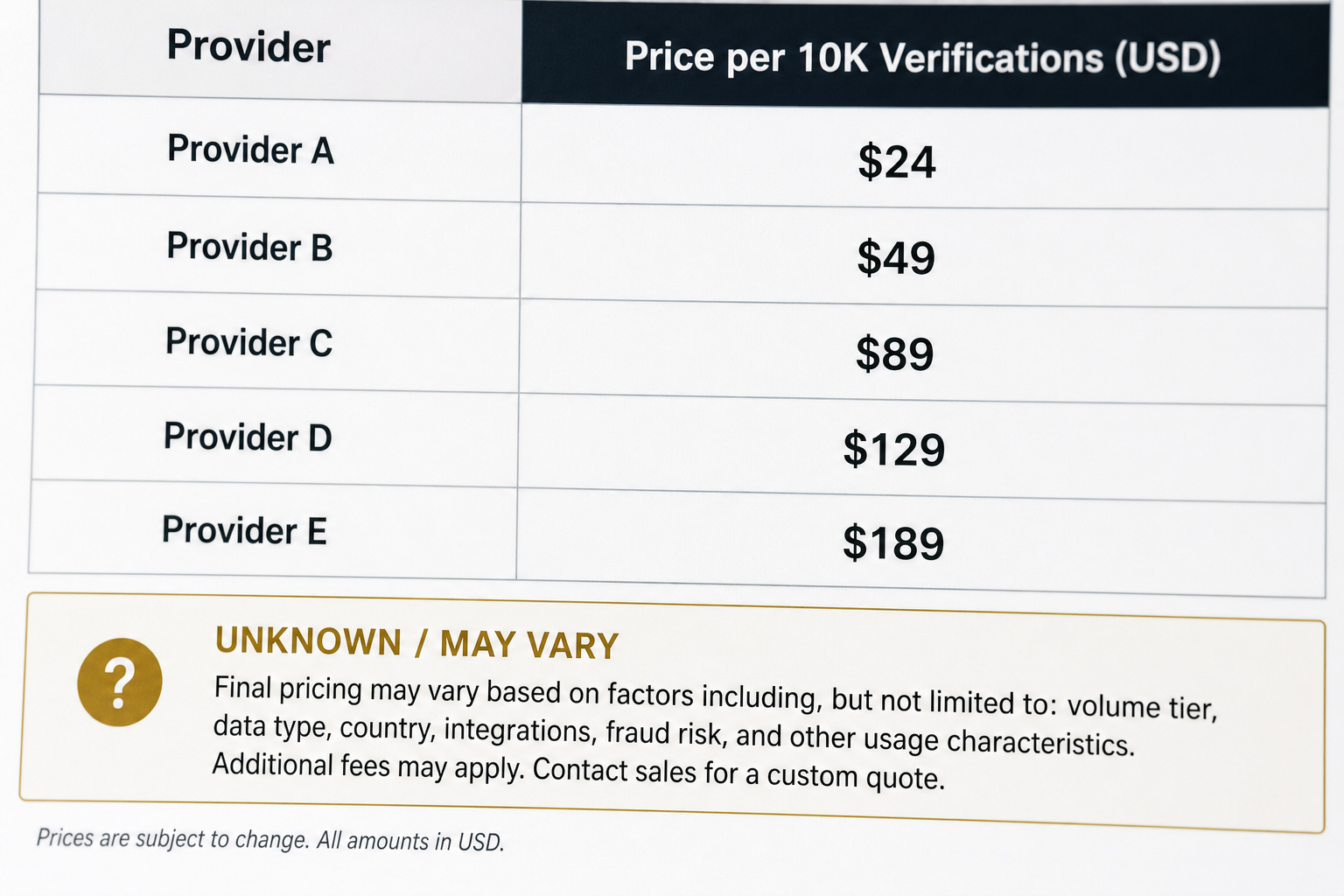
But here’s the tricky part. Some tools charge you for “unknown” results. That means you pay for every email they can’t classify, even though you can’t do anything with that data. Alfred explicitly doesn’t charge for unknowns.
Bouncer doesn’t charge for unknowns in some tiers. Most tools don’t make this obvious on their pricing page. So ask: “Do you bill me for uncertain results?” before you buy.
The real metric isn’t cost per email on the pricing page — it’s cost per successfully verified email that you actually use. If a tool charges $50 for 10K verifications but marks 30% as unknown and bills for those, your effective cost per usable result is much higher.
Cost check: A tool charging $50 for 10K verifications that bills for 30% unknowns effectively costs $71 per 10K usable results. Always ask about unknown billing before purchasing.
Detailed reviews: The 10 best email checkers
Each tool gets a straight-dope breakdown: accuracy data (self-reported, benchmark, observed), key features, pricing model, integrations, compliance, and who it’s actually for.
Bouncer: Best for accuracy, price, and support
Bouncer is the quiet overachiever. It’s not the loudest name, but it hit 65.43% in our benchmark — solidly in the top tier, and its price for 10K verifications ($45 with discount) is among the lowest. That combo of solid accuracy and low cost makes it a strong all-around choice.
Key features: Spam trap detection, toxicity scoring (identifies risky addresses), and an email verification API that returns detailed reasons for failure. Bouncer also offers real-time verification for signup forms.
Pricing: Pay-as-you-go and subscription plans. Free credits: 100. Speed: 180K emails per hour.
Integrations: 16 native integrations including HubSpot, Mailchimp, and Zapier.
Compliance: SOC2, GDPR, ISO 27001. This is the only tool in the roundup that explicitly tells you what happens to your data after verification: auto-deleted after 60 days, with immediate anonymization. That’s unusual transparency.
Bottom line: Best for SMBs and mid-market teams who want a good balance of accuracy, price, and privacy without overpaying.
ZeroBounce: Best for email enrichment and enterprise features
ZeroBounce is a platform, not just a verifier. It scored 60.7% in our benchmark — slightly behind the top three, but its relative performance on enterprise domains (66.2%) is competitive. Where it shines is in everything else.
Key features: Email List Enhancement adds name, geolocation, gender, social media profiles, and IP data to verified addresses. Activity Data shows engagement recency. Inbox Placement Checker tests whether your campaigns land in the inbox or spam folder.
Pricing: Pay-as-you-go and subscription. Free credits: 100. Speed: 120K emails per hour.
Integrations: 45+ native integrations including HubSpot, Salesforce, Mailchimp, Zapier, and Google Sheets.
Compliance: GDPR, SOC2, PCI (payment card industry). Good for regulated industries.
Bottom line: Best if you need enrichment data alongside verification, or if you work in a compliance-heavy field.

Emailable: Best for speed and integration quantity
Emailable doesn’t have benchmark data in our test, but its self-reported specs look impressive. It boasts 250 free credits (the most generous in the list), a claimed verification speed of 300,000 emails per hour (fastest in the roundup), and up to 92 integrations.
Key features: Monitor feature lets you schedule recurring list validations. 99% delivery guarantee — if more than 1% of verified emails bounce, they credit your account. That’s a strong confidence signal.
Pricing: $50 per 10K verifications. Free credits: 250.
Integrations: Claims between 22 and 92 integrations, covering most major CRMs and email platforms.
Compliance: GDPR, SOC2.
Bottom line: Best for high-volume marketers who need speed and schedule-based list maintenance, and want to test with substantial free credits.
Kickbox: Best for email deliverability analytics
Kickbox landed at 67.53% in our benchmark — right up with the leaders. What sets it apart is the suite of deliverability tools it packs beyond verification.
Key features: Proprietary SendEx™ Score predicts inbox placement. Blocklist monitoring alerts you if your domain gets blacklisted. DMARC monitoring helps with email authentication, and an inbox placement checker tests your emails’ deliverability — but how can I verify if an email is legit? That deep-dive guide covers everything from header analysis to SPF/DKIM/DMARC.
Pricing: $80 per 10K verifications. Free credits: 100. Speed: 60,000 emails per hour (slower than some, but acceptable).
Integrations: 27 native integrations, including Mailchimp, HubSpot, and ActiveCampaign.
Compliance: GDPR.
Bottom line: Best for email marketers who want to go beyond list cleaning into deliverability optimization.
NeverBounce: Best bounce guarantee for high-volume senders
NeverBounce has been around a while and has a loyal following. It scored 60.7% in older independent tests (not our benchmark — we tested six tools, and NeverBounce wasn’t in that batch). It’s not the fastest or cheapest, but it has a refreshingly simple refund policy.
Key features: 99.5% verified accuracy guarantee (self-reported). If more than 3% of verified emails bounce, they refund the verification cost. 20% discount for nonprofits. Automated email verification via API.
Pricing: $50 per 10K verifications. Free credits: only 10. Speed: 80,000 emails per hour.
Integrations: 22-88 integrations, including Salesforce, HubSpot, and Mailchimp.
Compliance: GDPR, SOC2.
Bottom line: Best for organizations that want a money-back safety net, or nonprofits looking for a discount.
Hunter: Best overall accuracy (with a caveat)
Hunter topped our benchmark at 70% overall accuracy, and it’s also an all-in-one outreach platform — you can do email finding, verification, and sending in one place. That’s unusual, most all-in-one tools sacrifice accuracy for convenience. Hunter proves that doesn’t have to be the case.
Key features: Integrated email finder and verifier. Native Google Sheets integration (huge for workflow). Cold email campaign tools. Domain search and email list building—plus a built-in guide on how to tell if it’s a scammer email, which reverse-engineers common social engineering patterns like urgency, grammatical quirks, mismatched links, and spoofed headers.
Pricing: $149 per 10K verifications — one of the most expensive. Free credits: 50. Speed: 30,000 emails per hour (slowest in the roundup).
Integrations: 9-24 native integrations (limited compared to ZeroBounce or Emailable), but the Google Sheets integration covers a lot of use cases.
Compliance: GDPR, CCPA.
Bottom line: Best for B2B sales teams who already use Hunter for prospecting and want verification built into their workflow — especially if you target SMBs. The enterprise-domain accuracy is also strong at 69.7%.
Caveat: Our benchmark emails came from Hunter’s own outreach campaigns, so Hunter may have had prior knowledge of those addresses. That could inflate its score. Even so, 70% is still the best we saw.
Clearout: Best real-time verification and form integration
Clearout scored 68.37% in our benchmark — second only to Hunter. It’s a strong all-purpose tool, but its standout feature is real-time email verification for signup forms, which helps you learn how to identify a fake email address instantly.
Key features: Real-time API verifies email the moment a user types it. Phone verification add-on. Bulk email cleaning with detailed reports. 38 integrations covering most platforms.
Pricing: $58 per 10K verifications — good value. Free credits: 100. Speed: 160,000 emails per hour (very fast).
Integrations: 38 native integrations, including Salesforce, HubSpot, Zapier, and Make.
Compliance: SOC2, GDPR.
Bottom line: Best for SaaS companies that need to catch invalid emails at the point of signup, or for teams that want a fast, affordable verifier with strong accuracy.
Snov.io: All-in-one platform with severe accuracy problems
Snov.io claims 98% accuracy. Our benchmark found 31.2% — the worst by a wide margin. On enterprise domains, it dropped to 22.4%. That’s not a minor gap — it’s a fundamental mismatch between what the tool says it can do and what it actually delivers.
Key features: Email finder, drip campaigns, and verification in one platform. 45-46 integrations including HubSpot, Salesforce, and LinkedIn.
Pricing: $189 per 10K verifications — the most expensive in the roundup. Free credits: 50. Speed: 20,000 emails per hour (slowest).
Compliance: GDPR.
Bottom line: Snov.io’s all-in-one convenience comes at a steep cost — both in money and accuracy. If you need a prospecting platform that includes verification, Hunter or NeverBounce are better bets. Only consider Snov.io if you can tolerate a lot of missed valid emails and you value the integrated workflow above all else.
EmailListVerify: Cheapest option for basic list cleaning
EmailListVerify is the budget king at $24 per 10K verifications. It’s not packed with fancy features, but for a one-time list clean on a tight budget, it gets the job done.
Key features: Bulk email cleaning, spam trap detection, and a simple API. No frills.
Pricing: $24 per 10K verifications — cheapest in the roundup. Free credits: 100. Speed: 100,000 emails per hour.
Integrations: 11 native integrations (limited, but covers Mailchimp and Zapier).
Compliance: GDPR.
Bottom line: Best for startups or small businesses that need a low-cost, no-frills option for occasional list cleaning. Don’t expect advanced analytics or enterprise-grade support.
Alfred: Unlimited verification for the brave
Alfred offers a different pricing model: unlimited verifications for a flat monthly fee. That sounds great — until you read the fine print.
Key features: Unlimited email verification (with caveats), duplicate removal, and API access. Claims 99.9% self-reported accuracy.

Pricing: $80 per month for unlimited verifications — but there are limits on how many emails you can queue at once. Free credits: 250.
Integrations: Only 5 native integrations (limited to Zapier and a few others).
Compliance: GDPR, SOC2.
Bottom line: Best for users who need very high volume (millions of emails per month) and don’t mind a bare-bones integration set. The unlimited pricing can work well, but test with the free credits first — the accuracy is self-reported, not independently verified.
Additional email checkers worth knowing about
Beyond the top 10, there are tools that nail niche use cases. Here’s a quick rundown grouped by strength:
Catch-all / B2B specialists:
- Allegrow — Analyzes 30+ signals to determine whether a catch-all domain’s addresses are actually active. It’s the only tool that attempts definitive catch-all status. Not tested in our benchmark, but interesting for B2B prospecting.
- Enrichley — Similar approach, focuses on finding active emails on accept-all domains.
Cost-effective alternatives:
- Debounce — Budget-friendly with a simple interface. Self-reported 99.5% accuracy. No benchmark data available.
- MillionVerifier — Offers a unique “daily verification” subscription model. Good for ongoing list maintenance.
All-in-one platforms (with verification as a feature):
- Apollo.io — Massive database with built-in verification. Convenient but accuracy may vary.
- Skrapp.io — Email finder with verification. Limited integrations.
- GetProspect — LinkedIn prospecting tool with verification capability.
Testing and sandbox tools: – Mailtrap Email Sandbox — Not for production verification; it’s for developers testing email sending in a safe environment.
Others to check:
- Briteverify (legacy tool, still used by some)
- Bounceless (low-cost, but limited integrations)
- Xverify (real-time API, 100 free credits)
- Woodpecker (outreach tool with built-in verification)
- Lead Magic (focuses on LinkedIn lead data)
If your use case is niche — say, you need to handle catch-all domains or you’re on a shoestring budget, these are worth a trial. But for most buyers, the top 10 above offer more proven performance.
Integrations and workflow fit: Beyond the vanity metric
Tool A has 45 integrations. Tool B has 5. That seems like an easy win for Tool A, right? Not necessarily.
The tell is when your primary CRM — the one you live in every day, is a native integration on one tool but requires a third-party connector like Zapier or Make on another. Zapier and Make add latency, potential failure points, and often extra subscription costs. A direct native integration is almost always more reliable and faster.
Here’s how the counts shake out, but remember: relevance beats quantity.
- ZeroBounce: 45+ integrations — covers HubSpot, Salesforce, Mailchimp, Zapier, and Google Sheets.
- Emailable: 22-92 integrations (wide range, depends on how you count)
- Snov.io: 45-46 integrations
- Kickbox: 27 integrations
- NeverBounce: 22-88 integrations
- Clearout: 38 integrations
- Bouncer: 16 integrations
- Hunter: 9-24 integrations (but the Google Sheets add-on is excellent)
- EmailListVerify: 11 integrations
- Alfred: 5 integrations
If you live in HubSpot and Salesforce, most top tools have you covered. If you use something niche like Woodpecker or Kit, check for direct support before buying. Hunter’s Google Sheets integration is a standout for anyone who builds lists in spreadsheets. Bouncer’s Woodpecker integration is unique for cold emailers. Clearout’s real-time form verification integrates well with signup forms.
The bottom line: match your stack first, compare total numbers second.
Compliance and data privacy: What happens after verification
When you upload your prospect list to a third-party service, you’re handing over sensitive data. How do they handle it? The answers vary a lot.

Bouncer is the most transparent. It explicitly states that your data is automatically deleted 60 days after verification, and it’s anonymized immediately. That’s unusual and should be the standard. It also holds SOC2 (security controls), GDPR (EU data rights), and ISO 27001 (broader security management) certifications.
ZeroBounce has GDPR, SOC2, and PCI (payment card industry — important if you handle transactions). It doesn’t advertise a specific data retention policy, so you’d need to ask.
Clearout holds SOC2 and GDPR. Same — no clear retention policy published.

Hunter holds GDPR and CCPA (California Consumer Privacy Act). No SOC2 or PCI.
Kickbox has GDPR only.
Emailable has GDPR and SOC2.
NeverBounce has GDPR and SOC2.
Alfred has GDPR and SOC2.
EmailListVerify has GDPR only.
Snov.io has GDPR only.
What does each certification mean practically?
- SOC2: The service has passed an audit for security controls — data encryption, access management, monitoring. Good for enterprise buyers.
- GDPR compliance: They promise to respect EU data rights (right to access, delete, etc.). Essential if you handle EU contacts.
- PCI: They handle payment data securely. Overkill for verification alone, but a signal of serious security posture.
- ISO 27001: Formal information security management system. Bouncer is the only tool here with this.
If you handle sensitive customer data (healthcare, finance, personal contact info), Bouncer or ZeroBounce are your safest bets. If you’re just cleaning a newsletter list, GDPR compliance is usually enough.
All-in-one platforms vs. dedicated verifiers: The trade-off
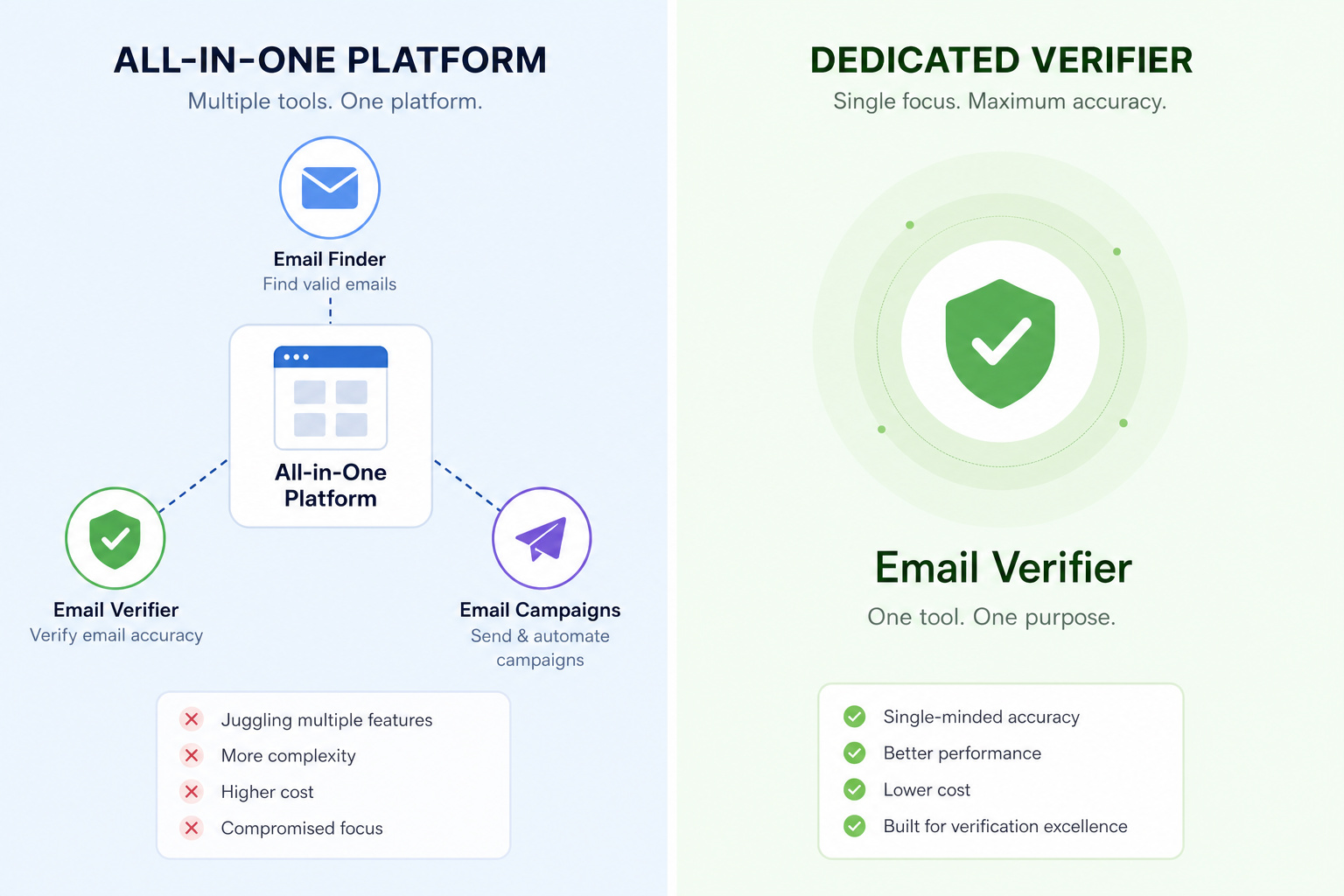
The conventional wisdom says dedicated verifiers are more accurate because they focus on one thing. All-in-one platforms (email finding + verification + outreach) sacrifice accuracy for convenience. Our benchmark data says: it’s complicated.
Hunter is an all-in-one platform (email finder, verifier, cold email campaigns) and it scored 70% — the highest accuracy we saw. That defies the stereotype. Hunter proves that an integrated tool can be at least as accurate as dedicated verifiers, at least for the types of emails we tested.
Snov.io is also an all-in-one platform, and it scored 31.2% — the lowest. That validates the concern. Snov.io’s all-in-one convenience came at a massive accuracy cost.
So what’s going on? Hunter likely benefits from its own data: it knows which addresses it discovered and may have more context on their validity. Snov.io’s verification engine appears to be a commodity add-on, not a core competency. The takeaway is not “all-in-one is bad” but look at the actual accuracy data for the specific all-in-one tool you’re considering.
Other all-in-one options like Apollo.io and Skrapp.io include verification but we don’t have benchmark data for them. If you prioritize workflow consolidation, choose an all-in-one platform with proven accuracy (Hunter) or plan to verify results separately with a dedicated tool.
A practical hybrid approach: use a dedicated verifier (Bouncer, Clearout, Kickbox) for bulk list cleaning, then route verified emails into your outreach tool. That gives you accuracy and automation together.
Buyer’s guide: How to choose the right email checker
There’s no single “best” email checker. But there’s a best one for your situation. Here’s a decision framework based on what we saw in testing.
Six criteria to evaluate
- Accuracy — Look at benchmark data, not just self-reported claims. For B2B lists, expect 60-70%. For consumers, you might see higher. The gap between self-reported and real-world accuracy is the biggest trap.
- Speed — If you’re cleaning 100,000+ addresses, speed matters. Emailable (300K/hr), Bouncer (180K/hr), and Clearout (160K/hr) are the fastest. Hunter (30K/hr) is slow.
- Reporting — Some tools tell you why an email failed (spam trap, invalid domain, catch-all, etc.). Bouncer, ZeroBounce, and Kickbox give the most detail. That helps you decide what to do with unknown results.
- Price — The range is $24 to $189 for 10K verifications. But factor in hidden costs: Does the tool charge for unknowns? Is there a minimum monthly spend? Do you need bulk discounts?
- Support — For mission-critical verification, responsive support matters. Bouncer and ZeroBounce are known for good support. Snov.io’s support quality varies.
- Integrations — Match your CRM first. If you use a niche tool, check for native support. Zapier can bridge gaps but adds complexity.
Decision matrix by use case
- Small business on a budget: Clearout ($58, 68.37% accuracy, fast) or EmailListVerify ($24, basic but cheap).
- Enterprise sales team: Hunter (70%, strong on enterprise domains, integrated outreach) or Kickbox (67.53%, deliverability analytics).
- Compliance-focused (GDPR/SOC2 needed): Bouncer (multi-certified, auto-delete) or ZeroBounce (SOC2, PCI, enrichment).
- High volume (millions of emails): Alfred (unlimited pricing) or Bouncer (fast, bulk discounts).
- Need lots of integrations: ZeroBounce (45+) or Emailable (22-92).
- Real-time signup verification: Clearout (real-time API) or Kickbox (SendEx scoring).
Must-ask questions before buying
- “Do you charge for unknown results?” — If yes, your cost could double.
- “What happens to my data after verification?” — Look for clear auto-delete policies.
- “How does your accuracy vary by domain size?” — If you target enterprises, you need a tool that holds up.
- “Can I test with free credits on my actual list?” — Always test before committing.
Bottom-line recommendations
- Best overall: Bouncer — excellent accuracy-to-price ratio, strong compliance, fast.
- Best for enterprise B2B: Hunter or Kickbox — both handle large domains well and offer workflow/analytics extras.
- Best budget pick: Clearout — under $60 for 10K, fast, and second-highest benchmark accuracy.
- Best for privacy nerds: Bouncer — only tool with explicit auto-delete and triple certification.
- Avoid if accuracy matters: Snov.io — the 31.2% benchmark speaks for itself.
Email verification isn’t magic, and it’s not going to be 99% accurate on your messy real-world list. But with the right tool — and realistic expectations, you can dramatically improve your deliverability, protect your sender reputation, and stop wasting money on dead emails. Start with a free credit trial on your actual target audience, and you’ll know which tool earns your budget.
Frequently Asked Questions
How much does email verification cost per 10,000 emails?
Prices range from $24 to $189 for 10,000 verifications, depending on the tool. But watch out for hidden costs — some tools charge you for ‘unknown’ results, which can effectively double your cost per usable email. Always ask about unknown billing before buying.
What’s the difference between dedicated email verifiers and all-in-one platforms?
Conventional wisdom says dedicated verifiers are more accurate, but it’s not that simple. Hunter is an all-in-one platform that scored 70% in testing — the highest accuracy seen. Snov.io is also all-in-one and scored 31.2%. The key is checking actual benchmark data for the specific tool rather than assuming one category is better.
How do email verification tools actually work?
Most tools run through four layers: a syntax check to validate the format, an MX record lookup to confirm the domain can receive mail, an SMTP ping that asks the server if the mailbox exists, and a blacklist or spam trap scan. The SMTP ping is where things break down — many servers won’t give a straight answer, which is why you get ‘unknown’ results.
Can I test an email verification tool before buying?
Yes, most tools offer free credits — typically 100 verifications, though Emailable and Alfred give 250. Run those free credits against your actual prospect list, not a clean test set. Compare the ‘valid’ rate you get to what the vendor claims on their pricing page, and you’ll see the real-world accuracy gap fast.
