I started digging into password data after seeing yet another breach headline, and what I found was striking. The Cybernews team analyzed over 15 billion passwords — 15,212,645,925 of them, to be exact — and pulled out 2.2 billion unique ones.
In 2026, “123456” is still the most common password in 2026. “qwerty” is still in the top three. “password” itself is still sitting at number four. We’re collectively refusing to learn.
Bottom line: The 15-billion-password dataset proves that password habits have barely changed in a decade — “123456” remains the most common password in 2026.
Mnemonic passwords exploit your memory: a sequence of unrelated words, a mini-story, a sentence you already know. The CISA method uses 4–7 random words. LSU suggests full sentences with personal twists or abbreviation tricks. Each approach trades a tiny bit of theoretical entropy for memorability gains.
Simple Phrase Passphrases: 4–7 Random Words (CISA’s Method)
CISA breaks passphrases into three tiers — Good, Great, Amazing, and the progression is simple.
The CISA passphrase scale
Start with HorsePurpleHatRun. That’s four random words, no separators, no numbers. CISA calls it “Good.” Each word adds roughly 12–13 bits of entropy, so four words land around 48 bits.
You know what else gives you about 48 bits? A 10-character random mixed-case string. But which one are you going to remember in a week?.
Step up to five words: HorsePurpleHatRunBay. That’s their “Great” tier. Now you’re at roughly 60 bits — territory for a master password. Finally, six words with spaces: Horse Purple Hat Run Bay Lifting. That’s “Amazing” — over 70 bits, which exceeds typical brute-force range.
Unique passphrases per account
CISA recommends different passwords for every account, and they’re right — but you can’t memorize 50 unique passphrases. The technique only scales for a handful of critical accounts: your password manager’s master password, email, banking. For everything else, you need a password manager.
The Best Formula: 4–6 Random Words + Separator + Optional Number
After testing a bunch of approaches, Sticky Password‘s compromise formula is the sweet spot. It’s simple, repeatable, and gives flexibility to work with most site requirements.
Hyphens and numbers
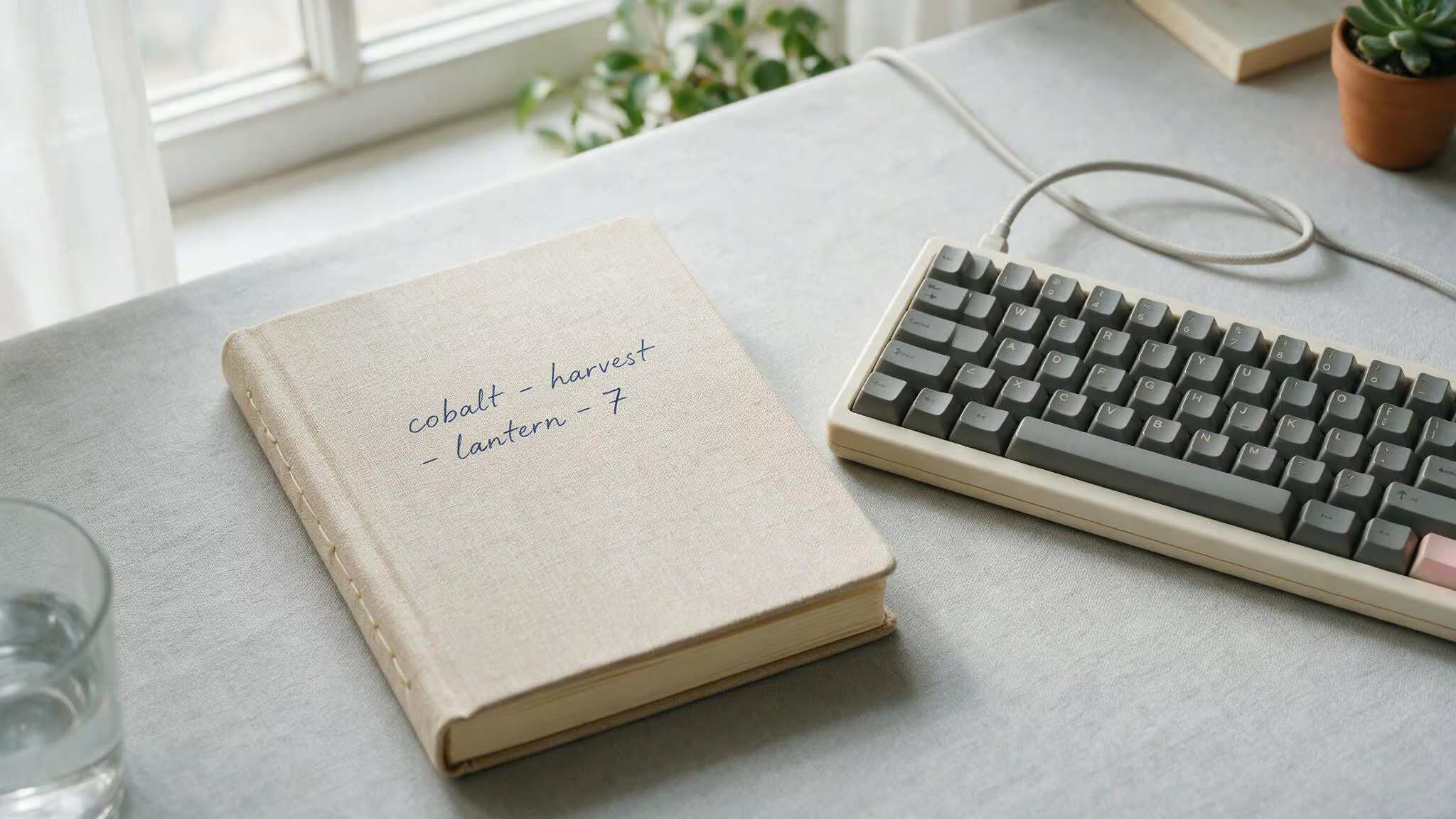
cobalt-harvest-lantern-7 — four words, hyphens, one number at the end. That’s the core pattern. Lantern-Cactus-Orbit-9 is another variant. The separator is predictable (hyphen), the number is small, but the words are still random and unrelated.
Attackers can’t pattern-match against common phrases because there’s no story. You can adapt this easily: piano#galaxy#notebook#3 (using # as separator) or museum_rocket_teacup_41 (underscores, two numbers). The separator adds maybe 3 bits of entropy, but the win is readability. Hyphens are scannable; underscores are slightly less so; symbols like ! or # sit in the middle.
Sentence-like passphrases (mixed case, no separator)
coffeeBeforeSunriseAlways reads like a tiny sentence but is actually four random words glued together. trainLateButStillSmiling tells a relatable mini-story. myUmbrellaHatesWindGusts is quirky to stick in your head. blueMugQuietBalcony77 and ticketStubRedScarfMoon follow the same pattern.
Symbol separators:!, #, _ variants
river!pepper!galaxy!notebook uses exclamation marks — playful, easy to type. piano#galaxy#notebook#3 with hash marks. museum_rocket_teacup_41 with underscores. The tradeoff is readabilty: hyphens > underscores > symbols > no separator. For memory, hyphens win because they visually break the words without adding cognitive load. Symbols like! can be fun but might get confusing if you’re typing on a phone keyboard.
Short-Site Workarounds: 8–12 Character Mnemonic Passwords
Some legacy sites still limit password length to 8–12 characters. You can still build mnemonic passwords within that constraint — just with a clear security compromise.

Two words plus a number
CactusPiano9, OrbitTeacup7, LanternMoss4, quartzKettle8, mangoSphinx3, velvetComet6 — all two random words plus one digit. That’s roughly 25 bits of entropy. Compare that to a weak password like Tiger123 (which uses a common name and predictable number placement), and the mnemonic version is far better. But it’s still much weaker than a 4-word passphrase. Use a mnemonic passwords generator only when you have no other option, and never for a primary account.
Misspelling and mixed-case tricks
caktusOrbit7 — misspell cactus as “caktus” to add ~3–5 bits because attackers have to consider plausible variants. lantrnPiano9 swaps an ‘e’ for a ‘t’. teacupGalaxi4 changes the ‘y’ to ‘i’. Mixed case within the limit also helps: cAcTuSorbit9, LanTERNpian7, orBitTeAcup4. These are still a compromise, but they’re harder to dictionary-attack than simple concatenations. Just don’t fool yourself into thinking they’re strong — they’re a stopgap for bad site rules.
The Abbreviation Technique: Full Sentence to Compact Password
LSU’s guide demonstrates it. Take a long memorable sentence, such as “Where oh where has my little 1 gone?” Then abbreviate it by taking the first letter of each word: Wowhml1g?.
That’s 9 characters that look random to an attacker — uppercase, lowercase, a number, and a symbol. But you know the original sentence, so recalling it is easy.
The original sentence isn’t truly random; it’s a known structure. So this approach sacrifices some entropy. But for sites that force 8–12 character limits, it’s a workaround. The key is to pick a sentence that’s memorable but not a common quote or song lyric.
Another LSU example, “Aren’t tigers awesome and number 1 in the nation?”, is specific to a fandom or personal enthusiasm. That makes it harder to guess than “Mary had a little lamb.”
Are Mnemonic Passwords Secure? The Memorability vs. Strength Tradeoff
A random 16-character string like Yuc8$rT!3gudhxn is stronger on paper. You won’t remember it.
How passphrase entropy compares to random passwords
A 4-word passphrase (~48 bits) is about as strong as a 10-character random mixed-case string. A 6-word passphrase (>70 bits) is beyond typical brute-force range. A random 16-character string (like the ones password managers generate) is stronger — nobody can hold that in their head for more than a few minutes. The tradeoff works for the small set of passwords you have to memorize, as the science of crafting easy passwords to remember but hard to guess applies directly to your master password, email, and banking credentials. For everything else, let the password manager handle the heavy lifting.
When the tradeoff is worth it (and when it isn’t)
If you have more than 10 logins — and most people do, keeping them all unique using memory alone is unrealistic. Memorize one strong mnemonic password for your password manager, then let the manager generate and store long random passwords for every other account. You get security for 99% of your accounts and a manageable memory burden for the one that matters.
Common Mistakes That Ruin Mnemonic Passwords
Data from the Cybernews analysis makes each of these concrete.
1. Personal info (names, birthdays, pets). The most common name in passwords? “Eva.”
Years like “2010” appear nearly 10 million times. If your passphrase includes your kid’s name or graduation year, it’s in the attacker’s first-pass dictionary.
2. Common phrases, song lyrics, quotes. ihatephiladelphia2020! might feel clever, but tells a story — and attackers run dictionary attacks that include common phrases. Lyrics are vulnerable because they’re shared across millions of people.
3. Reusing the same base password with minor tweaks. Emma’s story from CISA is a cautionary tale: she used the same password for her bank and email. A company breach exposed that password.
She received a $700 fraudulent bank transfer alert, then realized she couldn’t log into either account because the attacker had already locked her out. Reuse turns one breach into account takeover.
4. Predictable capitalization and number placement. Tiger123 follows a pattern that cracking tools recognize instantly: capital first letter, common word, sequential numbers. That’s not a strong password — it’s barely better than “password.”
5. Only 2 words or short phrases. Two words gives you maybe 25 bits of entropy. Add “Phoenix Suns” (the most common sports team in passwords) and you’re in dictionary-attack range. Short passphrases are better than “123456”.
The UK ITS Example: chArger-8brocoli-mordor-Penny-bottle
This is a “gold standard” mnemonic passphrase. It’s from the University of Kentucky Information Technology Services, and checks every box:
- 5 random words: charger, broccoli, mordor, penny, bottle
- Mixed case within words (not just the first letter):
chArger,mordor(only lowercase),Penny - Number embedded after hyphen:
-8brocoli - Symbol (hyphen) as separator between all words
- 36 characters total — more than double CISA’s minimum of 16
- No personal info, no predictable patterns
The mordor reference is a geek touch, but it’s still a random word from a large dictionary. This is the reference example for “strongest password” — it’s overkill for most accounts. For a password manager master password, though? Absolutely.
When to Use a Password Manager Instead of Memorizing
The boundary between “I should memorize this” and “let a tool handle it” is clear when you see what happens when people rely on memory alone.
Emma’s story: what happens when you rely on memory alone
Emma used weak passwords and reused them across accounts. Her company suffered a breach, and that password ended up online. She got a $700 bank transfer alert — a fraudulent request. She tried to reset her bank password, but the reset link went to her email, and she couldn’t log into the email because it used the same password. She was locked out of everything. The outcome: she set up a password manager with a friend’s help.
Red flag: If one compromised password can lock you out of both your email and your bank, you’ve created a single point of failure that attackers can exploit.
Ted’s story: the friction of memorizing everything
Ted memorized all his passwords. He took pride in it. In practice, he experienced hesitation, guessing, and repeated lockouts during logins. The friction of memory eventually wore him down. He shifted from memorization to secure management — and found that the mental overhead disappeared.
The Bottom Line
Here’s the system that works, backed by the data I’ve been digging through:
- Create one strong mnemonic passphrase for your password manager’s master password. Use 4–6 random words with a separator and an optional number. Something like
cobalt-harvest-lantern-7or a 5-word variant. - Use a password manager to generate, store, and fill in long random passwords for every other account. Most password managers also identify weak or reused passwords — it’s like a built-in audit.
- Enable MFA on email, social media, and financial accounts. That second factor buys you time even if your password is compromised.
- Recognize phishing attempts and keep your software updated. Software updates close the holes that criminals exploit.
- That’s it. Memorize one great passphrase. Let the machine handle the rest.
People Also Ask
What are some good passwords to remember?
Good passwords to remember are mnemonic passphrases made of 4–6 random words, like HorsePurpleHatRun or cobalt-harvest-lantern-7. These are easy for your brain to recall but hard for attackers to crack because they’re not common phrases or personal info.
Which password should never be used?
You should never use passwords like u0022123456,u0022 u0022qwerty,u0022 or u0022passwordu0022 — they’re still the most common choices and the first things attackers try. Also avoid personal info like names, birthdays, or pet names, as well as common phrases, song lyrics, or predictable patterns like Tiger123.
What is an example of a mnemonic password?
A mnemonic password example is Wowhml1g?, which comes from abbreviating the sentence u0022Where oh where has my little 1 gone?u0022 by taking the first letter of each word. Another example is a passphrase like HorsePurpleHatRun, which strings together four random words your brain can remember as a mini-story.
How does a 4-word passphrase compare to a random password?
A 4-word passphrase like HorsePurpleHatRun gives you about 48 bits of entropy, which is roughly as strong as a 10-character random mixed-case string. The difference is you’ll actually remember the passphrase a week later, while the random string will be gone from your memory in minutes.
What’s the difference between a passphrase and a password?
A passphrase is a sequence of random words (like HorsePurpleHatRun) that’s longer but easier to remember, while a password is typically a shorter, more random string. Passphrases exploit your brain’s ability to recall stories and images, giving you strong security without the mental overhead of a jumble of characters.
How do I create a strong password for sites with 8-12 character limits?
For sites with short limits, use two random words plus a number, like CactusPiano9, or try the abbreviation technique — turn a memorable sentence like u0022Where oh where has my little 1 gone?u0022 into Wowhml1g?. These are compromises, not ideal, but far better than reusing a weak password.
