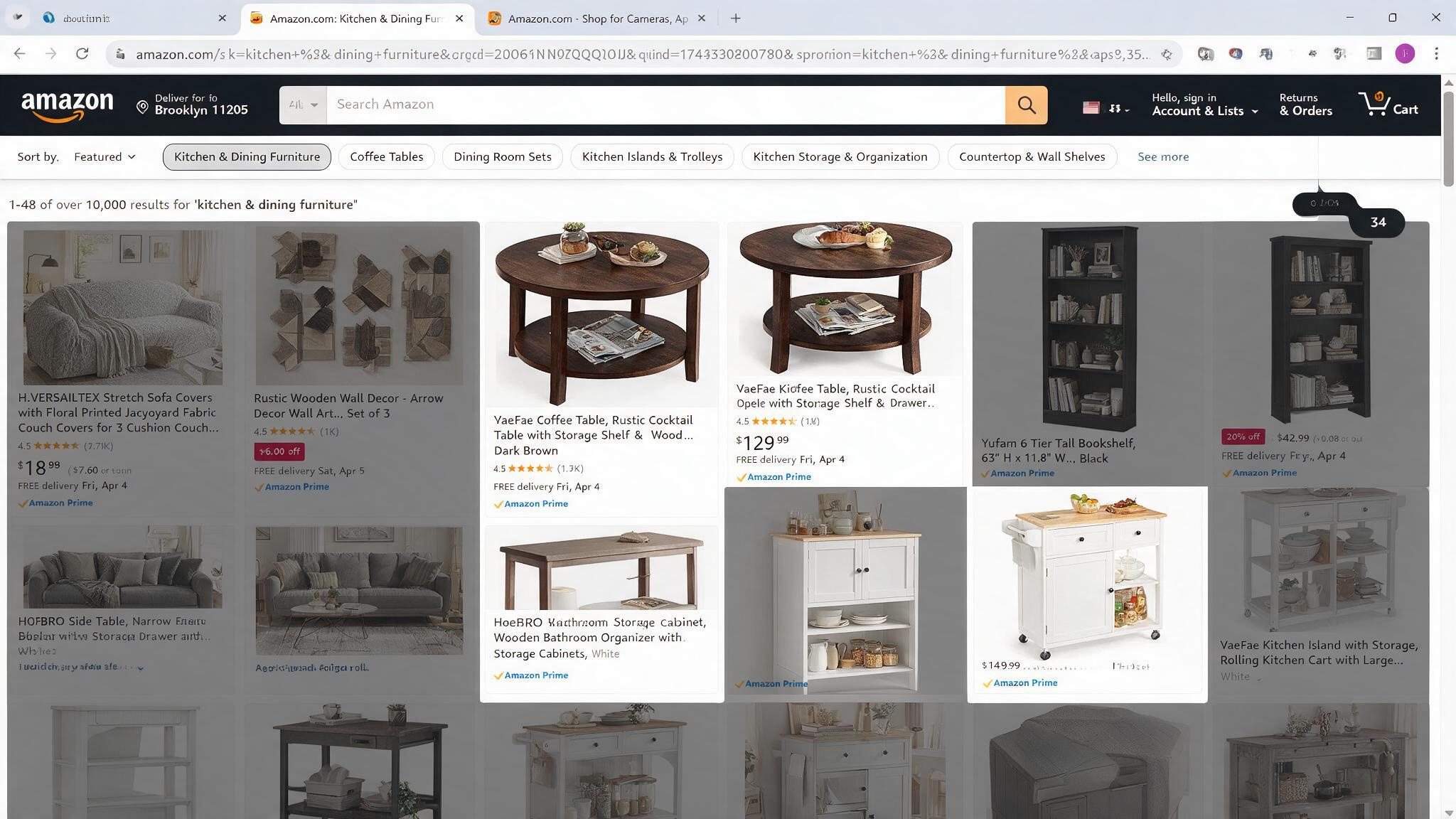
Have you ever been on Amazon looking for something simple—say, a replacement part for a trimmer—and the search results are just a wall of names you can’t pronounce? That’s what happened to developer Josh Pigford. His trimmer wouldn’t crank, he went looking for parts, and instead found listings from brands like SZHLUX, HORUSDY, and LATTOOK. He built a browser extension called Knockoff to filter out that noise. Now it’s gone viral with tens of thousands of downloads after Pigford’s X post got 22,000 likes.
Knockoff checks every brand name on an Amazon page against a detection pipeline: a curated list of ~5,000 known good brands, a set of heuristic rules that catch trademark-squatted gibberish, and your personal allow/block lists. Everything runs locally in a content script with no accounts, no tracking, and no server round-trips on the shopping path, and updates its brand list once a day. The result is a search page that shows you real, established brands instead of random strings filed at the USPTO.
I dug into how it works, what gets caught (and missed), and whether you should install it. Here’s what I found.
Key Takeaways
The 7-step brand resolution pipeline uses your allowlist, blocklist, a seed list, Chinese-major brands, ~5,000 known brands, linguistic heuristics (ALL-CAPS 5–9 chars, vanishing vowel ratios, weird consonant runs), and unbranded detection—first match wins.
In a CNET test drive, it correctly blocked obvious junk like SUNHZMCKP screwdrivers and SACATR spoons, but also falsely flagged Torras (a legit brand sold at Best Buy with thousands of patents) because its name uses all caps.
Known blind spots include mixed-case gibberish like Geinxurn and Mulwark (only caught in Strict mode), un-scanned carousel layouts, and English-tuned heuristics that skip non-Latin listings (Japanese, Arabic) instead of risking a mis-filter.
Table of Contents
The problem: Amazon search is full of brands that aren’t brands
Pigford was about to mow his lawn, his trimmer wouldn’t start, and he hit Amazon for a replacement part. Instead of finding familiar names like Ryobi or Stihl, he saw a dozen unknown brand labels. A user screenshot later showed the first 20 results grayed out by his own extension. That’s the scale of the problem.
These aren’t cheap products—they’re pseudo-brands: random strings someone registered at the USPTO specifically to unlock Amazon’s Brand Registry. That registration lets them get their listing in front of you with a “brand” that looks official, but there’s no company, no warranty, no reputation behind it. You’re buying a commodity product from a name that could be anything.
The extension launched July 7, 2026, and went viral—Pigford’s X post got 22,000 likes, downloads hit tens of thousands.
How Knockoff’s detection pipeline works
It’s a straightforward 7-step check, and the first match wins. Your allowlist is sacred—anything you add there is never filtered. Your blocklist is absolute. Then it checks a seed list of notorious pseudo-brands (in data/flagged-brands.js), followed by a list of legitimate Chinese-owned brands (you can choose to treat them as known or flag them).
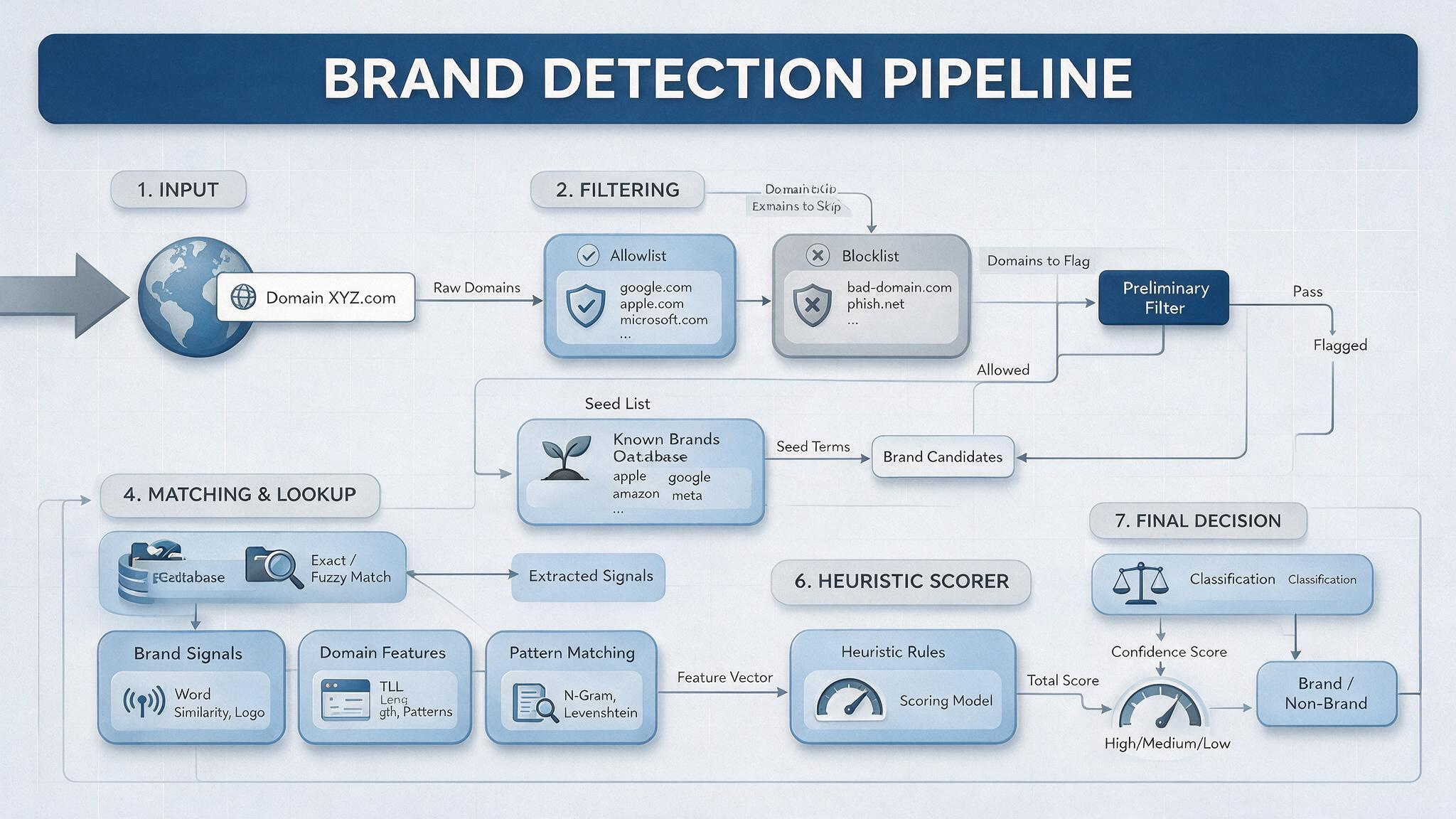
After that, there’s a curated list of ~5,000 established brands (data/known-brands.js plus a community list refreshed daily). If the brand is on that list, it passes.
If it’s not on any list, the heuristic scorer takes over. It lives in src/detector.js and looks for patterns that scream “made-up brand name”: all-caps strings 5–9 characters long, vanishing vowel ratios, unpronounceable consonant clusters, un-English letter pairs, non-Latin characters, and random internal capitalization. High scores get flagged, mid-range scores get marked as suspect.
The key safeguard: the known-brands list always vetoes the heuristics, so real brands like ASICS, RYOBI, and HOKA are never flagged. Without that, ASICS, RYOBI, and HOKA would all be flagged—all caps, short names. Good thing they’re protected.
Three filter levels, three display modes
You can adjust how aggressive the filtering is with three levels:
- Relaxed: only flags known pseudo-brands and your blocklist. Gentle onboarding.
- Standard (default): adds suspect-looking names and unbranded listings. The sweet spot for most people.
- Strict: allowlist-only—shows only items from known brands. Maximum trust exercise.
For the visual treatment, you choose between hidden (a floating pill shows how many items were filtered; one click reveals them), dimmed (faded and desaturated, restores on hover), or labeled (just a warning chip, no hiding). Every filtered item gets a clickable badge where you can trust the brand, block it, show the item once, or report a misclassification.
On product detail pages you get a verdict chip next to the brand byline, but the page is never hidden. Less aggressive, more informative.
Installing Knockoff on Chrome, Firefox, Safari, and beyond
Chrome users grab it from the Chrome Web Store. Firefox users hit the Add-ons page. On any Chromium browser (Edge, Opera, Brave), you can also use extensions like Video Downloader Global to download content directly from your browser, and it works on every Amazon marketplace—.com, .co.uk, .de, .jp—as well as services like OnlyFans.
Safari is the annoying one. You need to wrap the extension in a native app via Xcode. Open safari/Knockoff/Knockoff.xcodeproj, run the Knockoff scheme, then enable it in Safari’s Extensions settings. If you build it unsigned, you’ll also need to allow unsigned extensions in the Develop menu. It’s doable but not one-click.
For anyone who wants to peek under the hood, the extension is plain JavaScript with no build step. Clone the repo, enable Developer mode in Chrome, load the unpacked extension, and you’re in.
Real-world test: what gets caught and what slips through
CNET and 404 Media put Knockoff through its paces across several product categories. The results are a mixed bag that tells you exactly where the tool shines and where it stumbles.
Vacuum cleaners: mostly correct
Shark, Bissell, and Dyson all passed through untouched. A few listings were grayed out, but that was because the product title simply didn’t include a brand name—not because the heuristics misfired.
Solar lights: blocked dozens, kept Brightown
Searches for solar lights hit a minefield. Knockoff blocked Jkimk, Technet, and Tonulax. It correctly kept Brightown, which is a real company based in Raleigh, NC. That’s the kind of win the tool was built for—keeping Brightown visible while blocking Jkimk, Technet, and Tonulax.
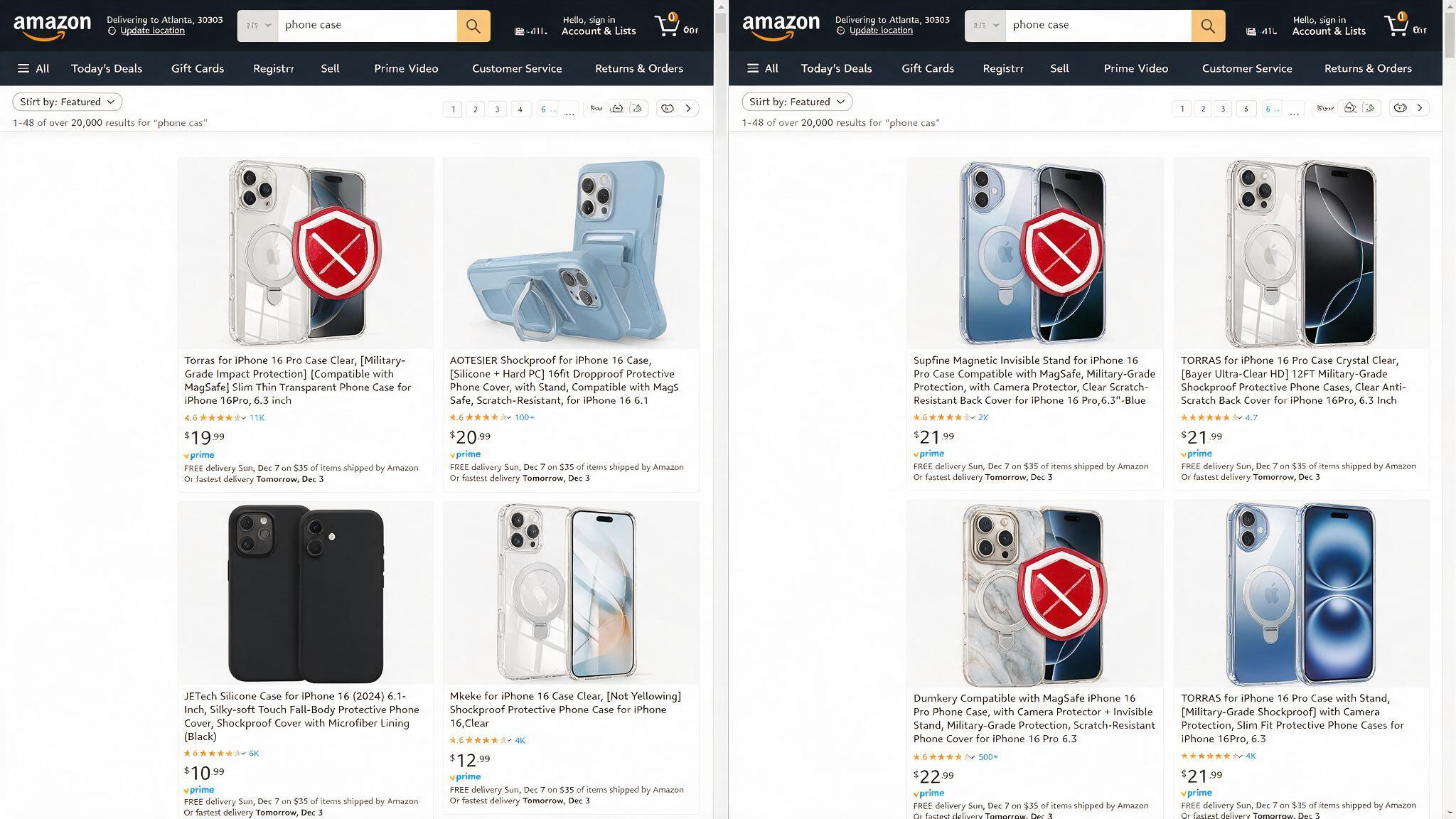
Phone cases: blocked junk but also blocked Torras
Supfine, Dumkery, and Hiearcool were correctly flagged as junk. But Torras—a legitimate brand you can buy at Best Buy, with thousands of global patents—was blocked because its name is stylized in all caps. The extension can’t tell the difference between a real company like Torras and a trademark-squat pseudo-brand, so it’s worth learning how to spot fake emails before scams catch you off guard. You can click “trust” to fix it, but it’s a false positive you have to catch yourself.
Earbuds and tools: correct calls and a weird gap
Tozo and Linsoul (real earbuds brands) were listed as known. Wgge and Horusdy (phony hand tool brands) were properly flagged. But Spec Ops Tools, a legitimate brand, was listed as unrecognized with only a “report as junk” option—no way to say “this is legit” right there. That’s a UI gap.
Known limitations: what Knockoff doesn’t catch and why
The project’s README is honest about where the heuristics fall short.
Mixed-case gibberish slips through Standard mode
Names like Geinxurn and Mulwark look fake to any human reader—mixed-case gibberish that sounds like a keyboard smash. But at Standard (default) level, they score below the suspect threshold. Only Strict mode catches them. The dev acknowledges a bundled character bigram model would fix it properly, and says PRs are welcome.
Carousels and exotic tile layouts aren’t scanned
There’s an extension point in src/content.js called TILE_SELECTORS. If Amazon shows products in a carousel or an unusual layout, Knockoff’s DOM scanner might not target it. Known gap.
Non-English stores are best effort
The name heuristics are tuned for English. Non-English marketplaces get the brand lists and product-page chip (which work everywhere), but the heuristic voting is less reliable. Non-Latin scripts (Japanese, Arabic) are skipped entirely rather than risk mis-filtering. That’s a sensible conservative choice.
Why seller-country lookup was abandoned
The dev considered looking up the seller’s country of origin to help flag suspicious sellers. But it would cost two rate-limited page fetches per product, and Amazon aggressively 503s scrapers. The name-based approach needs zero network calls per product, which is why it’s fast and reliable.
Privacy: runs entirely local, zero tracking
Knockoff makes no accounts, no tracking calls, and no server round-trips while you shop. The only network request is a daily brand-list refresh from api.knockoff.shopping/brands. Everything else—the pipeline, the heuristics, the UI—runs in a content script inside your browser.
Reporting misclassifications goes through a Cloudflare Worker backed by D1. No personally identifiable information is collected; reporter IPs are stored only as salted hashes for rate limiting. If the endpoint is unavailable, it falls back to opening a prefilled GitHub issue. No PII is collected, and IPs are stored only as salted hashes.
Community-driven daily improvements
See a false positive? Click “this is a real brand.” Spot a new pseudo-brand? Click “this is junk.”
Reports are reviewed by hand and added to the daily brand list, so fixes reach every user within 24 hours. No extension update needed—the list just refreshes.
The project is licensed under FSL-1.1-MIT (Functional Source License), which converts to full MIT after two years. That means the code is inspectable now and will become fully open in the future.
Pigford built on prior work: AmazonBrandFilter (which seeded the community allowlist), SoldBy (which taught him what rate-limit headaches to avoid), and The Markup’s Amazon Brand Detector (another reference for spotting sketchy brands). Knockoff’s novel contribution is combining a community allowlist with a heuristic scorer and giving the allowlist veto power. It’s iterative engineering—and that’s fine.
How to spot fake brands on Amazon without the extension
Even if you don’t install Knockoff, you can apply the same logic manually. CNET’s Russell Holly suggests three checks:
- Search for the brand outside Amazon. If it has no website, no retail presence, no independent reviews, it’s almost certainly a pseudo-brand.
- Pay attention to negative reviews and product support. Fake brands often generate fake positive reviews but neglect the negatives. If the only way to report a problem is through Amazon’s chatbot, you’re likely dealing with a dropshipper.
- Find the same product under multiple brand names. Look at the Photos—are the product shots identical? A Broserengy alarm clock / Bluetooth speaker / phone charger combo is nearly identical to a Fansbe product. Same RGB lights, same button placement, same rear USB port. Different brand names, same white-label unit.
For cheap items like zip ties, a no-name brand might work fine and save you a dollar. The heuristic you’re applying is about risk and transparency, not outright avoidance.
Should you install Knockoff? The balanced verdict
Yes—with realistic expectations. It cleans up search results, runs privately, is free, and improves every day through community feedback. The viral popularity (22,000 likes, tens of thousands of downloads) reflects how people wanted this kind of filter.
But it’s not perfect. It will occasionally block a real brand like Torras. It will miss subtle junk like Geinxurn unless you bump to Strict mode. It won’t scan carousels.
And it can’t tell you if a product is good—only that the brand looks like a trademark squat. (Fake brands often have fake reviews, so that’s a separate problem.)
CNET recommends enabling badges for known brands so you can see the verdict chip, then leaving the rest on default Standard settings. Tweak the display mode to your preference—hidden if you want maximum cleanup, dimmed if you want context with a gentle nudge.
At the end of the day, Knockoff is a tool that gives you some control back over a search engine optimized for sellers, not shoppers. Install it, play with the settings, and you’ll probably find Amazon a lot less frustrating.
Frequently Asked Questions
How does Knockoff protect my privacy while shopping?
Everything runs locally in a content script with no accounts, no tracking, and no server round-trips while you shop. The only network request is a daily brand-list refresh, and misclassification reports go through a Cloudflare Worker with no PII collected—IPs are stored only as salted hashes for rate limiting.
What types of fake brand names does Knockoff miss in Standard mode?
Mixed-case gibberish like Geinxurn and Mulwark slips through Standard mode because they score below the suspect threshold. Only Strict mode catches them. The developer acknowledges a bundled character bigram model would fix this properly.
How can I spot fake brands on Amazon without using Knockoff?
Search for the brand outside Amazon—if it has no website or retail presence, it’s likely a pseudo-brand. Check negative reviews and product support; fake brands often neglect them. Also look for identical product photos under different brand names, which indicates white-label dropshipping.
