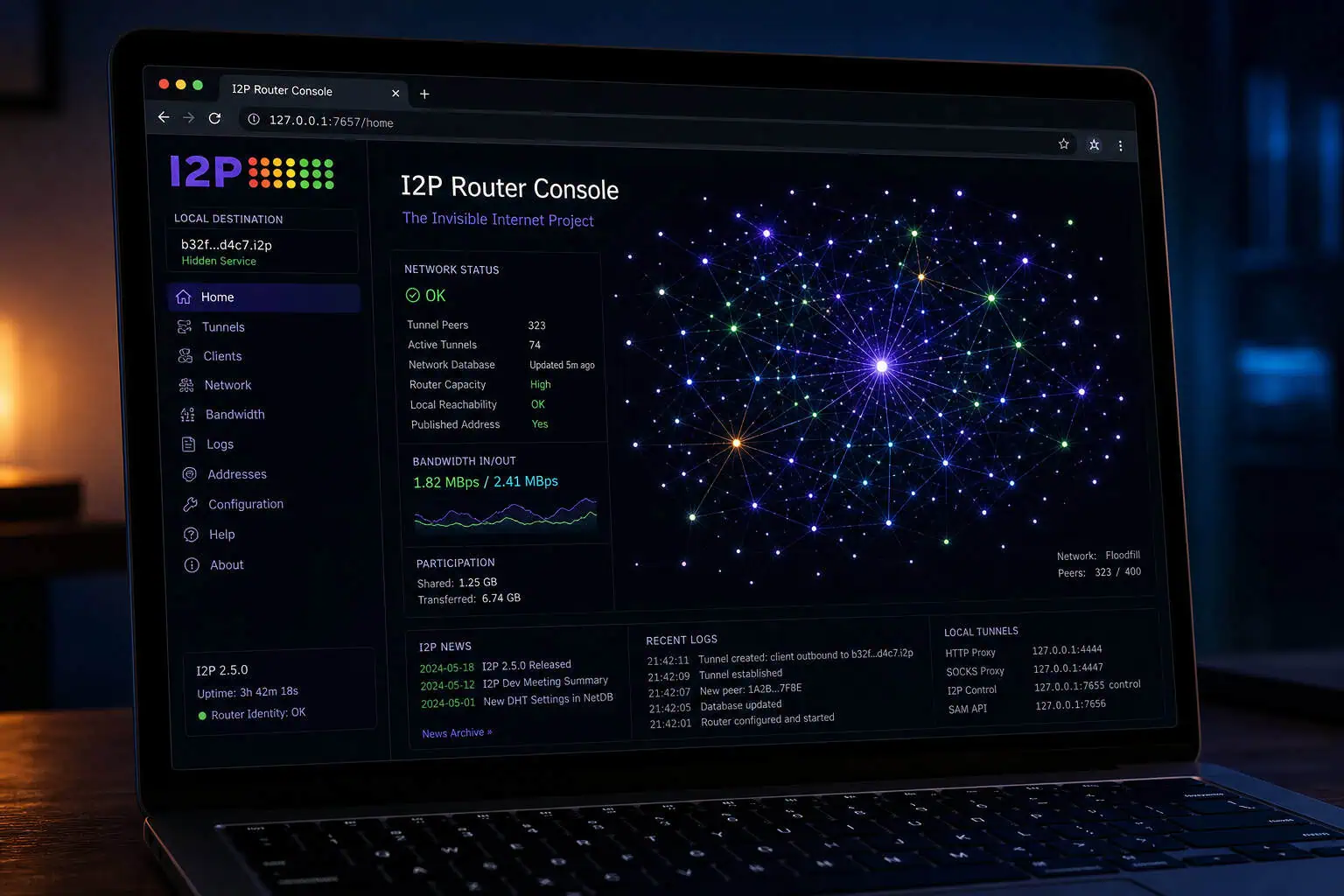
The first time you launch the I2P browser, nothing happens for 30 to 60 seconds. The window opens blank. You refresh. Still nothing. Then, after 30 to 60 seconds, the router console appears at http://127.0.0.1:7657 — and you realize your machine just became a routing node on a decentralized anonymous network.
This is the moment most guides skip. They tell you I2P is “Firefox with a proxy,” but that’s wrong in a way that matters. The I2P browser isn’t just a browser — it’s a full I2P router bundled with a modified Firefox, pre-configured proxy settings, and the ability to host anonymous sites right out of the box. Launching it means your computer starts participating in the I2P network, helping route traffic for others while you browse.
I’ve been digging into I2P lately, and honestly? It’s a structurally different tool from Tor — one that makes a lot more sense once you stop treating it like “Tor for darknet sites.” Here’s what I found.
Key Takeaways
The I2P browser is a bundle containing the I2P router software, a modified Firefox, and proxy settings on port 4444 — launching it turns your machine into a participating router on the I2P network, not just a client.
I2P uses garlic routing (bundling multiple messages like cloves) and unidirectional tunnels (separate paths for sending and receiving), which is structurally different from Tor’s onion routing and bidirectional circuits — optimized for hosting rather than clearnet browsing.
Every Java I2P installation ships with Eclipse Jetty webserver pre-installed, meaning you can host an eepsite by dropping files into the docroot folder — no extra server software needed.
Table of Contents
What Is the I2P Browser? (Not What You Think)
If you’ve only heard about I2P in passing, you’ve probably read something like “it’s Tor but for the dark web.” That’s not quite right — and the distinction matters.
The I2P browser is a bundle containing the I2P router, a modified Firefox, and proxy settings on port 4444. When you download it from geti2p.net, you get three things in one package:
- The I2P router — your machine becomes a node in the network, routing encrypted traffic for other participants
- A modified Firefox — with privacy-focused settings and the I2P proxy hardcoded
- Pre-set proxy configuration — the browser automatically routes traffic through the I2P HTTP proxy on port 4444
The router console at http://127.0.0.1:7657 shows peers, tunnels, hidden services, and traffic. From there you can check how many peers you’re connected to, manage tunnels, configure hidden services, and monitor traffic. It’s a web interface that runs locally — the router itself works in the background.
Every I2P client also acts as a server on the network. Because the network is fully decentralized, your machine helps carry traffic for others. You’re not just browsing anonymously — you’re contributing to the network’s resilience. That 30 to 60 second bootstrap delay on first launch?
Your router is finding peers, building routing tables, and establishing tunnels. It’s not a bug; it’s your machine becoming part of the infrastructure.
I2P vs Tor: Different Tools for Different Jobs
People love to compare I2P and Tor, but the real question isn’t “which is more secure” — it’s which is designed for what you’re trying to do.

| Tor | I2P | |
|---|---|---|
| Primary use case | Anonymous clearnet browsing | Anonymous hosting and internal services |
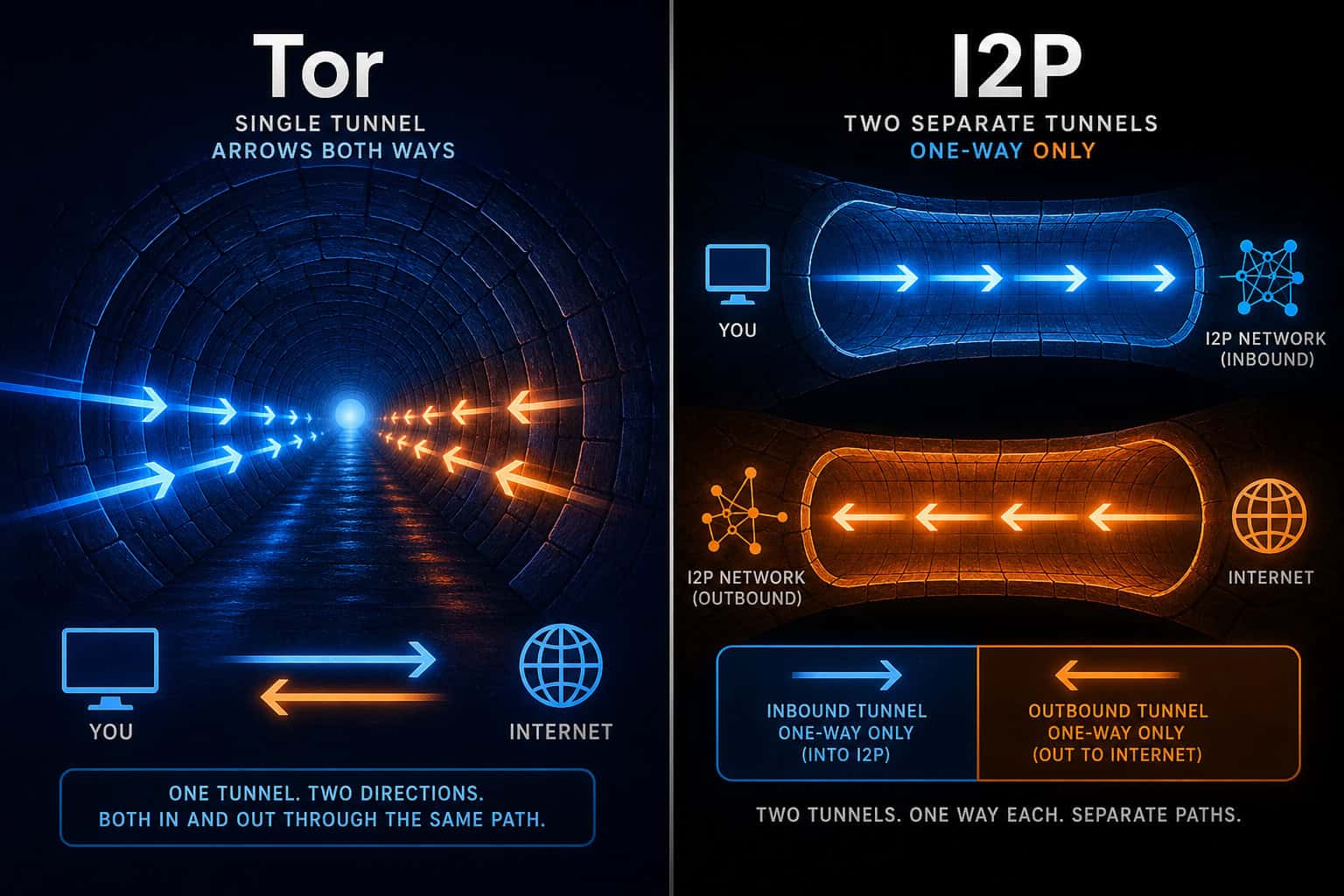
| Routing | Onion routing (bidirectional circuits) | Garlic routing (unidirectional tunnels, message bundling) |
| Path direction | Same path both ways | Different inbound and outbound paths |
| Network architecture | Directory servers (semi-centralized) | Fully decentralized via NetDB |
| Clearnet access | Exit nodes — excellent | Outproxies — unreliable, discouraged |
| Hosting | Onion services (added later as secondary feature) | Eepsites (designed from day one) |
Garlic routing bundles messages together (like cloves) to reduce timing observation risk; onion routing uses a single letter in nested envelopes. Each node peels one layer and passes it along. Garlic routing bundles multiple messages — each called a “clove”, into one packet, each with its own layered encryption and destination. Garlic routing bundles messages together (like cloves) to reduce timing observation risk.
And because I2P tunnels are unidirectional, a single round trip between you and an eepsite uses four tunnels total — your outbound tunnel to them, their inbound tunnel to receive it, then their outbound tunnel back to you, and your inbound tunnel to receive the reply. Each direction takes a different path through the network. Because I2P tunnels are unidirectional, an attacker would need to compromise twice as many routers to trace a conversation compared to Tor’s bidirectional circuits.
Tor is the most well-known dark web; I2P is arguably more anonymous, albeit much smaller. If you want to browse the public web anonymously, the Tor Browser is the right tool. I2P is smaller, which means less traffic to blend into, but also keeps it under the radar of censors and attackers. For hosting an anonymous site, I2P’s architecture uses unidirectional tunnels and garlic routing — but it’s not a competition. They serve different threat models.
How I2P Actually Works Under the Hood
I2P uses 2-3 hop unidirectional tunnels, meaning a single round trip between you and an eepsite requires four tunnels. You don’t need to be a networking engineer to use I2P, but understanding routers, destinations, tunnels, and NetDB explains why things work the way they do — especially the bootstrap delay and the addressing quirks.
Routers vs Destinations. I2P separates the router (your network participation) from destinations (cryptographic endpoints). Running I2P isn’t hidden — your ISP can see you’re running a router. What’s hidden is what you’re doing and which router your destination connects to.
Destinations are public keys, not IP addresses. Inside the network, nodes have garbled text identifiers.

Tunnels. A tunnel is a directional path through an explicitly selected list of 2 to 3 routers. Each router decrypts one layer of encryption to find the next hop — standard onion routing mechanics. Because tunnels are one-way, you maintain a pool of outbound tunnels (sending messages away from you) and inbound tunnels (receiving messages). When a tunnel is about to expire or becomes unusable, the router builds a new one and adds it to the pool.
NetDB. NetDB uses algorithms to share network metadata — routerinfo and leasesets. Two types of metadata are shared: routerinfo (contact info for routers — sent directly) and leasesets (how to reach a destination — sent through outbound tunnels for anonymity). A leaseset contains an inbound gateway, tunnel expiration time, and a pair of public keys.
Garlic routing. Beyond the bundling I described earlier, garlic routing also includes return routing info and status messages in the same packet, reducing round trips. Tunnel build messages are sent via garlic routing.
Encryption. All communication is end-to-end encrypted with four layers total, using ElGamal and AES. Each packet decrypts only the next hop. No IP addresses are exposed inside the network.
I2P is message-oriented — like IP, but has a library for reliable streaming, similar to TCP. Messages can be much larger than IP packets, and they’re addressed to cryptographic destinations, not IPs. That’s a different approach from Tor’s circuit model.
Installing the I2P Browser (and Surviving the Bootstrap)
I2P has applications for Windows, macOS, Linux, and Android. Grab the installer for your OS from geti2p.net:
- Windows, macOS, Linux — Java-based installer (most platforms)
- Android — available, no iOS client yet
- Linux — check your distro’s packages first, or use the Java installer
Run the installer. On Windows, you’ll get an I2P group in your Start Menu. Leave the “start I2P at boot” checkbox unchecked until you’re comfortable — you can toggle it manually.
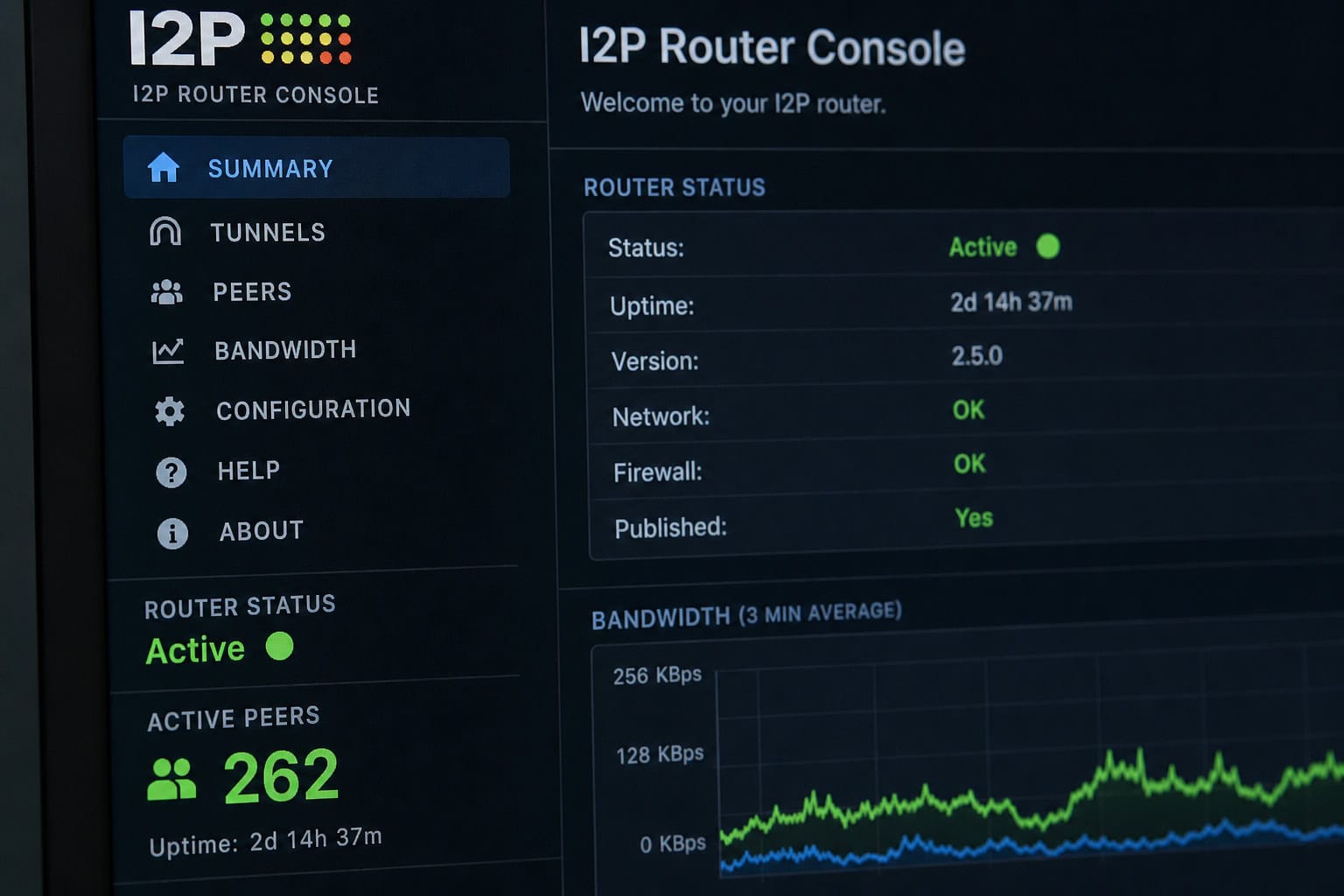
After installation, launch the I2P router (via Start I2P in the menu or command line). Then open a regular browser and go to http://127.0.0.1:7657. You’ll see the router console. Do not open the I2P browser yet — the router needs 30–60 seconds to find peers and build tunnels. If you launch the browser immediately, you’ll see connection errors or blank pages.
Check the router console for “Active” peers in the sidebar. Once you see a number greater than zero, you’re ready.
Now open the I2P browser (it’s a separate shortcut). The proxy is pre-configured to 127.0.0.1:4444. No manual setup needed. Port 4445 is deprecated, and the SOCKS proxy isn’t for browsing — stick with 4444.
To verify everything is working, visit http://127.0.0.1:7657 from within the I2P browser. If it loads, your proxy is routing through the router correctly.
How to Visit Eepsites (and Why .b32 Matters)
An eepsite is a website that lives exclusively on the I2P network — no clearnet access. The site operator and visitors both stay anonymous. They use .i2p domains, but those aren’t real TLDs. They’re just a pseudo-domain for the network.
There are two address types: human-readable.i2p names and auto-generated.b32.i2p addresses.
- Human-readable
.i2pnames — likemysite.i2p. These are convenient but require registration in the I2P address book. If you type one and it doesn’t load, the site probably exists — your router just hasn’t received the address book update yet. Propagation takes hours to 48 hours. - Auto-generated
.b32.i2paddresses — long strings likeabcdef123456...b32.i2p. These are permanent cryptographic identifiers derived from the destination’s private key. They work immediately, no address book needed.
The practical takeaway: if you’re sharing your eepsite with someone, give them the .b32 address first. The human-readable name is a convenience that can break if address books don’t sync.
The I2P browser includes an address book that resolves .i2p names over time. You can also use I2P search engines — identiguy.i2p is a popular one — or browse directory lists shared in I2P communities.
The Honest Limitations of I2P
I2P is not Tor, and using it like Tor will disappoint you.

No clearnet browsing. I2P is designed for internal services (eepsites), not anonymous exit to the public internet. Outproxies exist — they’re exit nodes that let you reach the clearnet, but they’re unreliable, slow, and actively discouraged by the project. For a three-way showdown on how I2P, Tor, and Freenet differ in design philosophy, anonymity guarantees, content sharing, and latency, and which one wins for which geek use case, see I2P vs Tor vs Freenet. In practice, I2P is almost exclusively used for eepsites.
Smaller network. Less traffic to blend into. This cuts both ways: lower scrutiny from attackers, but less anonymity through volume. I2P’s smaller size keeps it under the radar of censors for now.
No official entry/exit points. All peers participate in the mix. Good for decentralization, but it means everyone bears routing load. Your machine will use bandwidth helping others even when you’re just browsing.
Safety tips. Keep the I2P browser updated. Consider disabling JavaScript or using NoScript — the I2P browser can disable it in settings. A detailed i2p vs tor comparison can help you understand how they differ in architecture and threat models, but I2P-over-Tor is technically possible yet not recommended; it adds complexity without much benefit, and current instructions may be outdated (check the Whonix-I2P repo if you must).
Hosting Your Own Eepsite (It’s Easier Than You Think)
Every Java I2P installation ships with Eclipse Jetty webserver pre-installed and pre-configured. You don’t need to install Apache, Nginx, or any additional software. The barrier to hosting is dramatically lower than Tor onion services.
Step 1: Access the Hidden Services Manager
From the router console (http://127.0.0.1:7657), navigate to I2P Internals > I2PTunnel in the left sidebar. Under “I2P Server Tunnels,” you’ll see a default “I2P webserver” entry — not started yet.
Step 2: Configure the Tunnel
Click the entry to open the configuration page. Key fields:
- Name — whatever you like (e.g., “My Eepsite”)
- Description — optional, helps you remember
- Auto Start Tunnel — recommended, so it starts when the router boots
- Target Host and Port — default
127.0.0.1:7658(this is where Jetty listens locally) - Website Hostname — your desired
.i2pdomain (e.g.,mysite.i2p). A yellow warning will appear: QR code and registration auth require a hostname with.i2psuffix.
Advanced Options (Scroll Down)
These defaults are carefully chosen to balance anonymity, performance, and resource usage. Here’s what each setting does and when you might change it.
| Setting | Default | Range | When to Change |
|---|---|---|---|
| Tunnel Length | 3 hops | 0–3 | More hops = more anonymity, slower. Don’t reduce to 1 for speed — cuts anonymity. |
| Tunnel Variance | 0 | Any integer | Adds randomization for security. Default is fine for most. |
| Count (Inbound/Outbound) | 2/2 | Any | More tunnels = better load handling, higher resource usage. Increase for high-traffic sites. |
| Backup Count | 0 | Any | Standby tunnels for reliability. |
| POST Limits | 6 per 5 min per client, 20 total | Adjustable | Increase if you have high-traffic forms. |
Tunnel length defaults to 3 hops (the maximum). Reducing it to 2 or 1 speeds up your site but makes it easier to trace. Variance of 0 means all tunnels are exactly the same length; adding variance randomizes lengths slightly, which can frustrate timing attacks but may increase latency. Inbound/outbound tunnel counts of 2/2 are sufficient for low-traffic sites; raising them to 4/4 or more helps handle concurrent visitors but consumes more bandwidth and CPU. Backup tunnels (default 0) are spare tunnels that activate if a primary tunnel fails — useful for reliability but they consume resources even when idle. POST limits (6 requests per 5 minutes per client, 20 total) prevent abuse; if your site has forms that receive many submissions, you may need to raise these limits.
Step 3: Add Content
Drop your files into the docroot directory. Locations vary:
- Java I2P (Linux):
~/.i2p/eepsite/docroot/ - Java I2P (Windows):
%LOCALAPPDATA%I2Peepsitedocroot - Java I2P (macOS):
~/Library/Application Support/I2P/eepsite/docroot/ - i2pd (Linux):
/var/lib/i2pd/eepsite/or~/.i2pd/eepsite/ - i2pd (macOS):
~/Library/Application Support/i2pd/eepsite/
Place at least an index.html in the docroot. On Linux, verify the I2P process has read access (chown/chmod as needed).

Step 4: Start the Tunnel
Return to the Hidden Services Manager and click Start. Tunnel establishment takes 30 to 60 seconds. Status indicator: red (starting), yellow (partial), green (fully operational). Click Preview to open your eepsite in the browser.
You’ll get two addresses: the permanent .b32.i2p (shown in the tunnel config as “Local destination”) and, after registration, a human-readable .i2p name.
The Private Key Backup You Cannot Skip
This is the most important operational step for any eepsite operator. The file eepPriv.dat is your private key. It generates your .b32.i2p address and proves ownership. Lose it, and you lose your site forever.
- There’s no registrar to appeal to, no password reset, no support team.
- Domain registration is permanent and cannot be re-pointed.
- Anyone with this file can impersonate your eepsite — never share it.
- You’ll need it for migration (new computer) or multihoming (same site from multiple locations).
Default locations:
- Linux:
~/.i2p/eepsite/eepPriv.dat - Windows:
%LOCALAPPDATA%I2PeepsiteeepPriv.dat - macOS:
~/Library/Application Support/I2P/eepsite/eepPriv.dat
Copy this file to at least three secure locations — external drive, encrypted cloud storage, whatever works. If you lose your computer and didn’t back up the key, your .b32 address — your identity on the network, is gone. You can rebuild the site, but you can’t get that address back.
How to Register a Human-Readable .i2p Domain
Once your eepsite is running with a green light and you’ve set a Website Hostname in the tunnel config, you can register a memorable name.
Step 1: Generate Authentication String
From your tunnel configuration page, click the Registration Authentication button. The generated string contains your domain name, destination address, timestamp, and a cryptographic signature. It proves you own the private key.
Step 2: Register with stats.i2p
Visit stats.i2p through your I2P browser. Use the “Add Key” option. Paste the auth string, add a name and description, and check “HTTP Service” if it’s a website.
Step 3: Register with reg.i2p
Visit reg.i2p and use the “Add Domain” option. Paste the same auth string and add a description. Registering with both speeds up propagation and adds redundancy.
Step 4: Wait for Propagation
Initial availability is immediate from the registering service. Network-wide propagation across all address books takes several hours to 24+ hours, and full availability can take up to 48 hours. If people can’t find your site by name, give them the .b32 address in the meantime.
The counterintuitive point: Registration is free and permanent — no renewal, no transfer, no repointing. The authentication string proves you owned the private key at the time of registration, and that binding is permanent. This is the opposite of traditional DNS. The key is the domain.
Closing: Which Tool for Which Job?
I2P and Tor aren’t competitors. They’re different tools optimized for different jobs.
- Want to browse the clearnet anonymously? Use Tor.
- Want to host an anonymous site or access internal I2P services? Use I2P.
- Want maximum anonymity for both? Run I2P inside a Whonix workstation — but that’s a topic for another guide.
One last note on defaults: the I2P browser comes with 3 hops, 0 variance, and 2/2 tunnel counts. That’s already optimal for most users. The most common mistake is reducing tunnel length for speed. Don’t.
An attacker only needs to compromise one router between you and your destination instead of three. The speed gain isn’t worth the privacy loss.
The I2P browser isn’t “better” or “worse” than Tor Browser. It’s a different tool for a different job. Knowing the difference is the whole point. For hosting something anonymously, I2P is the more elegant design. Give it a try.
People Also Ask
Is I2P faster than Tor?
Not generally. I2P’s unidirectional tunnels and garlic routing add overhead that makes it slower for most tasks, especially clearnet browsing. It’s optimized for hosting and accessing internal eepsites, not speed — Tor typically feels faster for browsing the public web.
What’s the difference between I2P and Tor?
I2P uses garlic routing with unidirectional tunnels and is designed for hosting anonymous eepsites, while Tor uses onion routing with bidirectional circuits and is built for anonymous clearnet browsing. They serve different threat models — I2P is better for hidden services, Tor is better for reaching the public web.
How do I host an eepsite on I2P?
Every Java I2P installation includes Eclipse Jetty webserver pre-installed. Drop your files into the docroot folder, configure a server tunnel in the Hidden Services Manager, and start it — no extra software needed. Your site gets a permanent .b32.i2p address derived from your private key.
