
You open Reddit on your laptop, hand the machine to a family member, and then remember: that search bar is still holding last night’s deep dive into a specific health symptom. Or a coworker glances at your phone and sees a thread you’d rather not explain.
But Reddit doesn’t give you a single “nuke everything” button. It gives you four separate data types, each living in a different place, each requiring a different cleanup method. I learned this the hard way after clearing my local viewing history and thinking I was done — only to find old comments still sitting in subreddits, fully visible.
This guide walks you through each layer — what it is, how to clear it, and what it actually accomplishes.
Key Takeaways
Reddit history is four separate things — local viewing history, search history, posts and comments, and profile visibility, and each requires its own cleanup method; there’s no single “delete all” button for public content.
Clearing local history only wipes what’s stored on your device; it doesn’t touch your searches, posts, or comments, so you must repeat the process on every device you use.
The most effective privacy upgrade is the edit-then-delete technique — editing a post or comment to remove identifying details before deleting it reduces what survives in cached snippets and quotes.
Table of Contents
What “Reddit history” actually includes
Reddit history isn’t one pile of data — it’s four distinct categories, each stored differently and each carrying a different risk level.
Local viewing history. This is the stuff stored on your device — which posts you’ve scrolled past, what you’ve clicked on. It lives in your browser or the app’s cache. Nobody else can see it. Risk: low.
Search history. Every query you type into the search bar gets saved per device and per account interface. It’s private — no other user can see your searches, but if you share a device, it’s painfully visible the second someone taps the search bar. Risk: medium.
Posts and comments. These live on Reddit’s servers and are fully public. They appear on your profile, in subreddits, and can be indexed by Google. They can be quoted, screenshotted, and archived by third parties. Risk: high.
Profile visibility. This is about what shows up on your profile page — you can curate it, hide things, or show only certain activity. But curation changes appearance, not existence. Risk depends on what you’re trying to hide.
“Clear local history” only touches that first layer. The rest need separate action.
Method 1: Delete your local viewing history
This is the fastest cleanup you can do, and it’s the only one Reddit gives you a dedicated button for.
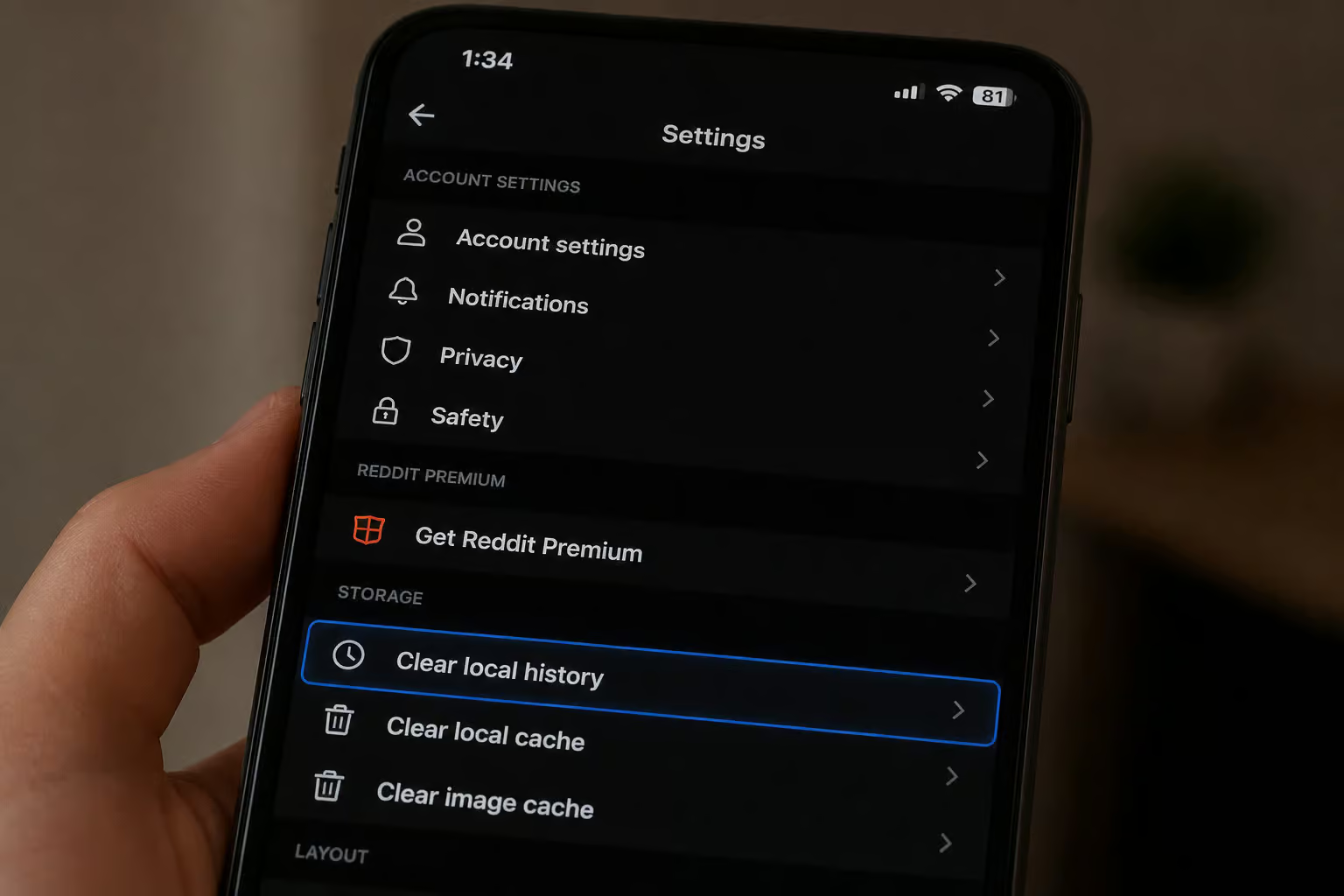
On mobile (iOS and Android): Open the app, tap your profile icon, then Settings ? Privacy ? Clear local history. Confirm. Done in about thirty seconds.

On desktop: You have two options. The in-app method works the same way — click your profile icon, Settings, Clear history. But the more thorough approach is to clear Reddit’s site data from your browser settings. Open your browser’s settings, find the section for cookies or site data, locate reddit.com in the list, and remove its stored data.
This wipes login sessions, preferences, and cached data — a more complete local wipe. You’ll need to log back into Reddit afterward.
Some desktop users also see a “Recent posts” panel with a Clear option. If you see it, use it, but don’t rely on it — it’s a secondary method, not a replacement for clearing site data.
What this does and doesn’t do: It removes locally stored viewing data on that specific device. It does not delete your searches, posts, or comments. And if you use Reddit on multiple devices, you need to repeat this on each one.
Method 2: Clear your Reddit search history
Tap the search bar on a shared device, and a list of your recent queries appears. There’s no “clear all searches” button — I wish there were. You have to remove them one by one.
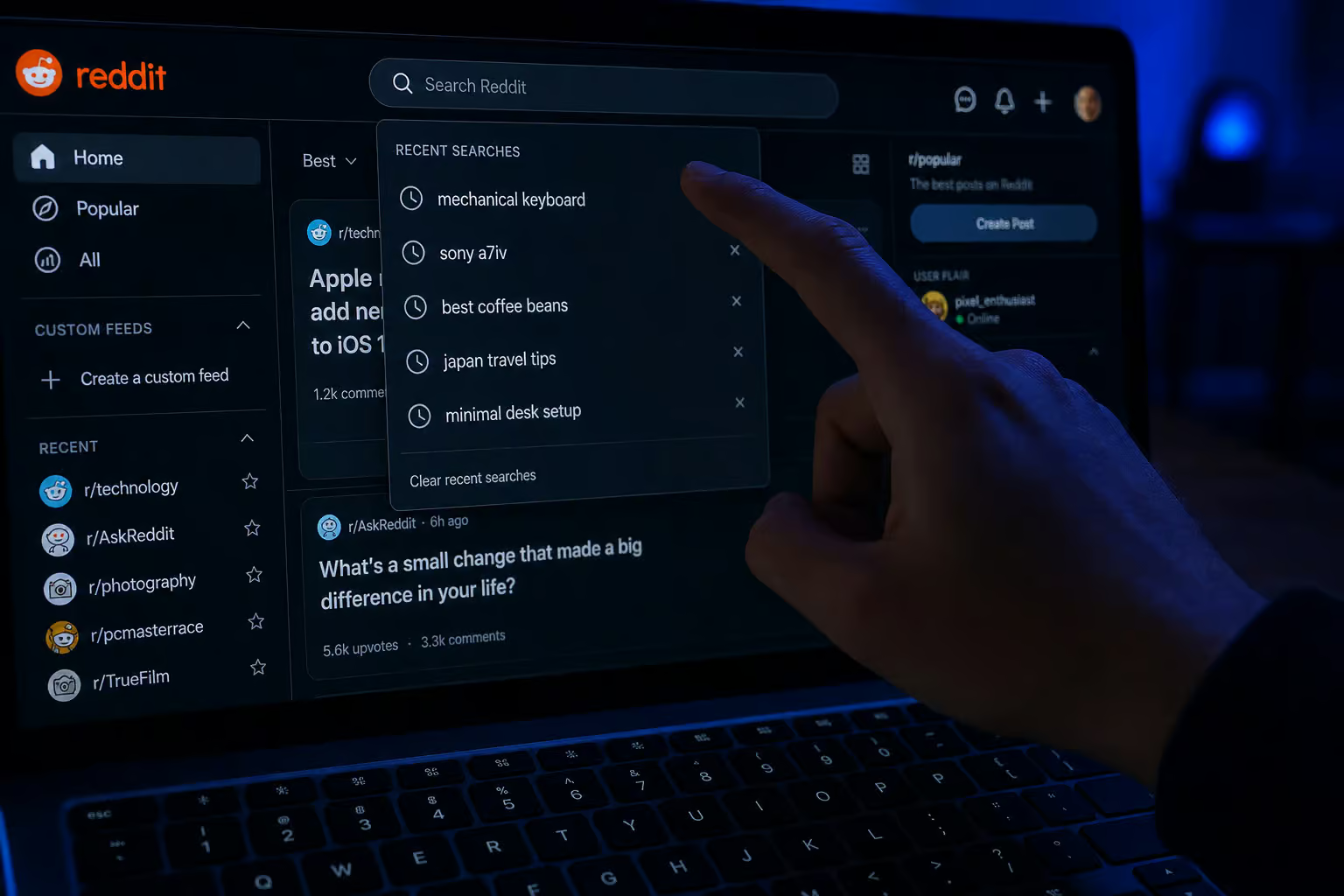
On mobile: Tap the search bar to bring up recent searches. Next to each query you’ll see an X. Tap it, and the query disappears. Repeat until the list is empty.
On desktop: Click into the search bar on the desktop site. Wait for the recent searches dropdown to appear, then click the X beside each term.

Tedious, but it’s the only option. And it’s per-device — clearing searches on your phone won’t clear them on your laptop.
Method 3: Delete your Reddit posts and comments
This is the big one. Your posts and comments are the part of your Reddit history that other people can actually find — on your profile, in subreddits, and in search results.

Manual deletion on mobile: Go to your Profile ? Posts or Comments tab ? tap the three-dot menu on an item ? Delete ? confirm. Repeat for each post or comment you want removed.
Manual deletion on desktop: Same flow — Profile ? Posts and Comments tabs ? three-dot menu ? Delete.
One thing that caught me off guard: deleting a post or comment removes it from your profile page, but it remains in the subreddit where it was posted. People can still see it in the thread, reply to it, quote it. The deletion only removes it from your own profile listing.
The edit-then-delete upgrade: For sensitive content, edit the post or comment to remove identifying details before hitting delete. For example, replace the text with “Deleted for privacy.” This doesn’t erase screenshots or third-party archives, but it reduces what survives in cached snippets and quotes from search engines.
If you have only a handful of posts, manual deletion is fine. If you have hundreds or thousands, you’ll want to consider automation (covered later in this article).
Method 4: Reduce your profile visibility (curate your profile)
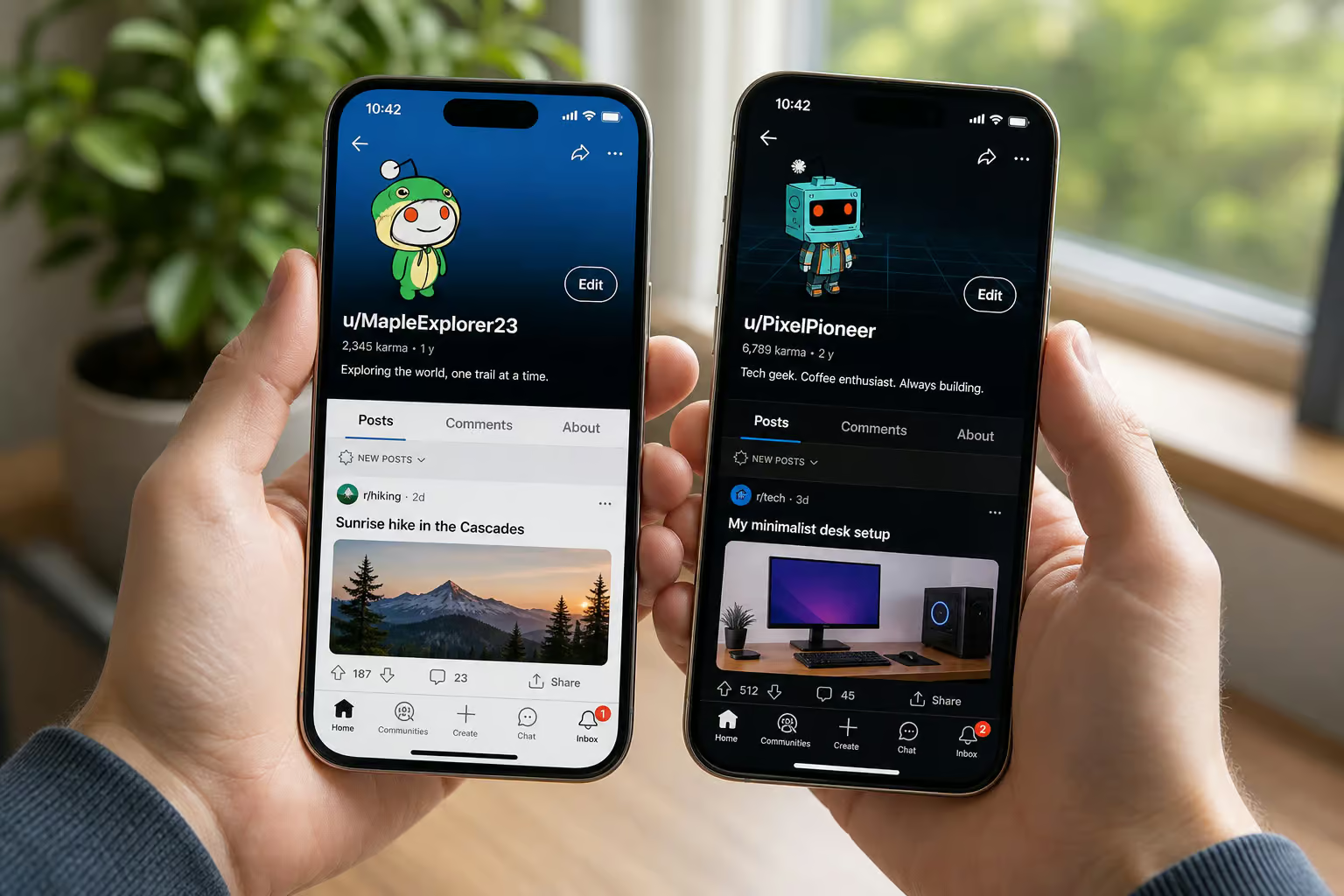
Reddit lets you control what appears on your profile page without deleting anything. Curation changes appearance, not existence.
- **How to curate: ** Go to your Profile
- three-dot menu
- Curate your profile
- choose what to show or hide
- save changes.
What this does: it hides selected activity from your profile page so strangers can’t see it at a glance. It limits what someone sees when they visit your profile, but note that main profiles cannot be deleted on Netflix, Kids profiles lack PIN protection, and devices made before 2013 don’t support profile features.

What it does not do: it doesn’t remove posts from subreddits, prevent search engine discovery, or delete content from Reddit’s servers. The content is still there, still public, still quotable. Hiding is a supplement to deletion, not a replacement.
If you want something truly removed, use Method 3.
What deletion achieves and what it can’t guarantee
Deletion achieves:
- Removes content from your profile page
- Removes it from subreddit feeds
- Reduces the chance of someone casually stumbling across it
- Over time, reduces search engine visibility — search engines eventually refresh their indexes
Deletion cannot guarantee:
- Removal of screenshots (once someone takes a screenshot, it’s out of your control)
- Removal of reposts or quotes in other threads
- Removal from third-party archives like the Wayback Machine or removeddit
- Immediate removal of old search snippets — they can linger until the next crawl
They remain, orphaned — still visible in subreddits, still quotable, still searchable. You must delete the content before you delete the account.
Automation: deleting hundreds of posts without the click fatigue
If you have a small footprint — say, a few dozen comments over the years, manual deletion is fine. You can do it while watching a show. But if you’ve been active on Reddit for years, you might be looking at hundreds or even thousands of posts and comments. Clicking each one individually isn’t practical.

What are your options?
Manual: Slow but gives you full control. Fine for one account with light activity.
Traditional scripts and userscripts: There are browser scripts that automate deletion, but they come with risks. They depend on CSS selectors and UI structures that change when Reddit updates its interface. When they break, they can silently stop working or mis-click and perform unintended actions. Plus, these scripts often run as opaque blobs of code — hard to audit what they’re actually doing.

No-code tools (Zapier, Make): Limited by Reddit’s API. There’s no official, simple endpoint to “delete all history,” so these tools can’t do much.
AI computer agents (Simular Pro): This is a newer approach. An AI agent logs into Reddit like a human, navigates the UI, and performs each deletion step transparently. Every action is readable, inspectable, and replayable — unlike a black-box script. The agent handles the drudgery in a way that security teams can understand and review.
It can enforce rules: edit-then-delete for sensitive content, straight delete for old posts, target by keyword or subreddit. It’s designed for long, reliable workflows, thousands to millions of steps, and can run scheduled sweeps triggered nightly or weekly.
I know a marketing agency that uses Simular Pro to automate Reddit cleanup across multiple client accounts. They set rules for content removal, and the agent runs a sweep every week. It gives them compliance oversight without manual labor.
How to keep your Reddit history clean going forward
Deleting history fixes the past, not future tracking. You need ongoing habits to prevent the buildup from starting over.
Behavioral habits:
- Use separate Reddit accounts for different topics — one for work, one for hobbies, one for sensitive stuff.
- Avoid repeating personal details across subreddits. It makes you easier to identify.
- Check Reddit’s privacy and personalization settings periodically. They change.
Technical habits:
- Adopt a regular cleanup schedule. Weekly for heavy users who post and comment a lot. Monthly for moderate users. Quarterly for light users who mostly lurk.
- Consider a VPN like X-VPN to limit IP-based tracking while you browse. A VPN hides your IP address from Reddit, which can prevent some tracking. But it doesn’t affect the content you post or delete — that’s a separate problem.
You now know what Reddit history actually is
Four layers, each with its own cleanup method. No magic button, but real control once you understand the system. Start with your local history and search — those are quick wins. Then tackle your public content, using the edit-then-delete technique for anything sensitive.
For large footprints, look into automation. And once you’re clean, keep it that way with separate accounts and a regular sweep.
People Also Ask
How do I delete my entire Reddit history?
There’s no single ‘delete all’ button. Reddit history is split into four separate layers: local viewing history, search history, posts and comments, and profile visibility. Each requires its own cleanup method — clearing local history only wipes what’s stored on your device, while posts and comments need to be deleted individually or via automation.
How do I completely delete Reddit data?
To completely delete your Reddit data, you need to clear your local viewing history in Settings, remove search queries individually, delete all posts and comments manually or with automation, and curate your profile visibility. For sensitive content, use the edit-then-delete technique — edit the post to remove identifying details before deleting it to reduce what survives in cached snippets.
What’s the difference between hiding and deleting Reddit content?
Hiding curates what shows up on your profile page without removing anything — the content stays on Reddit’s servers, remains public, and is still quotable. Deleting actually removes the content from your profile and subreddit feeds. Hiding is a supplement to deletion, not a replacement.
