The Ctrl Tattoo Sleeve: How to Build a Full-Arm Narrative Around a Keyboard Symbol
SZA dropped Ctrl on June 9, 2017, and something clicked. The 14-track album wasn’t just a critical smash — it sparked a tattoo trend that’s still going as of 2025. The singer herself wears a “ctrl” on her forearm and a “CTLR” on her wrist, as documented by StyleCraze and Refinery29. In her Breakfast Club interview, she explained the philosophy behind it: “I’ve lacked control my whole life… Ctrl is a concept about focusing on the present rather than trying to control the future.” That dual meaning — struggling for agency while surrendering to the moment, is what gives the symbol its weight.
But here’s what got me: why stop at one key? If the concept is rich enough to inspire a 14-track album, it’s rich enough to anchor a whole sleeve. A single Ctrl key on the wrist is fine — but a narrative arc across your arm, each command representing a chapter, is something else. So I started digging into how you’d actually pull that off, and what I found is that the Ctrl key works well as the foundation for a cohesive, personal arm piece.
Key Takeaways
SZA’s own forearm “ctrl” tattoo and her “CTLR” wrist piece, along with her Breakfast Club explanation of the album’s focus-on-the-present theme, are the cultural and philosophical anchors for any Ctrl-themed sleeve.
A full sleeve at a world-class studio runs 20–40+ hours across 5–12 sessions over 1–3 years, costing $5,000–$15,000+; a half sleeve is 8–20 hours over 2–5 sessions, $2,000–$6,000+ at premium NYC studios.
The most common failure pattern when building a themed sleeve is starting with too many small, disconnected ideas — the fix is to pick one anchor piece (a large Ctrl key with album art, for example) and build outward with a unifying style.
Table of Contents
The Meaning Behind Ctrl Tattoos and Why They Work for a Sleeve
This isn’t just a tech-geek souvenir. The Ctrl trend has real emotional weight, and that’s almost entirely SZA’s doing. Her 2017 album Ctrl is a 14-track exploration of craving control and learning to be present anyway. Fans latched onto that paradox immediately — on July 4, 2017, @YngBuddha tweeted a quote from SZA, “Can you remind me of my gravity ?” and on August 15, 2017, @cheyrichelle24 shared her own take, showing how fast the concept hit home.
SZA herself is a wearer: a “ctrl” on her forearm, a “CTLR” on her wrist. That gives the tattoo credibility beyond internet inspo boards. And the meaning is flexible. It can be about reclaiming agency, about self-empowerment, about mental health awareness, or — as SZA emphasized, about letting go of the need to control the future.
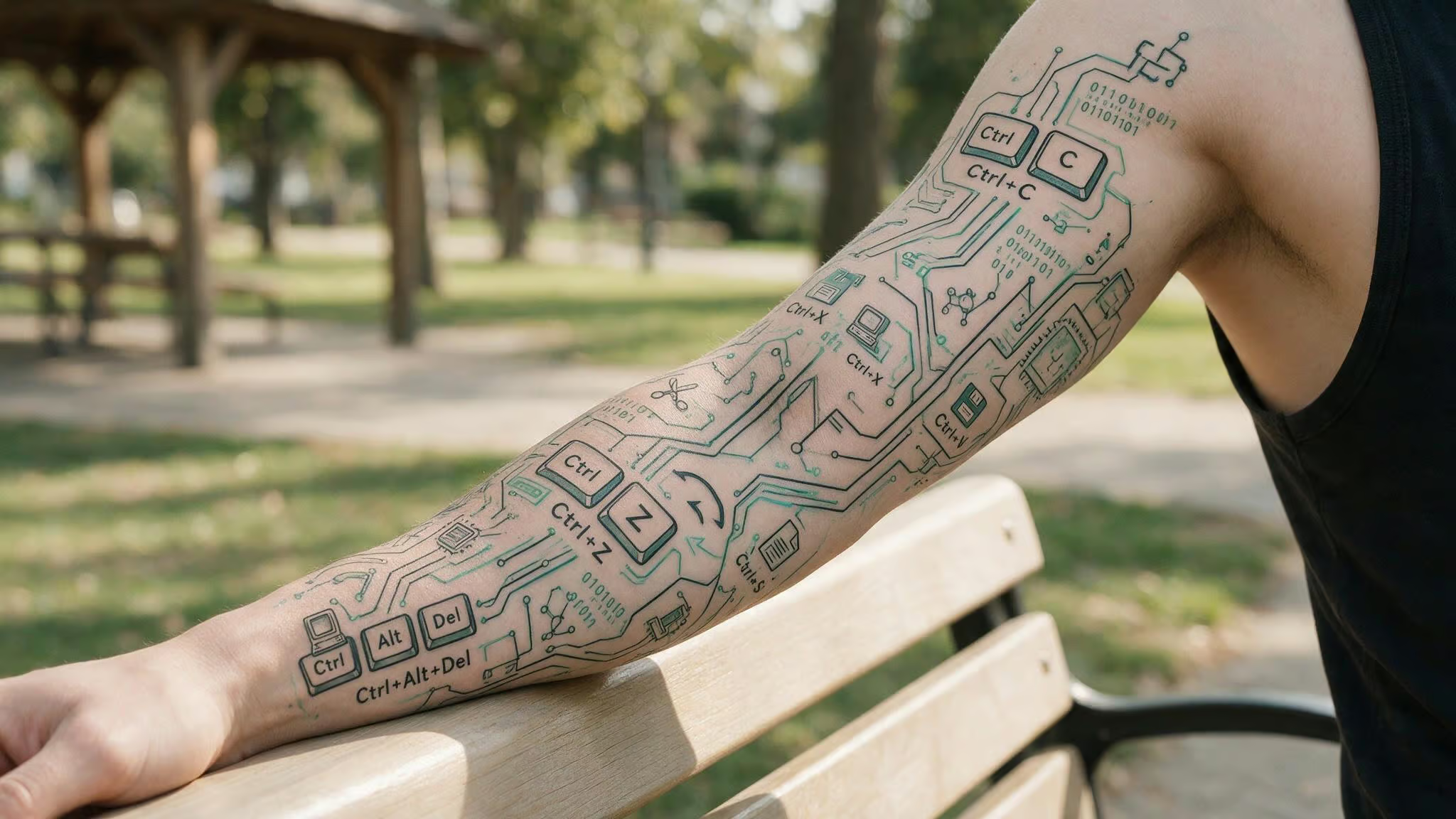
That flexibility is what makes it sleeve-worthy. Each command variant — Ctrl+C, Ctrl+Alt+Del, Ctrl+Z, can represent a different life chapter or philosophy. The sleeve becomes a narrative, not a random collection of keyboard shortcuts. That’s the core insight: you’re not just decorating your arm; you’re building a permanent manifesto about how you navigate control and chaos.
Planning Your Ctrl Sleeve: Anchor, Composition, and Artist
Here’s the pattern I’ve seen (and it’s worth catching early): the most common mistake when building a themed sleeve is starting with too many small, disconnected ideas. The tell is you’ve got a pile of individual Ctrl symbols — a little Ctrl+C here, a tiny Ctrl+Z there, but no visual flow between them. It ends up looking like a keyboard dropped in a blender.
To integrate album art or lyrics into your sleeve design, start by pulling the album cover’s color palette — for Ctrl, that means muted greens, earthy browns, and soft whites. Use a lyric line like “I’m not afraid to be alone” as a banner that wraps around the anchor piece. Or reference specific imagery from the album, such as the Ctrl font itself, by having your artist replicate its distinctive lettering for the main “CTRL” text. These concrete choices tie the sleeve directly to the source material.
The fix is counterintuitive but simple: start with one anchor piece. That’s a large, central design — maybe a big Ctrl key rendered in your chosen style, maybe a panel inspired by the album art, maybe a styled “CTRL” text that sets the scale and tone for everything else. That anchor gives you a reference point. Everything else orbits it.
From there, you’ll need a unifying theme. That could be a consistent style (fine line, geometric, blackwork), a consistent subject (keyboard commands mixed with album imagery and personal symbols), or a personal narrative arc (undo ? reboot ? replicate). The important thing is that the thread is visible.
Commit to one artist long-term. Switching artists mid-sleeve almost always creates cohesion problems — everyone’s line weight, shading approach, and saturation are slightly different. The most successful Ctrl sleeves I’ve seen? The wearer stuck with one artist from the anchor piece all the way through the final filler.
Ctrl C Ctrl V Tattoo: The Function of Replication
The universal shortcut for duplicating — that’s the most literal tech reference in the family. On its own, it can mean “I want to keep this”, a permanent bookmark for a good moment, a relationship, a version of yourself you don’t want to lose.
But there’s a specific use case that makes this one especially clever: the parent-child tattoo. The “copy” function visually represents the genetic or emotional resemblance between two people. Pair it with a portrait of the parent or child, and the connection becomes explicit. It’s a tech metaphor that actually lands on a deeply human level.
Sleeve integration: This works beautifully as a thematic cap on the shoulder — the “foundation” that influences everything below. Ctrl+C works beautifully as a thematic cap on the shoulder area, the origin point, the thing you chose to replicate forward.
Ctrl Alt Del Tattoo: The Reboot and Fresh Start
The classic three-finger salute. On a computer, it closes a hung application, removes a block, forces a restart. As a tattoo, it’s about hitting reset on a bad chapter. Most of us recognize that feeling — something’s frozen, it won’t respond, and you need a hard reboot.
The symbolism is hopeful: you want a smooth life free of blocks, to leave the bad stuff behind, a personal transformation. It’s the most dramatic life-change command in the Ctrl family.
Sleeve integration: This is your turning point. Put it as a large piece on the central forearm — the “restart moment” in the sleeve’s narrative. This is your turning point, the moment you decided to change direction.
Ctrl Z Tattoo: The Undo and a Fresh Start
The undo button. On the surface, it’s about the wish to take back mistakes. But the framing matters: this isn’t a regret tattoo. It’s a forgiveness-and-moving-forward tattoo. The hope that some errors can be undone, and the choice to move ahead anyway.
One specific design pairing makes this variant stand out: colorful flowers. The floral imagery softens the tech edge and turns the command into something organic. The flowers can represent a “re-blooming” after an error, making the whole piece feel alive rather than corrective.
Sleeve integration: This is excellent as filler or a transition piece between larger elements. The flowers can weave around other designs, turning Ctrl+Z into connective tissue instead of a standalone statement. It’s the piece that helps the sleeve breathe.
Ctrl Hand Tattoo: Bold, Assertive, and Free
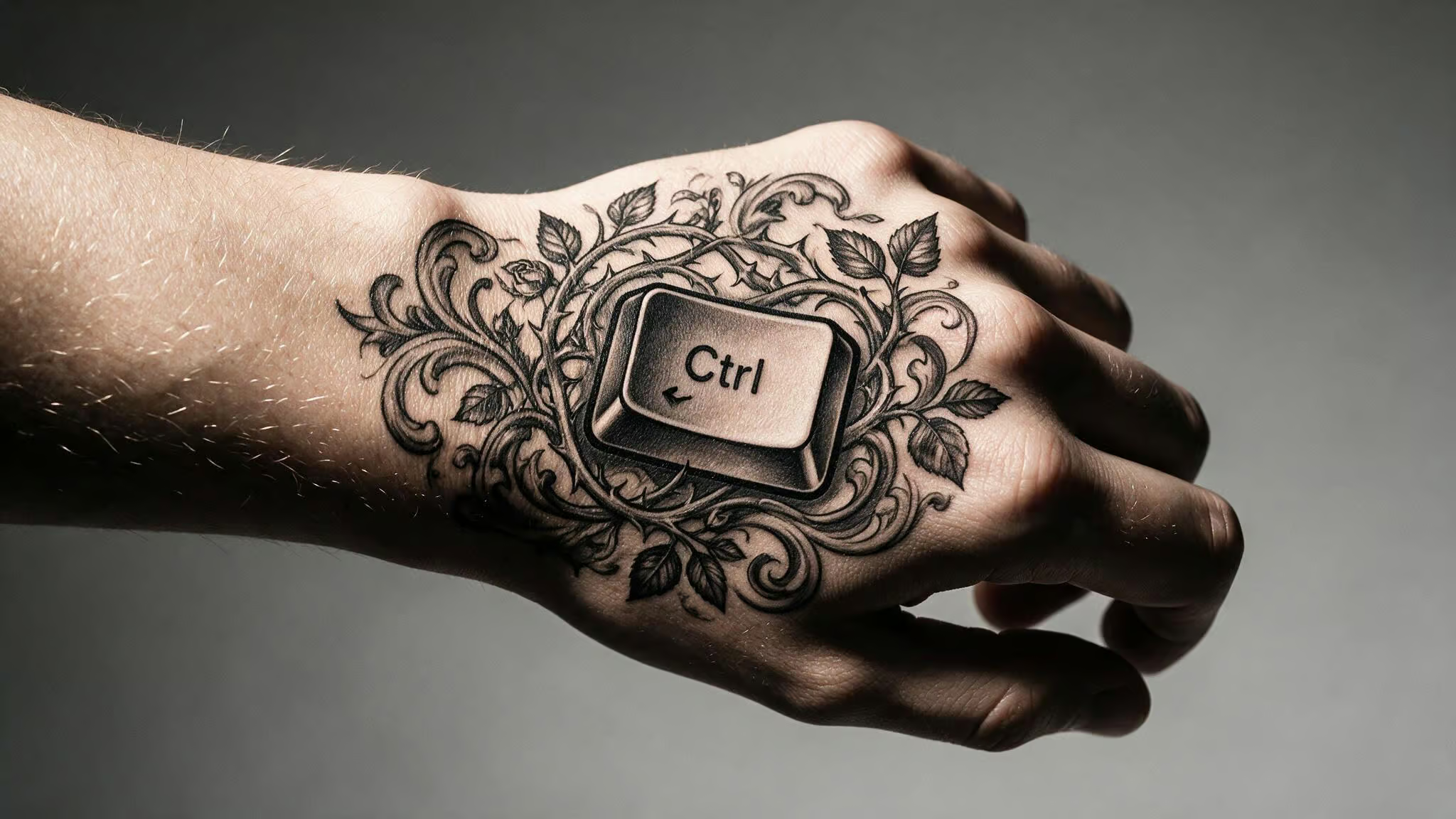
Hand placements are a power move. They’re visible, they’re assertive, they say this is part of my identity, not a secret. For a Ctrl sleeve, the hand is the natural terminus — the place where control meets your constant interaction with the world.
There’s a clever pairing that adds some nuance: a paper plane alongside the Ctrl key. The plane symbolizes travel, flight, freedom — a longing for escape or spontaneity. That creates an interesting tension: control (the key) versus the desire to let go (the paper plane). Two simple shapes, one layered meaning.
Sleeve context: If your sleeve ends at the wrist, the hand is the logical extension. A small Ctrl on the palm or back of the hand completes the composition and gives the whole arm piece a clean finish.
Ctrl Neck Tattoo: Sensuous Pain and Artistic Statement
The neck’s a different animal — it’s typically a standalone piece rather than part of a sleeve, but it’s worth covering because some people go straight there. The neck has a dense nerve network, so the application is intense, but that pain becomes part of the tattoo’s meaning. It’s a deliberate choice for a deeply personal symbol. A blackwork-shaded flower, such as a rose or lotus, is a common pairing that softens the tech edge and gives the piece a moody, artistic quality.
A common pairing: a blackwork-shaded flower. The flower type (rose, lotus, whatever) personalizes it further. The blackwork shading softens the tech edge and gives the piece a moody, artistic quality.
Sleeve context: This is an alternative to a sleeve, not a sleeve component. If you want maximum impact and you’re willing to commit to the visibility, the neck is where you put your favorite Ctrl variant as a standalone statement.
Ctrl Ankle Tattoo: Grounded Amidst Chaos
The ankle is a strong joint but a delicate canvas — thin skin and nerve endings make it a more painful spot. But the placement has a nice duality: it’s close to the earth, grounded, yet it’s part of a joint that’s constantly in motion.
The standout pairing here is a whirlpool. The swirl represents chaotic circumstances, and the Ctrl key represents the desire to navigate or control that chaos. It’s a visual metaphor that works: calm control symbol + chaotic swirl. Nice tension.
Sleeve context: Ankle is a natural base element for a leg sleeve, or a standalone piece. If you’re building a leg sleeve with Ctrl commands, the ankle anchors the narrative at the ground level — the chaos you started from.
Ctrl Wrist Tattoo: Pulse, Pulse, and Fine Lines
The wrist is the classic placement, and for good reason. The inside of the wrist is close to your pulse — the tattoo literally beats with you. That intimacy makes it a personal reminder you see every day. SZA herself wears a “CTLR” tattoo on her wrist, giving this placement direct cultural credibility and a real-world reference point.
This is where small, crisp fonts and fine-line, swirly designs shine. The canvas is small, so precision matters. A clean “ctrl” in a readable font or a delicate fine-line rendering of the key itself can look elegant without being fussy.
Sleeve context: If your sleeve ends at the wrist, a small Ctrl text there is a natural concluding detail — the final note in the story. It’s also a great place to start if you’re building upward over time.
Ctrl Finger Tattoo: Grip and Direction
Finger tattoos are a specific commitment — they fade faster and hurt more, but they’re right there in your face all the time. The good news is that “Ctrl” text can be scaled down to fit any finger, making it a minimalist option; for subtle placements that still make a statement, a Ctrl tattoo small design is worth considering.
Here’s the detail that makes finger placement genuinely interesting: the meaning shifts depending on which finger you pick. The index finger suggests control with direction and purpose — pointing forward. The thumb, on the other hand, signifies strength and grip, the thumb’s role in holding on. You’re not just picking a placement; you’re picking a sub-meaning.
Sleeve context: A perfect finishing detail that extends the sleeve down to the fingers. Gives the whole arm piece a clean, deliberate terminus. The thumb especially works as an anchor point for the “hold on” theme.
Sleeve Coverage Types: Full, Half, Quarter, and Leg
Before you start designing, it helps to know what you’re signing up for. Here’s the vocabulary and the real-world commitment for each.
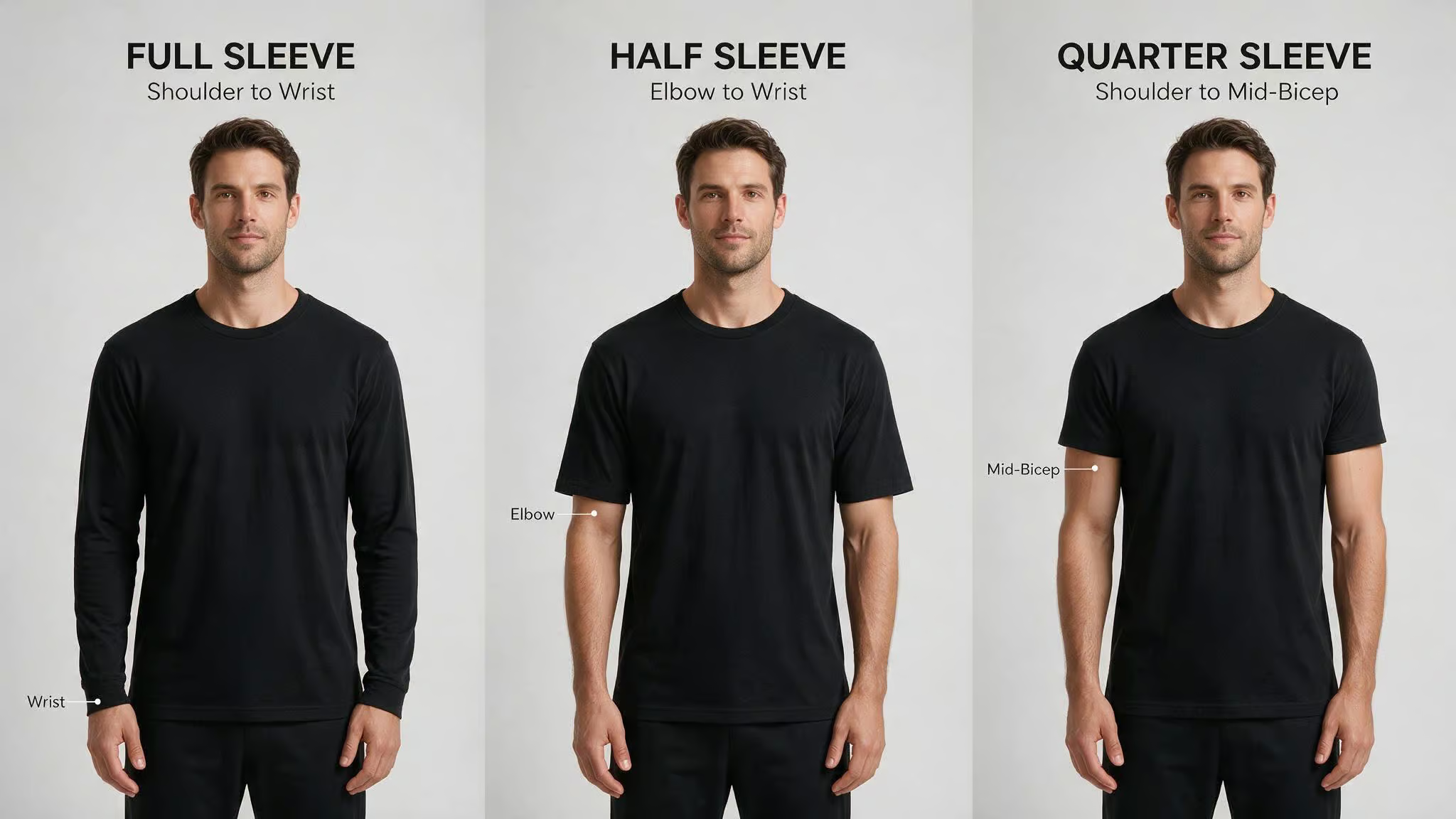
Full sleeve — shoulder to wrist. This is the ultimate. Expect 20–40+ hours across 5–12 sessions, spread over 1–3 years. At a world-class studio, you’re looking at $5,000–$15,000+. For context on budgeting for your piece, here’s a guide to Ctrl tattoo cost and tipping, including average costs, factors that affect pricing, and the etiquette of tipping your artist (including the $100-on-$600 question). That’s the price of a used car that lives on your arm forever.
Half sleeve — either upper arm (shoulder to elbow) or lower arm (elbow to wrist). A solid middle ground. 8–20 hours, usually 2–5 sessions over several months. Premium NYC studios charge $2,000–$6,000+. You can always extend it later.
Quarter sleeve — shoulder to mid-bicep. A great entry point. 4–8 hours, often 1–2 sessions. It’s a big enough statement to feel significant, but you can expand into a half or full later.
Leg sleeve — thigh to ankle. Surging in popularity, especially for men. The leg gives you a bigger canvas than the arm, so you can do more sprawling compositions.
The term “sleeve” comes from how the ink wraps around the arm like a garment sleeve. And sleeves can be planned as one cohesive design or grow organically over time — both approaches are valid. The key is knowing which one you’re doing.
Sleeve Artistic Styles: The Look of Your Ctrl Theme
The same Ctrl theme looks different depending on the style you choose. Each approach transforms the keyboard concept into a distinct visual language. Our Ctrl tattoo guide (#planned-ctrl-tattoo) covers SZA-inspired ink, keyboard command designs, and more.
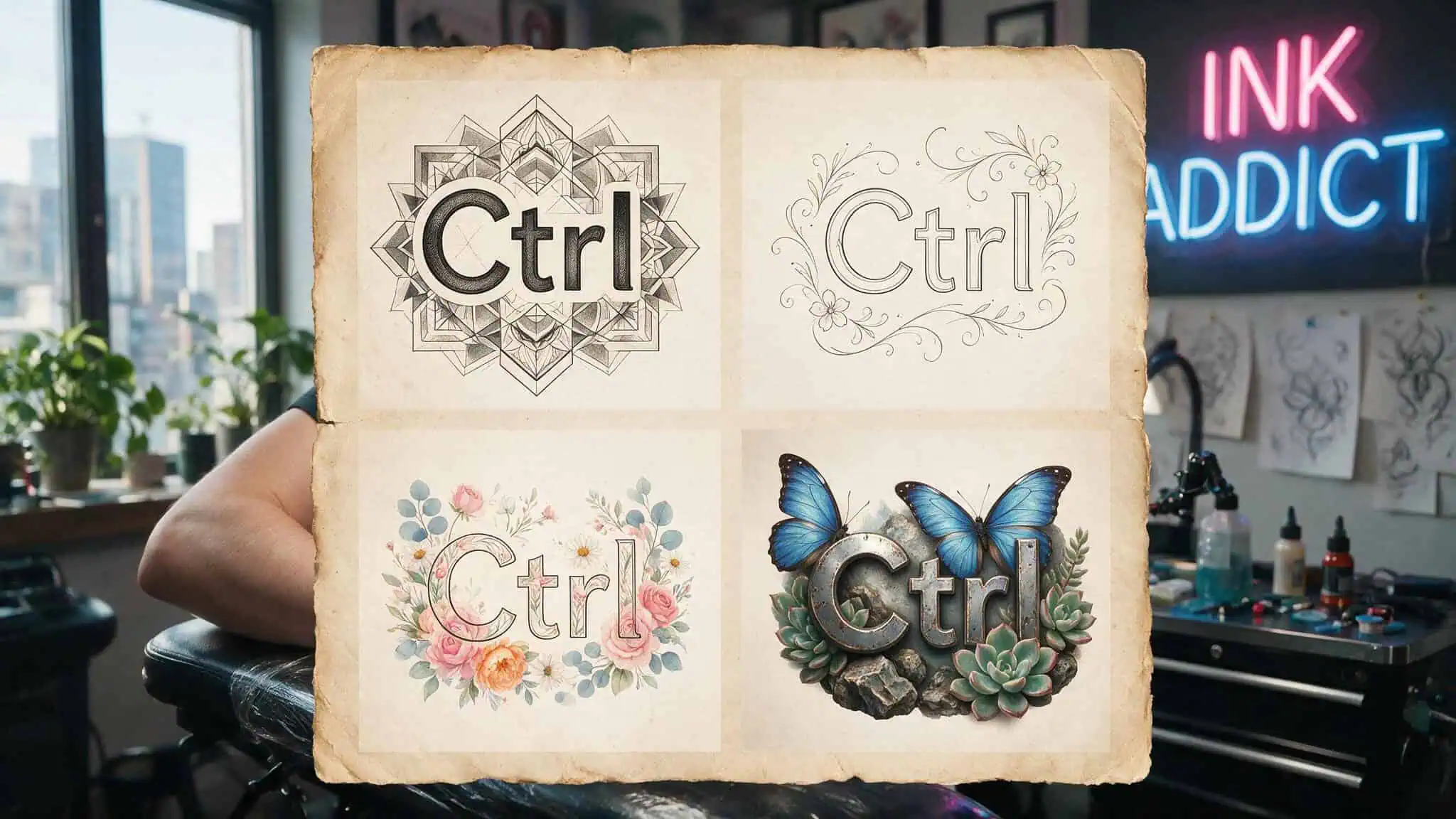
Geometric — precise shapes, sacred geometry, symmetrical patterns. Gives the Ctrl theme a clean, structured, tech-dashboard feel. Requires exceptional technical control. At Monolith Studio, Okan Uckun and Denizhan Ozkar are the go-to artists.
Black and grey realism — lifelike imagery with photographic precision. Ages beautifully. You could render the album art or keyboard textures with real depth.
Fine line — delicate single-needle work. Feels lighter and more intimate. Great for subtle Ctrl text and floral pairings. Takes longer because of the precision. Oscar Akermo and Okan Uckun specialize in this.
Patchwork — individual pieces collected over time. Each stands alone but contributes to the whole. Most organic, least planned approach, good if you want to collect your favorite commands over years.
Floral — botanical designs, often fine line. Softens the tech theme. Pairing Ctrl commands with flowers (like the Ctrl+Z example) creates contrast and makes the sleeve feel alive.
Minimalist — clean intentional pieces, negative space. Editorial feel. A single bold Ctrl key with minimal decoration, letting the meaning do the work.
Ornamental — Baroque jewelry, henna patterns, sacred geometry. Follows body contours. Gives the sleeve a decorative, luxurious feel. George Kalodimas and Kaylee Ruiz are specialists here.
Micro realism — hyperrealistic detail in small-scale designs. Master-level difficulty. Each tiny piece takes 3–5 hours. Good for reproducing detailed album art or small keyboard elements. Oscar Akermo, co-founder of Monolith, is globally recognized for this.
Each style changes how the Ctrl theme reads.
Geometric makes it tech-precise. Floral makes it organic. Micro realism makes it feel like a window into another world.
Patchwork vs. Cohesive Sleeve for Your Ctrl Theme
This is one of the biggest decisions you’ll make, and there’s no universal right answer. Here’s the tradeoff.
A patchwork sleeve is a collection of individual pieces added over time. Each tattoo stands alone. This is how most collectors actually build their sleeves — one beloved design at a time. The pros: flexibility, organic growth, no pressure to plan everything upfront. The cons: it’s harder to achieve visual flow, and there’s a real risk of a disconnected look if you’re not careful.
A cohesive sleeve is planned as a single design with a unifying thread — a consistent style, subject, or narrative. The pros: better flow, stronger visual impact, a clear story. The cons: requires more upfront planning and less flexibility to add random pieces later.
For a Ctrl sleeve specifically, a cohesive design with a unifying style (fine line or geometric, for example) serves the narrative arc well — undo ? reboot ? replicate feels like a natural progression. But patchwork works if you want to collect your favorite commands as separate meaningful moments.
There’s a middle ground: start cohesive but leave room for future additions. Plan the anchor piece and major elements, then let some negative space breathe so you can grow into it. That’s the spot for most people.
Practical Logistics: Time and Cost for Your Ctrl Sleeve
Let’s talk numbers. This is where first-timers get that sticker shock.
Time by coverage type:
- Quarter sleeve: 4–8 hours, typically 1–2 sessions
- Half sleeve: 8–20 hours, typically 2–5 sessions over several months
- Full sleeve: 20–40+ hours, typically 5–12 sessions over 1–3 years
Fine line and geometric sleeves take longer per session because of the precision required — it’s slow, careful work. Micro realism is the most time-intensive; each small piece can take 3–5 hours. Recommended spacing between sessions is 4–8 weeks for proper healing.
Cost:
- Half sleeve at a premium NYC studio: $2,000 to $6,000+
- Full sleeve at a world-class studio: $5,000 to $15,000+
These are ranges, not guarantees. Studios like Monolith don’t publish fixed pricing — you get a quote after a booking request and consultation. The price depends on the artist, the style, the complexity, and the number of sessions.
A full sleeve is a 1–3 year project, not a weekend. Plan accordingly.
Aftercare and Longevity: Protecting Your Ctrl Sleeve
You’ve invested serious time and money. Don’t let it fade.
The first two weeks after each session are critical. Keep the tattooed area clean, apply a fragrance-free moisturizer regularly, and avoid direct sun, pools, oceans, and saunas until it’s fully healed.
After that, the biggest threat is UV exposure — it’s the number one cause of tattoo fading. Apply SPF 50+ to healed work every time you’re in the sun. This is non-negotiable for any sleeve, but it’s especially important for fine line and micro realism details, which are more susceptible to blurring over time. Thin lines fade faster than bold ones. Delicate details require diligent protection.
Touch-ups may be needed in the years ahead, especially for fine work. That’s normal. A well-cared-for sleeve will outlast any trend.
Your Ctrl Sleeve as a Personal Narrative
Each Ctrl command maps to a life chapter. Ctrl+C and Ctrl+V for what you want to replicate — good moments, family traits, versions of yourself you want to keep. Ctrl+Alt+Del for the moments you needed to reboot, to close a frozen chapter and start fresh. Ctrl+Z for the things you wish you could undo, and the forgiveness you chose instead.
A sleeve built on these commands isn’t just a fandom reference. It’s a permanent statement about how you navigate control and chaos — SZA’s original paradox, made physical. The choice between patchwork and cohesive, between styles, between placements, it’s all part of telling your version of the story.
Start with a quarter sleeve anchor piece or go all in — either way, the composition should reflect your actual relationship with the concept. That’s what makes it yours.
Frequently Asked Questions
What’s the difference between a patchwork and cohesive Ctrl sleeve?
A patchwork sleeve is built by adding individual Ctrl tattoos over time, each standing alone — it offers flexibility but risks a disconnected look. A cohesive sleeve is planned as one continuous design with a unifying style and narrative arc, like moving from Ctrl+Z (undo) to Ctrl+Alt+Del (reboot) to Ctrl+C (replicate). The middle ground is starting with a cohesive anchor piece while leaving negative space for future additions.
