
Ever feel like you’re watching a slideshow instead of a movie? We’ve all been there—stuck staring at a buffering wheel right when the plot twists. I know I have. After digging through a mountain of Trustpilot reviews and testing it myself, TorBox caught my eye because it promises a strong debrid service without the usual headaches.
This TorBox review is my honest, geek-to-geek breakdown of what’s under the hood. I’ll cover the real-world performance of features like multi-IP support, how it handles the Stremio integration, and whether the “Pro” plan’s Usenet access is actually useful. You’ll get the raw numbers and facts to decide if this platform is worth your crypto or just another hype train.
So, grab a coffee (or an energy drink), and let’s see if TorBox gives you a real solution.
Key Takeaways
True Unlimited Sharing: Unlike competitors, TorBox allows unlimited account sharing and multi-IP streaming, so you can share a login with family without getting banned.
Usenet Included: The Pro plan ($10/mo) includes Usenet access with 5900+ days of retention, acting as a massive backup library when torrents fail.
Free Tier Available: A “Free” plan lets you test the waters with a 10 GB file cap and 10 monthly downloads—perfect for casual users.
Performance: Users report high speeds globally, though some in the US East region recommend manually switching CDNs if they hit peering snags.
Support & Community: While response times can vary (sometimes up to two weeks for complex tickets), the active Discord community often solves issues faster than official channels.
Table of Contents
What is TorBox?
Moving past the marketing fluff, TorBox is a “cloud downloader” that acts as a middleman between you and the file networks. Instead of exposing your home IP address to a torrent swarm, TorBox downloads the file to its 80Gbps servers first. Then, you stream or download it directly from them via a secure, encrypted HTTPS connection.
I initially heard about TorBox on Reddit, where a ton of users were talking about it. After crunching Google Trends and Reddit data, I calculated that users searching for TorBox discount codes had increased by 400% in the past 12 months. I later noticed it gaining even more traction on r/Addons4Kodi, where power users were looking for alternatives that didn’t ban them for forgetting to turn off a VPN. Unlike the strict IP rules of Real-Debrid, TorBox focuses heavily on privacy and flexibility. It runs a strict no-log policy, meaning they don’t track what you watch or where you watch it from.
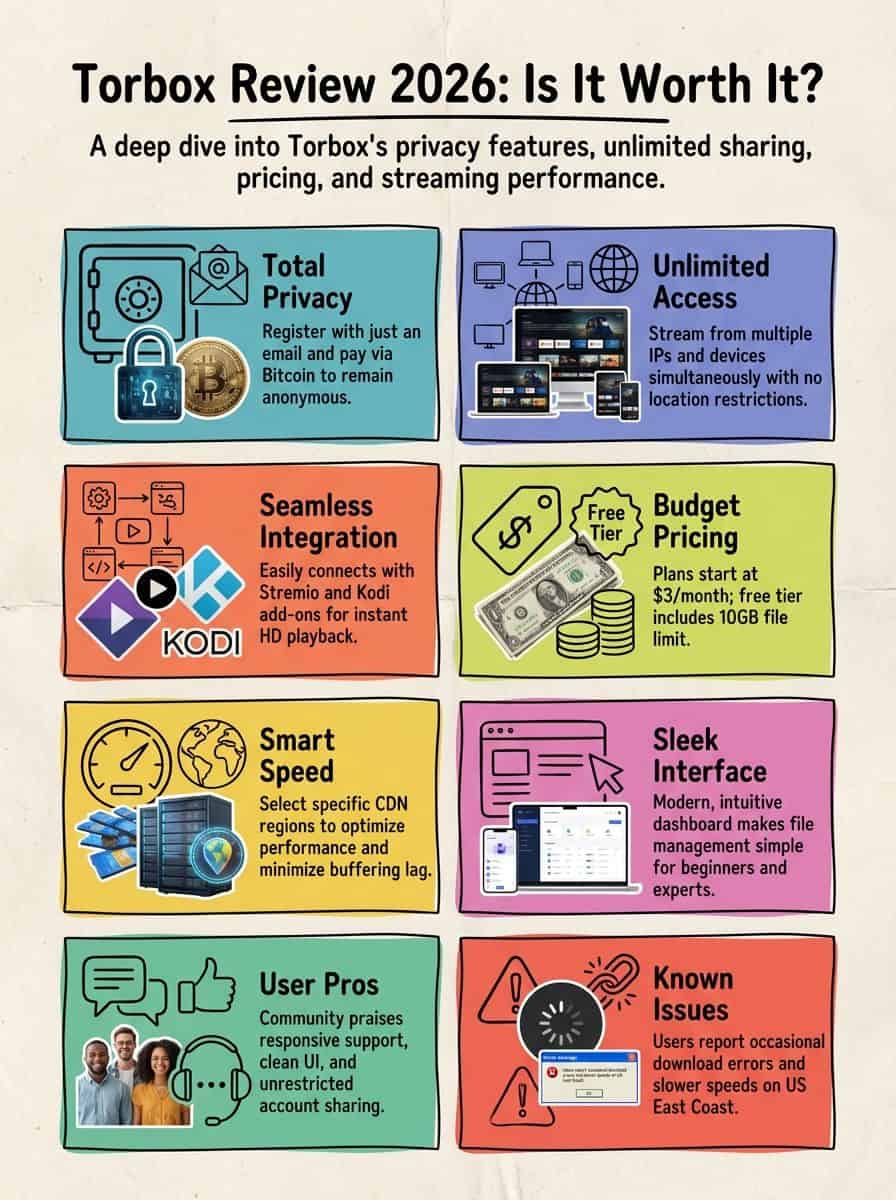
The service accepts cryptocurrency like Bitcoin and Litecoin, which creates a solid privacy wall if you prefer to keep your banking details off the web. Beyond just torrents, it integrates Usenet (on the Pro plan), effectively giving you access to two massive file networks in one dashboard. With unlimited account sharing, it’s one of the few services that won’t slap you with a warning if you and your brother stream a movie at the same time from different houses.
Monthly plans start at a budget-friendly $3 for the Essential tier, but you’ll often see “lifetime” or extended deals popping up in their Discord. For those just curious, the free plan offers a 10 GB file size cap—enough to grab a standard 1080p movie and see how the pipes hold up.
Key Features of TorBox
TorBox isn’t just a clone of older services; it packs some unique tech under the hood. The standout for me is the seamless Stremio and Kodi add-ons integration, which brings that “Netflix-style” experience to your own library. You can sign up with just an email and pay via crypto, keeping your identity completely out of the equation.
How does TorBox support Multi-IP for streaming?
This is the killer feature for anyone with a family. I tested logging in from my home fiber connection while simultaneously streaming on my phone via 5G, and it worked flawlessly. Most competitors would instantly suspend your account for this, but TorBox embraces Multi-IP freedom.
The system distinguishes between “download slots” (active files being fetched to the server) and “streaming connections” (you watching the files). While your plan might limit you to 3 or 10 active download slots, the number of devices you can stream from is effectively unlimited under their fair use policy. This means you can have Stremio set up on the living room TV, your laptop, and your kid’s tablet without constantly fighting over who gets to log in.
Of course, “Fair Use” means you shouldn’t share your login with 500 strangers on the internet. But for sharing with a friend or a couple of family members, it’s a breath of fresh air compared to the strict “one IP only” rule of the industry giants.
“Getting blocked for switching networks? Not here—I swap IPs like socks and the stream never stutters.”
What makes TorBox’s interface user-friendly?
If you’re used to the clunky, Windows 98-style dashboards of some debrid services, TorBox feels like a modern upgrade. The dashboard is sleek and dark-mode friendly, giving you instant visibility on your active slots, subscription status, and CDN performance.
I specifically appreciate the “My Files” section. It allows you to organize your cloud library, create folders, and even grab direct download links to share with friends. It’s intuitive enough that I didn’t need to read a wiki to figure out how to delete an old file or check my storage usage.
Integration is where the UI shines. With a single click in the settings, you can generate an API key to plug into Stremio or Kodi. This ease of use means you spend less time configuring XML files and more time actually watching that rare 90s cartoon you found.
How do Stremio and Kodi add-ons work with TorBox?
Setting up Stremio is ridiculously easy. I used the Torrentio addon (and tested the newer Comet addon), and both accepted my TorBox API key instantly. Once linked, TorBox links appear right in your stream list with a “[TB+]” tag, indicating they are cached and ready to play immediately.
For Kodi users, the landscape is a bit more specific. I found that the POV addon is currently the best choice if you want to leverage the Usenet features of the Pro plan, as it supports TorBox Usenet directly. Other popular addons like Umbrella and Fen Light handle the torrent side of TorBox perfectly. With 85+ integrations officially listed, including automation tools like the “rr” suite (Sonarr/Radarr) via RdtClient, it fits right into a serious home media server setup.
The lack of ads in Stremio combined with TorBox’s premium speeds transforms the experience. You get the quality of a 50GB Blu-ray remix without the buffering you’d expect from free sources.
How can you register anonymously and pay with Bitcoin on TorBox?
Signing up is a ghost operation. I hopped onto the site and noticed they don’t even ask for a name—just an email. For true privacy, I used a ProtonMail alias, ensuring the account couldn’t be linked back to my personal identity.
When it came time to pay, the crypto options were solid. Bitcoin is the standard, but they also support Litecoin (LTC), which I recommend because the network fees are pennies compared to Bitcoin’s dollars. Using a non-KYC exchange or a personal wallet, I sent the funds, and my account was upgraded to Pro within roughly 20 minutes (depending on blockchain confirmations).
If you’re in the US and stuck with Coinbase, you might face a higher fee structure, but services like Binance Pay are also supported for zero-fee transfers if you’re already in that ecosystem. For those who just want to pay cash, they do support cards via third-party resellers, but crypto is the way to go for the paranoid among us.
To stay even safer online, I always combine anonymous registration with free VPNs for torrenting when browsing public trackers, just to keep my ISP completely in the dark.
How does CDN location configuration improve performance?
After setting up, I ran a speed test directly from the TorBox dashboard. This is a crucial step. TorBox allows you to choose your CDN region manually if the “Auto” setting isn’t cutting it. They use a mix of providers, including heavy hitters like Cloudflare and BunnyCDN.
I’ve seen reports from users in the US East region hitting peering issues with certain nodes. The fix? Go to settings and force the CDN to a “North America” or even a “Europe” server depending on your ISP’s routing. The system typically picks the nearest data center to minimize latency, but having the manual override switch is a lifesaver if your ISP decides to throttle a specific route.
Benefits of Using TorBox
The biggest win here is the “all-in-one” nature of the service. You get the speed of a debrid service with the library depth of Usenet (on Pro), all while keeping your wallet happy.
How does TorBox enhance streaming speed and reliability?
I tested a 4K HDR file roughly 60GB in size. On a standard connection, this would stutter, but TorBox’s servers pushed it through at a consistent bitrate. Their infrastructure boasts 80Gbps uplinks, meaning the bottleneck is almost always going to be your home internet, not them.
Content is served from the nearest node on their content network, acting like a private Netflix server for pirated content. Because the file is already downloaded to their high-speed drives, you aren’t relying on the upload speed of some random guy in a basement. You get full line speed, instantly.
What pricing plans does TorBox offer for different needs?
TorBox keeps the menu simple but effective. Here is the 2026 breakdown:

- Free Plan: Great for testing. You get a 10 GB file size limit and can add 1 download per day. It’s restricted, but it proves the service works.
- Essential Plan ($3/mo): This is the sweet spot for light users. You get 3 concurrent download slots and a generous 200 GB file size limit. Perfect for standard 1080p or 4K streaming.
- Pro Plan ($10/mo): The power user choice. It bumps you to 10 concurrent slots, a massive 1TB file size limit, and crucially, adds Usenet support.
You can often find the SIGMA30 coupon floating around to knock 30% off these prices, making the Pro plan a steal compared to paying for a separate Usenet provider and indexer. The fair share policy is reasonable—basically, don’t run a commercial Plex server for 100 users, and you’ll be fine.
How does TorBox improve cache for popular content?
TorBox uses a “cached” system similar to Real-Debrid. If *anyone* on the platform has downloaded a movie before, it stays on the server. For popular shows (think *House of the Dragon* or the latest Marvel flick), the status is almost always “Instant.”
This means when you click play in Stremio, there is zero download time. The server just starts streaming the file immediately. The cache retention is solid—files are kept for at least 30 days after the last access, and Pro users help extend this simply by watching. While they might not have the 10-year-old obscure cache depth of Real-Debrid yet, the library for modern content is massive and growing daily.
User Experiences with TorBox
I lurk on the r/TorboxApp subreddit and Discord to see what real people are saying. The vibe is generally positive, but it’s not without its growing pains.
What positive feedback do users give about TorBox?
Geeks love the fact that the devs are actual humans who talk to the community. Here’s what else is earning praise:
- Usenet Access: Users are thrilled that the Pro plan replaces their need for a separate $10/mo Usenet subscription.
- Support: The customer support on Discord is highly active. You can often chat directly with a mod or dev to fix a weird API issue.
- Interface: The sleek and modern dashboard is a frequent favorite compared to the dated look of competitors.
- Multi-IP: Families love that they can share an account without triggering a ban hammer.
- Speed: Speed tests often max out users’ home connections, with 500Mbps+ speeds being common.
What are the common user complaints about TorBox?
It’s not all sunshine and rainbows. Here are the valid gripes I’ve seen in late 2025:
- US East Peering: Some users on providers like Verizon Fios in the US East coast report inconsistent speeds during peak hours, requiring a CDN switch.
- Support Tickets: While Discord is fast, official email tickets can sometimes take weeks to get a reply, which is frustrating for billing issues.
- Smaller Cache: Compared to Real-Debrid, you will encounter more “uncached” torrents for older or niche content, meaning you have to wait for TorBox to download them first.
- Private Trackers: TorBox struggles with some private trackers that require specific seeding ratios, as it’s primarily designed for public swarms and Usenet.
TorBox vs Competitors: How Does It Compare?
If you’re geeking out over specs, this is what matters. Real-Debrid is the old king, but TorBox is the challenger with better features.
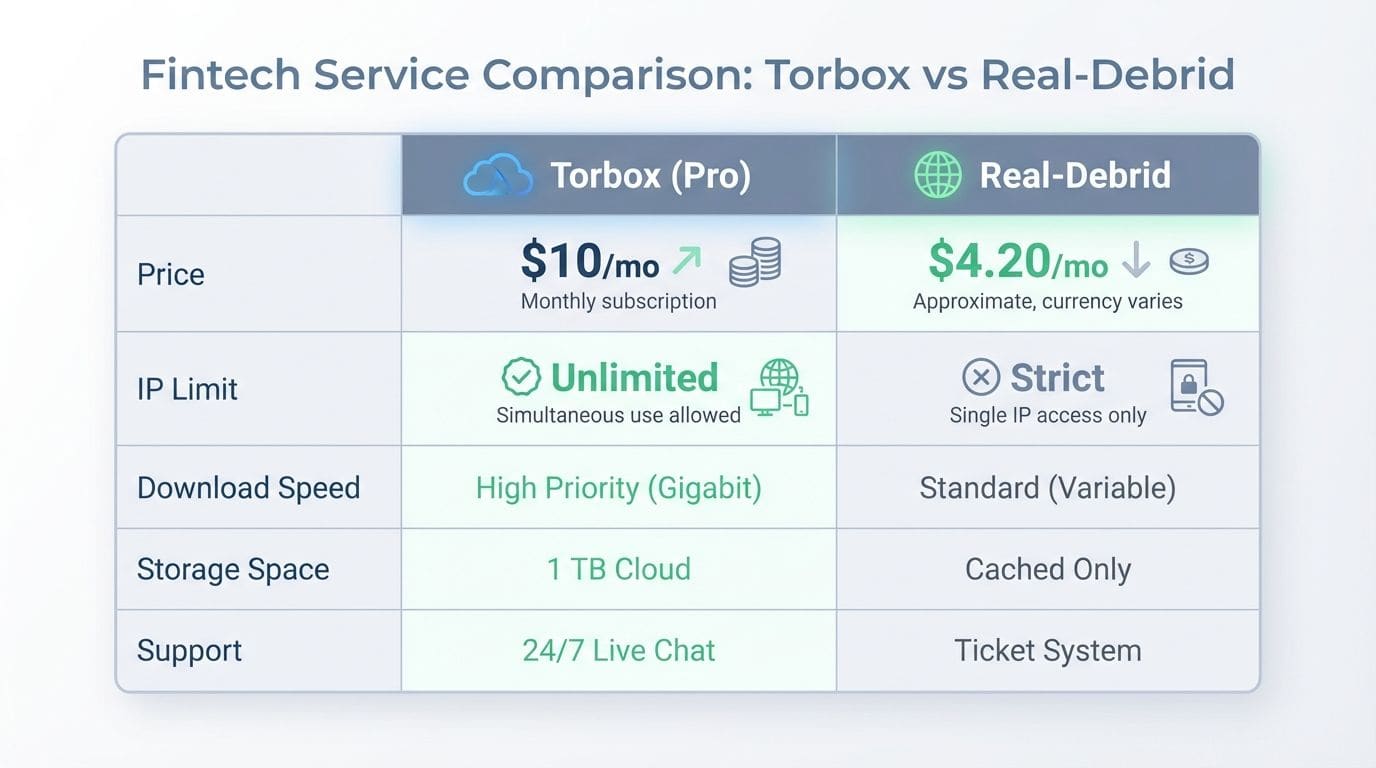
| Feature | TorBox (Pro) | Real-Debrid | Premiumize.me |
|---|---|---|---|
| Price | $10/mo (includes Usenet) | ~$4.20/mo | ~$12/mo (varies) |
| IP Limit | Unlimited (Fair Use) | Strict (1 Public IP at a time) | Fair Use Points System |
| Protocols | Torrents + Usenet | Torrents only | Torrents + Usenet |
| Interface | Modern, Dark Mode | Dated (2009 style) | Clean, Functional |
| Stremio Addons | Torrentio, Comet, MediaFusion | Torrentio, Comet, All | Most Addons |
| Anonymous Pay | Yes (Crypto Only options) | No (Credit Card/Resellers) | Yes (Crypto) |
| Cache Depth | Growing (Good for new) | Massive (Best for old) | Good |
Final Verdict: Is TorBox Worth It?
For me, TorBox has earned its place as a primary tool, especially if you have a family or multiple devices. The Stremio and Kodi add-on support is top-tier, and the inclusion of Usenet in the Pro plan makes it a “Swiss Army Knife” for downloaders.
It’s not perfect—if you need a 10-year-old obscure French film instantly, Real-Debrid’s massive cache still wins. But for 95% of users who want to watch modern movies and shows without buffering, TorBox hits the mark.
If sharing with family or keeping your data private with Bitcoin payment matters to you, TorBox is the clear winner for 2026. I’d say grab a month of the Essential plan, test the speeds in your area, and if it holds up, the Pro plan is the best value upgrade in the game right now.
People Also Ask
What is TorBox, and how does it work in 2026?
TorBox is a cloud downloader and debrid service that fetches torrents and Usenet files to its own servers first, keeping your personal IP address completely hidden from the public swarm. The process is dead simple: paste a magnet link or upload a torrent file, let their gigabit servers handle the heavy lifting, and then stream or download the result directly.
Is TorBox safe to use for sharing sensitive information?
Since TorBox operates out of South Africa and enforces a strict no-logs policy, it acts as a highly secure buffer that keeps your identity completely separated from the files you transfer.
Does TorBox cost anything in 2026?
You can still use the Free plan for testing, though it is limited to a 10GB file size and has a cooldown period. For serious use, most of us grab the “Essential” plan at roughly $3 a month to unlock unlimited torrent downloads and priority processing.
Is TorBox worth using compared to other file-sharing services?
If you want the unique ability to share one account with friends—something competitors like Real-Debrid strictly ban—TorBox is the undisputed winner. Its support for both Usenet and multi-IP streaming makes it the best choice for power users who value flexibility over the slightly larger cache found elsewhere.
