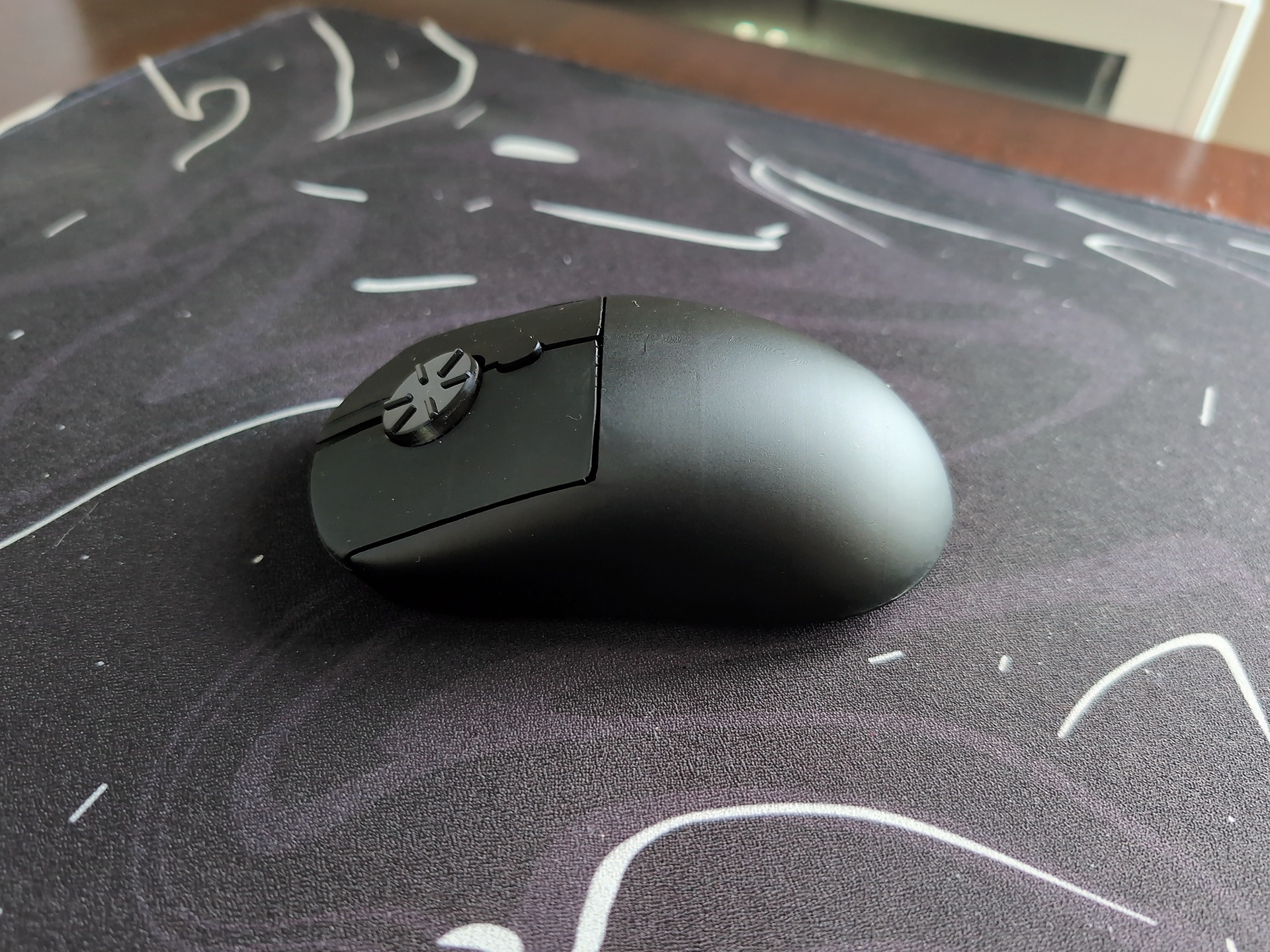
A few weeks ago a mouse showed up at my desk with no scroll wheel on it, and I’ve been using it ever since. This rotary mouse review covers the Rotary Mouse from Airra Labs, a Kickstarter peripheral that replaces the wheel with a rotary dial, and my job here is to separate the marketing claims from what the thing actually does when your hand is on it. Short version: I like it, it’s fairly comfortable, and the dial works.
Also, the battery door needs love, but we’ll get there. The Rotary Mouse product page quotes The Honest Gadget calling it “a softer, more fluid motion compared to repeated flick scrolling,” which tracks with my experience so far.
Key Takeaways
The Rotary Mouse swaps the scroll wheel for a detented rotary dial, and in my hands-on use it’s faster than a standard notched wheel because your finger never lifts, though it’s much slower than a free-spinning wheel for long traverses.
The creator’s “2.5X faster scrolling” claim and the site’s own “up to 2X” figure don’t match, neither is independently verified, and no independent lab (including RTINGS, which has tested 416 mice) has evaluated this mouse at all.
At $49 super early-bird against a $139 MSRP, with free shipping and a 30-day money-back guarantee that doesn’t require shipping the mouse back, the risk of trying it is low; the bigger constraints are one size, matte black only, no side buttons, and no middle click on the pre-production unit I tested.
Table of Contents
What the Rotary Mouse is and how the dial works
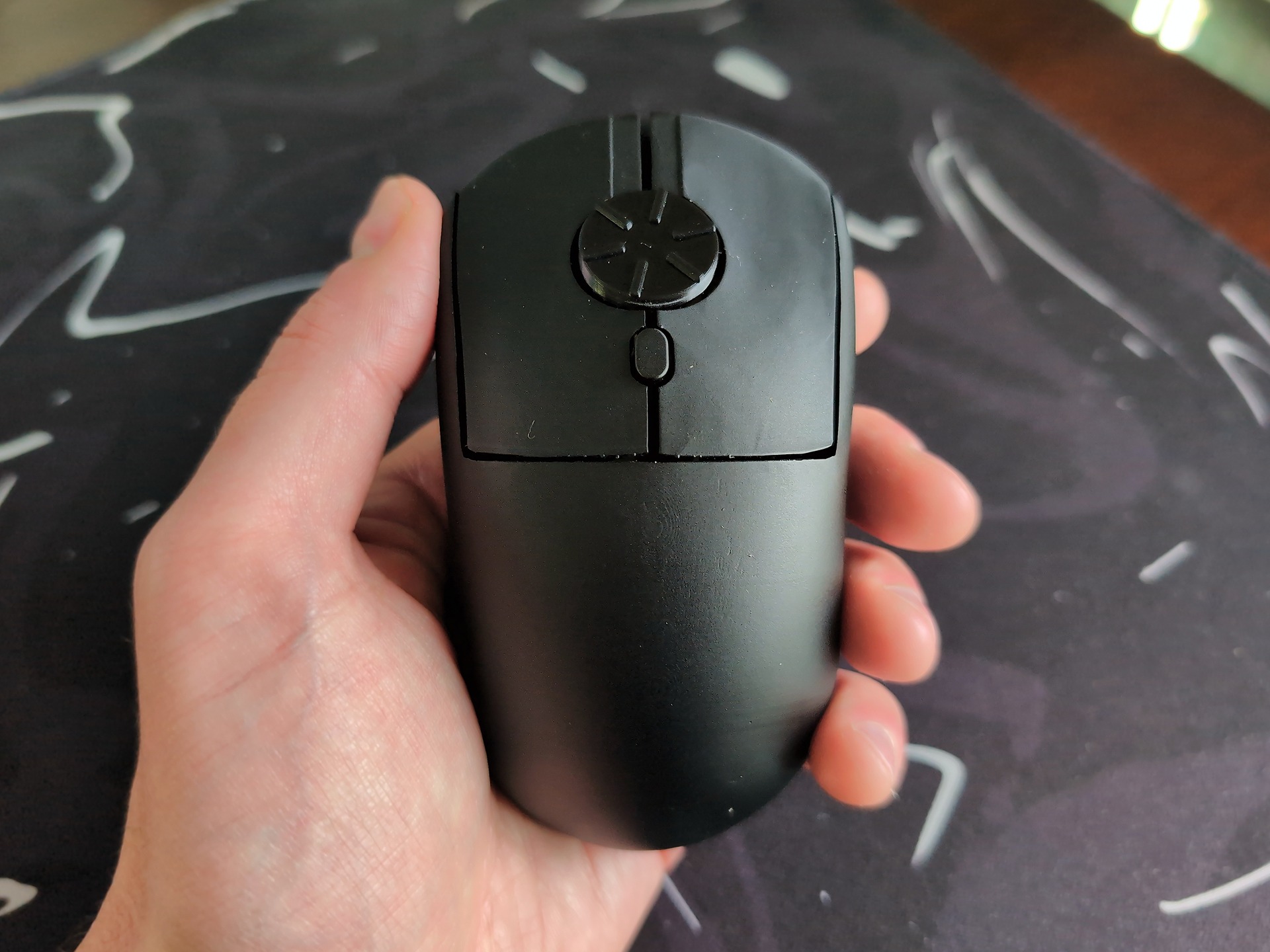
The Rotary Mouse is a wireless productivity mouse from Airra Labs, an independent outfit founded by engineer Melvin Wong, who created it solo, and its defining feature is right there in the name: the traditional scroll wheel is gone, replaced by a rotary scrolling dial that you twist clockwise or counterclockwise. Out of the box, counterclockwise scrolls down, matching Windows-style scrolling, and if that feels backwards to your hand, OS settings can invert it.
The Rotary Mouse’s dial offers three ways to scroll, which is what makes it more interesting than a gimmick. First, rotary scrolling itself: you twist the dial clockwise or counterclockwise, and it has quiet, tactile detent clicks and doesn’t spin freely like an infinite scroll wheel, so every bump is feedback your finger can feel, and stopping accurate to individual lines or pixel-level adjustments is the payoff for giving up free-spin coasting. Second, a half-circular flicking motion on the dial handles conventional vertical scrolling, which turns out to be the safety net for twenty years of wheel habits. And if the default direction feels backwards to your hand, OS settings can invert it.
Physically, the wheel is roughly an inch wide with six raised grip ridges, so your finger grips instead of slides, the way a good knurled knob does. And the origin story is indie: one engineer built this himself because he wanted it, and it’s debuting via Kickstarter.
Daily use: hands-on findings
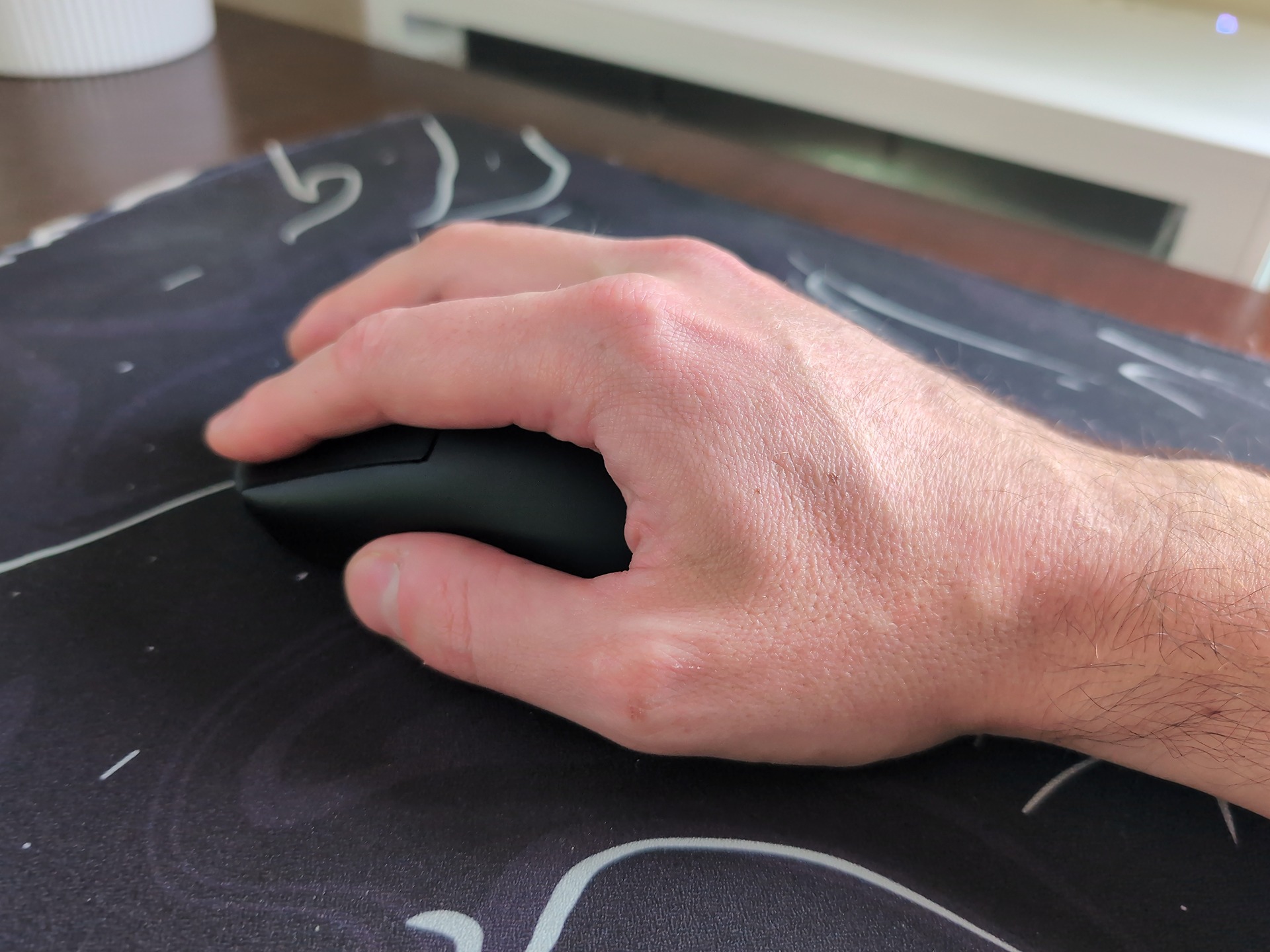
In daily use, the dial works, and the detent feedback makes stop-where-you-want the standout behavior. That’s the thing I kept noticing: I could park a spreadsheet row or a line of code exactly where I wanted it without overshooting.
The primary hands-on review this article draws its experiential details from is The Honest Gadget, where Ethan tested a pre-launch, pre-production unit with a 3D-printed housing provided by Melvin Wong, described as close to final retail. His take on the motion: “It just feels like a softer, more fluid motion compared to repeated flick scrolling… I can absolutely see why this design could be genuinely useful and even feel a bit therapeutic.” That’s his impression, not a medical claim, but it matches what my own weeks with the mouse felt like. There’s a rhythm to it that repeated flicking doesn’t have.
Independent media has noticed too. TweakTown ran coverage on June 11, 2026, with Senior Editor Kosta Andreadis framing the mouse as attempting to “reinvent” scrolling and reading the design as built for productivity: large documents, spreadsheets, source code. My verdict after a few weeks lands in the same territory, positive, with caveats I’ll get to in the sections below.
Is the Rotary Mouse actually 2.5X faster?
Yes, conditionally: the 2.5X claim is real in the sense that scrolling feels faster than a standard notched wheel, but the advantage holds against notched wheels, not free-spinning ones.
What hands-on testing found
Here’s where the numbers get funny. The creator claims roughly 2.5X faster scrolling than a conventional mouse, but elsewhere on the official site the same claim hedges to “up to 2X.” Both are creator claims, neither has been independently verified, and nobody has reconciled them.
What I can tell you from actual use is the concrete, testable part: it’s faster than a standard notched wheel because your finger never lifts. The scroll-lift-scroll loop that dominates normal wheel scrolling disappears, and the time savings come from that, not from magic. Fun wrinkle: per the creator, the speed boost wasn’t even a design goal. It showed up unexpectedly during development, which is “side project got weird” energy.
Vs. the Logitech MX Master for scrolling speed
For scale, related coverage notes the Logitech MX Master 4‘s free-spinning tier scrolls 1,000 lines per second. Against that tier, the dial is much slower for full-page traversal, and I want to be careful here: no direct head-to-head test between these two mice exists in any source I have, so treat this as context, not a benchmark. But the shape of the verdict holds either way: faster than the wheel most people own, slower than the best wheel on the market.
Adjusting to the Rotary Mouse scrolling motion
Adjustment is muscle memory, not a fixed timeline. First use feels awkward, and comfort arrives after an adjustment period that early users describe as minutes to days. The real tell is what your hand does on day one and two: you’ll catch yourself lifting your finger mid-scroll, the old flick-and-lift reflex dying hard. I did it constantly. It’s funny the first three times and mildly humbling after that.
Early users report adjustment times ranging from minutes to days. Jonathan Barton, a programmer, adjusted to the lateral index-finger motion within minutes and now uses either finger. Jeffrey Lawson called the learning curve “not bad at all” after a weekend. Read those together as a typical pattern across early users, minutes to days, not as a guaranteed schedule for your hand.
Scroll direction is personalization, not defect. Some users immediately invert the default, and Barton prefers clockwise-as-down. If you want to flip it, the paths are exact: on Windows 10, X-Mouse Button Control (free); on Windows 11, the reverse-scrolling toggle in Mouse Settings; on macOS, toggle off “Scroll direction: Natural” in System Settings.
Ergonomics: finger strain and RSI
The rotary motion plausibly reduces finger strain because it kills the repetitive flick-and-lift pattern, but every relief report so far is subjective, not clinical.
The origin story is the causal seed of the whole design: founder Melvin Wong’s finger joint pain from constant vertical scrolling was relieved by a stirring motion, the classic scratched-my-own-itch maker setup. That’s where the “range of motion (ROM) exercise” framing comes from, and it stays a maker’s claim, not established therapy.
The third-party reports are real but individual. Candace Grant, a posture therapist in Ontario, Canada, recommends it to her ergonomics clients for reduced strain. Lex Schwartz in Kentucky cites RSI avoidance. Ethan noticed his middle finger felt more relaxed and looser after extended use, despite not normally having finger pain, which is one person’s experience, not data.
I’ll add my own version of that: after a few weeks, my scrolling finger does feel less beaten-up than it does after long wheel sessions. Feels nice, isn’t medicine. I’m not calling this a medical device and I’m not claiming it treats anything.
Field note: Every strain-relief report here is anecdotal. Treat the rotary motion as a plausible comfort change, not a therapy, until your own hand says otherwise.
On fit: it’s designed for a general range of hand sizes, so smaller or larger-than-average hands may not get along with it. Testers across palm, claw, fingertip, and pincer claw grips mostly had no complaints, and the “mostly” is doing real work there. Wong himself uses a relaxed claw grip, for what it’s worth.
Build quality and the battery door problem
After a few weeks of use, my honest critique is specific: the fit and finish could use a bit of love, especially the battery door. It’s the one part of the mouse that feels unfinished, and I’m naming it rather than hiding it behind vague “build could be better” language.
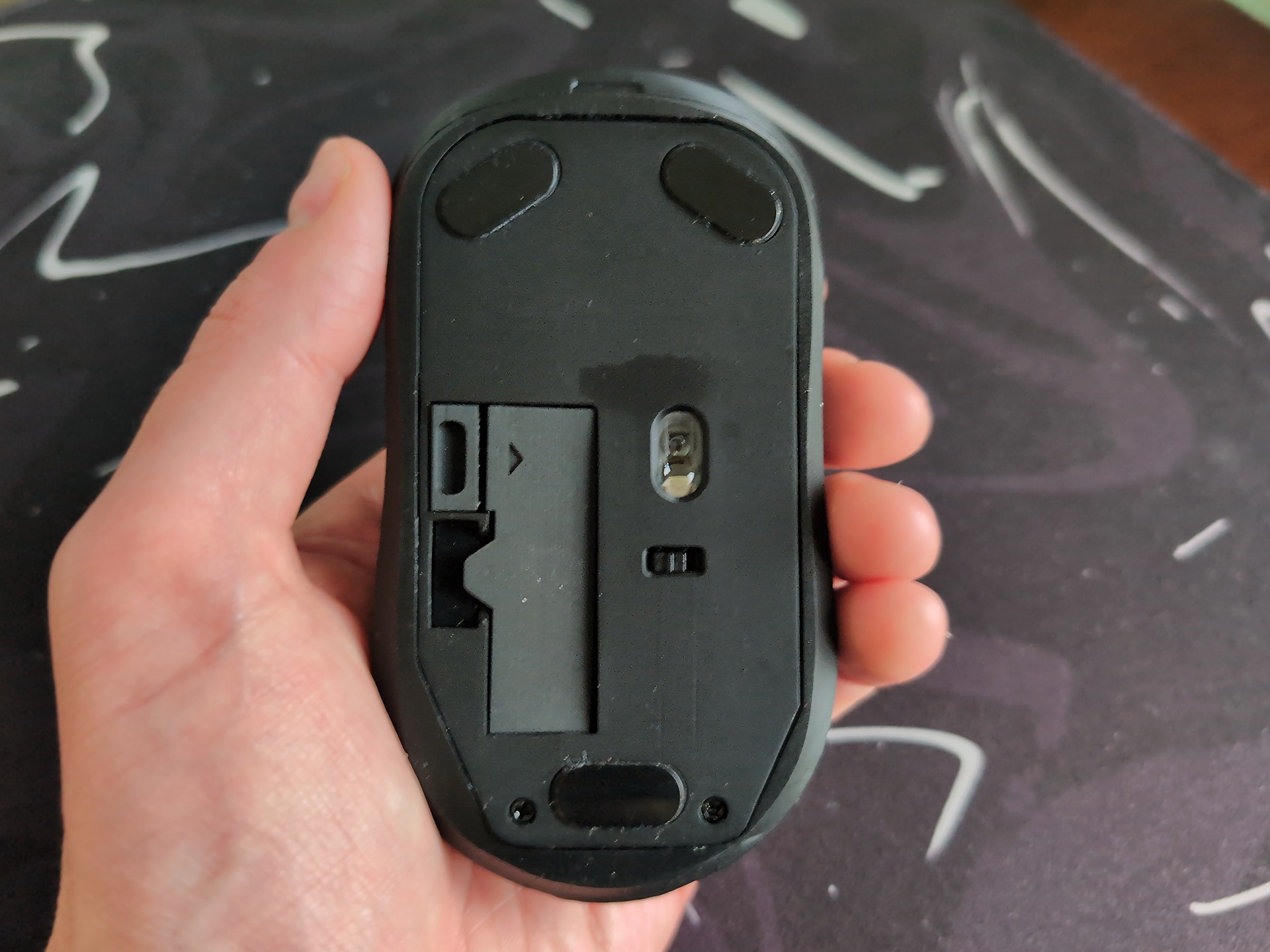
The official update log quietly corroborates this from the other direction: the August 3, 2026 update lists battery cover durability among its fixes, alongside improved button levers and a rotary wheel fix, and the August 17 update strengthened housing plastics as production began for Kickstarter backers. Later updates on September 15 (improved wheel touch interface) and September 24 (improved wheel retention) continue the arc. That’s trajectory, not resolution; I can’t claim the retail unit fixed anything.
Specs: DPI, polling, weight, and compatibility
On paper this is a compact, well-connected productivity mouse: 2.4 GHz wireless over a USB receiver, 125 Hz polling, 59 g without the battery, and a single AAA (included in the box). The 125 Hz polling rate is described as standard for productivity devices, a sensible balance of responsive tracking and power efficiency, and fine for casual gaming with that qualifier attached. Here’s the stable picture:
| Spec | Value |
|---|---|
| Connectivity | 2.4 GHz wireless via USB receiver |
| Polling rate | 125 Hz (standard for productivity devices; fine for casual gaming) |
| Weight | 59 g (2.08 oz) without battery |
| Power | Single AAA battery, included in the box |
| Buttons | Silent left/right, middle button, DPI button |
| Dimensions | Roughly 119 x 60-64 x 40 mm (varies by source) |
Where the spec sheets disagree
The DPI situation is messy, and I’m not going to pretend otherwise. TweakTown reports a standard optical sensor rated 1600 DPI. The official site’s spec table lists selectable 800/1200/1600. A Newatlas-derived writeup lists 800/1200/1800. Three sources, three answers, nobody has reconciled them.
Dimensions disagree by a whisker too: the official site says 119 x 64 x 40 mm, TweakTown says 119 x 60 x 40 mm, a 4 mm width variance. And stated once, plainly: battery life is entirely unreported in any source, despite the AAA spec.
Setup and OS compatibility
Compatibility is a plain win: Windows 10/11, macOS, Linux, and Android are all supported, and customers confirm plug-and-play on Windows 11, on CachyOS, and on Linux generally, which will land especially well with a certain readership. Setup friction isn’t pairing, it’s scroll-direction preference; the per-OS inversion paths are in the adjustment section above.
Use cases: heavy scrolling, video editing, sim racing
The strength here is unglamorous heavy scrolling, and the flashier use cases are secondary, however fun they are to talk about.
Heavy scrolling (documents, code, spreadsheets)
This is the fit list: website readers, long documents, spreadsheets, code and JSON files, video editing timelines. TweakTown framed the design as built for productivity, and named users back that up. Rolland Liao, a researcher in San Francisco, says: “This has quickly become my go-to mouse for reading code documentation and research papers. The rotary wheel feels very natural to use, and I don’t see myself ever going back to a traditional scroll wheel.”
Jesselyn of Hey Bubbles Studio ditched her standard mouse entirely, describing the scrolling as fast, controllable, and, in her word, “addicting.” People drawn in by the novelty use cases may be the worst-fit buyers, because the real value is everyday heavy scrolling.
Jog wheel replacement in DaVinci Resolve and Premiere Pro
The dial works as a compact jog/shuttle controller: frame-by-frame navigation and precise zoom in DaVinci Resolve, Adobe Premiere Pro, and Final Cut Pro. It’s positioned as a practical alternative to dedicated editing controllers for certain workflows, one less box on the desk, not full controller parity. A Creator Edition is planned, which is roadmap intention, not a shipping product. But the sleeper value is real: a $49 mouse absorbing a function that normally needs separate hardware.
Sim racing and the gaming question
The Kickstarter itself suggests using it as a tiny steering wheel in slower-paced driving games like Euro Truck Simulator 2, and I need you to appreciate that this is an official suggestion, which makes it funnier. I have not been able to stop thinking about it. Sim racer and coach Ammar Dizdarevi? endorses it for sim racing, citing a “Nordschleife certificate” durability anecdote, which is a great story and not a lab certification. The precise split: viable as a novelty steering input in slow driving sims, the wrong tool for competitive gaming, where the 125 Hz polling is a productivity trade-off. The roadmap confirms the company isn’t chasing that market.
Downsides and limitations
The Rotary Mouse’s limitations are real but mostly version-shaped: pre-production gaps and first-generation constraints rather than broken fundamentals. The middle-click gap is the clearest example, a spec-sheet feature missing from the hardware I actually held. The full list:
- Middle-click conflict. Official materials place a middle-click button at the dial’s center, but the pre-production review unit had none. Spec-yes, review-unit-no. The reviewer suggested adding middle click and a free-spin mode in future versions.
- No side buttons in this version; future models plan them. That’s a real wait-vs-buy input, not a footnote.
- One size, one color (matte black) at launch, though the spec table’s matte or metallic black, more colors coming soon sits slightly at odds with the one-color line.
- Adjustment friction: initial awkwardness and muscle-memory finger-lifting, covered in the adjustment section above.
- 125 Hz polling limits competitive-gaming suitability.
- Battery door fit-and-finish, my own complaint, cross-referenced with the build section.
- No direct head-to-head against free-spinning wheels exists, and battery life is unreported anywhere.
Testimonials, Reddit claims, and the independent-testing void
Every piece of social proof around this mouse comes with a disclosure attached, and no independent lab has tested it at all, which shapes how much weight each claim can carry.
What named testers report, and what they were paid
The named testers: Michael Melenciano, a cloud engineer in New Jersey, calls the browser workflow faster and more intuitive and says it’s not gimmicky, which is peer-review language for a dev audience. Jasmine Pang, an accounts executive in Kuala Lumpur, found it fast once she got used to it and asks for a smaller size and more colors, asks that conveniently mirror the roadmap, an echo worth noticing. Rolland Liao’s code-docs-and-research-papers use appeared above. Candace Grant and Lex Schwartz already got their airtime in the ergonomics section.
The compensation tiers footnoted on the product page: some testers got only a complimentary sample; some received a nominal review fee plus the sample, opinions their own; and some quoted voices are actual paying customers, the strongest tier available. Testimonials are only weighable alongside those disclosures, so now you have them.
Reddit traction and the missing lab tests
The 3,000+ Reddit upvotes figure spans sim racing, PC enthusiast, and product design communities, which is exactly who’d care about a dial-mouse. But it’s the official site’s own marketing claim, and no actual thread content exists in the available sources to verify or contextualize it. The internet noticed, per the company. Not peer review.
RTINGS, which has bought and tested 416 mice, has no Rotary Mouse evaluation, and its best-work-mice page contained only site navigation. No independent lab data on this mouse exists yet. That absence is information, and it’s exactly what makes the hands-on impressions in this article the best available evidence.
Price: the $49 Kickstarter bet or wait?
The pricing here is a risk calculus, not a discount announcement, so let’s lay out the whole deal shape in one place. The Kickstarter campaign launched June 17, and that’s when the good pricing exists: a $49 super early-bird price against a $139 MSRP, with free shipping included. Launch day carries an additional 40% discount plus free shipping, early bird backers only, and the “only” is doing real work in that sentence. On top of that sits a 30-day money-back guarantee where you don’t even ship the mouse back. That no-return refund is unusual enough to state exactly, and it matters for a specific reason: trying a weird input device is exactly the kind of purchase where you don’t know if your hand agrees until it’s on your desk, and a refund that doesn’t involve boxing something up removes most of the friction from finding out.
Cost check: $49 super early-bird against a $139 MSRP, free shipping, and a 30-day no-return refund make the trial cost mostly your time, not your money.
If you’re not ready to camp the campaign date, the official site also links to buying on eBay as an alternative route, the maker’s own pointer, so I’ll pass it along without speculating on reseller prices. Prices may vary, one sentence, done.
The stronger argument for buying now is the iteration arc. Between August 3 and September 24, 2026, the project pushed five dated production updates: button levers and battery cover durability, a reworked bottom shell and rotary component, the start of production with strengthened housing plastics, an improved wheel touch interface, and improved wheel retention. That rhythm reads as a product actively being finished, which is what you want to see from a crowdfunded gadget. Buying early means funding that arc, and the 65% early-bird cut plus the no-return refund are what de-risk the bet.
The constraint is real, though: the campaign offers exactly one size and one color, matte black, with the spec table’s metallic-black mention and “more colors coming soon” hovering slightly at odds with that. If that doesn’t fit your hand or your desk, waiting is a legitimate answer.
Personally, I’m looking forward to seeing how Melvin and Matt continue to improve the product.
Who should buy the Rotary Mouse (and who should skip it)
Buy it if you’re a heavy scroller; skip it if you need speed, options, or gaming. That’s the whole decision, and the details below just fill in the edges.
The fit list is concrete: people who live in long documents, spreadsheets, code, and research reading, plus video editors who want a budget jog wheel. If your workday is a wall of text and your scroll finger is tired, you’re the target. The skip list is equally concrete: competitive gamers, since no gaming version is planned and nobody should wait for one; anyone who needs free-spinning speed for full-page traversal; buyers who want size or color options now, because it’s one size in matte black at launch; and buyers who depend on middle-click certainty pending retail confirmation, given the spec-yes, review-unit-no gap.
| Reader type | Fit | Why |
|---|---|---|
| Heavy scrollers (docs, code, spreadsheets) | Yes | Detent precision and no scroll-lift-scroll loop, confirmed in hands-on use |
| Video editors wanting a budget jog wheel | Yes | Frame-by-frame control in Resolve, Premiere, and Final Cut |
| Competitive gamers | No | 125 Hz polling, no gaming version planned |
| Free-spin speed seekers | No | Much slower than infinite wheels for full-page traversal |
| Buyers wanting size/color options now | No | One size, matte black at launch; variants are roadmap intentions |
| Buyers needing middle-click certainty | Partial | Official spec says yes; the pre-production unit had none |
For the future buyers, the maker’s stated roadmap (intentions, not promises) includes a vertical ergonomic version, smaller and larger sizes, a SIM Edition for driving, a Creator Edition for video editing, white/gray/blue colors, a wired version, side buttons, weight reduction, and improved DPI and button response. If any of those are dealbreakers, that’s your wait case.
My recommendation, stated directly: for the heavy-scrolling productivity user who’s comfortable with crowdfunding risk, the $49 early-bird price plus the no-return 30-day refund makes trying the Rotary Mouse a low-risk bet. That’s grounded in what a few weeks of hands-on use actually showed, the dial works, the detents are satisfying, the battery door needs work, not in hype. It’s a weird little peripheral that someone actually built, and it mostly works exactly the way its origin story says it should.
Frequently Asked Questions
What is the highest rated ergonomic mouse?
There’s no single consensus pick, and for the Rotary Mouse specifically, no independent lab has tested it at all — RTINGS, which has bought and tested 416 mice, has no evaluation of it. The best available evidence for the Rotary Mouse is hands-on impressions from early testers and reviewers, all of which come with disclosure caveats about compensation.
Is the Rotary Mouse worth $49 on Kickstarter compared to the $139 retail price?
For heavy scrollers comfortable with crowdfunding risk, it’s a low-risk bet: $49 super early-bird against a $139 MSRP, free shipping, and a 30-day money-back guarantee that doesn’t require shipping the mouse back. The trial cost is mostly your time, not your money. Skip it if you need free-spinning speed, size or color options, middle-click certainty, or competitive gaming.
What are the downsides and limitations of the Rotary Mouse?
The main limitations: no middle click on the pre-production review unit despite the spec sheet claiming one, no side buttons, one size in matte black only, 125 Hz polling that rules out competitive gaming, and a battery door that feels unfinished. Battery life is also entirely unreported, and no independent lab has tested the mouse.
Which brand of mouse is the best?
It depends on what your hand does all day. For heavy scrolling in documents, code, and spreadsheets, the Rotary Mouse’s detented dial is a genuinely strong fit, while free-spinning wheels like the Logitech MX Master remain faster for full-page traversal. No independent lab has tested the Rotary Mouse yet, so its ranking among established brands is still an open question.
