
The first time I sent traffic through I2P, I was expecting Tor with a different coat of paint. I2P is a network you join, not merely a proxy you configure in your browser. It’s a fully self-contained darknet where every connected user is also a relay, and where hidden services (eepsites) live exclusively inside the network. Tor was designed to get you to the clearnet anonymously; I2P was designed to let people host and communicate inside its own encrypted world.
This guide walks you through the whole thing: installation, browser configuration, built-in applications, hosting your first eepsite, and the honest trade-offs you’ll hit along the way. In April 2012, the drakopoulos university research group debated Tor vs I2P and picked I2P for six specific architectural reasons. We rebuilt their setup on modern hardware to confirm which config steps still hold up.
Key Takeaways
I2P uses garlic routing—bundling multiple messages (cloves) into a single encrypted packet with three encryption layers (garlic, tunnel, inter-router transport)—making traffic analysis harder than onion routing.
During first run, expect a 1-minute bandwidth test via M-Lab, then 3–10 minutes of reseeding (downloading ~100 RouterInfo records over HTTPS), followed by days of continuous uptime before the router reaches peak performance.
Only 12% of eepsites indexed by reg.i2p are alive; use identiguy.i2p to find what’s actually running right now, and always type http:// before any .i2p address.
Table of Contents
What Is I2P and How Is It Architecturally Different from Tor?
Back in April 2012, a university research group (drakopoulos) needed an anonymous network for a project. They narrowed it to Tor or I2P, debated the strengths and weaknesses over several meetings, and settled on I2P for six specific reasons. Those reasons are still the best explanation of what makes I2P different—and why you’d pick it over Tor for certain jobs.
Decentralized network database vs directory servers
Tor relies on a handful of directory servers to tell your client which relays exist. I2P uses NetDB, a distributed hash table (DHT) stored across the network. No central authority, no phone-home server. Every router publishes its own RouterInfo (address, keys, capabilities) to NetDB, and LeaseSets tell the network where a specific destination (like an eepsite) can be reached right now. It’s like a self-organizing phone book that never goes down because there’s no single book.
The group saw this as a major advantage: no directory servers to compromise or censor.
Unidirectional short-lived tunnels vs bidirectional long-lived circuits
Tor builds a circuit (typically three hops) and sends traffic back and forth through it for minutes or hours. I2P builds unidirectional tunnels that expire every 10 minutes, and each round trip between you and a server requires four tunnels: outbound from you ? inbound to server ? outbound from server ? inbound to you.
That sounds like overhead, and it is—but it also doubles the attacker’s problem. To trace a connection, they’d need to compromise both your outbound tunnel and the server’s inbound tunnel at the same time, which is statistically harder than breaking one long-lived circuit. The drakopoulos group explicitly cited this “doubling of compromise difficulty” as a deciding factor.
Packet-switched vs circuit-switched
Tor is circuit-switched: once a circuit is built, all packets follow the same path. If a relay gets congested, your entire circuit slows down. I2P is packet-switched: each individual message can take a different path through the network. The router picks routes based on current congestion, so traffic dynamically shifts away from slow or failing nodes. This makes I2P feel more resilient under load, even if absolute throughput is lower than Tor’s.
Garlic routing vs onion routing
This is the secret sauce. Onion routing wraps a message in layers of encryption, one per hop. Garlic routing bundles multiple messages (cloves) into a single encrypted packet. Each clove can be a different type of data—a delivery status message (DSM), a database store message (DBSM), part of a chat message—and they all get encrypted together before being sent through the tunnel. This bundling mechanism allows I2P to handle multiple messages per packet efficiently, mixing control and data traffic to further obscure communication patterns.

Three encryption layers sit on top of each other: garlic layer (for the message bundle), tunnel layer (routing instructions), and inter-router transport layer (between individual routers). It’s like a carpool lane for your data: one trip carries multiple passengers, making it much harder for an observer to figure out who’s talking to whom.
Step 1: Install I2P on Your Operating System
You have two main choices for running I2P: the Java I2P Router or i2pd, and the decision mostly comes down to your hardware and goals.

Java I2P Router (the official one) is the full desktop experience. It includes the router console at 127.0.0.1:7657, plus built-in apps like I2PSnark (torrenting), SusiMail (email), and Irc2P (IRC). The Easy Install Bundle from geti2p.net bundles its own Java runtime, so you don’t need to install Java separately. Works on Windows, macOS, and Linux. There is no official iOS support; iOS users must rely on third-party clients or remote routers.
i2pd is the lightweight C++ implementation. No Java needed, no built-in apps, just the core router. It’s perfect for a headless VPS or a Raspberry Pi you want to run 24/7 without a heavy footprint. Console lives at 127.0.0.1:7070, HTTP proxy on port 4444.
Installation is straightforward:
- Windows/macOS: Download the
.jarfrom geti2p.net, double-click, follow the wizard. - Linux (Java router):
sudo apt install i2p(Debian/Ubuntu) or download the.jarinstaller and runjava -jar i2pinstall_2.8.2.jar. Replace with the latest version number from the site. - Linux (i2pd):
sudo apt install i2pdon Debian 12/Bookworm or Ubuntu. The config file lives at/etc/i2pd/i2pd.conf. - Docker: Community images exist for both routers. I’ve used
geti2p/i2pto spin up a container in minutes.
There are also alternative distributions: I2P+ (enhanced Java router with extra features and performance tweaks) and Prestium (a Linux live OS pre-configured for I2P—possibly abandoned but still useful as a reference). If you’re on Android, you’re limited to i2pd-based apps; there’s no official Java router for mobile.
Step 2: First-Run Experience—What Actually Happens When You Launch I2P
Most beginners panic during the first run because the router looks dead for several minutes. Here’s the exact timeline so you know what’s normal.
Minute 1: The first-run wizard runs. You pick a language, a theme, and then I2P runs an automated bandwidth test using M-Lab to estimate your connection speed. This takes about one minute.
Minutes 3–10: The router starts reseeding. It downloads roughly 100 RouterInfo records over HTTPS from known seed nodes. During this time, your console will show “Rejecting tunnels: starting up.” This is normal. You’ll also see the peer count display as “Active x/y”—once y climbs and x starts showing 10 or more active peers, you’re healthy.

Days of continuous uptime: Here’s the part most people miss. I2P’s performance improves over time as your router builds reputation and discovers more peers. The first few hours will be slow, and the first day will feel sluggish. After two or three days of 24/7 uptime, you’ll see consistent tunnel builds and page loads.
The restart penalty: If you shut down I2P and restart it within 24 hours, your router is marked as unreliable. It gets fewer tunnel requests, which means slower performance for you. So once you start it, leave it running.
Step 3: Configure Your Browser to Browse.i2p Sites
Most people set the proxy, start browsing, and never realize their browser is leaking their real IP through WebRTC. Here’s how to actually fix that.
Firefox is the recommended browser because of its independent proxy settings and profile management. Chrome and Edge work but require extra vigilance.
Set up the proxy
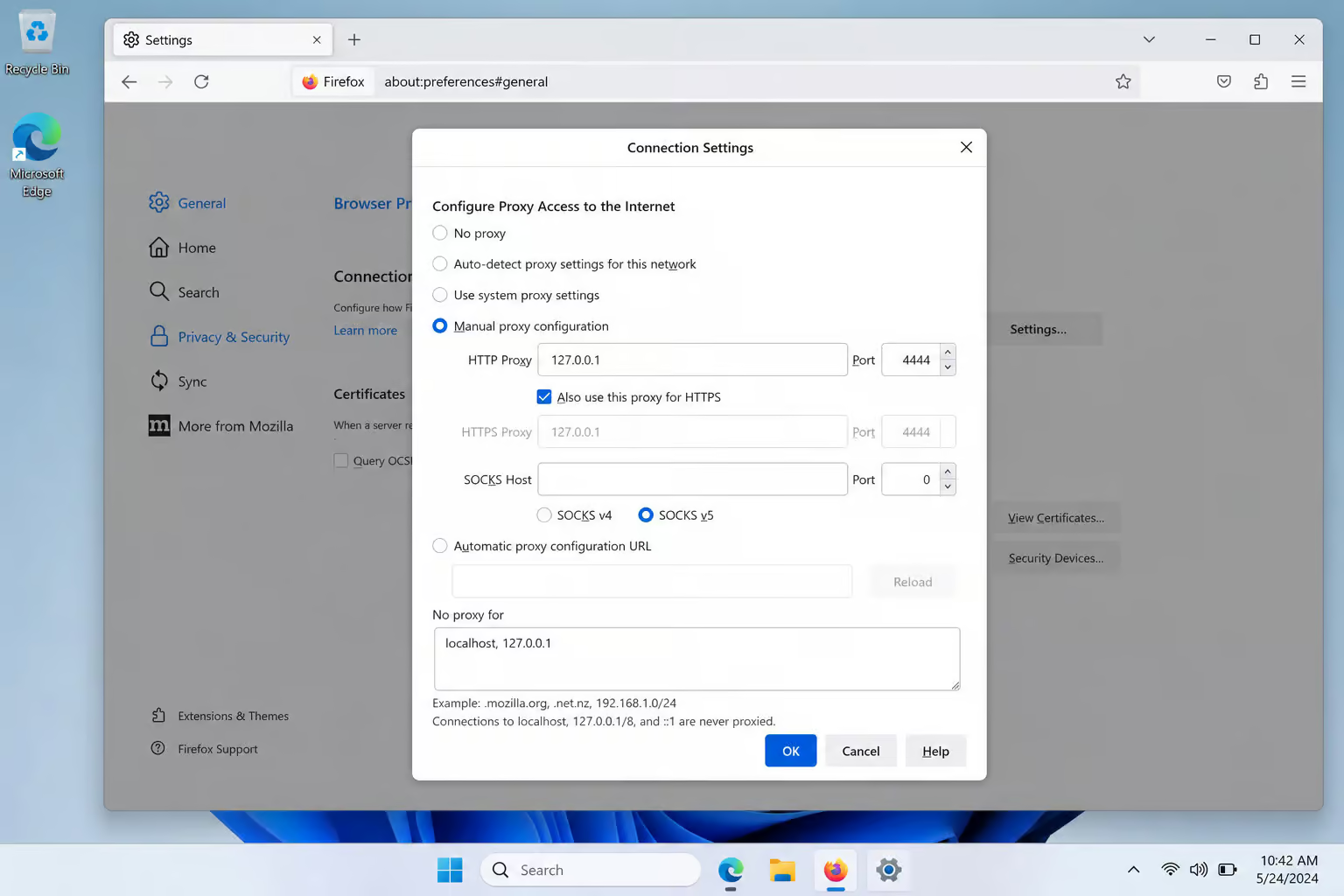
In Firefox, go to Settings ? Network Settings ? Manual proxy configuration. Set:
– HTTP Proxy: 127.0.0.1 port 4444
– Check “Also use this proxy for HTTPS”
– Clear everything else (no SOCKS)
Three essential about:config tweaks
Type about:config in the address bar, accept the warning, and set these:
media.peerConnection.ice.proxy_only=true— This forces WebRTC to route through the proxy, preventing an IP leak. Without it, WebRTC can bypass the proxy and expose your real address.keyword.enabled=false— Prevents Firefox from sending search terms to your default search engine if you accidentally type a non-URL in the address bar while using the I2P proxy.browser.fixup.domainsuffixwhitelist.i2p= add.i2pto the value — Tells Firefox that.i2pis a valid top-level domain, so typingsomeeepsite.i2pdoesn’t trigger a search.
Browser profile isolation
Use a dedicated Firefox profile for I2P browsing. Type about:profiles and create a new profile called “I2P.” Follow a step-by-step guide for the I2P download to get the software on your operating system with checksums and security tips, and you can even set Firefox to ask which profile to use at startup.

The official “I2P in Private Browsing” Firefox extension automates container isolation: private browsing windows go through I2P, normal windows stay on clearnet. It also enables anti-fingerprinting and letterboxing.
Tools to avoid: FoxyProxy and Privoxy can introduce leaks if misconfigured. Stick with Firefox’s built-in proxy settings or the official extension.
Chrome, Edge, Safari
- Chrome: Use command-line flags
--proxy-server=127.0.0.1:4444and a dedicated user-data-dir for I2P. - Edge: Similar to Chrome, but you’ll need a separate profile.
- Safari: Limited proxy support; manual configuration possible but clunky.
One more thing: always type http:// before any .i2p address. For a curated directory of the best I2P sites — forums, file sharing, blogs, and tools, most eepsites don’t use HTTPS, and Firefox may try to force HTTPS if you omit the protocol scheme.
Step 4: Tune Bandwidth and Participate in the Network
You can be a passive consumer or help run the network. Here’s what each option costs.
The default bandwidth limits are:
- Download: 96 KB/s
- Upload: 40 KB/s
- Shared: 48 KB/s
You can adjust these at http://localhost:7657/config (Java router) or in i2pd’s config.
Two thresholds matter:
- Below 12 KB/s shared: Your router enters hidden mode—it stops relaying traffic for others. Your own performance will suffer because you’re not accumulating reputation. Don’t go below this unless you’re testing.
- Above 128 KB/s shared: You become a candidate for floodfill status, meaning your router helps maintain NetDB’s DHT. It’s more work but improves network health and your own connectivity.
Increasing your shared bandwidth improves your own transfer speeds. Over 90% of I2P routers relay traffic by default.
Tunnel lifecycle: Tunnels expire every 10 minutes and auto-rebuild. You can watch this in the router console under “Tunnels” or “Active x/y” in the summary. If your active count stays below 10, check your bandwidth limits or reseeding status.

Step 5: Use I2P’s Built-in Applications (Torrenting, Email, IRC)
I2P doesn’t just browse—it torrents, emails, and chats. Each app is accessible from the router console sidebar or directly at specific ports, and for a detailed breakdown of how this network compares to its anonymizing counterpart, check out this i2p vs tor analysis.
I2PSnark — anonymous torrenting
I2PSnark is a fork of the 2003 Snark client by Mark Wielaard. It speaks I2P natively, so you don’t need to route traffic through a proxy. Default uses 3-hop tunnels, and since version 2.10.0 it supports UDP trackers.
Access it via the router console sidebar or go to http://127.0.0.1:7657/i2psnark. Add .torrent files from Postman’s tracker at tracker2.postman.i2p. Keep in mind: I2P torrenting is slow (see the real-world numbers later) and only works within the I2P network—you won’t find mainstream content here.
SusiMail — anonymous email
SusiMail is a webmail client/server that runs inside your router. Go to http://127.0.0.1:7657/susimail. You need a free account at hq.postman.i2p (a popular I2P email service). Once registered, SusiMail handles sending and receiving through Postman’s servers via:
– SMTP: localhost:7659
– POP3: localhost:7660
You can also configure desktop clients like Thunderbird or Claws Mail using those proxy ports.
Irc2P — anonymous chat
Irc2P is a pre-configured IRC server on localhost:6668. It automatically strips identifying information from headers. Connection is dead simple:
- HexChat: Create a new network, server =
localhost/6668, tick “Bypass proxy server” (so the IRC traffic goes through I2P directly, not through your browser proxy). - WeeChat:
/server add irc2p localhost/6668then/connect irc2p. Done.
No registration, no IP exposure. You’re in.
I2P Messenger — direct messaging
Less documented, but it exists—peer-to-peer encrypted messaging using destination keys. Not as polished as the other apps, but functional for one-to-one chats.

Step 6: Host Your First Eepsite (Hidden Website)
Once your router is stable, you can turn it into a web server that’s reachable only inside I2P. The Java router includes everything you need to get started.
The default Jetty web server
The Java router includes Jetty (a lightweight Java web server) listening on localhost:7658. Your site files go in:
– Windows: C:Program Filesi2peepsitedocroot (or %LOCALAPPDATA%I2PI2P Sitedocroot on modern installs)
– Linux/macOS: ~/.i2p/eepsite/docroot
Start by replacing index.html with your own content. Jetty serves it immediately—open http://localhost:7658 in your I2P-configured browser and you’ll see your local site.
The local destination key (500+ characters, must end in AAAA)
On the router console, navigate to I2PTunnel ? Eepsite. Your local destination key is displayed—a string of over 500 characters in Base64 that must end in AAAA. Copy the entire thing.
Registration and propagation
Now go to the I2PTunnel configuration page for your eepsite. Paste the local destination key into the master address book field. Then open stats.i2p (within I2P) and register your human-readable name (e.g., mysite.i2p). This pairs the key with the name.
Propagation takes several hours. During that time, only you can see your site. Once NetDB distributes the mapping, anyone on I2P can reach it by typing http://mysite.i2p. If you ever change the name field but forget to update the address book, the site will resolve locally but be invisible to everyone else.
Advanced: Nginx/Apache2 for dynamic content
Jetty is fine for static sites, but if you need PHP, databases, or anything dynamic, set up Nginx or Apache2 on the normal web port and use I2PTunnel to map a remote tunnel from 127.0.0.1:7658 to your actual web server. For i2pd, add the tunnel definition to /etc/i2pd/tunnels.conf.
Step 7: Access the Clearnet via Outproxies (with Caveats)
I2P was not designed for clearnet exit. It’s an internal darknet. But if you need to check a clearnet URL from inside I2P, you can use an outproxy—a volunteer-run server that forwards I2P traffic to the clearnet.
The recommended outproxy since August 2022 is exit.stormycloud.i2p, run by StormyCloud Inc. Older outproxies like false.i2p are gone; alternatives include purokishi.i2p, bandura.i2p, and outproxy-tor.meeh.i2p (which routes through Tor).
Configure it:
- **Java router**: Router console
- Hidden Services Manager
- I2P HTTP Proxy
- enable “Use outproxy”
- set to `exit.stormycloud.i2p`
- i2pd: Edit
/etc/i2pd/i2pd.confunder[httpproxy]and setoutproxy = exit.stormycloud.i2p
Risks and limitations:
- Outproxies can see all unencrypted traffic you send through them, just like your ISP can. Always use HTTPS for sensitive data.
- They’re run voluntarily and may go offline without notice.
- This is not I2P’s main purpose. If you mostly want to browse the clearnet anonymously, Tor is a better tool. I2P shines for hidden services.
Step 8: Security Best Practices and Common Pitfalls
The most common I2P security failure is mixing clearnet and I2P browsing in the same browser session. Cookies, history, and cached data cross-contaminate. Here’s how to avoid it.
Never browse I2P and clearnet in the same browser profile. Use a dedicated Firefox profile for I2P via about:profiles, or the official “I2P in Private Browsing” extension which isolates I2P traffic to private windows with anti-fingerprinting and letterboxing built in.
Tools to avoid: FoxyProxy and Privoxy can leak your real IP if URL pattern matching fails or if a DNS request escapes the proxy. Stick with Firefox’s manual proxy configuration or the official extension.
SOCKS proxy warnings: I2P has a SOCKS proxy on port 4447, but it’s limited to I2P-only traffic—no outproxy exists for SOCKS. Applications that use SOCKS may leak content even if connection data is filtered. Be careful.

General OPSEC:
– Always type http:// before .i2p addresses.
- Use separate aliases for I2P services (don’t reuse usernames).
- Disable DNS and JavaScript when accessing non-I2P sites via outproxy.
- Understand that your ISP can still detect you’re using I2P (the protocol has distinctive traffic patterns). If that’s a problem, route I2P through a VPN or obfs4. The official I2P FAQ notes that adding extra network layers like a VPN may degrade performance without clear benefit, and the community remains divided on whether this practice improves security or merely adds complexity.
Step 9: Find Eepsites and Search the I2P Network
The I2P darknet is small and most of its sites are dead. Here’s how to find the living ones.

Only 12% of eepsites indexed by reg.i2p are currently alive. identiguy.i2p maintains a non-curated list of active sites—that’s your best bet for finding live content.
Directories and search engines
reg.i2p: Updates every 4 hours, but many listed sites are down.identiguy.i2p: Current active list, no curation.- Search engines:
legwork.i2p,ransack.i2p,duckduckgo.i2p(DuckDuckGo’s I2P mirror),ahmia.i2p,raklet.i2p,torch.i2p. You can also reach I2P Search from the clearnet ati2psearch.com.
Address Book and Jump Service
The Address Book uses a hosts.txt file containing key-value pairs of names and destination keys. You can subscribe to address book updates from other users’ eepsites. The Jump Service at stats.i2p asks permission to map a cryptographic key to a human-readable name—use it as a bootstrap, not as your primary resolver.
Troubleshooting Common Issues
Three failure modes bite most beginners. Here’s what they look like and how to fix them.
“Protocol family unavailable” in wrapper.log
Your system has IPv6 enabled, and I2P’s Tanuki Java service wrapper doesn’t like the dual-stack configuration. Fixes (pick one):
– echo 0 > /proc/sys/net/ipv6/bindv6only (disables IPv6-only binding, temporary)
– Edit wrapper.config and add wrapper.java.additional.xx=-Djava.net.preferIPv4Stack=true
– Or simply disable IPv6 on your network adapter
Firewalled router or no peers
If NetDB has no routers to connect to, reseeding may have failed. Check the reseed URLs in the router console. As a workaround, use Tor Browser to download the seed file from a trusted source and place it in your I2P directory. Also try lowering max connections in bandwidth settings—some routers with limited resources struggle with too many simultaneous peers.
Performance and restart issues
Slow performance is almost always because your router hasn’t been running long enough or you’ve restarted too recently. The 24-hour unreliability mark is real. Also note: if you edit wrapper.config, you must fully stop and restart I2P—clicking “Restart” in the console does not reread that file. And if you’re on Verizon 4G/5G wireless in the US, the provider blocks UDP, which will break SSU transports. Switch to TCP-only in the router config.
Conclusion: I2P’s Real-World Performance and Trade-Offs
I2P is cool, it’s clever, and it’s great for hidden services. But let’s look at the numbers.
When both client and server use 3-hop tunnels, 12 different I2P routers relay your traffic. The round-trip time? About 740 milliseconds—with per-hop latencies ranging from 10ms to 100ms. Bandwidth bottlenecks at roughly 32 KB/s client-to-server and 64 KB/s server-to-client. That’s fine for a text-based eepsite or a low-res image, but forget about streaming video or large file downloads.
Only 12% of indexed eepsites are alive. Most I2P sites that have ever existed are now dead. The network is small, and it requires maintaining a server up and running for full integration. I2P was not designed for clearnet exit—Tor is better for that. And mobile support is limited (some Android apps, nothing native on iOS).
But if what you need is a decentralized, encrypted network where you can host a hidden website, chat anonymously, and torrent inside a censorship-resistant space—with the architectural advantages of garlic routing, unidirectional tunnels, and packet-switching—then I2P is exactly the right tool. It’s not a replacement for Tor. It’s a different tool for a different job.
People Also Ask
What is I2P and how to use it?
I2P (Invisible Internet Project) is a fully self-contained darknet where every user is also a relay, designed for hosting hidden services and communicating inside its own encrypted world. To use it, install the Java I2P Router or i2pd, configure your browser’s proxy to 127.0.0.1:4444, and access eepsites by typing http:// before any .i2p address.
How to browse on I2P?
Set Firefox to manual proxy configuration with HTTP Proxy 127.0.0.1 port 4444 and check ‘Also use this proxy for HTTPS.’ Then make three about:config tweaks: force WebRTC through the proxy, disable keyword searches, and add .i2p as a valid domain suffix. Always type http:// before any .i2p address, and use a dedicated Firefox profile to avoid cross-contamination with clearnet browsing.
What’s the difference between I2P and Tor?
I2P uses garlic routing with unidirectional short-lived tunnels and a decentralized distributed hash table (NetDB), while Tor uses onion routing with bidirectional long-lived circuits and centralized directory servers. I2P is packet-switched, so traffic dynamically shifts away from congestion, whereas Tor is circuit-switched. I2P is designed for hidden services inside its network; Tor is designed for anonymous clearnet access.
