Our team recently had to pick a platform for 40 screens across six sites, and the first search returned hundreds of products that all promised the same things. Review directories are huge, reviews are self-selected, and every demo runs smoothly. This is the method we ended up with: where to look, what to read on a vendor page before any call, and how to compare the finalists in two weeks.
Where Do Teams Find Digital Signage Software?
Most teams start in review directories, and the numbers there explain why choosing is hard. G2 listed 554 products in its digital signage category in October 2026, backed by about 67,400 verified reviews. Capterra covers roughly 497 products and a database of nearly 24,700 reviews. Even a quick scan of digital signage software reviews on both sites turns up more candidates than any IT team can trial.
The entry bar for these lists is low. To appear in G2’s category, a product only has to show images, text and video, upload content to a screen, allow remote management and support frequent updates. Almost every product clears that bar, so the category tells you what is available, not what fits.
Directories are more useful for one thing: what other buyers say they need. Capterra asks reviewers which features matter most, and the ranking is consistent:
- remote display management, rated highly important by 93% of users;
- playlist management, 90%;
- layout and design tools, 85%;
- a media library, 83%;
- multimedia support, 79%;
- access controls and permissions, 75%;
- content scheduling and automatic updates, 74% each;
- multi-location management and customizable templates, 72% each;
- data security, 70%;
- multi-screen support, 64%.
The order matters. Managing screens from a distance ranks above every content feature, which matches what we saw on our own sites: the expensive problems were screens we couldn’t see, not slides we couldn’t design. A shortlist built only on the editor demo misses that.
Reviews need a filter of their own. We kept only reviews from the last 12 months, because platforms change fast, and searched them for three words: offline, outage and support. A product with a high star rating and a cluster of recent outage complaints went to the bottom of our list, while a lower-rated one with complaints only about the editor stayed in. Star averages hide that difference, and so do the category badges most directories award each quarter.
The second channel is vendor websites, and the third is integrators and display makers, who often bundle a platform with hardware. Both carry a bias, so we read them for disclosure rather than claims.
What Should a Vendor Page Tell You Before a Demo?
A vendor page should tell you three things before you book a call: whether the platform confirms that content actually played, what happens when the internet drops, and which customers it is not built for. Most pages answer none of them. Security pages are more common, and the better ones name concrete controls such as multi-factor sign-in, TLS encryption or a privacy-management standard like ISO/IEC 27701.
We found the gap clearest on vendor homepages. When the practical question is where to get digital signs software, verified playback is the detail most vendor pages leave out, and the few that publish it tend to state their limits too. One homepage, for example, names networks under five screens, sites without internet and content that changes less than every 90 days as poor fits, and gives 72 hours as its local-cache window for outages.
That kind of disclosure saved us a week of trials. Before booking a demo, we now check every vendor page for three lines:
- how the platform proves a screen is showing the current content, not just that a file was sent;
- how many hours screens keep playing offline, and what stops working meanwhile;
- who the vendor says should not buy it.
A vendor that answers all three in public usually answers them the same way on a call. One that answers none of them tends to answer with a demo instead, and a demo never shows a screen that has gone dark.
How Do You Compare Platforms and Test Ease of Use?
We compared finalists with a weighted scorecard, then tested “easy to use” as a list of timed tasks rather than an impression.
A weighted scorecard for digital signage software comparison
One published comparison guide weights six criteria: features 25%, ease of use 20%, reliability 20%, support 15%, price 10% and scalability 10%. We scored each platform from 1 to 10 per criterion. The example below uses illustrative scores.
| Criterion | Weight | Platform A | Platform B | Platform C |
| Ease of use | 20% | 9 | 7 | 6 |
| Features | 25% | 6 | 8 | 9 |
| Reliability | 20% | 6 | 8 | 7 |
| Support | 15% | 7 | 7 | 6 |
| Price | 10% | 9 | 6 | 5 |
| Scalability | 10% | 5 | 7 | 9 |
| Weighted total | 6.95 | 7.35 | 7.15 |
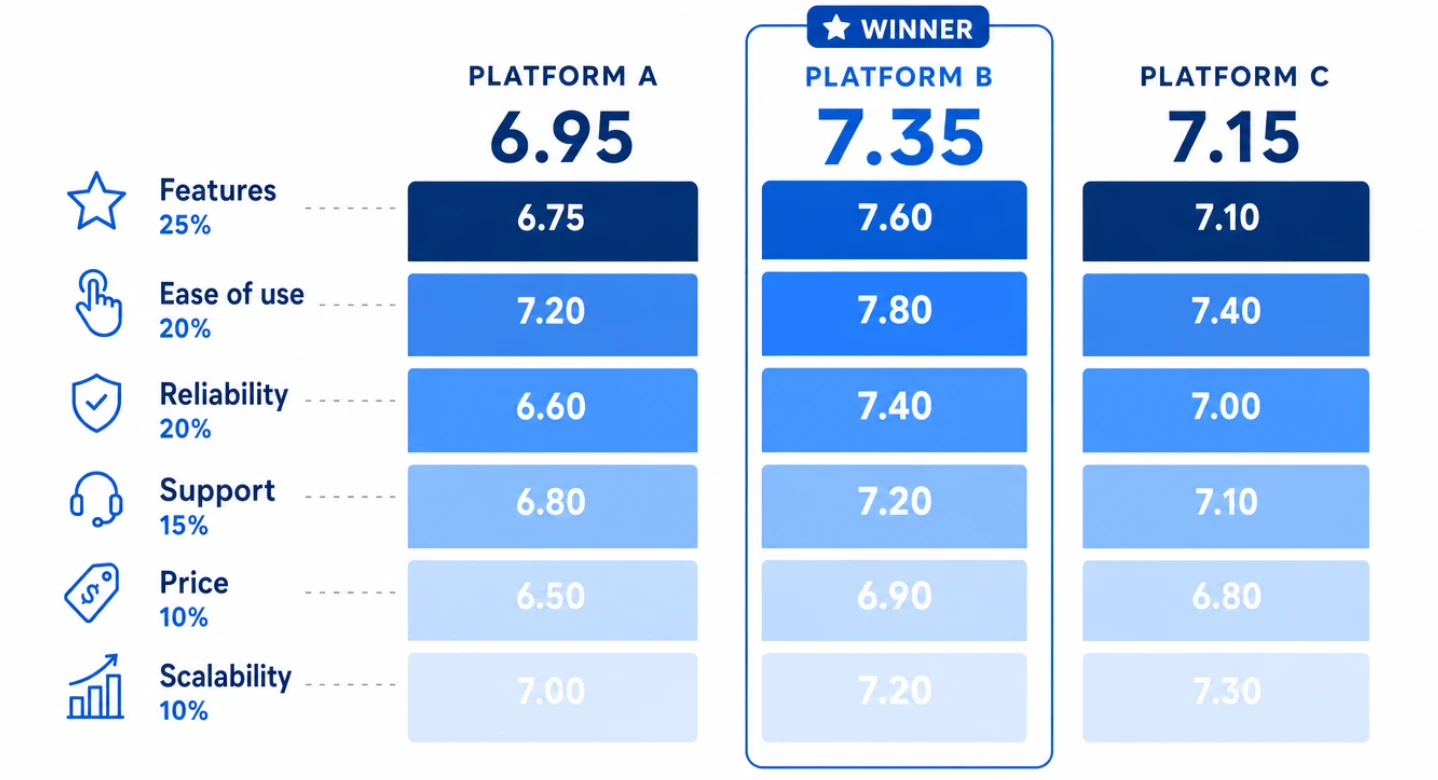
Platform A wins on price and the demo, yet finishes last once reliability counts for a fifth of the score. That was the pattern in our own shortlist.
What makes digital signage software easy to use
We timed five tasks for one non-technical colleague: upload a video, schedule a lunch playlist, change a price on a live screen, give a coworker limited access, and unplug the network to see what the screen does. Easy digital signage software finished all five without a call to support.
Reliability needs numbers too. A 99.5% uptime commitment allows about 43.8 hours of downtime a year; 99.9% allows 8.76 hours; 99.99% allows under one hour. Critical support tickets typically get a response within 1–4 hours on stronger plans and 24–48 hours on standard ones. For a store that opens at 7 a.m., a 48-hour response to a dark screen on Friday evening means a weekend without it, so we priced the support tier alongside the software.
What digital signage software costs a small business
Published plans run from about $3 to $45 per screen per month. For a small business with 10 screens, that is $1,080 to $16,200 over three years before hardware, which is why total cost of ownership is usually judged over three to five years. Trials last 14–30 days, and two weeks of active testing is the minimum that exposes offline and permission problems. Several vendors also keep a free single-screen tier, which makes a first layout test cost nothing but the screen, although such tiers usually leave out the remote management that users ranked first.
Bringing It Together
Choosing digital signage software is mostly a filtering problem. Directories show what exists, user-rated features show what matters, and vendor pages show who is willing to disclose limits. A weighted scorecard and a timed task list then turn a long list into a decision the whole team can check. The platform that wins is rarely the one with the smoothest demo; it is the one whose limits were clear before the trial began.
Sources
- Digital Signage Software category, G2
- Digital Signage Software, Capterra
- Digital signage software comparison guide, DigitalSignage.com
- How to choose the right digital signage software for your display network, Samsung Insights
